






Skip to content

Cart

Your cart is empty

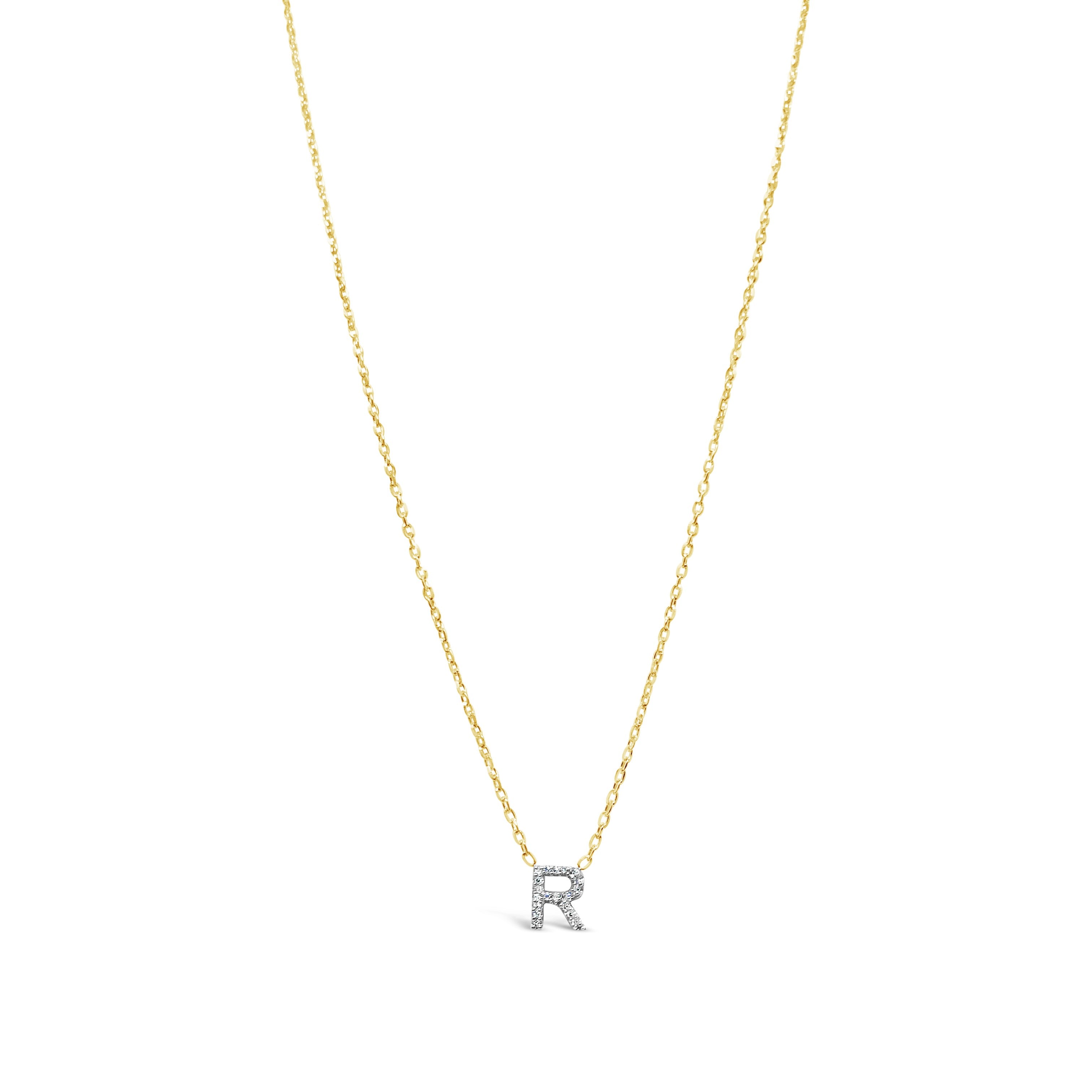
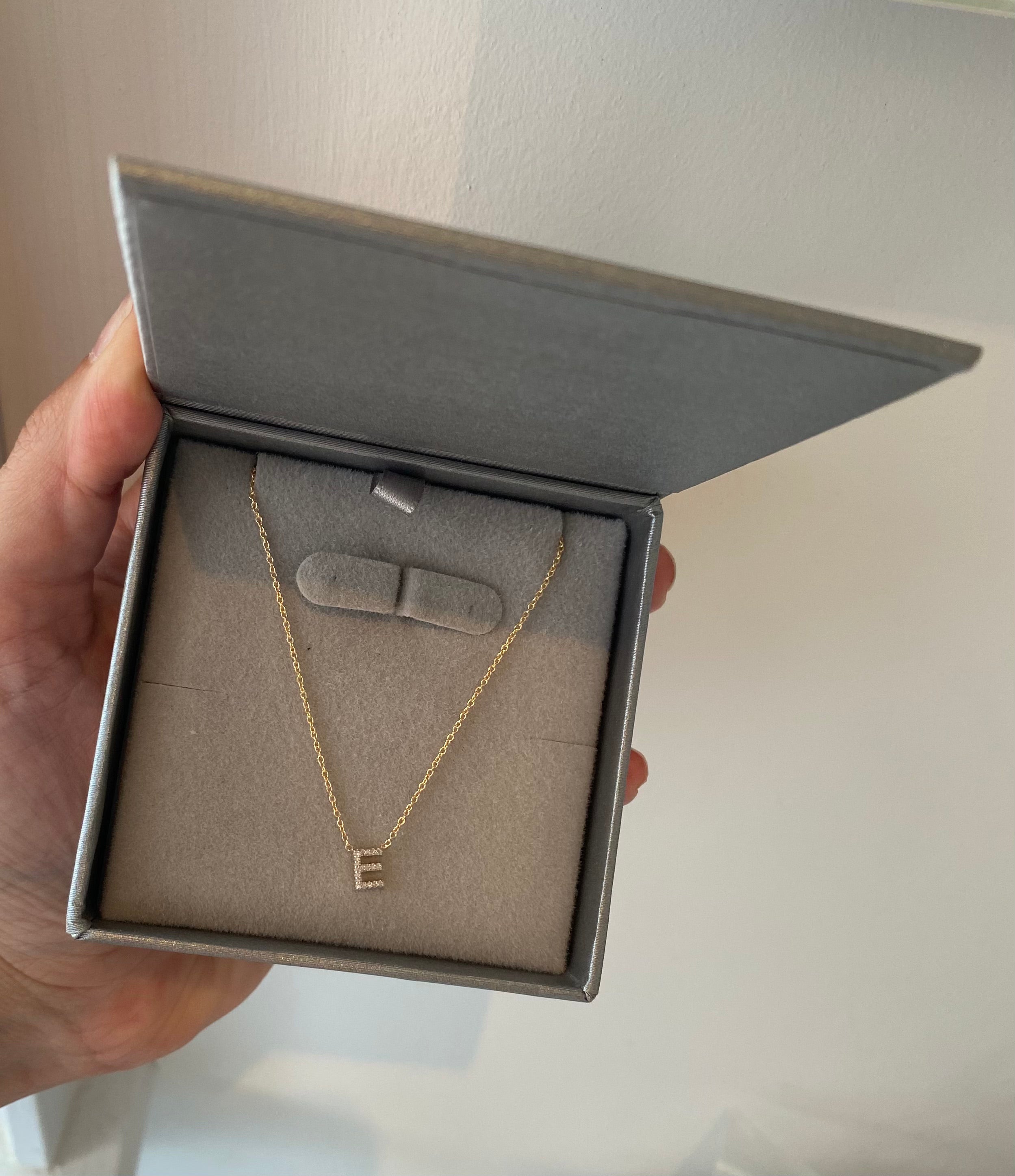
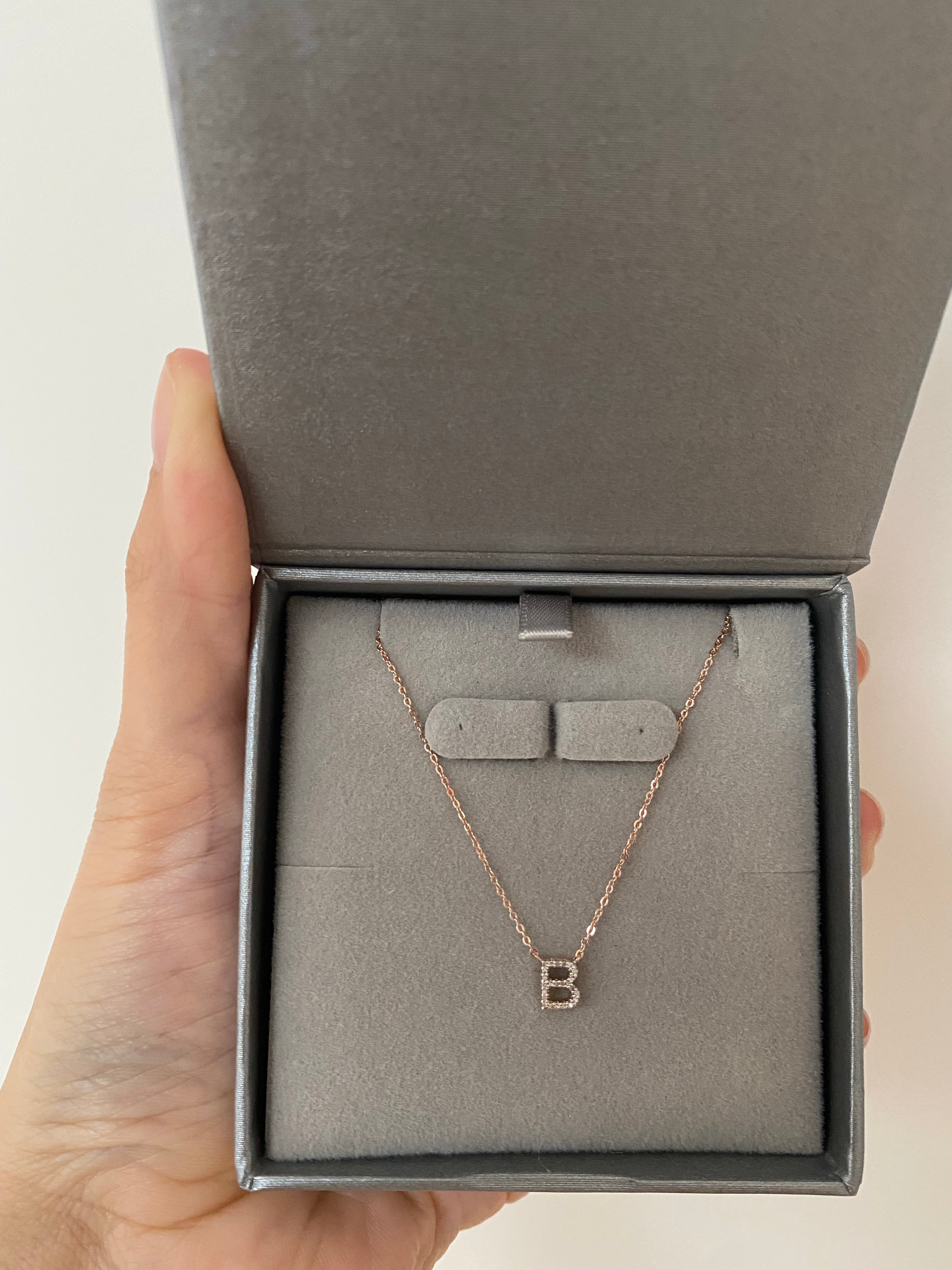
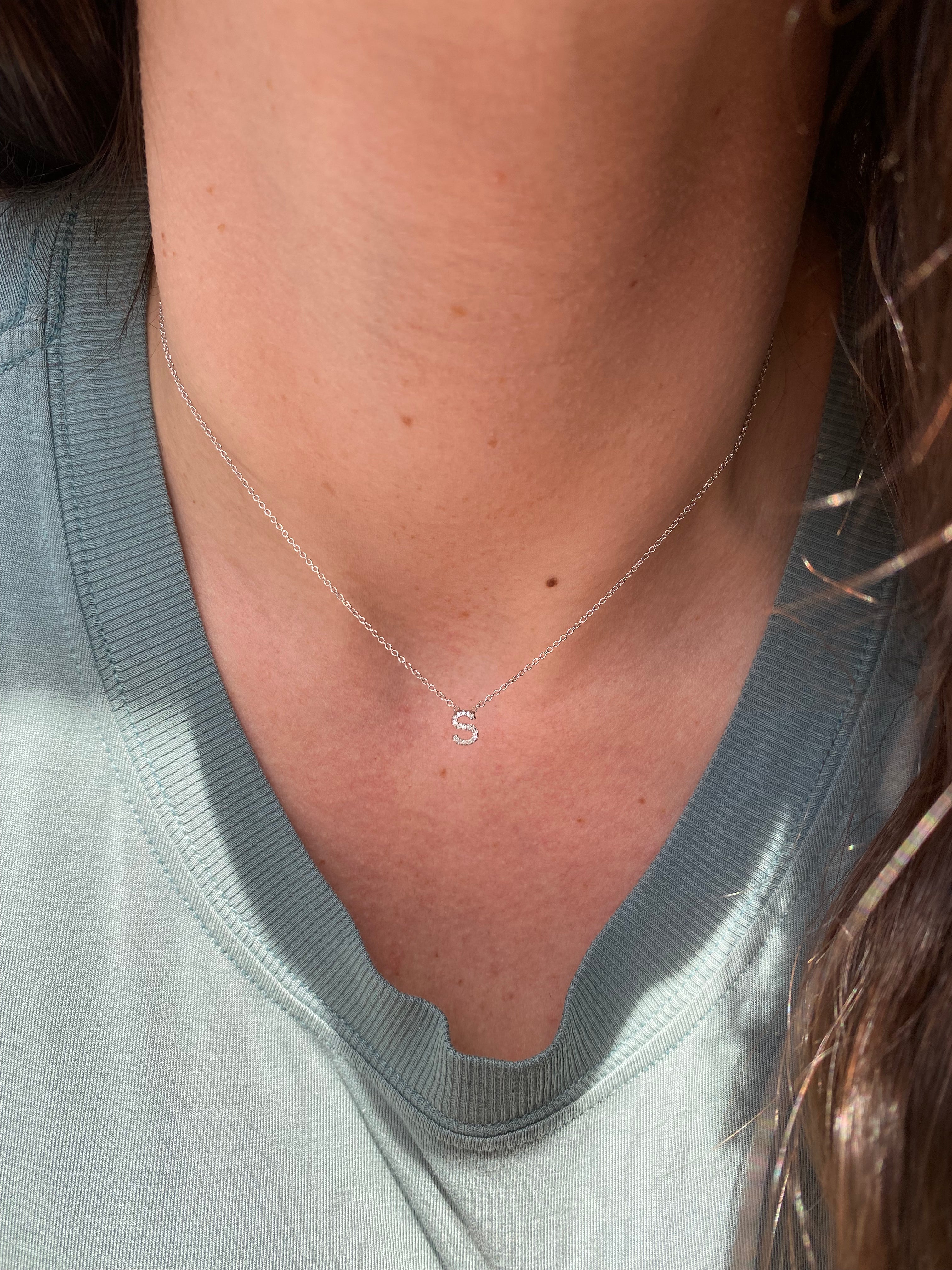
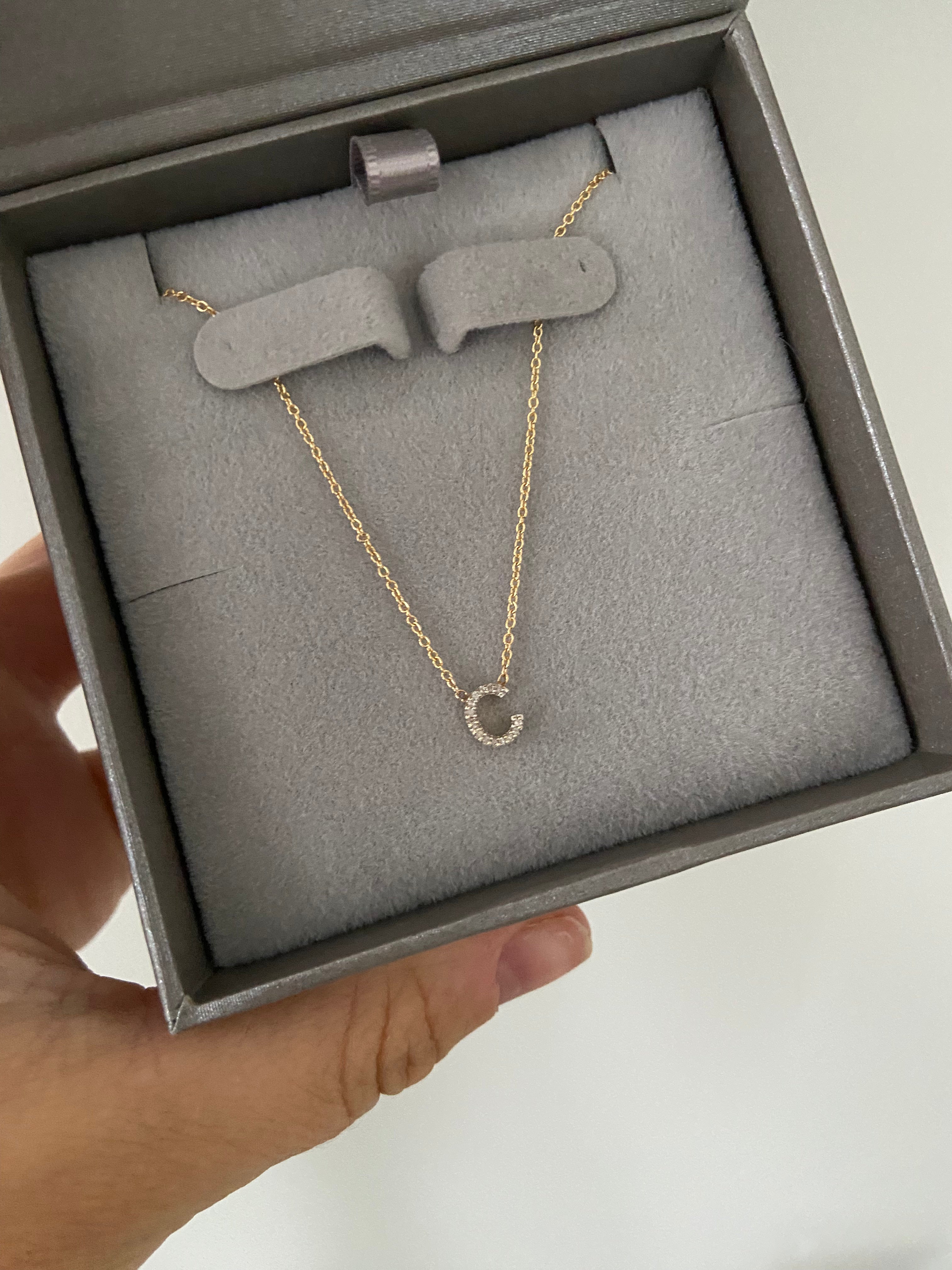
10K Gold Diamond Initial Necklace

Sale price$548.00

10K Gold Diamond Initial Necklace

Personalized Fine Jewelry for Special Occasions

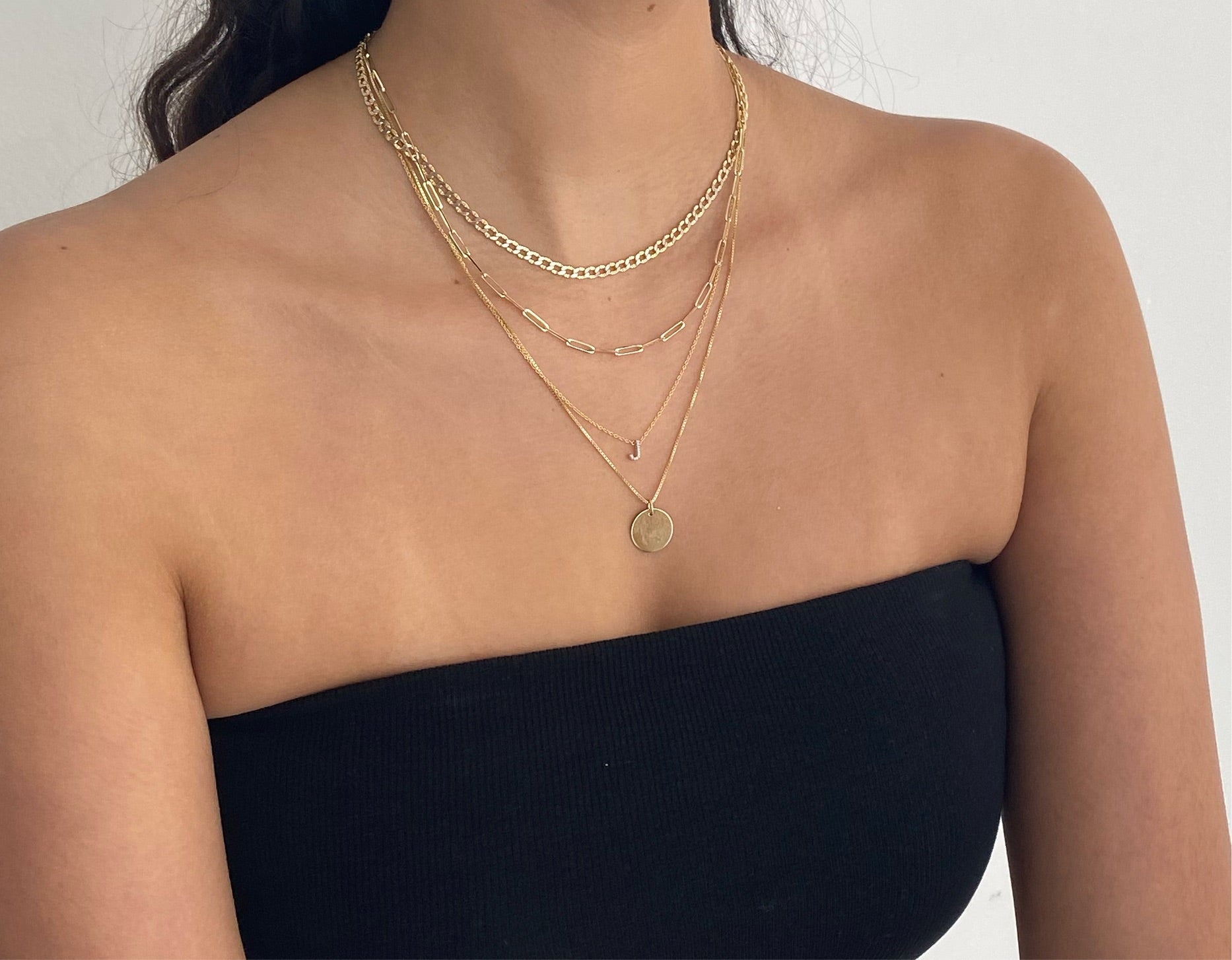
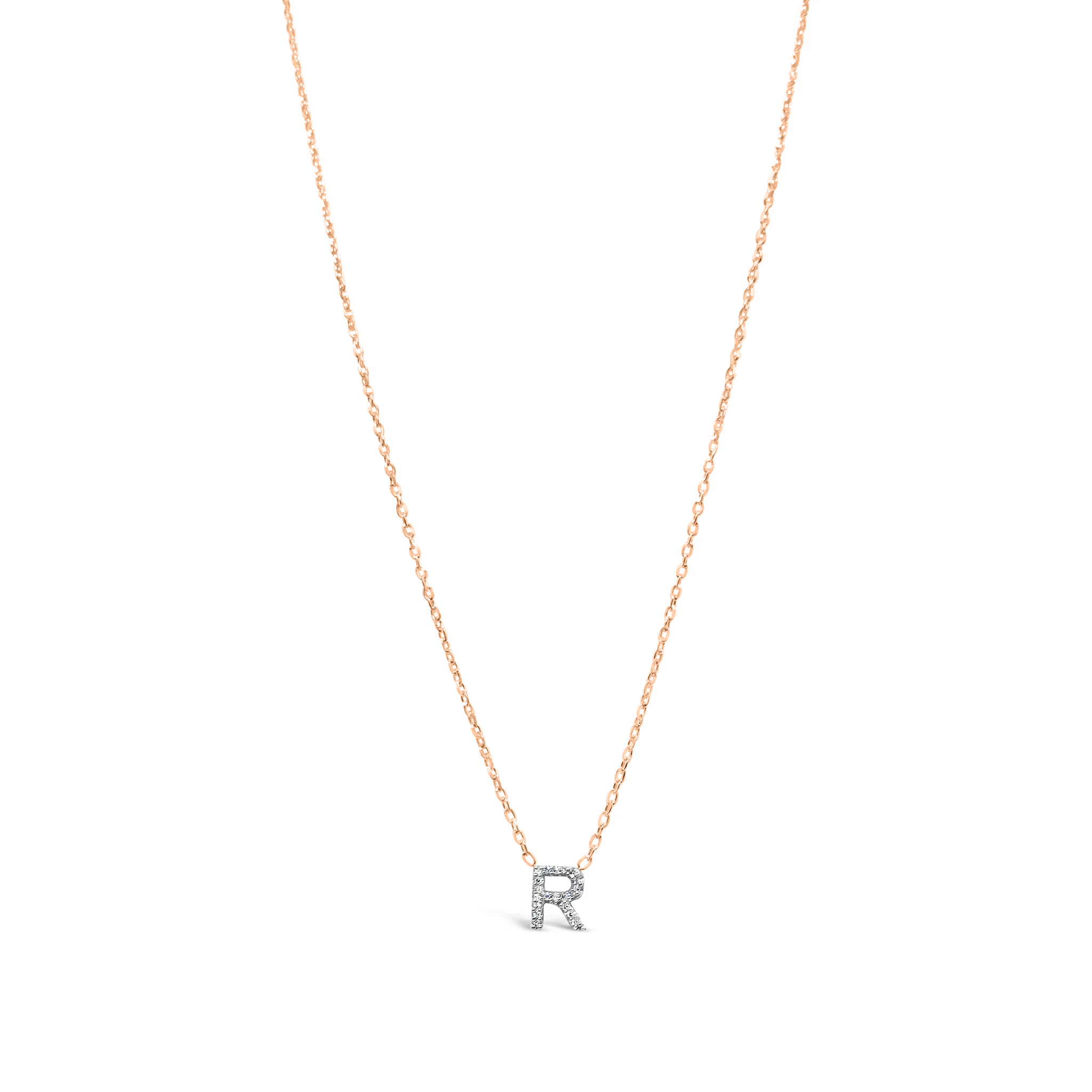
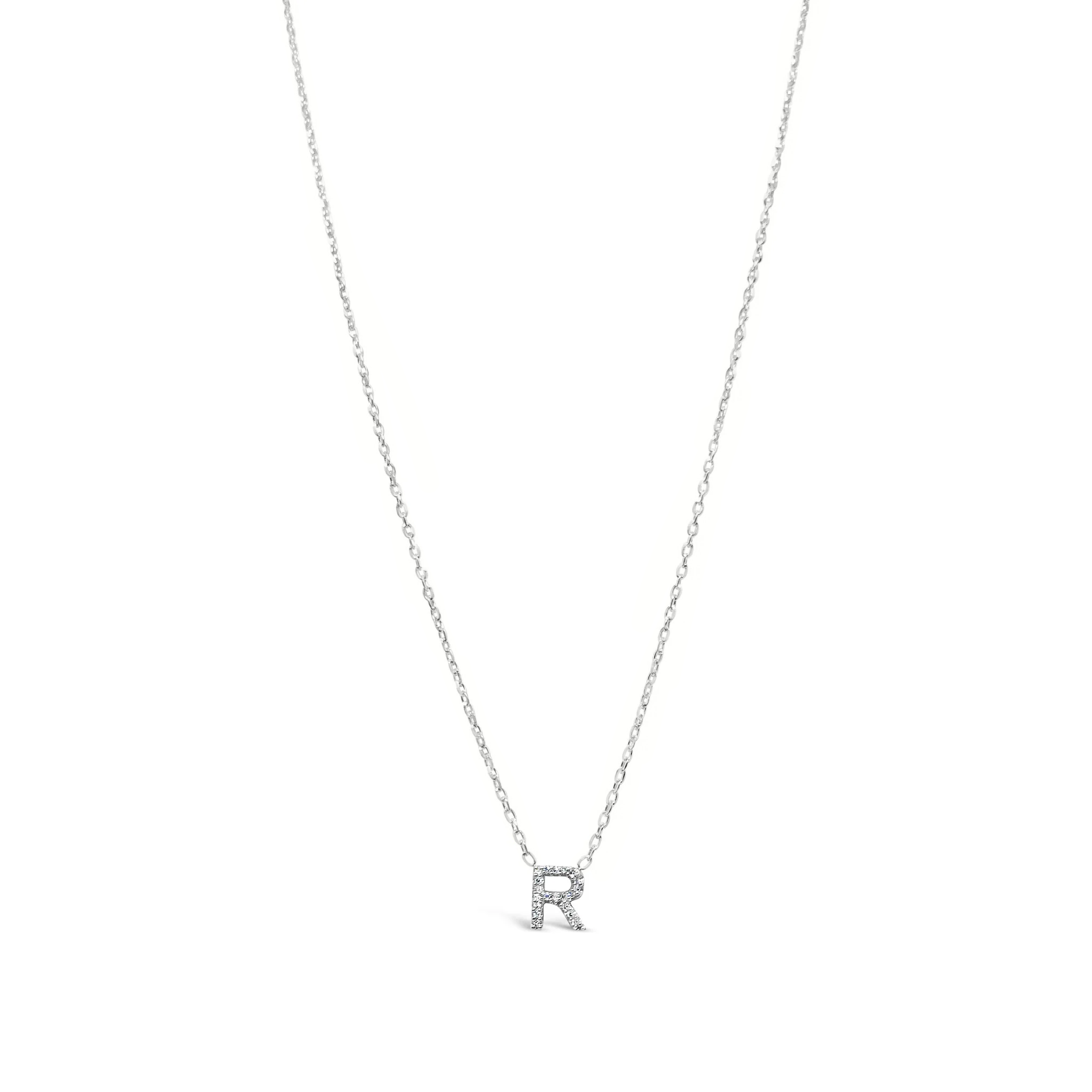
Personalize your jewelry collection with our 10K Gold Diamond Initial Necklace, a beautiful and timeless piece available in solid 10 karat yellow, white, or rose gold. This necklace features a sparkling diamond initial, adding a touch of elegance and individuality. Whether for yourself or a loved one, it's a perfect gift choice that will be cherished for years.

PRODUCT DETAILS

• Crafted from solid 10 karat yellow, white, or rose gold
• Initial measures approximately 7mm
• Diamond weight varies by initial
• Includes one initial in the middle of the chain
• Chain: 1mm cable chain, with a spring ring
• Available in 16",18" or 20" chain lengths

Made to order; ships within 1-2 weeks

Metal:10K Yellow Gold
Length:

Length

FREE SHIPPING

Enjoy complimentary shipping on all orders $300+

Pickup available at Toronto Warehouse & Pick Up Location

Usually ready in 5+ days

Single Diamond Initial Necklace - Close-up view of delicate pendant with a single sparkling diamond, customizable with initials. Handcrafted by Jessica Jewellery.

10K Gold Diamond Initial Necklace

10K Yellow Gold / 16"

Toronto Warehouse & Pick Up Location

Pickup available, Usually ready in 5+ days

14 Leswyn Road
Toronto ON M6A 1K2
Canada

+16472919273
Single Diamond Initial Necklace - Close-up view of delicate pendant with a single sparkling diamond, customizable with initials. Handcrafted by Jessica Jewellery.
10K Gold Diamond Initial Necklace Sale price$548.00

Want to make this yours?

Engrave it, resize it, or customize it for your exact vision. Reach out and we'll make it happen.

Continuing from JESSICA JEWELLERY: Help implement a sticky category-image carousel on Jessica Jewellery Shopify collection pages. The category multicolumn/image-link section should scroll normally until reaching the top, then remain sticky while the product grid scrolls below; title and description must scroll away. Inspect actual theme selectors/structure before editing, avoid global effects, and test desktop/mobile. 12:10 PM Prepared a Shopify snippet using the markup from five Jessica Jewellery collection pages. The carousel scrolls normally until it reaches the bottom of the sticky site header. It then stays in place while the title and description scroll away and the products move underneath. The filter toolbar sticks below the carousel. I scoped the change to collection pages where the category carousel sits directly before the product grid. I also tightened the carousel’s vertical padding to leave more room for products on smaller screens. I tested a local copy of the Bracelets page in Chrome at 1440px and 390px. The carousel stuck and released on scroll, the filter toolbar cleared it, and the next arrow scrolled the carousel at phone width. Live Shopify preview and physical-device testing are still pending. Bracelets collection To install it in an unpublished theme, add the snippet as snippets/collection-category-sticky.liquid and place this line after the closing in layout/theme.liquid: Continuing from JESSICA JEWELLERY: Help implement a sticky category-image carousel on Jessica Jewellery Shopify collection pages. The category multicolumn/image-link section should scroll normally until reaching the top, then remain sticky while the product grid scrolls below; title and description must scroll away. Inspect actual theme selectors/structure before editing, avoid global effects, and test desktop/mobile. 12:10 PM Prepared a Shopify snippet using the markup from five Jessica Jewellery collection pages. The carousel scrolls normally until it reaches the bottom of the sticky site header. It then stays in place while the title and description scroll away and the products move underneath. The filter toolbar sticks below the carousel. I scoped the change to collection pages where the category carousel sits directly before the product grid. I also tightened the carousel’s vertical padding to leave more room for products on smaller screens. I tested a local copy of the Bracelets page in Chrome at 1440px and 390px. The carousel stuck and released on scroll, the filter toolbar cleared it, and the next arrow scrolled the carousel at phone width. Live Shopify preview and physical-device testing are still pending. Bracelets collection To install it in an unpublished theme, add the snippet as snippets/collection-category-sticky.liquid and place this line after the closing in layout/theme.liquid: Continuing from JESSICA JEWELLERY: Help implement a sticky category-image carousel on Jessica Jewellery Shopify collection pages. The category multicolumn/image-link section should scroll normally until reaching the top, then remain sticky while the product grid scrolls below; title and description must scroll away. Inspect actual theme selectors/structure before editing, avoid global effects, and test desktop/mobile. 12:10 PM Prepared a Shopify snippet using the markup from five Jessica Jewellery collection pages. The carousel scrolls normally until it reaches the bottom of the sticky site header. It then stays in place while the title and description scroll away and the products move underneath. The filter toolbar sticks below the carousel. I scoped the change to collection pages where the category carousel sits directly before the product grid. I also tightened the carousel’s vertical padding to leave more room for products on smaller screens. I tested a local copy of the Bracelets page in Chrome at 1440px and 390px. The carousel stuck and released on scroll, the filter toolbar cleared it, and the next arrow scrolled the carousel at phone width. Live Shopify preview and physical-device testing are still pending. Bracelets collection To install it in an unpublished theme, add the snippet as snippets/collection-category-sticky.liquid and place this line after the closing in layout/theme.liquid: Continuing from JESSICA JEWELLERY: Help implement a sticky category-image carousel on Jessica Jewellery Shopify collection pages. The category multicolumn/image-link section should scroll normally until reaching the top, then remain sticky while the product grid scrolls below; title and description must scroll away. Inspect actual theme selectors/structure before editing, avoid global effects, and test desktop/mobile. 12:10 PM Prepared a Shopify snippet using the markup from five Jessica Jewellery collection pages. The carousel scrolls normally until it reaches the bottom of the sticky site header. It then stays in place while the title and description scroll away and the products move underneath. The filter toolbar sticks below the carousel. I scoped the change to collection pages where the category carousel sits directly before the product grid. I also tightened the carousel’s vertical padding to leave more room for products on smaller screens. I tested a local copy of the Bracelets page in Chrome at 1440px and 390px. The carousel stuck and released on scroll, the filter toolbar cleared it, and the next arrow scrolled the carousel at phone width. Live Shopify preview and physical-device testing are still pending. Bracelets collection To install it in an unpublished theme, add the snippet as snippets/collection-category-sticky.liquid and place this line after the closing in layout/theme.liquid: Continuing from JESSICA JEWELLERY: Help implement a sticky category-image carousel on Jessica Jewellery Shopify collection pages. The category multicolumn/image-link section should scroll normally until reaching the top, then remain sticky while the product grid scrolls below; title and description must scroll away. Inspect actual theme selectors/structure before editing, avoid global effects, and test desktop/mobile. 12:10 PM Prepared a Shopify snippet using the markup from five Jessica Jewellery collection pages. The carousel scrolls normally until it reaches the bottom of the sticky site header. It then stays in place while the title and description scroll away and the products move underneath. The filter toolbar sticks below the carousel. I scoped the change to collection pages where the category carousel sits directly before the product grid. I also tightened the carousel’s vertical padding to leave more room for products on smaller screens. I tested a local copy of the Bracelets page in Chrome at 1440px and 390px. The carousel stuck and released on scroll, the filter toolbar cleared it, and the next arrow scrolled the carousel at phone width. Live Shopify preview and physical-device testing are still pending. Bracelets collection To install it in an unpublished theme, add the snippet as snippets/collection-category-sticky.liquid and place this line after the closing in layout/theme.liquid: Continuing from JESSICA JEWELLERY: Help implement a sticky category-image carousel on Jessica Jewellery Shopify collection pages. The category multicolumn/image-link section should scroll normally until reaching the top, then remain sticky while the product grid scrolls below; title and description must scroll away. Inspect actual theme selectors/structure before editing, avoid global effects, and test desktop/mobile. 12:10 PM Prepared a Shopify snippet using the markup from five Jessica Jewellery collection pages. The carousel scrolls normally until it reaches the bottom of the sticky site header. It then stays in place while the title and description scroll away and the products move underneath. The filter toolbar sticks below the carousel. I scoped the change to collection pages where the category carousel sits directly before the product grid. I also tightened the carousel’s vertical padding to leave more room for products on smaller screens. I tested a local copy of the Bracelets page in Chrome at 1440px and 390px. The carousel stuck and released on scroll, the filter toolbar cleared it, and the next arrow scrolled the carousel at phone width. Live Shopify preview and physical-device testing are still pending. Bracelets collection To install it in an unpublished theme, add the snippet as snippets/collection-category-sticky.liquid and place this line after the closing in layout/theme.liquid: Continuing from JESSICA JEWELLERY: Help implement a sticky category-image carousel on Jessica Jewellery Shopify collection pages. The category multicolumn/image-link section should scroll normally until reaching the top, then remain sticky while the product grid scrolls below; title and description must scroll away. Inspect actual theme selectors/structure before editing, avoid global effects, and test desktop/mobile. 12:10 PM Prepared a Shopify snippet using the markup from five Jessica Jewellery collection pages. The carousel scrolls normally until it reaches the bottom of the sticky site header. It then stays in place while the title and description scroll away and the products move underneath. The filter toolbar sticks below the carousel. I scoped the change to collection pages where the category carousel sits directly before the product grid. I also tightened the carousel’s vertical padding to leave more room for products on smaller screens. I tested a local copy of the Bracelets page in Chrome at 1440px and 390px. The carousel stuck and released on scroll, the filter toolbar cleared it, and the next arrow scrolled the carousel at phone width. Live Shopify preview and physical-device testing are still pending. Bracelets collection To install it in an unpublished theme, add the snippet as snippets/collection-category-sticky.liquid and place this line after the closing in layout/theme.liquid: Continuing from JESSICA JEWELLERY: Help implement a sticky category-image carousel on Jessica Jewellery Shopify collection pages. The category multicolumn/image-link section should scroll normally until reaching the top, then remain sticky while the product grid scrolls below; title and description must scroll away. Inspect actual theme selectors/structure before editing, avoid global effects, and test desktop/mobile. 12:10 PM Prepared a Shopify snippet using the markup from five Jessica Jewellery collection pages. The carousel scrolls normally until it reaches the bottom of the sticky site header. It then stays in place while the title and description scroll away and the products move underneath. The filter toolbar sticks below the carousel. I scoped the change to collection pages where the category carousel sits directly before the product grid. I also tightened the carousel’s vertical padding to leave more room for products on smaller screens. I tested a local copy of the Bracelets page in Chrome at 1440px and 390px. The carousel stuck and released on scroll, the filter toolbar cleared it, and the next arrow scrolled the carousel at phone width. Live Shopify preview and physical-device testing are still pending. Bracelets collection To install it in an unpublished theme, add the snippet as snippets/collection-category-sticky.liquid and place this line after the closing in layout/theme.liquid: Continuing from JESSICA JEWELLERY: Help implement a sticky category-image carousel on Jessica Jewellery Shopify collection pages. The category multicolumn/image-link section should scroll normally until reaching the top, then remain sticky while the product grid scrolls below; title and description must scroll away. Inspect actual theme selectors/structure before editing, avoid global effects, and test desktop/mobile. 12:10 PM Prepared a Shopify snippet using the markup from five Jessica Jewellery collection pages. The carousel scrolls normally until it reaches the bottom of the sticky site header. It then stays in place while the title and description scroll away and the products move underneath. The filter toolbar sticks below the carousel. I scoped the change to collection pages where the category carousel sits directly before the product grid. I also tightened the carousel’s vertical padding to leave more room for products on smaller screens. I tested a local copy of the Bracelets page in Chrome at 1440px and 390px. The carousel stuck and released on scroll, the filter toolbar cleared it, and the next arrow scrolled the carousel at phone width. Live Shopify preview and physical-device testing are still pending. Bracelets collection To install it in an unpublished theme, add the snippet as snippets/collection-category-sticky.liquid and place this line after the closing in layout/theme.liquid: Continuing from JESSICA JEWELLERY: Help implement a sticky category-image carousel on Jessica Jewellery Shopify collection pages. The category multicolumn/image-link section should scroll normally until reaching the top, then remain sticky while the product grid scrolls below; title and description must scroll away. Inspect actual theme selectors/structure before editing, avoid global effects, and test desktop/mobile. 12:10 PM Prepared a Shopify snippet using the markup from five Jessica Jewellery collection pages. The carousel scrolls normally until it reaches the bottom of the sticky site header. It then stays in place while the title and description scroll away and the products move underneath. The filter toolbar sticks below the carousel. I scoped the change to collection pages where the category carousel sits directly before the product grid. I also tightened the carousel’s vertical padding to leave more room for products on smaller screens. I tested a local copy of the Bracelets page in Chrome at 1440px and 390px. The carousel stuck and released on scroll, the filter toolbar cleared it, and the next arrow scrolled the carousel at phone width. Live Shopify preview and physical-device testing are still pending. Bracelets collection To install it in an unpublished theme, add the snippet as snippets/collection-category-sticky.liquid and place this line after the closing in layout/theme.liquid: Continuing from JESSICA JEWELLERY: Help implement a sticky category-image carousel on Jessica Jewellery Shopify collection pages. The category multicolumn/image-link section should scroll normally until reaching the top, then remain sticky while the product grid scrolls below; title and description must scroll away. Inspect actual theme selectors/structure before editing, avoid global effects, and test desktop/mobile. 12:10 PM Prepared a Shopify snippet using the markup from five Jessica Jewellery collection pages. The carousel scrolls normally until it reaches the bottom of the sticky site header. It then stays in place while the title and description scroll away and the products move underneath. The filter toolbar sticks below the carousel. I scoped the change to collection pages where the category carousel sits directly before the product grid. I also tightened the carousel’s vertical padding to leave more room for products on smaller screens. I tested a local copy of the Bracelets page in Chrome at 1440px and 390px. The carousel stuck and released on scroll, the filter toolbar cleared it, and the next arrow scrolled the carousel at phone width. Live Shopify preview and physical-device testing are still pending. Bracelets collection To install it in an unpublished theme, add the snippet as snippets/collection-category-sticky.liquid and place this line after the closing in layout/theme.liquid: Continuing from JESSICA JEWELLERY: Help implement a sticky category-image carousel on Jessica Jewellery Shopify collection pages. The category multicolumn/image-link section should scroll normally until reaching the top, then remain sticky while the product grid scrolls below; title and description must scroll away. Inspect actual theme selectors/structure before editing, avoid global effects, and test desktop/mobile. 12:10 PM Prepared a Shopify snippet using the markup from five Jessica Jewellery collection pages. The carousel scrolls normally until it reaches the bottom of the sticky site header. It then stays in place while the title and description scroll away and the products move underneath. The filter toolbar sticks below the carousel. I scoped the change to collection pages where the category carousel sits directly before the product grid. I also tightened the carousel’s vertical padding to leave more room for products on smaller screens. I tested a local copy of the Bracelets page in Chrome at 1440px and 390px. The carousel stuck and released on scroll, the filter toolbar cleared it, and the next arrow scrolled the carousel at phone width. Live Shopify preview and physical-device testing are still pending. Bracelets collection To install it in an unpublished theme, add the snippet as snippets/collection-category-sticky.liquid and place this line after the closing in layout/theme.liquid: Continuing from JESSICA JEWELLERY: Help implement a sticky category-image carousel on Jessica Jewellery Shopify collection pages. The category multicolumn/image-link section should scroll normally until reaching the top, then remain sticky while the product grid scrolls below; title and description must scroll away. Inspect actual theme selectors/structure before editing, avoid global effects, and test desktop/mobile. 12:10 PM Prepared a Shopify snippet using the markup from five Jessica Jewellery collection pages. The carousel scrolls normally until it reaches the bottom of the sticky site header. It then stays in place while the title and description scroll away and the products move underneath. The filter toolbar sticks below the carousel. I scoped the change to collection pages where the category carousel sits directly before the product grid. I also tightened the carousel’s vertical padding to leave more room for products on smaller screens. I tested a local copy of the Bracelets page in Chrome at 1440px and 390px. The carousel stuck and released on scroll, the filter toolbar cleared it, and the next arrow scrolled the carousel at phone width. Live Shopify preview and physical-device testing are still pending. Bracelets collection To install it in an unpublished theme, add the snippet as snippets/collection-category-sticky.liquid and place this line after the closing in layout/theme.liquid: Continuing from JESSICA JEWELLERY: Help implement a sticky category-image carousel on Jessica Jewellery Shopify collection pages. The category multicolumn/image-link section should scroll normally until reaching the top, then remain sticky while the product grid scrolls below; title and description must scroll away. Inspect actual theme selectors/structure before editing, avoid global effects, and test desktop/mobile. 12:10 PM Prepared a Shopify snippet using the markup from five Jessica Jewellery collection pages. The carousel scrolls normally until it reaches the bottom of the sticky site header. It then stays in place while the title and description scroll away and the products move underneath. The filter toolbar sticks below the carousel. I scoped the change to collection pages where the category carousel sits directly before the product grid. I also tightened the carousel’s vertical padding to leave more room for products on smaller screens. I tested a local copy of the Bracelets page in Chrome at 1440px and 390px. The carousel stuck and released on scroll, the filter toolbar cleared it, and the next arrow scrolled the carousel at phone width. Live Shopify preview and physical-device testing are still pending. Bracelets collection To install it in an unpublished theme, add the snippet as snippets/collection-category-sticky.liquid and place this line after the closing in layout/theme.liquid: Continuing from JESSICA JEWELLERY: Help implement a sticky category-image carousel on Jessica Jewellery Shopify collection pages. The category multicolumn/image-link section should scroll normally until reaching the top, then remain sticky while the product grid scrolls below; title and description must scroll away. Inspect actual theme selectors/structure before editing, avoid global effects, and test desktop/mobile. 12:10 PM Prepared a Shopify snippet using the markup from five Jessica Jewellery collection pages. The carousel scrolls normally until it reaches the bottom of the sticky site header. It then stays in place while the title and description scroll away and the products move underneath. The filter toolbar sticks below the carousel. I scoped the change to collection pages where the category carousel sits directly before the product grid. I also tightened the carousel’s vertical padding to leave more room for products on smaller screens. I tested a local copy of the Bracelets page in Chrome at 1440px and 390px. The carousel stuck and released on scroll, the filter toolbar cleared it, and the next arrow scrolled the carousel at phone width. Live Shopify preview and physical-device testing are still pending. Bracelets collection To install it in an unpublished theme, add the snippet as snippets/collection-category-sticky.liquid and place this line after the closing in layout/theme.liquid: Continuing from JESSICA JEWELLERY: Help implement a sticky category-image carousel on Jessica Jewellery Shopify collection pages. The category multicolumn/image-link section should scroll normally until reaching the top, then remain sticky while the product grid scrolls below; title and description must scroll away. Inspect actual theme selectors/structure before editing, avoid global effects, and test desktop/mobile. 12:10 PM Prepared a Shopify snippet using the markup from five Jessica Jewellery collection pages. The carousel scrolls normally until it reaches the bottom of the sticky site header. It then stays in place while the title and description scroll away and the products move underneath. The filter toolbar sticks below the carousel. I scoped the change to collection pages where the category carousel sits directly before the product grid. I also tightened the carousel’s vertical padding to leave more room for products on smaller screens. I tested a local copy of the Bracelets page in Chrome at 1440px and 390px. The carousel stuck and released on scroll, the filter toolbar cleared it, and the next arrow scrolled the carousel at phone width. Live Shopify preview and physical-device testing are still pending. Bracelets collection To install it in an unpublished theme, add the snippet as snippets/collection-category-sticky.liquid and place this line after the closing in layout/theme.liquid: Continuing from JESSICA JEWELLERY: Help implement a sticky category-image carousel on Jessica Jewellery Shopify collection pages. The category multicolumn/image-link section should scroll normally until reaching the top, then remain sticky while the product grid scrolls below; title and description must scroll away. Inspect actual theme selectors/structure before editing, avoid global effects, and test desktop/mobile. 12:10 PM Prepared a Shopify snippet using the markup from five Jessica Jewellery collection pages. The carousel scrolls normally until it reaches the bottom of the sticky site header. It then stays in place while the title and description scroll away and the products move underneath. The filter toolbar sticks below the carousel. I scoped the change to collection pages where the category carousel sits directly before the product grid. I also tightened the carousel’s vertical padding to leave more room for products on smaller screens. I tested a local copy of the Bracelets page in Chrome at 1440px and 390px. The carousel stuck and released on scroll, the filter toolbar cleared it, and the next arrow scrolled the carousel at phone width. Live Shopify preview and physical-device testing are still pending. Bracelets collection To install it in an unpublished theme, add the snippet as snippets/collection-category-sticky.liquid and place this line after the closing in layout/theme.liquid: Continuing from JESSICA JEWELLERY: Help implement a sticky category-image carousel on Jessica Jewellery Shopify collection pages. The category multicolumn/image-link section should scroll normally until reaching the top, then remain sticky while the product grid scrolls below; title and description must scroll away. Inspect actual theme selectors/structure before editing, avoid global effects, and test desktop/mobile. 12:10 PM Prepared a Shopify snippet using the markup from five Jessica Jewellery collection pages. The carousel scrolls normally until it reaches the bottom of the sticky site header. It then stays in place while the title and description scroll away and the products move underneath. The filter toolbar sticks below the carousel. I scoped the change to collection pages where the category carousel sits directly before the product grid. I also tightened the carousel’s vertical padding to leave more room for products on smaller screens. I tested a local copy of the Bracelets page in Chrome at 1440px and 390px. The carousel stuck and released on scroll, the filter toolbar cleared it, and the next arrow scrolled the carousel at phone width. Live Shopify preview and physical-device testing are still pending. Bracelets collection To install it in an unpublished theme, add the snippet as snippets/collection-category-sticky.liquid and place this line after the closing in layout/theme.liquid: Continuing from JESSICA JEWELLERY: Help implement a sticky category-image carousel on Jessica Jewellery Shopify collection pages. The category multicolumn/image-link section should scroll normally until reaching the top, then remain sticky while the product grid scrolls below; title and description must scroll away. Inspect actual theme selectors/structure before editing, avoid global effects, and test desktop/mobile. 12:10 PM Prepared a Shopify snippet using the markup from five Jessica Jewellery collection pages. The carousel scrolls normally until it reaches the bottom of the sticky site header. It then stays in place while the title and description scroll away and the products move underneath. The filter toolbar sticks below the carousel. I scoped the change to collection pages where the category carousel sits directly before the product grid. I also tightened the carousel’s vertical padding to leave more room for products on smaller screens. I tested a local copy of the Bracelets page in Chrome at 1440px and 390px. The carousel stuck and released on scroll, the filter toolbar cleared it, and the next arrow scrolled the carousel at phone width. Live Shopify preview and physical-device testing are still pending. Bracelets collection To install it in an unpublished theme, add the snippet as snippets/collection-category-sticky.liquid and place this line after the closing in layout/theme.liquid: Continuing from JESSICA JEWELLERY: Help implement a sticky category-image carousel on Jessica Jewellery Shopify collection pages. The category multicolumn/image-link section should scroll normally until reaching the top, then remain sticky while the product grid scrolls below; title and description must scroll away. Inspect actual theme selectors/structure before editing, avoid global effects, and test desktop/mobile. 12:10 PM Prepared a Shopify snippet using the markup from five Jessica Jewellery collection pages. The carousel scrolls normally until it reaches the bottom of the sticky site header. It then stays in place while the title and description scroll away and the products move underneath. The filter toolbar sticks below the carousel. I scoped the change to collection pages where the category carousel sits directly before the product grid. I also tightened the carousel’s vertical padding to leave more room for products on smaller screens. I tested a local copy of the Bracelets page in Chrome at 1440px and 390px. The carousel stuck and released on scroll, the filter toolbar cleared it, and the next arrow scrolled the carousel at phone width. Live Shopify preview and physical-device testing are still pending. Bracelets collection To install it in an unpublished theme, add the snippet as snippets/collection-category-sticky.liquid and place this line after the closing in layout/theme.liquid: Continuing from JESSICA JEWELLERY: Help implement a sticky category-image carousel on Jessica Jewellery Shopify collection pages. The category multicolumn/image-link section should scroll normally until reaching the top, then remain sticky while the product grid scrolls below; title and description must scroll away. Inspect actual theme selectors/structure before editing, avoid global effects, and test desktop/mobile. 12:10 PM Prepared a Shopify snippet using the markup from five Jessica Jewellery collection pages. The carousel scrolls normally until it reaches the bottom of the sticky site header. It then stays in place while the title and description scroll away and the products move underneath. The filter toolbar sticks below the carousel. I scoped the change to collection pages where the category carousel sits directly before the product grid. I also tightened the carousel’s vertical padding to leave more room for products on smaller screens. I tested a local copy of the Bracelets page in Chrome at 1440px and 390px. The carousel stuck and released on scroll, the filter toolbar cleared it, and the next arrow scrolled the carousel at phone width. Live Shopify preview and physical-device testing are still pending. Bracelets collection To install it in an unpublished theme, add the snippet as snippets/collection-category-sticky.liquid and place this line after the closing in layout/theme.liquid: Continuing from JESSICA JEWELLERY: Help implement a sticky category-image carousel on Jessica Jewellery Shopify collection pages. The category multicolumn/image-link section should scroll normally until reaching the top, then remain sticky while the product grid scrolls below; title and description must scroll away. Inspect actual theme selectors/structure before editing, avoid global effects, and test desktop/mobile. 12:10 PM Prepared a Shopify snippet using the markup from five Jessica Jewellery collection pages. The carousel scrolls normally until it reaches the bottom of the sticky site header. It then stays in place while the title and description scroll away and the products move underneath. The filter toolbar sticks below the carousel. I scoped the change to collection pages where the category carousel sits directly before the product grid. I also tightened the carousel’s vertical padding to leave more room for products on smaller screens. I tested a local copy of the Bracelets page in Chrome at 1440px and 390px. The carousel stuck and released on scroll, the filter toolbar cleared it, and the next arrow scrolled the carousel at phone width. Live Shopify preview and physical-device testing are still pending. Bracelets collection To install it in an unpublished theme, add the snippet as snippets/collection-category-sticky.liquid and place this line after the closing in layout/theme.liquid: Continuing from JESSICA JEWELLERY: Help implement a sticky category-image carousel on Jessica Jewellery Shopify collection pages. The category multicolumn/image-link section should scroll normally until reaching the top, then remain sticky while the product grid scrolls below; title and description must scroll away. Inspect actual theme selectors/structure before editing, avoid global effects, and test desktop/mobile. 12:10 PM Prepared a Shopify snippet using the markup from five Jessica Jewellery collection pages. The carousel scrolls normally until it reaches the bottom of the sticky site header. It then stays in place while the title and description scroll away and the products move underneath. The filter toolbar sticks below the carousel. I scoped the change to collection pages where the category carousel sits directly before the product grid. I also tightened the carousel’s vertical padding to leave more room for products on smaller screens. I tested a local copy of the Bracelets page in Chrome at 1440px and 390px. The carousel stuck and released on scroll, the filter toolbar cleared it, and the next arrow scrolled the carousel at phone width. Live Shopify preview and physical-device testing are still pending. Bracelets collection To install it in an unpublished theme, add the snippet as snippets/collection-category-sticky.liquid and place this line after the closing in layout/theme.liquid: Continuing from JESSICA JEWELLERY: Help implement a sticky category-image carousel on Jessica Jewellery Shopify collection pages. The category multicolumn/image-link section should scroll normally until reaching the top, then remain sticky while the product grid scrolls below; title and description must scroll away. Inspect actual theme selectors/structure before editing, avoid global effects, and test desktop/mobile. 12:10 PM Prepared a Shopify snippet using the markup from five Jessica Jewellery collection pages. The carousel scrolls normally until it reaches the bottom of the sticky site header. It then stays in place while the title and description scroll away and the products move underneath. The filter toolbar sticks below the carousel. I scoped the change to collection pages where the category carousel sits directly before the product grid. I also tightened the carousel’s vertical padding to leave more room for products on smaller screens. I tested a local copy of the Bracelets page in Chrome at 1440px and 390px. The carousel stuck and released on scroll, the filter toolbar cleared it, and the next arrow scrolled the carousel at phone width. Live Shopify preview and physical-device testing are still pending. Bracelets collection To install it in an unpublished theme, add the snippet as snippets/collection-category-sticky.liquid and place this line after the closing in layout/theme.liquid: Continuing from JESSICA JEWELLERY: Help implement a sticky category-image carousel on Jessica Jewellery Shopify collection pages. The category multicolumn/image-link section should scroll normally until reaching the top, then remain sticky while the product grid scrolls below; title and description must scroll away. Inspect actual theme selectors/structure before editing, avoid global effects, and test desktop/mobile. 12:10 PM Prepared a Shopify snippet using the markup from five Jessica Jewellery collection pages. The carousel scrolls normally until it reaches the bottom of the sticky site header. It then stays in place while the title and description scroll away and the products move underneath. The filter toolbar sticks below the carousel. I scoped the change to collection pages where the category carousel sits directly before the product grid. I also tightened the carousel’s vertical padding to leave more room for products on smaller screens. I tested a local copy of the Bracelets page in Chrome at 1440px and 390px. The carousel stuck and released on scroll, the filter toolbar cleared it, and the next arrow scrolled the carousel at phone width. Live Shopify preview and physical-device testing are still pending. Bracelets collection To install it in an unpublished theme, add the snippet as snippets/collection-category-sticky.liquid and place this line after the closing in layout/theme.liquid: Continuing from JESSICA JEWELLERY: Help implement a sticky category-image carousel on Jessica Jewellery Shopify collection pages. The category multicolumn/image-link section should scroll normally until reaching the top, then remain sticky while the product grid scrolls below; title and description must scroll away. Inspect actual theme selectors/structure before editing, avoid global effects, and test desktop/mobile. 12:10 PM Prepared a Shopify snippet using the markup from five Jessica Jewellery collection pages. The carousel scrolls normally until it reaches the bottom of the sticky site header. It then stays in place while the title and description scroll away and the products move underneath. The filter toolbar sticks below the carousel. I scoped the change to collection pages where the category carousel sits directly before the product grid. I also tightened the carousel’s vertical padding to leave more room for products on smaller screens. I tested a local copy of the Bracelets page in Chrome at 1440px and 390px. The carousel stuck and released on scroll, the filter toolbar cleared it, and the next arrow scrolled the carousel at phone width. Live Shopify preview and physical-device testing are still pending. Bracelets collection To install it in an unpublished theme, add the snippet as snippets/collection-category-sticky.liquid and place this line after the closing in layout/theme.liquid: Continuing from JESSICA JEWELLERY: Help implement a sticky category-image carousel on Jessica Jewellery Shopify collection pages. The category multicolumn/image-link section should scroll normally until reaching the top, then remain sticky while the product grid scrolls below; title and description must scroll away. Inspect actual theme selectors/structure before editing, avoid global effects, and test desktop/mobile. 12:10 PM Prepared a Shopify snippet using the markup from five Jessica Jewellery collection pages. The carousel scrolls normally until it reaches the bottom of the sticky site header. It then stays in place while the title and description scroll away and the products move underneath. The filter toolbar sticks below the carousel. I scoped the change to collection pages where the category carousel sits directly before the product grid. I also tightened the carousel’s vertical padding to leave more room for products on smaller screens. I tested a local copy of the Bracelets page in Chrome at 1440px and 390px. The carousel stuck and released on scroll, the filter toolbar cleared it, and the next arrow scrolled the carousel at phone width. Live Shopify preview and physical-device testing are still pending. Bracelets collection To install it in an unpublished theme, add the snippet as snippets/collection-category-sticky.liquid and place this line after the closing in layout/theme.liquid: Continuing from JESSICA JEWELLERY: Help implement a sticky category-image carousel on Jessica Jewellery Shopify collection pages. The category multicolumn/image-link section should scroll normally until reaching the top, then remain sticky while the product grid scrolls below; title and description must scroll away. Inspect actual theme selectors/structure before editing, avoid global effects, and test desktop/mobile. 12:10 PM Prepared a Shopify snippet using the markup from five Jessica Jewellery collection pages. The carousel scrolls normally until it reaches the bottom of the sticky site header. It then stays in place while the title and description scroll away and the products move underneath. The filter toolbar sticks below the carousel. I scoped the change to collection pages where the category carousel sits directly before the product grid. I also tightened the carousel’s vertical padding to leave more room for products on smaller screens. I tested a local copy of the Bracelets page in Chrome at 1440px and 390px. The carousel stuck and released on scroll, the filter toolbar cleared it, and the next arrow scrolled the carousel at phone width. Live Shopify preview and physical-device testing are still pending. Bracelets collection To install it in an unpublished theme, add the snippet as snippets/collection-category-sticky.liquid and place this line after the closing in layout/theme.liquid: Continuing from JESSICA JEWELLERY: Help implement a sticky category-image carousel on Jessica Jewellery Shopify collection pages. The category multicolumn/image-link section should scroll normally until reaching the top, then remain sticky while the product grid scrolls below; title and description must scroll away. Inspect actual theme selectors/structure before editing, avoid global effects, and test desktop/mobile. 12:10 PM Prepared a Shopify snippet using the markup from five Jessica Jewellery collection pages. The carousel scrolls normally until it reaches the bottom of the sticky site header. It then stays in place while the title and description scroll away and the products move underneath. The filter toolbar sticks below the carousel. I scoped the change to collection pages where the category carousel sits directly before the product grid. I also tightened the carousel’s vertical padding to leave more room for products on smaller screens. I tested a local copy of the Bracelets page in Chrome at 1440px and 390px. The carousel stuck and released on scroll, the filter toolbar cleared it, and the next arrow scrolled the carousel at phone width. Live Shopify preview and physical-device testing are still pending. Bracelets collection To install it in an unpublished theme, add the snippet as snippets/collection-category-sticky.liquid and place this line after the closing in layout/theme.liquid: Continuing from JESSICA JEWELLERY: Help implement a sticky category-image carousel on Jessica Jewellery Shopify collection pages. The category multicolumn/image-link section should scroll normally until reaching the top, then remain sticky while the product grid scrolls below; title and description must scroll away. Inspect actual theme selectors/structure before editing, avoid global effects, and test desktop/mobile. 12:10 PM Prepared a Shopify snippet using the markup from five Jessica Jewellery collection pages. The carousel scrolls normally until it reaches the bottom of the sticky site header. It then stays in place while the title and description scroll away and the products move underneath. The filter toolbar sticks below the carousel. I scoped the change to collection pages where the category carousel sits directly before the product grid. I also tightened the carousel’s vertical padding to leave more room for products on smaller screens. I tested a local copy of the Bracelets page in Chrome at 1440px and 390px. The carousel stuck and released on scroll, the filter toolbar cleared it, and the next arrow scrolled the carousel at phone width. Live Shopify preview and physical-device testing are still pending. Bracelets collection To install it in an unpublished theme, add the snippet as snippets/collection-category-sticky.liquid and place this line after the closing in layout/theme.liquid: Continuing from JESSICA JEWELLERY: Help implement a sticky category-image carousel on Jessica Jewellery Shopify collection pages. The category multicolumn/image-link section should scroll normally until reaching the top, then remain sticky while the product grid scrolls below; title and description must scroll away. Inspect actual theme selectors/structure before editing, avoid global effects, and test desktop/mobile. 12:10 PM Prepared a Shopify snippet using the markup from five Jessica Jewellery collection pages. The carousel scrolls normally until it reaches the bottom of the sticky site header. It then stays in place while the title and description scroll away and the products move underneath. The filter toolbar sticks below the carousel. I scoped the change to collection pages where the category carousel sits directly before the product grid. I also tightened the carousel’s vertical padding to leave more room for products on smaller screens. I tested a local copy of the Bracelets page in Chrome at 1440px and 390px. The carousel stuck and released on scroll, the filter toolbar cleared it, and the next arrow scrolled the carousel at phone width. Live Shopify preview and physical-device testing are still pending. Bracelets collection To install it in an unpublished theme, add the snippet as snippets/collection-category-sticky.liquid and place this line after the closing in layout/theme.liquid: Continuing from JESSICA JEWELLERY: Help implement a sticky category-image carousel on Jessica Jewellery Shopify collection pages. The category multicolumn/image-link section should scroll normally until reaching the top, then remain sticky while the product grid scrolls below; title and description must scroll away. Inspect actual theme selectors/structure before editing, avoid global effects, and test desktop/mobile. 12:10 PM Prepared a Shopify snippet using the markup from five Jessica Jewellery collection pages. The carousel scrolls normally until it reaches the bottom of the sticky site header. It then stays in place while the title and description scroll away and the products move underneath. The filter toolbar sticks below the carousel. I scoped the change to collection pages where the category carousel sits directly before the product grid. I also tightened the carousel’s vertical padding to leave more room for products on smaller screens. I tested a local copy of the Bracelets page in Chrome at 1440px and 390px. The carousel stuck and released on scroll, the filter toolbar cleared it, and the next arrow scrolled the carousel at phone width. Live Shopify preview and physical-device testing are still pending. Bracelets collection To install it in an unpublished theme, add the snippet as snippets/collection-category-sticky.liquid and place this line after the closing in layout/theme.liquid: Continuing from JESSICA JEWELLERY: Help implement a sticky category-image carousel on Jessica Jewellery Shopify collection pages. The category multicolumn/image-link section should scroll normally until reaching the top, then remain sticky while the product grid scrolls below; title and description must scroll away. Inspect actual theme selectors/structure before editing, avoid global effects, and test desktop/mobile. 12:10 PM Prepared a Shopify snippet using the markup from five Jessica Jewellery collection pages. The carousel scrolls normally until it reaches the bottom of the sticky site header. It then stays in place while the title and description scroll away and the products move underneath. The filter toolbar sticks below the carousel. I scoped the change to collection pages where the category carousel sits directly before the product grid. I also tightened the carousel’s vertical padding to leave more room for products on smaller screens. I tested a local copy of the Bracelets page in Chrome at 1440px and 390px. The carousel stuck and released on scroll, the filter toolbar cleared it, and the next arrow scrolled the carousel at phone width. Live Shopify preview and physical-device testing are still pending. Bracelets collection To install it in an unpublished theme, add the snippet as snippets/collection-category-sticky.liquid and place this line after the closing in layout/theme.liquid: Continuing from JESSICA JEWELLERY: Help implement a sticky category-image carousel on Jessica Jewellery Shopify collection pages. The category multicolumn/image-link section should scroll normally until reaching the top, then remain sticky while the product grid scrolls below; title and description must scroll away. Inspect actual theme selectors/structure before editing, avoid global effects, and test desktop/mobile. 12:10 PM Prepared a Shopify snippet using the markup from five Jessica Jewellery collection pages. The carousel scrolls normally until it reaches the bottom of the sticky site header. It then stays in place while the title and description scroll away and the products move underneath. The filter toolbar sticks below the carousel. I scoped the change to collection pages where the category carousel sits directly before the product grid. I also tightened the carousel’s vertical padding to leave more room for products on smaller screens. I tested a local copy of the Bracelets page in Chrome at 1440px and 390px. The carousel stuck and released on scroll, the filter toolbar cleared it, and the next arrow scrolled the carousel at phone width. Live Shopify preview and physical-device testing are still pending. Bracelets collection To install it in an unpublished theme, add the snippet as snippets/collection-category-sticky.liquid and place this line after the closing in layout/theme.liquid: Continuing from JESSICA JEWELLERY: Help implement a sticky category-image carousel on Jessica Jewellery Shopify collection pages. The category multicolumn/image-link section should scroll normally until reaching the top, then remain sticky while the product grid scrolls below; title and description must scroll away. Inspect actual theme selectors/structure before editing, avoid global effects, and test desktop/mobile. 12:10 PM Prepared a Shopify snippet using the markup from five Jessica Jewellery collection pages. The carousel scrolls normally until it reaches the bottom of the sticky site header. It then stays in place while the title and description scroll away and the products move underneath. The filter toolbar sticks below the carousel. I scoped the change to collection pages where the category carousel sits directly before the product grid. I also tightened the carousel’s vertical padding to leave more room for products on smaller screens. I tested a local copy of the Bracelets page in Chrome at 1440px and 390px. The carousel stuck and released on scroll, the filter toolbar cleared it, and the next arrow scrolled the carousel at phone width. Live Shopify preview and physical-device testing are still pending. Bracelets collection To install it in an unpublished theme, add the snippet as snippets/collection-category-sticky.liquid and place this line after the closing in layout/theme.liquid: Continuing from JESSICA JEWELLERY: Help implement a sticky category-image carousel on Jessica Jewellery Shopify collection pages. The category multicolumn/image-link section should scroll normally until reaching the top, then remain sticky while the product grid scrolls below; title and description must scroll away. Inspect actual theme selectors/structure before editing, avoid global effects, and test desktop/mobile. 12:10 PM Prepared a Shopify snippet using the markup from five Jessica Jewellery collection pages. The carousel scrolls normally until it reaches the bottom of the sticky site header. It then stays in place while the title and description scroll away and the products move underneath. The filter toolbar sticks below the carousel. I scoped the change to collection pages where the category carousel sits directly before the product grid. I also tightened the carousel’s vertical padding to leave more room for products on smaller screens. I tested a local copy of the Bracelets page in Chrome at 1440px and 390px. The carousel stuck and released on scroll, the filter toolbar cleared it, and the next arrow scrolled the carousel at phone width. Live Shopify preview and physical-device testing are still pending. Bracelets collection To install it in an unpublished theme, add the snippet as snippets/collection-category-sticky.liquid and place this line after the closing in layout/theme.liquid: Continuing from JESSICA JEWELLERY: Help implement a sticky category-image carousel on Jessica Jewellery Shopify collection pages. The category multicolumn/image-link section should scroll normally until reaching the top, then remain sticky while the product grid scrolls below; title and description must scroll away. Inspect actual theme selectors/structure before editing, avoid global effects, and test desktop/mobile. 12:10 PM Prepared a Shopify snippet using the markup from five Jessica Jewellery collection pages. The carousel scrolls normally until it reaches the bottom of the sticky site header. It then stays in place while the title and description scroll away and the products move underneath. The filter toolbar sticks below the carousel. I scoped the change to collection pages where the category carousel sits directly before the product grid. I also tightened the carousel’s vertical padding to leave more room for products on smaller screens. I tested a local copy of the Bracelets page in Chrome at 1440px and 390px. The carousel stuck and released on scroll, the filter toolbar cleared it, and the next arrow scrolled the carousel at phone width. Live Shopify preview and physical-device testing are still pending. Bracelets collection To install it in an unpublished theme, add the snippet as snippets/collection-category-sticky.liquid and place this line after the closing in layout/theme.liquid: Continuing from JESSICA JEWELLERY: Help implement a sticky category-image carousel on Jessica Jewellery Shopify collection pages. The category multicolumn/image-link section should scroll normally until reaching the top, then remain sticky while the product grid scrolls below; title and description must scroll away. Inspect actual theme selectors/structure before editing, avoid global effects, and test desktop/mobile. 12:10 PM Prepared a Shopify snippet using the markup from five Jessica Jewellery collection pages. The carousel scrolls normally until it reaches the bottom of the sticky site header. It then stays in place while the title and description scroll away and the products move underneath. The filter toolbar sticks below the carousel. I scoped the change to collection pages where the category carousel sits directly before the product grid. I also tightened the carousel’s vertical padding to leave more room for products on smaller screens. I tested a local copy of the Bracelets page in Chrome at 1440px and 390px. The carousel stuck and released on scroll, the filter toolbar cleared it, and the next arrow scrolled the carousel at phone width. Live Shopify preview and physical-device testing are still pending. Bracelets collection To install it in an unpublished theme, add the snippet as snippets/collection-category-sticky.liquid and place this line after the closing in layout/theme.liquid: Continuing from JESSICA JEWELLERY: Help implement a sticky category-image carousel on Jessica Jewellery Shopify collection pages. The category multicolumn/image-link section should scroll normally until reaching the top, then remain sticky while the product grid scrolls below; title and description must scroll away. Inspect actual theme selectors/structure before editing, avoid global effects, and test desktop/mobile. 12:10 PM Prepared a Shopify snippet using the markup from five Jessica Jewellery collection pages. The carousel scrolls normally until it reaches the bottom of the sticky site header. It then stays in place while the title and description scroll away and the products move underneath. The filter toolbar sticks below the carousel. I scoped the change to collection pages where the category carousel sits directly before the product grid. I also tightened the carousel’s vertical padding to leave more room for products on smaller screens. I tested a local copy of the Bracelets page in Chrome at 1440px and 390px. The carousel stuck and released on scroll, the filter toolbar cleared it, and the next arrow scrolled the carousel at phone width. Live Shopify preview and physical-device testing are still pending. Bracelets collection To install it in an unpublished theme, add the snippet as snippets/collection-category-sticky.liquid and place this line after the closing in layout/theme.liquid: Continuing from JESSICA JEWELLERY: Help implement a sticky category-image carousel on Jessica Jewellery Shopify collection pages. The category multicolumn/image-link section should scroll normally until reaching the top, then remain sticky while the product grid scrolls below; title and description must scroll away. Inspect actual theme selectors/structure before editing, avoid global effects, and test desktop/mobile. 12:10 PM Prepared a Shopify snippet using the markup from five Jessica Jewellery collection pages. The carousel scrolls normally until it reaches the bottom of the sticky site header. It then stays in place while the title and description scroll away and the products move underneath. The filter toolbar sticks below the carousel. I scoped the change to collection pages where the category carousel sits directly before the product grid. I also tightened the carousel’s vertical padding to leave more room for products on smaller screens. I tested a local copy of the Bracelets page in Chrome at 1440px and 390px. The carousel stuck and released on scroll, the filter toolbar cleared it, and the next arrow scrolled the carousel at phone width. Live Shopify preview and physical-device testing are still pending. Bracelets collection To install it in an unpublished theme, add the snippet as snippets/collection-category-sticky.liquid and place this line after the closing in layout/theme.liquid: Continuing from JESSICA JEWELLERY: Help implement a sticky category-image carousel on Jessica Jewellery Shopify collection pages. The category multicolumn/image-link section should scroll normally until reaching the top, then remain sticky while the product grid scrolls below; title and description must scroll away. Inspect actual theme selectors/structure before editing, avoid global effects, and test desktop/mobile. 12:10 PM Prepared a Shopify snippet using the markup from five Jessica Jewellery collection pages. The carousel scrolls normally until it reaches the bottom of the sticky site header. It then stays in place while the title and description scroll away and the products move underneath. The filter toolbar sticks below the carousel. I scoped the change to collection pages where the category carousel sits directly before the product grid. I also tightened the carousel’s vertical padding to leave more room for products on smaller screens. I tested a local copy of the Bracelets page in Chrome at 1440px and 390px. The carousel stuck and released on scroll, the filter toolbar cleared it, and the next arrow scrolled the carousel at phone width. Live Shopify preview and physical-device testing are still pending. Bracelets collection To install it in an unpublished theme, add the snippet as snippets/collection-category-sticky.liquid and place this line after the closing in layout/theme.liquid: Continuing from JESSICA JEWELLERY: Help implement a sticky category-image carousel on Jessica Jewellery Shopify collection pages. The category multicolumn/image-link section should scroll normally until reaching the top, then remain sticky while the product grid scrolls below; title and description must scroll away. Inspect actual theme selectors/structure before editing, avoid global effects, and test desktop/mobile. 12:10 PM Prepared a Shopify snippet using the markup from five Jessica Jewellery collection pages. The carousel scrolls normally until it reaches the bottom of the sticky site header. It then stays in place while the title and description scroll away and the products move underneath. The filter toolbar sticks below the carousel. I scoped the change to collection pages where the category carousel sits directly before the product grid. I also tightened the carousel’s vertical padding to leave more room for products on smaller screens. I tested a local copy of the Bracelets page in Chrome at 1440px and 390px. The carousel stuck and released on scroll, the filter toolbar cleared it, and the next arrow scrolled the carousel at phone width. Live Shopify preview and physical-device testing are still pending. Bracelets collection To install it in an unpublished theme, add the snippet as snippets/collection-category-sticky.liquid and place this line after the closing in layout/theme.liquid: Continuing from JESSICA JEWELLERY: Help implement a sticky category-image carousel on Jessica Jewellery Shopify collection pages. The category multicolumn/image-link section should scroll normally until reaching the top, then remain sticky while the product grid scrolls below; title and description must scroll away. Inspect actual theme selectors/structure before editing, avoid global effects, and test desktop/mobile. 12:10 PM Prepared a Shopify snippet using the markup from five Jessica Jewellery collection pages. The carousel scrolls normally until it reaches the bottom of the sticky site header. It then stays in place while the title and description scroll away and the products move underneath. The filter toolbar sticks below the carousel. I scoped the change to collection pages where the category carousel sits directly before the product grid. I also tightened the carousel’s vertical padding to leave more room for products on smaller screens. I tested a local copy of the Bracelets page in Chrome at 1440px and 390px. The carousel stuck and released on scroll, the filter toolbar cleared it, and the next arrow scrolled the carousel at phone width. Live Shopify preview and physical-device testing are still pending. Bracelets collection To install it in an unpublished theme, add the snippet as snippets/collection-category-sticky.liquid and place this line after the closing in layout/theme.liquid: Continuing from JESSICA JEWELLERY: Help implement a sticky category-image carousel on Jessica Jewellery Shopify collection pages. The category multicolumn/image-link section should scroll normally until reaching the top, then remain sticky while the product grid scrolls below; title and description must scroll away. Inspect actual theme selectors/structure before editing, avoid global effects, and test desktop/mobile. 12:10 PM Prepared a Shopify snippet using the markup from five Jessica Jewellery collection pages. The carousel scrolls normally until it reaches the bottom of the sticky site header. It then stays in place while the title and description scroll away and the products move underneath. The filter toolbar sticks below the carousel. I scoped the change to collection pages where the category carousel sits directly before the product grid. I also tightened the carousel’s vertical padding to leave more room for products on smaller screens. I tested a local copy of the Bracelets page in Chrome at 1440px and 390px. The carousel stuck and released on scroll, the filter toolbar cleared it, and the next arrow scrolled the carousel at phone width. Live Shopify preview and physical-device testing are still pending. Bracelets collection To install it in an unpublished theme, add the snippet as snippets/collection-category-sticky.liquid and place this line after the closing in layout/theme.liquid: Continuing from JESSICA JEWELLERY: Help implement a sticky category-image carousel on Jessica Jewellery Shopify collection pages. The category multicolumn/image-link section should scroll normally until reaching the top, then remain sticky while the product grid scrolls below; title and description must scroll away. Inspect actual theme selectors/structure before editing, avoid global effects, and test desktop/mobile. 12:10 PM Prepared a Shopify snippet using the markup from five Jessica Jewellery collection pages. The carousel scrolls normally until it reaches the bottom of the sticky site header. It then stays in place while the title and description scroll away and the products move underneath. The filter toolbar sticks below the carousel. I scoped the change to collection pages where the category carousel sits directly before the product grid. I also tightened the carousel’s vertical padding to leave more room for products on smaller screens. I tested a local copy of the Bracelets page in Chrome at 1440px and 390px. The carousel stuck and released on scroll, the filter toolbar cleared it, and the next arrow scrolled the carousel at phone width. Live Shopify preview and physical-device testing are still pending. Bracelets collection To install it in an unpublished theme, add the snippet as snippets/collection-category-sticky.liquid and place this line after the closing in layout/theme.liquid: Continuing from JESSICA JEWELLERY: Help implement a sticky category-image carousel on Jessica Jewellery Shopify collection pages. The category multicolumn/image-link section should scroll normally until reaching the top, then remain sticky while the product grid scrolls below; title and description must scroll away. Inspect actual theme selectors/structure before editing, avoid global effects, and test desktop/mobile. 12:10 PM Prepared a Shopify snippet using the markup from five Jessica Jewellery collection pages. The carousel scrolls normally until it reaches the bottom of the sticky site header. It then stays in place while the title and description scroll away and the products move underneath. The filter toolbar sticks below the carousel. I scoped the change to collection pages where the category carousel sits directly before the product grid. I also tightened the carousel’s vertical padding to leave more room for products on smaller screens. I tested a local copy of the Bracelets page in Chrome at 1440px and 390px. The carousel stuck and released on scroll, the filter toolbar cleared it, and the next arrow scrolled the carousel at phone width. Live Shopify preview and physical-device testing are still pending. Bracelets collection To install it in an unpublished theme, add the snippet as snippets/collection-category-sticky.liquid and place this line after the closing in layout/theme.liquid: Continuing from JESSICA JEWELLERY: Help implement a sticky category-image carousel on Jessica Jewellery Shopify collection pages. The category multicolumn/image-link section should scroll normally until reaching the top, then remain sticky while the product grid scrolls below; title and description must scroll away. Inspect actual theme selectors/structure before editing, avoid global effects, and test desktop/mobile. 12:10 PM Prepared a Shopify snippet using the markup from five Jessica Jewellery collection pages. The carousel scrolls normally until it reaches the bottom of the sticky site header. It then stays in place while the title and description scroll away and the products move underneath. The filter toolbar sticks below the carousel. I scoped the change to collection pages where the category carousel sits directly before the product grid. I also tightened the carousel’s vertical padding to leave more room for products on smaller screens. I tested a local copy of the Bracelets page in Chrome at 1440px and 390px. The carousel stuck and released on scroll, the filter toolbar cleared it, and the next arrow scrolled the carousel at phone width. Live Shopify preview and physical-device testing are still pending. Bracelets collection To install it in an unpublished theme, add the snippet as snippets/collection-category-sticky.liquid and place this line after the closing in layout/theme.liquid: Continuing from JESSICA JEWELLERY: Help implement a sticky category-image carousel on Jessica Jewellery Shopify collection pages. The category multicolumn/image-link section should scroll normally until reaching the top, then remain sticky while the product grid scrolls below; title and description must scroll away. Inspect actual theme selectors/structure before editing, avoid global effects, and test desktop/mobile. 12:10 PM Prepared a Shopify snippet using the markup from five Jessica Jewellery collection pages. The carousel scrolls normally until it reaches the bottom of the sticky site header. It then stays in place while the title and description scroll away and the products move underneath. The filter toolbar sticks below the carousel. I scoped the change to collection pages where the category carousel sits directly before the product grid. I also tightened the carousel’s vertical padding to leave more room for products on smaller screens. I tested a local copy of the Bracelets page in Chrome at 1440px and 390px. The carousel stuck and released on scroll, the filter toolbar cleared it, and the next arrow scrolled the carousel at phone width. Live Shopify preview and physical-device testing are still pending. Bracelets collection To install it in an unpublished theme, add the snippet as snippets/collection-category-sticky.liquid and place this line after the closing in layout/theme.liquid: Continuing from JESSICA JEWELLERY: Help implement a sticky category-image carousel on Jessica Jewellery Shopify collection pages. The category multicolumn/image-link section should scroll normally until reaching the top, then remain sticky while the product grid scrolls below; title and description must scroll away. Inspect actual theme selectors/structure before editing, avoid global effects, and test desktop/mobile. 12:10 PM Prepared a Shopify snippet using the markup from five Jessica Jewellery collection pages. The carousel scrolls normally until it reaches the bottom of the sticky site header. It then stays in place while the title and description scroll away and the products move underneath. The filter toolbar sticks below the carousel. I scoped the change to collection pages where the category carousel sits directly before the product grid. I also tightened the carousel’s vertical padding to leave more room for products on smaller screens. I tested a local copy of the Bracelets page in Chrome at 1440px and 390px. The carousel stuck and released on scroll, the filter toolbar cleared it, and the next arrow scrolled the carousel at phone width. Live Shopify preview and physical-device testing are still pending. Bracelets collection To install it in an unpublished theme, add the snippet as snippets/collection-category-sticky.liquid and place this line after the closing in layout/theme.liquid: Continuing from JESSICA JEWELLERY: Help implement a sticky category-image carousel on Jessica Jewellery Shopify collection pages. The category multicolumn/image-link section should scroll normally until reaching the top, then remain sticky while the product grid scrolls below; title and description must scroll away. Inspect actual theme selectors/structure before editing, avoid global effects, and test desktop/mobile. 12:10 PM Prepared a Shopify snippet using the markup from five Jessica Jewellery collection pages. The carousel scrolls normally until it reaches the bottom of the sticky site header. It then stays in place while the title and description scroll away and the products move underneath. The filter toolbar sticks below the carousel. I scoped the change to collection pages where the category carousel sits directly before the product grid. I also tightened the carousel’s vertical padding to leave more room for products on smaller screens. I tested a local copy of the Bracelets page in Chrome at 1440px and 390px. The carousel stuck and released on scroll, the filter toolbar cleared it, and the next arrow scrolled the carousel at phone width. Live Shopify preview and physical-device testing are still pending. Bracelets collection To install it in an unpublished theme, add the snippet as snippets/collection-category-sticky.liquid and place this line after the closing in layout/theme.liquid: Continuing from JESSICA JEWELLERY: Help implement a sticky category-image carousel on Jessica Jewellery Shopify collection pages. The category multicolumn/image-link section should scroll normally until reaching the top, then remain sticky while the product grid scrolls below; title and description must scroll away. Inspect actual theme selectors/structure before editing, avoid global effects, and test desktop/mobile. 12:10 PM Prepared a Shopify snippet using the markup from five Jessica Jewellery collection pages. The carousel scrolls normally until it reaches the bottom of the sticky site header. It then stays in place while the title and description scroll away and the products move underneath. The filter toolbar sticks below the carousel. I scoped the change to collection pages where the category carousel sits directly before the product grid. I also tightened the carousel’s vertical padding to leave more room for products on smaller screens. I tested a local copy of the Bracelets page in Chrome at 1440px and 390px. The carousel stuck and released on scroll, the filter toolbar cleared it, and the next arrow scrolled the carousel at phone width. Live Shopify preview and physical-device testing are still pending. Bracelets collection To install it in an unpublished theme, add the snippet as snippets/collection-category-sticky.liquid and place this line after the closing in layout/theme.liquid: Continuing from JESSICA JEWELLERY: Help implement a sticky category-image carousel on Jessica Jewellery Shopify collection pages. The category multicolumn/image-link section should scroll normally until reaching the top, then remain sticky while the product grid scrolls below; title and description must scroll away. Inspect actual theme selectors/structure before editing, avoid global effects, and test desktop/mobile. 12:10 PM Prepared a Shopify snippet using the markup from five Jessica Jewellery collection pages. The carousel scrolls normally until it reaches the bottom of the sticky site header. It then stays in place while the title and description scroll away and the products move underneath. The filter toolbar sticks below the carousel. I scoped the change to collection pages where the category carousel sits directly before the product grid. I also tightened the carousel’s vertical padding to leave more room for products on smaller screens. I tested a local copy of the Bracelets page in Chrome at 1440px and 390px. The carousel stuck and released on scroll, the filter toolbar cleared it, and the next arrow scrolled the carousel at phone width. Live Shopify preview and physical-device testing are still pending. Bracelets collection To install it in an unpublished theme, add the snippet as snippets/collection-category-sticky.liquid and place this line after the closing in layout/theme.liquid: Continuing from JESSICA JEWELLERY: Help implement a sticky category-image carousel on Jessica Jewellery Shopify collection pages. The category multicolumn/image-link section should scroll normally until reaching the top, then remain sticky while the product grid scrolls below; title and description must scroll away. Inspect actual theme selectors/structure before editing, avoid global effects, and test desktop/mobile. 12:10 PM Prepared a Shopify snippet using the markup from five Jessica Jewellery collection pages. The carousel scrolls normally until it reaches the bottom of the sticky site header. It then stays in place while the title and description scroll away and the products move underneath. The filter toolbar sticks below the carousel. I scoped the change to collection pages where the category carousel sits directly before the product grid. I also tightened the carousel’s vertical padding to leave more room for products on smaller screens. I tested a local copy of the Bracelets page in Chrome at 1440px and 390px. The carousel stuck and released on scroll, the filter toolbar cleared it, and the next arrow scrolled the carousel at phone width. Live Shopify preview and physical-device testing are still pending. Bracelets collection To install it in an unpublished theme, add the snippet as snippets/collection-category-sticky.liquid and place this line after the closing in layout/theme.liquid: Continuing from JESSICA JEWELLERY: Help implement a sticky category-image carousel on Jessica Jewellery Shopify collection pages. The category multicolumn/image-link section should scroll normally until reaching the top, then remain sticky while the product grid scrolls below; title and description must scroll away. Inspect actual theme selectors/structure before editing, avoid global effects, and test desktop/mobile. 12:10 PM Prepared a Shopify snippet using the markup from five Jessica Jewellery collection pages. The carousel scrolls normally until it reaches the bottom of the sticky site header. It then stays in place while the title and description scroll away and the products move underneath. The filter toolbar sticks below the carousel. I scoped the change to collection pages where the category carousel sits directly before the product grid. I also tightened the carousel’s vertical padding to leave more room for products on smaller screens. I tested a local copy of the Bracelets page in Chrome at 1440px and 390px. The carousel stuck and released on scroll, the filter toolbar cleared it, and the next arrow scrolled the carousel at phone width. Live Shopify preview and physical-device testing are still pending. Bracelets collection To install it in an unpublished theme, add the snippet as snippets/collection-category-sticky.liquid and place this line after the closing in layout/theme.liquid: Continuing from JESSICA JEWELLERY: Help implement a sticky category-image carousel on Jessica Jewellery Shopify collection pages. The category multicolumn/image-link section should scroll normally until reaching the top, then remain sticky while the product grid scrolls below; title and description must scroll away. Inspect actual theme selectors/structure before editing, avoid global effects, and test desktop/mobile. 12:10 PM Prepared a Shopify snippet using the markup from five Jessica Jewellery collection pages. The carousel scrolls normally until it reaches the bottom of the sticky site header. It then stays in place while the title and description scroll away and the products move underneath. The filter toolbar sticks below the carousel. I scoped the change to collection pages where the category carousel sits directly before the product grid. I also tightened the carousel’s vertical padding to leave more room for products on smaller screens. I tested a local copy of the Bracelets page in Chrome at 1440px and 390px. The carousel stuck and released on scroll, the filter toolbar cleared it, and the next arrow scrolled the carousel at phone width. Live Shopify preview and physical-device testing are still pending. Bracelets collection To install it in an unpublished theme, add the snippet as snippets/collection-category-sticky.liquid and place this line after the closing in layout/theme.liquid: Continuing from JESSICA JEWELLERY: Help implement a sticky category-image carousel on Jessica Jewellery Shopify collection pages. The category multicolumn/image-link section should scroll normally until reaching the top, then remain sticky while the product grid scrolls below; title and description must scroll away. Inspect actual theme selectors/structure before editing, avoid global effects, and test desktop/mobile. 12:10 PM Prepared a Shopify snippet using the markup from five Jessica Jewellery collection pages. The carousel scrolls normally until it reaches the bottom of the sticky site header. It then stays in place while the title and description scroll away and the products move underneath. The filter toolbar sticks below the carousel. I scoped the change to collection pages where the category carousel sits directly before the product grid. I also tightened the carousel’s vertical padding to leave more room for products on smaller screens. I tested a local copy of the Bracelets page in Chrome at 1440px and 390px. The carousel stuck and released on scroll, the filter toolbar cleared it, and the next arrow scrolled the carousel at phone width. Live Shopify preview and physical-device testing are still pending. Bracelets collection To install it in an unpublished theme, add the snippet as snippets/collection-category-sticky.liquid and place this line after the closing in layout/theme.liquid: Continuing from JESSICA JEWELLERY: Help implement a sticky category-image carousel on Jessica Jewellery Shopify collection pages. The category multicolumn/image-link section should scroll normally until reaching the top, then remain sticky while the product grid scrolls below; title and description must scroll away. Inspect actual theme selectors/structure before editing, avoid global effects, and test desktop/mobile. 12:10 PM Prepared a Shopify snippet using the markup from five Jessica Jewellery collection pages. The carousel scrolls normally until it reaches the bottom of the sticky site header. It then stays in place while the title and description scroll away and the products move underneath. The filter toolbar sticks below the carousel. I scoped the change to collection pages where the category carousel sits directly before the product grid. I also tightened the carousel’s vertical padding to leave more room for products on smaller screens. I tested a local copy of the Bracelets page in Chrome at 1440px and 390px. The carousel stuck and released on scroll, the filter toolbar cleared it, and the next arrow scrolled the carousel at phone width. Live Shopify preview and physical-device testing are still pending. Bracelets collection To install it in an unpublished theme, add the snippet as snippets/collection-category-sticky.liquid and place this line after the closing in layout/theme.liquid: Continuing from JESSICA JEWELLERY: Help implement a sticky category-image carousel on Jessica Jewellery Shopify collection pages. The category multicolumn/image-link section should scroll normally until reaching the top, then remain sticky while the product grid scrolls below; title and description must scroll away. Inspect actual theme selectors/structure before editing, avoid global effects, and test desktop/mobile. 12:10 PM Prepared a Shopify snippet using the markup from five Jessica Jewellery collection pages. The carousel scrolls normally until it reaches the bottom of the sticky site header. It then stays in place while the title and description scroll away and the products move underneath. The filter toolbar sticks below the carousel. I scoped the change to collection pages where the category carousel sits directly before the product grid. I also tightened the carousel’s vertical padding to leave more room for products on smaller screens. I tested a local copy of the Bracelets page in Chrome at 1440px and 390px. The carousel stuck and released on scroll, the filter toolbar cleared it, and the next arrow scrolled the carousel at phone width. Live Shopify preview and physical-device testing are still pending. Bracelets collection To install it in an unpublished theme, add the snippet as snippets/collection-category-sticky.liquid and place this line after the closing in layout/theme.liquid: Continuing from JESSICA JEWELLERY: Help implement a sticky category-image carousel on Jessica Jewellery Shopify collection pages. The category multicolumn/image-link section should scroll normally until reaching the top, then remain sticky while the product grid scrolls below; title and description must scroll away. Inspect actual theme selectors/structure before editing, avoid global effects, and test desktop/mobile. 12:10 PM Prepared a Shopify snippet using the markup from five Jessica Jewellery collection pages. The carousel scrolls normally until it reaches the bottom of the sticky site header. It then stays in place while the title and description scroll away and the products move underneath. The filter toolbar sticks below the carousel. I scoped the change to collection pages where the category carousel sits directly before the product grid. I also tightened the carousel’s vertical padding to leave more room for products on smaller screens. I tested a local copy of the Bracelets page in Chrome at 1440px and 390px. The carousel stuck and released on scroll, the filter toolbar cleared it, and the next arrow scrolled the carousel at phone width. Live Shopify preview and physical-device testing are still pending. Bracelets collection To install it in an unpublished theme, add the snippet as snippets/collection-category-sticky.liquid and place this line after the closing in layout/theme.liquid: Continuing from JESSICA JEWELLERY: Help implement a sticky category-image carousel on Jessica Jewellery Shopify collection pages. The category multicolumn/image-link section should scroll normally until reaching the top, then remain sticky while the product grid scrolls below; title and description must scroll away. Inspect actual theme selectors/structure before editing, avoid global effects, and test desktop/mobile. 12:10 PM Prepared a Shopify snippet using the markup from five Jessica Jewellery collection pages. The carousel scrolls normally until it reaches the bottom of the sticky site header. It then stays in place while the title and description scroll away and the products move underneath. The filter toolbar sticks below the carousel. I scoped the change to collection pages where the category carousel sits directly before the product grid. I also tightened the carousel’s vertical padding to leave more room for products on smaller screens. I tested a local copy of the Bracelets page in Chrome at 1440px and 390px. The carousel stuck and released on scroll, the filter toolbar cleared it, and the next arrow scrolled the carousel at phone width. Live Shopify preview and physical-device testing are still pending. Bracelets collection To install it in an unpublished theme, add the snippet as snippets/collection-category-sticky.liquid and place this line after the closing in layout/theme.liquid: Continuing from JESSICA JEWELLERY: Help implement a sticky category-image carousel on Jessica Jewellery Shopify collection pages. The category multicolumn/image-link section should scroll normally until reaching the top, then remain sticky while the product grid scrolls below; title and description must scroll away. Inspect actual theme selectors/structure before editing, avoid global effects, and test desktop/mobile. 12:10 PM Prepared a Shopify snippet using the markup from five Jessica Jewellery collection pages. The carousel scrolls normally until it reaches the bottom of the sticky site header. It then stays in place while the title and description scroll away and the products move underneath. The filter toolbar sticks below the carousel. I scoped the change to collection pages where the category carousel sits directly before the product grid. I also tightened the carousel’s vertical padding to leave more room for products on smaller screens. I tested a local copy of the Bracelets page in Chrome at 1440px and 390px. The carousel stuck and released on scroll, the filter toolbar cleared it, and the next arrow scrolled the carousel at phone width. Live Shopify preview and physical-device testing are still pending. Bracelets collection To install it in an unpublished theme, add the snippet as snippets/collection-category-sticky.liquid and place this line after the closing in layout/theme.liquid: Continuing from JESSICA JEWELLERY: Help implement a sticky category-image carousel on Jessica Jewellery Shopify collection pages. The category multicolumn/image-link section should scroll normally until reaching the top, then remain sticky while the product grid scrolls below; title and description must scroll away. Inspect actual theme selectors/structure before editing, avoid global effects, and test desktop/mobile. 12:10 PM Prepared a Shopify snippet using the markup from five Jessica Jewellery collection pages. The carousel scrolls normally until it reaches the bottom of the sticky site header. It then stays in place while the title and description scroll away and the products move underneath. The filter toolbar sticks below the carousel. I scoped the change to collection pages where the category carousel sits directly before the product grid. I also tightened the carousel’s vertical padding to leave more room for products on smaller screens. I tested a local copy of the Bracelets page in Chrome at 1440px and 390px. The carousel stuck and released on scroll, the filter toolbar cleared it, and the next arrow scrolled the carousel at phone width. Live Shopify preview and physical-device testing are still pending. Bracelets collection To install it in an unpublished theme, add the snippet as snippets/collection-category-sticky.liquid and place this line after the closing in layout/theme.liquid: Continuing from JESSICA JEWELLERY: Help implement a sticky category-image carousel on Jessica Jewellery Shopify collection pages. The category multicolumn/image-link section should scroll normally until reaching the top, then remain sticky while the product grid scrolls below; title and description must scroll away. Inspect actual theme selectors/structure before editing, avoid global effects, and test desktop/mobile. 12:10 PM Prepared a Shopify snippet using the markup from five Jessica Jewellery collection pages. The carousel scrolls normally until it reaches the bottom of the sticky site header. It then stays in place while the title and description scroll away and the products move underneath. The filter toolbar sticks below the carousel. I scoped the change to collection pages where the category carousel sits directly before the product grid. I also tightened the carousel’s vertical padding to leave more room for products on smaller screens. I tested a local copy of the Bracelets page in Chrome at 1440px and 390px. The carousel stuck and released on scroll, the filter toolbar cleared it, and the next arrow scrolled the carousel at phone width. Live Shopify preview and physical-device testing are still pending. Bracelets collection To install it in an unpublished theme, add the snippet as snippets/collection-category-sticky.liquid and place this line after the closing in layout/theme.liquid: Continuing from JESSICA JEWELLERY: Help implement a sticky category-image carousel on Jessica Jewellery Shopify collection pages. The category multicolumn/image-link section should scroll normally until reaching the top, then remain sticky while the product grid scrolls below; title and description must scroll away. Inspect actual theme selectors/structure before editing, avoid global effects, and test desktop/mobile. 12:10 PM Prepared a Shopify snippet using the markup from five Jessica Jewellery collection pages. The carousel scrolls normally until it reaches the bottom of the sticky site header. It then stays in place while the title and description scroll away and the products move underneath. The filter toolbar sticks below the carousel. I scoped the change to collection pages where the category carousel sits directly before the product grid. I also tightened the carousel’s vertical padding to leave more room for products on smaller screens. I tested a local copy of the Bracelets page in Chrome at 1440px and 390px. The carousel stuck and released on scroll, the filter toolbar cleared it, and the next arrow scrolled the carousel at phone width. Live Shopify preview and physical-device testing are still pending. Bracelets collection To install it in an unpublished theme, add the snippet as snippets/collection-category-sticky.liquid and place this line after the closing in layout/theme.liquid: Continuing from JESSICA JEWELLERY: Help implement a sticky category-image carousel on Jessica Jewellery Shopify collection pages. The category multicolumn/image-link section should scroll normally until reaching the top, then remain sticky while the product grid scrolls below; title and description must scroll away. Inspect actual theme selectors/structure before editing, avoid global effects, and test desktop/mobile. 12:10 PM Prepared a Shopify snippet using the markup from five Jessica Jewellery collection pages. The carousel scrolls normally until it reaches the bottom of the sticky site header. It then stays in place while the title and description scroll away and the products move underneath. The filter toolbar sticks below the carousel. I scoped the change to collection pages where the category carousel sits directly before the product grid. I also tightened the carousel’s vertical padding to leave more room for products on smaller screens. I tested a local copy of the Bracelets page in Chrome at 1440px and 390px. The carousel stuck and released on scroll, the filter toolbar cleared it, and the next arrow scrolled the carousel at phone width. Live Shopify preview and physical-device testing are still pending. Bracelets collection To install it in an unpublished theme, add the snippet as snippets/collection-category-sticky.liquid and place this line after the closing in layout/theme.liquid: Continuing from JESSICA JEWELLERY: Help implement a sticky category-image carousel on Jessica Jewellery Shopify collection pages. The category multicolumn/image-link section should scroll normally until reaching the top, then remain sticky while the product grid scrolls below; title and description must scroll away. Inspect actual theme selectors/structure before editing, avoid global effects, and test desktop/mobile. 12:10 PM Prepared a Shopify snippet using the markup from five Jessica Jewellery collection pages. The carousel scrolls normally until it reaches the bottom of the sticky site header. It then stays in place while the title and description scroll away and the products move underneath. The filter toolbar sticks below the carousel. I scoped the change to collection pages where the category carousel sits directly before the product grid. I also tightened the carousel’s vertical padding to leave more room for products on smaller screens. I tested a local copy of the Bracelets page in Chrome at 1440px and 390px. The carousel stuck and released on scroll, the filter toolbar cleared it, and the next arrow scrolled the carousel at phone width. Live Shopify preview and physical-device testing are still pending. Bracelets collection To install it in an unpublished theme, add the snippet as snippets/collection-category-sticky.liquid and place this line after the closing in layout/theme.liquid: Continuing from JESSICA JEWELLERY: Help implement a sticky category-image carousel on Jessica Jewellery Shopify collection pages. The category multicolumn/image-link section should scroll normally until reaching the top, then remain sticky while the product grid scrolls below; title and description must scroll away. Inspect actual theme selectors/structure before editing, avoid global effects, and test desktop/mobile. 12:10 PM Prepared a Shopify snippet using the markup from five Jessica Jewellery collection pages. The carousel scrolls normally until it reaches the bottom of the sticky site header. It then stays in place while the title and description scroll away and the products move underneath. The filter toolbar sticks below the carousel. I scoped the change to collection pages where the category carousel sits directly before the product grid. I also tightened the carousel’s vertical padding to leave more room for products on smaller screens. I tested a local copy of the Bracelets page in Chrome at 1440px and 390px. The carousel stuck and released on scroll, the filter toolbar cleared it, and the next arrow scrolled the carousel at phone width. Live Shopify preview and physical-device testing are still pending. Bracelets collection To install it in an unpublished theme, add the snippet as snippets/collection-category-sticky.liquid and place this line after the closing in layout/theme.liquid: Continuing from JESSICA JEWELLERY: Help implement a sticky category-image carousel on Jessica Jewellery Shopify collection pages. The category multicolumn/image-link section should scroll normally until reaching the top, then remain sticky while the product grid scrolls below; title and description must scroll away. Inspect actual theme selectors/structure before editing, avoid global effects, and test desktop/mobile. 12:10 PM Prepared a Shopify snippet using the markup from five Jessica Jewellery collection pages. The carousel scrolls normally until it reaches the bottom of the sticky site header. It then stays in place while the title and description scroll away and the products move underneath. The filter toolbar sticks below the carousel. I scoped the change to collection pages where the category carousel sits directly before the product grid. I also tightened the carousel’s vertical padding to leave more room for products on smaller screens. I tested a local copy of the Bracelets page in Chrome at 1440px and 390px. The carousel stuck and released on scroll, the filter toolbar cleared it, and the next arrow scrolled the carousel at phone width. Live Shopify preview and physical-device testing are still pending. Bracelets collection To install it in an unpublished theme, add the snippet as snippets/collection-category-sticky.liquid and place this line after the closing in layout/theme.liquid: Continuing from JESSICA JEWELLERY: Help implement a sticky category-image carousel on Jessica Jewellery Shopify collection pages. The category multicolumn/image-link section should scroll normally until reaching the top, then remain sticky while the product grid scrolls below; title and description must scroll away. Inspect actual theme selectors/structure before editing, avoid global effects, and test desktop/mobile. 12:10 PM Prepared a Shopify snippet using the markup from five Jessica Jewellery collection pages. The carousel scrolls normally until it reaches the bottom of the sticky site header. It then stays in place while the title and description scroll away and the products move underneath. The filter toolbar sticks below the carousel. I scoped the change to collection pages where the category carousel sits directly before the product grid. I also tightened the carousel’s vertical padding to leave more room for products on smaller screens. I tested a local copy of the Bracelets page in Chrome at 1440px and 390px. The carousel stuck and released on scroll, the filter toolbar cleared it, and the next arrow scrolled the carousel at phone width. Live Shopify preview and physical-device testing are still pending. Bracelets collection To install it in an unpublished theme, add the snippet as snippets/collection-category-sticky.liquid and place this line after the closing in layout/theme.liquid: Continuing from JESSICA JEWELLERY: Help implement a sticky category-image carousel on Jessica Jewellery Shopify collection pages. The category multicolumn/image-link section should scroll normally until reaching the top, then remain sticky while the product grid scrolls below; title and description must scroll away. Inspect actual theme selectors/structure before editing, avoid global effects, and test desktop/mobile. 12:10 PM Prepared a Shopify snippet using the markup from five Jessica Jewellery collection pages. The carousel scrolls normally until it reaches the bottom of the sticky site header. It then stays in place while the title and description scroll away and the products move underneath. The filter toolbar sticks below the carousel. I scoped the change to collection pages where the category carousel sits directly before the product grid. I also tightened the carousel’s vertical padding to leave more room for products on smaller screens. I tested a local copy of the Bracelets page in Chrome at 1440px and 390px. The carousel stuck and released on scroll, the filter toolbar cleared it, and the next arrow scrolled the carousel at phone width. Live Shopify preview and physical-device testing are still pending. Bracelets collection To install it in an unpublished theme, add the snippet as snippets/collection-category-sticky.liquid and place this line after the closing in layout/theme.liquid: Continuing from JESSICA JEWELLERY: Help implement a sticky category-image carousel on Jessica Jewellery Shopify collection pages. The category multicolumn/image-link section should scroll normally until reaching the top, then remain sticky while the product grid scrolls below; title and description must scroll away. Inspect actual theme selectors/structure before editing, avoid global effects, and test desktop/mobile. 12:10 PM Prepared a Shopify snippet using the markup from five Jessica Jewellery collection pages. The carousel scrolls normally until it reaches the bottom of the sticky site header. It then stays in place while the title and description scroll away and the products move underneath. The filter toolbar sticks below the carousel. I scoped the change to collection pages where the category carousel sits directly before the product grid. I also tightened the carousel’s vertical padding to leave more room for products on smaller screens. I tested a local copy of the Bracelets page in Chrome at 1440px and 390px. The carousel stuck and released on scroll, the filter toolbar cleared it, and the next arrow scrolled the carousel at phone width. Live Shopify preview and physical-device testing are still pending. Bracelets collection To install it in an unpublished theme, add the snippet as snippets/collection-category-sticky.liquid and place this line after the closing in layout/theme.liquid: Continuing from JESSICA JEWELLERY: Help implement a sticky category-image carousel on Jessica Jewellery Shopify collection pages. The category multicolumn/image-link section should scroll normally until reaching the top, then remain sticky while the product grid scrolls below; title and description must scroll away. Inspect actual theme selectors/structure before editing, avoid global effects, and test desktop/mobile. 12:10 PM Prepared a Shopify snippet using the markup from five Jessica Jewellery collection pages. The carousel scrolls normally until it reaches the bottom of the sticky site header. It then stays in place while the title and description scroll away and the products move underneath. The filter toolbar sticks below the carousel. I scoped the change to collection pages where the category carousel sits directly before the product grid. I also tightened the carousel’s vertical padding to leave more room for products on smaller screens. I tested a local copy of the Bracelets page in Chrome at 1440px and 390px. The carousel stuck and released on scroll, the filter toolbar cleared it, and the next arrow scrolled the carousel at phone width. Live Shopify preview and physical-device testing are still pending. Bracelets collection To install it in an unpublished theme, add the snippet as snippets/collection-category-sticky.liquid and place this line after the closing in layout/theme.liquid: Continuing from JESSICA JEWELLERY: Help implement a sticky category-image carousel on Jessica Jewellery Shopify collection pages. The category multicolumn/image-link section should scroll normally until reaching the top, then remain sticky while the product grid scrolls below; title and description must scroll away. Inspect actual theme selectors/structure before editing, avoid global effects, and test desktop/mobile. 12:10 PM Prepared a Shopify snippet using the markup from five Jessica Jewellery collection pages. The carousel scrolls normally until it reaches the bottom of the sticky site header. It then stays in place while the title and description scroll away and the products move underneath. The filter toolbar sticks below the carousel. I scoped the change to collection pages where the category carousel sits directly before the product grid. I also tightened the carousel’s vertical padding to leave more room for products on smaller screens. I tested a local copy of the Bracelets page in Chrome at 1440px and 390px. The carousel stuck and released on scroll, the filter toolbar cleared it, and the next arrow scrolled the carousel at phone width. Live Shopify preview and physical-device testing are still pending. Bracelets collection To install it in an unpublished theme, add the snippet as snippets/collection-category-sticky.liquid and place this line after the closing in layout/theme.liquid: Continuing from JESSICA JEWELLERY: Help implement a sticky category-image carousel on Jessica Jewellery Shopify collection pages. The category multicolumn/image-link section should scroll normally until reaching the top, then remain sticky while the product grid scrolls below; title and description must scroll away. Inspect actual theme selectors/structure before editing, avoid global effects, and test desktop/mobile. 12:10 PM Prepared a Shopify snippet using the markup from five Jessica Jewellery collection pages. The carousel scrolls normally until it reaches the bottom of the sticky site header. It then stays in place while the title and description scroll away and the products move underneath. The filter toolbar sticks below the carousel. I scoped the change to collection pages where the category carousel sits directly before the product grid. I also tightened the carousel’s vertical padding to leave more room for products on smaller screens. I tested a local copy of the Bracelets page in Chrome at 1440px and 390px. The carousel stuck and released on scroll, the filter toolbar cleared it, and the next arrow scrolled the carousel at phone width. Live Shopify preview and physical-device testing are still pending. Bracelets collection To install it in an unpublished theme, add the snippet as snippets/collection-category-sticky.liquid and place this line after the closing in layout/theme.liquid: Continuing from JESSICA JEWELLERY: Help implement a sticky category-image carousel on Jessica Jewellery Shopify collection pages. The category multicolumn/image-link section should scroll normally until reaching the top, then remain sticky while the product grid scrolls below; title and description must scroll away. Inspect actual theme selectors/structure before editing, avoid global effects, and test desktop/mobile. 12:10 PM Prepared a Shopify snippet using the markup from five Jessica Jewellery collection pages. The carousel scrolls normally until it reaches the bottom of the sticky site header. It then stays in place while the title and description scroll away and the products move underneath. The filter toolbar sticks below the carousel. I scoped the change to collection pages where the category carousel sits directly before the product grid. I also tightened the carousel’s vertical padding to leave more room for products on smaller screens. I tested a local copy of the Bracelets page in Chrome at 1440px and 390px. The carousel stuck and released on scroll, the filter toolbar cleared it, and the next arrow scrolled the carousel at phone width. Live Shopify preview and physical-device testing are still pending. Bracelets collection To install it in an unpublished theme, add the snippet as snippets/collection-category-sticky.liquid and place this line after the closing in layout/theme.liquid: Continuing from JESSICA JEWELLERY: Help implement a sticky category-image carousel on Jessica Jewellery Shopify collection pages. The category multicolumn/image-link section should scroll normally until reaching the top, then remain sticky while the product grid scrolls below; title and description must scroll away. Inspect actual theme selectors/structure before editing, avoid global effects, and test desktop/mobile. 12:10 PM Prepared a Shopify snippet using the markup from five Jessica Jewellery collection pages. The carousel scrolls normally until it reaches the bottom of the sticky site header. It then stays in place while the title and description scroll away and the products move underneath. The filter toolbar sticks below the carousel. I scoped the change to collection pages where the category carousel sits directly before the product grid. I also tightened the carousel’s vertical padding to leave more room for products on smaller screens. I tested a local copy of the Bracelets page in Chrome at 1440px and 390px. The carousel stuck and released on scroll, the filter toolbar cleared it, and the next arrow scrolled the carousel at phone width. Live Shopify preview and physical-device testing are still pending. Bracelets collection To install it in an unpublished theme, add the snippet as snippets/collection-category-sticky.liquid and place this line after the closing in layout/theme.liquid: Continuing from JESSICA JEWELLERY: Help implement a sticky category-image carousel on Jessica Jewellery Shopify collection pages. The category multicolumn/image-link section should scroll normally until reaching the top, then remain sticky while the product grid scrolls below; title and description must scroll away. Inspect actual theme selectors/structure before editing, avoid global effects, and test desktop/mobile. 12:10 PM Prepared a Shopify snippet using the markup from five Jessica Jewellery collection pages. The carousel scrolls normally until it reaches the bottom of the sticky site header. It then stays in place while the title and description scroll away and the products move underneath. The filter toolbar sticks below the carousel. I scoped the change to collection pages where the category carousel sits directly before the product grid. I also tightened the carousel’s vertical padding to leave more room for products on smaller screens. I tested a local copy of the Bracelets page in Chrome at 1440px and 390px. The carousel stuck and released on scroll, the filter toolbar cleared it, and the next arrow scrolled the carousel at phone width. Live Shopify preview and physical-device testing are still pending. Bracelets collection To install it in an unpublished theme, add the snippet as snippets/collection-category-sticky.liquid and place this line after the closing in layout/theme.liquid: Continuing from JESSICA JEWELLERY: Help implement a sticky category-image carousel on Jessica Jewellery Shopify collection pages. The category multicolumn/image-link section should scroll normally until reaching the top, then remain sticky while the product grid scrolls below; title and description must scroll away. Inspect actual theme selectors/structure before editing, avoid global effects, and test desktop/mobile. 12:10 PM Prepared a Shopify snippet using the markup from five Jessica Jewellery collection pages. The carousel scrolls normally until it reaches the bottom of the sticky site header. It then stays in place while the title and description scroll away and the products move underneath. The filter toolbar sticks below the carousel. I scoped the change to collection pages where the category carousel sits directly before the product grid. I also tightened the carousel’s vertical padding to leave more room for products on smaller screens. I tested a local copy of the Bracelets page in Chrome at 1440px and 390px. The carousel stuck and released on scroll, the filter toolbar cleared it, and the next arrow scrolled the carousel at phone width. Live Shopify preview and physical-device testing are still pending. Bracelets collection To install it in an unpublished theme, add the snippet as snippets/collection-category-sticky.liquid and place this line after the closing in layout/theme.liquid: Continuing from JESSICA JEWELLERY: Help implement a sticky category-image carousel on Jessica Jewellery Shopify collection pages. The category multicolumn/image-link section should scroll normally until reaching the top, then remain sticky while the product grid scrolls below; title and description must scroll away. Inspect actual theme selectors/structure before editing, avoid global effects, and test desktop/mobile. 12:10 PM Prepared a Shopify snippet using the markup from five Jessica Jewellery collection pages. The carousel scrolls normally until it reaches the bottom of the sticky site header. It then stays in place while the title and description scroll away and the products move underneath. The filter toolbar sticks below the carousel. I scoped the change to collection pages where the category carousel sits directly before the product grid. I also tightened the carousel’s vertical padding to leave more room for products on smaller screens. I tested a local copy of the Bracelets page in Chrome at 1440px and 390px. The carousel stuck and released on scroll, the filter toolbar cleared it, and the next arrow scrolled the carousel at phone width. Live Shopify preview and physical-device testing are still pending. Bracelets collection To install it in an unpublished theme, add the snippet as snippets/collection-category-sticky.liquid and place this line after the closing in layout/theme.liquid: Continuing from JESSICA JEWELLERY: Help implement a sticky category-image carousel on Jessica Jewellery Shopify collection pages. The category multicolumn/image-link section should scroll normally until reaching the top, then remain sticky while the product grid scrolls below; title and description must scroll away. Inspect actual theme selectors/structure before editing, avoid global effects, and test desktop/mobile. 12:10 PM Prepared a Shopify snippet using the markup from five Jessica Jewellery collection pages. The carousel scrolls normally until it reaches the bottom of the sticky site header. It then stays in place while the title and description scroll away and the products move underneath. The filter toolbar sticks below the carousel. I scoped the change to collection pages where the category carousel sits directly before the product grid. I also tightened the carousel’s vertical padding to leave more room for products on smaller screens. I tested a local copy of the Bracelets page in Chrome at 1440px and 390px. The carousel stuck and released on scroll, the filter toolbar cleared it, and the next arrow scrolled the carousel at phone width. Live Shopify preview and physical-device testing are still pending. Bracelets collection To install it in an unpublished theme, add the snippet as snippets/collection-category-sticky.liquid and place this line after the closing in layout/theme.liquid: Continuing from JESSICA JEWELLERY: Help implement a sticky category-image carousel on Jessica Jewellery Shopify collection pages. The category multicolumn/image-link section should scroll normally until reaching the top, then remain sticky while the product grid scrolls below; title and description must scroll away. Inspect actual theme selectors/structure before editing, avoid global effects, and test desktop/mobile. 12:10 PM Prepared a Shopify snippet using the markup from five Jessica Jewellery collection pages. The carousel scrolls normally until it reaches the bottom of the sticky site header. It then stays in place while the title and description scroll away and the products move underneath. The filter toolbar sticks below the carousel. I scoped the change to collection pages where the category carousel sits directly before the product grid. I also tightened the carousel’s vertical padding to leave more room for products on smaller screens. I tested a local copy of the Bracelets page in Chrome at 1440px and 390px. The carousel stuck and released on scroll, the filter toolbar cleared it, and the next arrow scrolled the carousel at phone width. Live Shopify preview and physical-device testing are still pending. Bracelets collection To install it in an unpublished theme, add the snippet as snippets/collection-category-sticky.liquid and place this line after the closing in layout/theme.liquid: Continuing from JESSICA JEWELLERY: Help implement a sticky category-image carousel on Jessica Jewellery Shopify collection pages. The category multicolumn/image-link section should scroll normally until reaching the top, then remain sticky while the product grid scrolls below; title and description must scroll away. Inspect actual theme selectors/structure before editing, avoid global effects, and test desktop/mobile. 12:10 PM Prepared a Shopify snippet using the markup from five Jessica Jewellery collection pages. The carousel scrolls normally until it reaches the bottom of the sticky site header. It then stays in place while the title and description scroll away and the products move underneath. The filter toolbar sticks below the carousel. I scoped the change to collection pages where the category carousel sits directly before the product grid. I also tightened the carousel’s vertical padding to leave more room for products on smaller screens. I tested a local copy of the Bracelets page in Chrome at 1440px and 390px. The carousel stuck and released on scroll, the filter toolbar cleared it, and the next arrow scrolled the carousel at phone width. Live Shopify preview and physical-device testing are still pending. Bracelets collection To install it in an unpublished theme, add the snippet as snippets/collection-category-sticky.liquid and place this line after the closing in layout/theme.liquid: Continuing from JESSICA JEWELLERY: Help implement a sticky category-image carousel on Jessica Jewellery Shopify collection pages. The category multicolumn/image-link section should scroll normally until reaching the top, then remain sticky while the product grid scrolls below; title and description must scroll away. Inspect actual theme selectors/structure before editing, avoid global effects, and test desktop/mobile. 12:10 PM Prepared a Shopify snippet using the markup from five Jessica Jewellery collection pages. The carousel scrolls normally until it reaches the bottom of the sticky site header. It then stays in place while the title and description scroll away and the products move underneath. The filter toolbar sticks below the carousel. I scoped the change to collection pages where the category carousel sits directly before the product grid. I also tightened the carousel’s vertical padding to leave more room for products on smaller screens. I tested a local copy of the Bracelets page in Chrome at 1440px and 390px. The carousel stuck and released on scroll, the filter toolbar cleared it, and the next arrow scrolled the carousel at phone width. Live Shopify preview and physical-device testing are still pending. Bracelets collection To install it in an unpublished theme, add the snippet as snippets/collection-category-sticky.liquid and place this line after the closing in layout/theme.liquid: Continuing from JESSICA JEWELLERY: Help implement a sticky category-image carousel on Jessica Jewellery Shopify collection pages. The category multicolumn/image-link section should scroll normally until reaching the top, then remain sticky while the product grid scrolls below; title and description must scroll away. Inspect actual theme selectors/structure before editing, avoid global effects, and test desktop/mobile. 12:10 PM Prepared a Shopify snippet using the markup from five Jessica Jewellery collection pages. The carousel scrolls normally until it reaches the bottom of the sticky site header. It then stays in place while the title and description scroll away and the products move underneath. The filter toolbar sticks below the carousel. I scoped the change to collection pages where the category carousel sits directly before the product grid. I also tightened the carousel’s vertical padding to leave more room for products on smaller screens. I tested a local copy of the Bracelets page in Chrome at 1440px and 390px. The carousel stuck and released on scroll, the filter toolbar cleared it, and the next arrow scrolled the carousel at phone width. Live Shopify preview and physical-device testing are still pending. Bracelets collection To install it in an unpublished theme, add the snippet as snippets/collection-category-sticky.liquid and place this line after the closing in layout/theme.liquid: Continuing from JESSICA JEWELLERY: Help implement a sticky category-image carousel on Jessica Jewellery Shopify collection pages. The category multicolumn/image-link section should scroll normally until reaching the top, then remain sticky while the product grid scrolls below; title and description must scroll away. Inspect actual theme selectors/structure before editing, avoid global effects, and test desktop/mobile. 12:10 PM Prepared a Shopify snippet using the markup from five Jessica Jewellery collection pages. The carousel scrolls normally until it reaches the bottom of the sticky site header. It then stays in place while the title and description scroll away and the products move underneath. The filter toolbar sticks below the carousel. I scoped the change to collection pages where the category carousel sits directly before the product grid. I also tightened the carousel’s vertical padding to leave more room for products on smaller screens. I tested a local copy of the Bracelets page in Chrome at 1440px and 390px. The carousel stuck and released on scroll, the filter toolbar cleared it, and the next arrow scrolled the carousel at phone width. Live Shopify preview and physical-device testing are still pending. Bracelets collection To install it in an unpublished theme, add the snippet as snippets/collection-category-sticky.liquid and place this line after the closing in layout/theme.liquid: Continuing from JESSICA JEWELLERY: Help implement a sticky category-image carousel on Jessica Jewellery Shopify collection pages. The category multicolumn/image-link section should scroll normally until reaching the top, then remain sticky while the product grid scrolls below; title and description must scroll away. Inspect actual theme selectors/structure before editing, avoid global effects, and test desktop/mobile. 12:10 PM Prepared a Shopify snippet using the markup from five Jessica Jewellery collection pages. The carousel scrolls normally until it reaches the bottom of the sticky site header. It then stays in place while the title and description scroll away and the products move underneath. The filter toolbar sticks below the carousel. I scoped the change to collection pages where the category carousel sits directly before the product grid. I also tightened the carousel’s vertical padding to leave more room for products on smaller screens. I tested a local copy of the Bracelets page in Chrome at 1440px and 390px. The carousel stuck and released on scroll, the filter toolbar cleared it, and the next arrow scrolled the carousel at phone width. Live Shopify preview and physical-device testing are still pending. Bracelets collection To install it in an unpublished theme, add the snippet as snippets/collection-category-sticky.liquid and place this line after the closing in layout/theme.liquid: Continuing from JESSICA JEWELLERY: Help implement a sticky category-image carousel on Jessica Jewellery Shopify collection pages. The category multicolumn/image-link section should scroll normally until reaching the top, then remain sticky while the product grid scrolls below; title and description must scroll away. Inspect actual theme selectors/structure before editing, avoid global effects, and test desktop/mobile. 12:10 PM Prepared a Shopify snippet using the markup from five Jessica Jewellery collection pages. The carousel scrolls normally until it reaches the bottom of the sticky site header. It then stays in place while the title and description scroll away and the products move underneath. The filter toolbar sticks below the carousel. I scoped the change to collection pages where the category carousel sits directly before the product grid. I also tightened the carousel’s vertical padding to leave more room for products on smaller screens. I tested a local copy of the Bracelets page in Chrome at 1440px and 390px. The carousel stuck and released on scroll, the filter toolbar cleared it, and the next arrow scrolled the carousel at phone width. Live Shopify preview and physical-device testing are still pending. Bracelets collection To install it in an unpublished theme, add the snippet as snippets/collection-category-sticky.liquid and place this line after the closing in layout/theme.liquid: Continuing from JESSICA JEWELLERY: Help implement a sticky category-image carousel on Jessica Jewellery Shopify collection pages. The category multicolumn/image-link section should scroll normally until reaching the top, then remain sticky while the product grid scrolls below; title and description must scroll away. Inspect actual theme selectors/structure before editing, avoid global effects, and test desktop/mobile. 12:10 PM Prepared a Shopify snippet using the markup from five Jessica Jewellery collection pages. The carousel scrolls normally until it reaches the bottom of the sticky site header. It then stays in place while the title and description scroll away and the products move underneath. The filter toolbar sticks below the carousel. I scoped the change to collection pages where the category carousel sits directly before the product grid. I also tightened the carousel’s vertical padding to leave more room for products on smaller screens. I tested a local copy of the Bracelets page in Chrome at 1440px and 390px. The carousel stuck and released on scroll, the filter toolbar cleared it, and the next arrow scrolled the carousel at phone width. Live Shopify preview and physical-device testing are still pending. Bracelets collection To install it in an unpublished theme, add the snippet as snippets/collection-category-sticky.liquid and place this line after the closing in layout/theme.liquid: Continuing from JESSICA JEWELLERY: Help implement a sticky category-image carousel on Jessica Jewellery Shopify collection pages. The category multicolumn/image-link section should scroll normally until reaching the top, then remain sticky while the product grid scrolls below; title and description must scroll away. Inspect actual theme selectors/structure before editing, avoid global effects, and test desktop/mobile. 12:10 PM Prepared a Shopify snippet using the markup from five Jessica Jewellery collection pages. The carousel scrolls normally until it reaches the bottom of the sticky site header. It then stays in place while the title and description scroll away and the products move underneath. The filter toolbar sticks below the carousel. I scoped the change to collection pages where the category carousel sits directly before the product grid. I also tightened the carousel’s vertical padding to leave more room for products on smaller screens. I tested a local copy of the Bracelets page in Chrome at 1440px and 390px. The carousel stuck and released on scroll, the filter toolbar cleared it, and the next arrow scrolled the carousel at phone width. Live Shopify preview and physical-device testing are still pending. Bracelets collection To install it in an unpublished theme, add the snippet as snippets/collection-category-sticky.liquid and place this line after the closing in layout/theme.liquid: Continuing from JESSICA JEWELLERY: Help implement a sticky category-image carousel on Jessica Jewellery Shopify collection pages. The category multicolumn/image-link section should scroll normally until reaching the top, then remain sticky while the product grid scrolls below; title and description must scroll away. Inspect actual theme selectors/structure before editing, avoid global effects, and test desktop/mobile. 12:10 PM Prepared a Shopify snippet using the markup from five Jessica Jewellery collection pages. The carousel scrolls normally until it reaches the bottom of the sticky site header. It then stays in place while the title and description scroll away and the products move underneath. The filter toolbar sticks below the carousel. I scoped the change to collection pages where the category carousel sits directly before the product grid. I also tightened the carousel’s vertical padding to leave more room for products on smaller screens. I tested a local copy of the Bracelets page in Chrome at 1440px and 390px. The carousel stuck and released on scroll, the filter toolbar cleared it, and the next arrow scrolled the carousel at phone width. Live Shopify preview and physical-device testing are still pending. Bracelets collection To install it in an unpublished theme, add the snippet as snippets/collection-category-sticky.liquid and place this line after the closing in layout/theme.liquid: Continuing from JESSICA JEWELLERY: Help implement a sticky category-image carousel on Jessica Jewellery Shopify collection pages. The category multicolumn/image-link section should scroll normally until reaching the top, then remain sticky while the product grid scrolls below; title and description must scroll away. Inspect actual theme selectors/structure before editing, avoid global effects, and test desktop/mobile. 12:10 PM Prepared a Shopify snippet using the markup from five Jessica Jewellery collection pages. The carousel scrolls normally until it reaches the bottom of the sticky site header. It then stays in place while the title and description scroll away and the products move underneath. The filter toolbar sticks below the carousel. I scoped the change to collection pages where the category carousel sits directly before the product grid. I also tightened the carousel’s vertical padding to leave more room for products on smaller screens. I tested a local copy of the Bracelets page in Chrome at 1440px and 390px. The carousel stuck and released on scroll, the filter toolbar cleared it, and the next arrow scrolled the carousel at phone width. Live Shopify preview and physical-device testing are still pending. Bracelets collection To install it in an unpublished theme, add the snippet as snippets/collection-category-sticky.liquid and place this line after the closing in layout/theme.liquid: Continuing from JESSICA JEWELLERY: Help implement a sticky category-image carousel on Jessica Jewellery Shopify collection pages. The category multicolumn/image-link section should scroll normally until reaching the top, then remain sticky while the product grid scrolls below; title and description must scroll away. Inspect actual theme selectors/structure before editing, avoid global effects, and test desktop/mobile. 12:10 PM Prepared a Shopify snippet using the markup from five Jessica Jewellery collection pages. The carousel scrolls normally until it reaches the bottom of the sticky site header. It then stays in place while the title and description scroll away and the products move underneath. The filter toolbar sticks below the carousel. I scoped the change to collection pages where the category carousel sits directly before the product grid. I also tightened the carousel’s vertical padding to leave more room for products on smaller screens. I tested a local copy of the Bracelets page in Chrome at 1440px and 390px. The carousel stuck and released on scroll, the filter toolbar cleared it, and the next arrow scrolled the carousel at phone width. Live Shopify preview and physical-device testing are still pending. Bracelets collection To install it in an unpublished theme, add the snippet as snippets/collection-category-sticky.liquid and place this line after the closing in layout/theme.liquid: Continuing from JESSICA JEWELLERY: Help implement a sticky category-image carousel on Jessica Jewellery Shopify collection pages. The category multicolumn/image-link section should scroll normally until reaching the top, then remain sticky while the product grid scrolls below; title and description must scroll away. Inspect actual theme selectors/structure before editing, avoid global effects, and test desktop/mobile. 12:10 PM Prepared a Shopify snippet using the markup from five Jessica Jewellery collection pages. The carousel scrolls normally until it reaches the bottom of the sticky site header. It then stays in place while the title and description scroll away and the products move underneath. The filter toolbar sticks below the carousel. I scoped the change to collection pages where the category carousel sits directly before the product grid. I also tightened the carousel’s vertical padding to leave more room for products on smaller screens. I tested a local copy of the Bracelets page in Chrome at 1440px and 390px. The carousel stuck and released on scroll, the filter toolbar cleared it, and the next arrow scrolled the carousel at phone width. Live Shopify preview and physical-device testing are still pending. Bracelets collection To install it in an unpublished theme, add the snippet as snippets/collection-category-sticky.liquid and place this line after the closing in layout/theme.liquid: Continuing from JESSICA JEWELLERY: Help implement a sticky category-image carousel on Jessica Jewellery Shopify collection pages. The category multicolumn/image-link section should scroll normally until reaching the top, then remain sticky while the product grid scrolls below; title and description must scroll away. Inspect actual theme selectors/structure before editing, avoid global effects, and test desktop/mobile. 12:10 PM Prepared a Shopify snippet using the markup from five Jessica Jewellery collection pages. The carousel scrolls normally until it reaches the bottom of the sticky site header. It then stays in place while the title and description scroll away and the products move underneath. The filter toolbar sticks below the carousel. I scoped the change to collection pages where the category carousel sits directly before the product grid. I also tightened the carousel’s vertical padding to leave more room for products on smaller screens. I tested a local copy of the Bracelets page in Chrome at 1440px and 390px. The carousel stuck and released on scroll, the filter toolbar cleared it, and the next arrow scrolled the carousel at phone width. Live Shopify preview and physical-device testing are still pending. Bracelets collection To install it in an unpublished theme, add the snippet as snippets/collection-category-sticky.liquid and place this line after the closing in layout/theme.liquid: Continuing from JESSICA JEWELLERY: Help implement a sticky category-image carousel on Jessica Jewellery Shopify collection pages. The category multicolumn/image-link section should scroll normally until reaching the top, then remain sticky while the product grid scrolls below; title and description must scroll away. Inspect actual theme selectors/structure before editing, avoid global effects, and test desktop/mobile. 12:10 PM Prepared a Shopify snippet using the markup from five Jessica Jewellery collection pages. The carousel scrolls normally until it reaches the bottom of the sticky site header. It then stays in place while the title and description scroll away and the products move underneath. The filter toolbar sticks below the carousel. I scoped the change to collection pages where the category carousel sits directly before the product grid. I also tightened the carousel’s vertical padding to leave more room for products on smaller screens. I tested a local copy of the Bracelets page in Chrome at 1440px and 390px. The carousel stuck and released on scroll, the filter toolbar cleared it, and the next arrow scrolled the carousel at phone width. Live Shopify preview and physical-device testing are still pending. Bracelets collection To install it in an unpublished theme, add the snippet as snippets/collection-category-sticky.liquid and place this line after the closing in layout/theme.liquid: Continuing from JESSICA JEWELLERY: Help implement a sticky category-image carousel on Jessica Jewellery Shopify collection pages. The category multicolumn/image-link section should scroll normally until reaching the top, then remain sticky while the product grid scrolls below; title and description must scroll away. Inspect actual theme selectors/structure before editing, avoid global effects, and test desktop/mobile. 12:10 PM Prepared a Shopify snippet using the markup from five Jessica Jewellery collection pages. The carousel scrolls normally until it reaches the bottom of the sticky site header. It then stays in place while the title and description scroll away and the products move underneath. The filter toolbar sticks below the carousel. I scoped the change to collection pages where the category carousel sits directly before the product grid. I also tightened the carousel’s vertical padding to leave more room for products on smaller screens. I tested a local copy of the Bracelets page in Chrome at 1440px and 390px. The carousel stuck and released on scroll, the filter toolbar cleared it, and the next arrow scrolled the carousel at phone width. Live Shopify preview and physical-device testing are still pending. Bracelets collection To install it in an unpublished theme, add the snippet as snippets/collection-category-sticky.liquid and place this line after the closing in layout/theme.liquid: Continuing from JESSICA JEWELLERY: Help implement a sticky category-image carousel on Jessica Jewellery Shopify collection pages. The category multicolumn/image-link section should scroll normally until reaching the top, then remain sticky while the product grid scrolls below; title and description must scroll away. Inspect actual theme selectors/structure before editing, avoid global effects, and test desktop/mobile. 12:10 PM Prepared a Shopify snippet using the markup from five Jessica Jewellery collection pages. The carousel scrolls normally until it reaches the bottom of the sticky site header. It then stays in place while the title and description scroll away and the products move underneath. The filter toolbar sticks below the carousel. I scoped the change to collection pages where the category carousel sits directly before the product grid. I also tightened the carousel’s vertical padding to leave more room for products on smaller screens. I tested a local copy of the Bracelets page in Chrome at 1440px and 390px. The carousel stuck and released on scroll, the filter toolbar cleared it, and the next arrow scrolled the carousel at phone width. Live Shopify preview and physical-device testing are still pending. Bracelets collection To install it in an unpublished theme, add the snippet as snippets/collection-category-sticky.liquid and place this line after the closing in layout/theme.liquid: Continuing from JESSICA JEWELLERY: Help implement a sticky category-image carousel on Jessica Jewellery Shopify collection pages. The category multicolumn/image-link section should scroll normally until reaching the top, then remain sticky while the product grid scrolls below; title and description must scroll away. Inspect actual theme selectors/structure before editing, avoid global effects, and test desktop/mobile. 12:10 PM Prepared a Shopify snippet using the markup from five Jessica Jewellery collection pages. The carousel scrolls normally until it reaches the bottom of the sticky site header. It then stays in place while the title and description scroll away and the products move underneath. The filter toolbar sticks below the carousel. I scoped the change to collection pages where the category carousel sits directly before the product grid. I also tightened the carousel’s vertical padding to leave more room for products on smaller screens. I tested a local copy of the Bracelets page in Chrome at 1440px and 390px. The carousel stuck and released on scroll, the filter toolbar cleared it, and the next arrow scrolled the carousel at phone width. Live Shopify preview and physical-device testing are still pending. Bracelets collection To install it in an unpublished theme, add the snippet as snippets/collection-category-sticky.liquid and place this line after the closing in layout/theme.liquid: Continuing from JESSICA JEWELLERY: Help implement a sticky category-image carousel on Jessica Jewellery Shopify collection pages. The category multicolumn/image-link section should scroll normally until reaching the top, then remain sticky while the product grid scrolls below; title and description must scroll away. Inspect actual theme selectors/structure before editing, avoid global effects, and test desktop/mobile. 12:10 PM Prepared a Shopify snippet using the markup from five Jessica Jewellery collection pages. The carousel scrolls normally until it reaches the bottom of the sticky site header. It then stays in place while the title and description scroll away and the products move underneath. The filter toolbar sticks below the carousel. I scoped the change to collection pages where the category carousel sits directly before the product grid. I also tightened the carousel’s vertical padding to leave more room for products on smaller screens. I tested a local copy of the Bracelets page in Chrome at 1440px and 390px. The carousel stuck and released on scroll, the filter toolbar cleared it, and the next arrow scrolled the carousel at phone width. Live Shopify preview and physical-device testing are still pending. Bracelets collection To install it in an unpublished theme, add the snippet as snippets/collection-category-sticky.liquid and place this line after the closing in layout/theme.liquid: Continuing from JESSICA JEWELLERY: Help implement a sticky category-image carousel on Jessica Jewellery Shopify collection pages. The category multicolumn/image-link section should scroll normally until reaching the top, then remain sticky while the product grid scrolls below; title and description must scroll away. Inspect actual theme selectors/structure before editing, avoid global effects, and test desktop/mobile. 12:10 PM Prepared a Shopify snippet using the markup from five Jessica Jewellery collection pages. The carousel scrolls normally until it reaches the bottom of the sticky site header. It then stays in place while the title and description scroll away and the products move underneath. The filter toolbar sticks below the carousel. I scoped the change to collection pages where the category carousel sits directly before the product grid. I also tightened the carousel’s vertical padding to leave more room for products on smaller screens. I tested a local copy of the Bracelets page in Chrome at 1440px and 390px. The carousel stuck and released on scroll, the filter toolbar cleared it, and the next arrow scrolled the carousel at phone width. Live Shopify preview and physical-device testing are still pending. Bracelets collection To install it in an unpublished theme, add the snippet as snippets/collection-category-sticky.liquid and place this line after the closing in layout/theme.liquid: Liquid error (snippets/collection-category-sticky line 13): Nesting too deep 12:13 PM can we also make the image size smaller 12:16 PM I updated the Shopify snippet to make the category images smaller. They’re capped at 144 px and measured about 125 px on a 390 px phone viewport. In the local Chrome preview, the carousel still stuck beneath the header, the filters stayed below it, and the phone-width arrow still scrolled the row. The update is ready to preview in Shopify. 12:16 PM User attachment okay I like the size but they need to be spaced out properly based on screen size 12:18 PM Updated the Shopify snippet to keep the images at the size you liked and space them evenly across the row when they all fit. On narrower screens, the cards keep a 12 px gap and scroll horizontally. Verified both layouts in the local Chrome preview. The updated snippet is ready to preview in Shopify. 12:19 PM User attachment can we make the hyperlinks font under images a teeny bit smaller? 12:23 PM Updated the Shopify snippet so the category links beneath the images are about 1 px smaller. The change is scoped to the sticky collection carousel and is ready to preview in Shopify. 12:23 PM touch smaller 12:24 PM Made the carousel link text another half pixel smaller in the Shopify snippet. 12:24 PM collection-category-sticky.liquidDraggable item chatgpt:conversation:6aedf9d9-52a0-83e9-b2dc-5214a7d78ac4 was dropped over droppable area chatgpt:conversation:6aedf9d9-52a0-83e9-b2dc-5214a7d78ac4 12:13 PM can we also make the image size smaller 12:16 PM I updated the Shopify snippet to make the category images smaller. They’re capped at 144 px and measured about 125 px on a 390 px phone viewport. In the local Chrome preview, the carousel still stuck beneath the header, the filters stayed below it, and the phone-width arrow still scrolled the row. The update is ready to preview in Shopify. 12:16 PM User attachment okay I like the size but they need to be spaced out properly based on screen size 12:18 PM Updated the Shopify snippet to keep the images at the size you liked and space them evenly across the row when they all fit. On narrower screens, the cards keep a 12 px gap and scroll horizontally. Verified both layouts in the local Chrome preview. The updated snippet is ready to preview in Shopify. 12:19 PM User attachment can we make the hyperlinks font under images a teeny bit smaller? 12:23 PM Updated the Shopify snippet so the category links beneath the images are about 1 px smaller. The change is scoped to the sticky collection carousel and is ready to preview in Shopify. 12:23 PM touch smaller 12:24 PM Made the carousel link text another half pixel smaller in the Shopify snippet. 12:24 PM collection-category-sticky.liquidDraggable item chatgpt:conversation:6aedf9d9-52a0-83e9-b2dc-5214a7d78ac4 was dropped over droppable area chatgpt:conversation:6aedf9d9-52a0-83e9-b2dc-5214a7d78ac4 12:13 PM can we also make the image size smaller 12:16 PM I updated the Shopify snippet to make the category images smaller. They’re capped at 144 px and measured about 125 px on a 390 px phone viewport. In the local Chrome preview, the carousel still stuck beneath the header, the filters stayed below it, and the phone-width arrow still scrolled the row. The update is ready to preview in Shopify. 12:16 PM User attachment okay I like the size but they need to be spaced out properly based on screen size 12:18 PM Updated the Shopify snippet to keep the images at the size you liked and space them evenly across the row when they all fit. On narrower screens, the cards keep a 12 px gap and scroll horizontally. Verified both layouts in the local Chrome preview. The updated snippet is ready to preview in Shopify. 12:19 PM User attachment can we make the hyperlinks font under images a teeny bit smaller? 12:23 PM Updated the Shopify snippet so the category links beneath the images are about 1 px smaller. The change is scoped to the sticky collection carousel and is ready to preview in Shopify. 12:23 PM touch smaller 12:24 PM Made the carousel link text another half pixel smaller in the Shopify snippet. 12:24 PM collection-category-sticky.liquidDraggable item chatgpt:conversation:6aedf9d9-52a0-83e9-b2dc-5214a7d78ac4 was dropped over droppable area chatgpt:conversation:6aedf9d9-52a0-83e9-b2dc-5214a7d78ac4 12:13 PM can we also make the image size smaller 12:16 PM I updated the Shopify snippet to make the category images smaller. They’re capped at 144 px and measured about 125 px on a 390 px phone viewport. In the local Chrome preview, the carousel still stuck beneath the header, the filters stayed below it, and the phone-width arrow still scrolled the row. The update is ready to preview in Shopify. 12:16 PM User attachment okay I like the size but they need to be spaced out properly based on screen size 12:18 PM Updated the Shopify snippet to keep the images at the size you liked and space them evenly across the row when they all fit. On narrower screens, the cards keep a 12 px gap and scroll horizontally. Verified both layouts in the local Chrome preview. The updated snippet is ready to preview in Shopify. 12:19 PM User attachment can we make the hyperlinks font under images a teeny bit smaller? 12:23 PM Updated the Shopify snippet so the category links beneath the images are about 1 px smaller. The change is scoped to the sticky collection carousel and is ready to preview in Shopify. 12:23 PM touch smaller 12:24 PM Made the carousel link text another half pixel smaller in the Shopify snippet. 12:24 PM collection-category-sticky.liquidDraggable item chatgpt:conversation:6aedf9d9-52a0-83e9-b2dc-5214a7d78ac4 was dropped over droppable area chatgpt:conversation:6aedf9d9-52a0-83e9-b2dc-5214a7d78ac4 12:13 PM can we also make the image size smaller 12:16 PM I updated the Shopify snippet to make the category images smaller. They’re capped at 144 px and measured about 125 px on a 390 px phone viewport. In the local Chrome preview, the carousel still stuck beneath the header, the filters stayed below it, and the phone-width arrow still scrolled the row. The update is ready to preview in Shopify. 12:16 PM User attachment okay I like the size but they need to be spaced out properly based on screen size 12:18 PM Updated the Shopify snippet to keep the images at the size you liked and space them evenly across the row when they all fit. On narrower screens, the cards keep a 12 px gap and scroll horizontally. Verified both layouts in the local Chrome preview. The updated snippet is ready to preview in Shopify. 12:19 PM User attachment can we make the hyperlinks font under images a teeny bit smaller? 12:23 PM Updated the Shopify snippet so the category links beneath the images are about 1 px smaller. The change is scoped to the sticky collection carousel and is ready to preview in Shopify. 12:23 PM touch smaller 12:24 PM Made the carousel link text another half pixel smaller in the Shopify snippet. 12:24 PM collection-category-sticky.liquidDraggable item chatgpt:conversation:6aedf9d9-52a0-83e9-b2dc-5214a7d78ac4 was dropped over droppable area chatgpt:conversation:6aedf9d9-52a0-83e9-b2dc-5214a7d78ac4 12:13 PM can we also make the image size smaller 12:16 PM I updated the Shopify snippet to make the category images smaller. They’re capped at 144 px and measured about 125 px on a 390 px phone viewport. In the local Chrome preview, the carousel still stuck beneath the header, the filters stayed below it, and the phone-width arrow still scrolled the row. The update is ready to preview in Shopify. 12:16 PM User attachment okay I like the size but they need to be spaced out properly based on screen size 12:18 PM Updated the Shopify snippet to keep the images at the size you liked and space them evenly across the row when they all fit. On narrower screens, the cards keep a 12 px gap and scroll horizontally. Verified both layouts in the local Chrome preview. The updated snippet is ready to preview in Shopify. 12:19 PM User attachment can we make the hyperlinks font under images a teeny bit smaller? 12:23 PM Updated the Shopify snippet so the category links beneath the images are about 1 px smaller. The change is scoped to the sticky collection carousel and is ready to preview in Shopify. 12:23 PM touch smaller 12:24 PM Made the carousel link text another half pixel smaller in the Shopify snippet. 12:24 PM collection-category-sticky.liquidDraggable item chatgpt:conversation:6aedf9d9-52a0-83e9-b2dc-5214a7d78ac4 was dropped over droppable area chatgpt:conversation:6aedf9d9-52a0-83e9-b2dc-5214a7d78ac4 12:13 PM can we also make the image size smaller 12:16 PM I updated the Shopify snippet to make the category images smaller. They’re capped at 144 px and measured about 125 px on a 390 px phone viewport. In the local Chrome preview, the carousel still stuck beneath the header, the filters stayed below it, and the phone-width arrow still scrolled the row. The update is ready to preview in Shopify. 12:16 PM User attachment okay I like the size but they need to be spaced out properly based on screen size 12:18 PM Updated the Shopify snippet to keep the images at the size you liked and space them evenly across the row when they all fit. On narrower screens, the cards keep a 12 px gap and scroll horizontally. Verified both layouts in the local Chrome preview. The updated snippet is ready to preview in Shopify. 12:19 PM User attachment can we make the hyperlinks font under images a teeny bit smaller? 12:23 PM Updated the Shopify snippet so the category links beneath the images are about 1 px smaller. The change is scoped to the sticky collection carousel and is ready to preview in Shopify. 12:23 PM touch smaller 12:24 PM Made the carousel link text another half pixel smaller in the Shopify snippet. 12:24 PM collection-category-sticky.liquidDraggable item chatgpt:conversation:6aedf9d9-52a0-83e9-b2dc-5214a7d78ac4 was dropped over droppable area chatgpt:conversation:6aedf9d9-52a0-83e9-b2dc-5214a7d78ac4 12:13 PM can we also make the image size smaller 12:16 PM I updated the Shopify snippet to make the category images smaller. They’re capped at 144 px and measured about 125 px on a 390 px phone viewport. In the local Chrome preview, the carousel still stuck beneath the header, the filters stayed below it, and the phone-width arrow still scrolled the row. The update is ready to preview in Shopify. 12:16 PM User attachment okay I like the size but they need to be spaced out properly based on screen size 12:18 PM Updated the Shopify snippet to keep the images at the size you liked and space them evenly across the row when they all fit. On narrower screens, the cards keep a 12 px gap and scroll horizontally. Verified both layouts in the local Chrome preview. The updated snippet is ready to preview in Shopify. 12:19 PM User attachment can we make the hyperlinks font under images a teeny bit smaller? 12:23 PM Updated the Shopify snippet so the category links beneath the images are about 1 px smaller. The change is scoped to the sticky collection carousel and is ready to preview in Shopify. 12:23 PM touch smaller 12:24 PM Made the carousel link text another half pixel smaller in the Shopify snippet. 12:24 PM collection-category-sticky.liquidDraggable item chatgpt:conversation:6aedf9d9-52a0-83e9-b2dc-5214a7d78ac4 was dropped over droppable area chatgpt:conversation:6aedf9d9-52a0-83e9-b2dc-5214a7d78ac4 12:13 PM can we also make the image size smaller 12:16 PM I updated the Shopify snippet to make the category images smaller. They’re capped at 144 px and measured about 125 px on a 390 px phone viewport. In the local Chrome preview, the carousel still stuck beneath the header, the filters stayed below it, and the phone-width arrow still scrolled the row. The update is ready to preview in Shopify. 12:16 PM User attachment okay I like the size but they need to be spaced out properly based on screen size 12:18 PM Updated the Shopify snippet to keep the images at the size you liked and space them evenly across the row when they all fit. On narrower screens, the cards keep a 12 px gap and scroll horizontally. Verified both layouts in the local Chrome preview. The updated snippet is ready to preview in Shopify. 12:19 PM User attachment can we make the hyperlinks font under images a teeny bit smaller? 12:23 PM Updated the Shopify snippet so the category links beneath the images are about 1 px smaller. The change is scoped to the sticky collection carousel and is ready to preview in Shopify. 12:23 PM touch smaller 12:24 PM Made the carousel link text another half pixel smaller in the Shopify snippet. 12:24 PM collection-category-sticky.liquidDraggable item chatgpt:conversation:6aedf9d9-52a0-83e9-b2dc-5214a7d78ac4 was dropped over droppable area chatgpt:conversation:6aedf9d9-52a0-83e9-b2dc-5214a7d78ac4 12:13 PM can we also make the image size smaller 12:16 PM I updated the Shopify snippet to make the category images smaller. They’re capped at 144 px and measured about 125 px on a 390 px phone viewport. In the local Chrome preview, the carousel still stuck beneath the header, the filters stayed below it, and the phone-width arrow still scrolled the row. The update is ready to preview in Shopify. 12:16 PM User attachment okay I like the size but they need to be spaced out properly based on screen size 12:18 PM Updated the Shopify snippet to keep the images at the size you liked and space them evenly across the row when they all fit. On narrower screens, the cards keep a 12 px gap and scroll horizontally. Verified both layouts in the local Chrome preview. The updated snippet is ready to preview in Shopify. 12:19 PM User attachment can we make the hyperlinks font under images a teeny bit smaller? 12:23 PM Updated the Shopify snippet so the category links beneath the images are about 1 px smaller. The change is scoped to the sticky collection carousel and is ready to preview in Shopify. 12:23 PM touch smaller 12:24 PM Made the carousel link text another half pixel smaller in the Shopify snippet. 12:24 PM collection-category-sticky.liquidDraggable item chatgpt:conversation:6aedf9d9-52a0-83e9-b2dc-5214a7d78ac4 was dropped over droppable area chatgpt:conversation:6aedf9d9-52a0-83e9-b2dc-5214a7d78ac4 12:13 PM can we also make the image size smaller 12:16 PM I updated the Shopify snippet to make the category images smaller. They’re capped at 144 px and measured about 125 px on a 390 px phone viewport. In the local Chrome preview, the carousel still stuck beneath the header, the filters stayed below it, and the phone-width arrow still scrolled the row. The update is ready to preview in Shopify. 12:16 PM User attachment okay I like the size but they need to be spaced out properly based on screen size 12:18 PM Updated the Shopify snippet to keep the images at the size you liked and space them evenly across the row when they all fit. On narrower screens, the cards keep a 12 px gap and scroll horizontally. Verified both layouts in the local Chrome preview. The updated snippet is ready to preview in Shopify. 12:19 PM User attachment can we make the hyperlinks font under images a teeny bit smaller? 12:23 PM Updated the Shopify snippet so the category links beneath the images are about 1 px smaller. The change is scoped to the sticky collection carousel and is ready to preview in Shopify. 12:23 PM touch smaller 12:24 PM Made the carousel link text another half pixel smaller in the Shopify snippet. 12:24 PM collection-category-sticky.liquidDraggable item chatgpt:conversation:6aedf9d9-52a0-83e9-b2dc-5214a7d78ac4 was dropped over droppable area chatgpt:conversation:6aedf9d9-52a0-83e9-b2dc-5214a7d78ac4 12:13 PM can we also make the image size smaller 12:16 PM I updated the Shopify snippet to make the category images smaller. They’re capped at 144 px and measured about 125 px on a 390 px phone viewport. In the local Chrome preview, the carousel still stuck beneath the header, the filters stayed below it, and the phone-width arrow still scrolled the row. The update is ready to preview in Shopify. 12:16 PM User attachment okay I like the size but they need to be spaced out properly based on screen size 12:18 PM Updated the Shopify snippet to keep the images at the size you liked and space them evenly across the row when they all fit. On narrower screens, the cards keep a 12 px gap and scroll horizontally. Verified both layouts in the local Chrome preview. The updated snippet is ready to preview in Shopify. 12:19 PM User attachment can we make the hyperlinks font under images a teeny bit smaller? 12:23 PM Updated the Shopify snippet so the category links beneath the images are about 1 px smaller. The change is scoped to the sticky collection carousel and is ready to preview in Shopify. 12:23 PM touch smaller 12:24 PM Made the carousel link text another half pixel smaller in the Shopify snippet. 12:24 PM collection-category-sticky.liquidDraggable item chatgpt:conversation:6aedf9d9-52a0-83e9-b2dc-5214a7d78ac4 was dropped over droppable area chatgpt:conversation:6aedf9d9-52a0-83e9-b2dc-5214a7d78ac4 12:13 PM can we also make the image size smaller 12:16 PM I updated the Shopify snippet to make the category images smaller. They’re capped at 144 px and measured about 125 px on a 390 px phone viewport. In the local Chrome preview, the carousel still stuck beneath the header, the filters stayed below it, and the phone-width arrow still scrolled the row. The update is ready to preview in Shopify. 12:16 PM User attachment okay I like the size but they need to be spaced out properly based on screen size 12:18 PM Updated the Shopify snippet to keep the images at the size you liked and space them evenly across the row when they all fit. On narrower screens, the cards keep a 12 px gap and scroll horizontally. Verified both layouts in the local Chrome preview. The updated snippet is ready to preview in Shopify. 12:19 PM User attachment can we make the hyperlinks font under images a teeny bit smaller? 12:23 PM Updated the Shopify snippet so the category links beneath the images are about 1 px smaller. The change is scoped to the sticky collection carousel and is ready to preview in Shopify. 12:23 PM touch smaller 12:24 PM Made the carousel link text another half pixel smaller in the Shopify snippet. 12:24 PM collection-category-sticky.liquidDraggable item chatgpt:conversation:6aedf9d9-52a0-83e9-b2dc-5214a7d78ac4 was dropped over droppable area chatgpt:conversation:6aedf9d9-52a0-83e9-b2dc-5214a7d78ac4 12:13 PM can we also make the image size smaller 12:16 PM I updated the Shopify snippet to make the category images smaller. They’re capped at 144 px and measured about 125 px on a 390 px phone viewport. In the local Chrome preview, the carousel still stuck beneath the header, the filters stayed below it, and the phone-width arrow still scrolled the row. The update is ready to preview in Shopify. 12:16 PM User attachment okay I like the size but they need to be spaced out properly based on screen size 12:18 PM Updated the Shopify snippet to keep the images at the size you liked and space them evenly across the row when they all fit. On narrower screens, the cards keep a 12 px gap and scroll horizontally. Verified both layouts in the local Chrome preview. The updated snippet is ready to preview in Shopify. 12:19 PM User attachment can we make the hyperlinks font under images a teeny bit smaller? 12:23 PM Updated the Shopify snippet so the category links beneath the images are about 1 px smaller. The change is scoped to the sticky collection carousel and is ready to preview in Shopify. 12:23 PM touch smaller 12:24 PM Made the carousel link text another half pixel smaller in the Shopify snippet. 12:24 PM collection-category-sticky.liquidDraggable item chatgpt:conversation:6aedf9d9-52a0-83e9-b2dc-5214a7d78ac4 was dropped over droppable area chatgpt:conversation:6aedf9d9-52a0-83e9-b2dc-5214a7d78ac4 12:13 PM can we also make the image size smaller 12:16 PM I updated the Shopify snippet to make the category images smaller. They’re capped at 144 px and measured about 125 px on a 390 px phone viewport. In the local Chrome preview, the carousel still stuck beneath the header, the filters stayed below it, and the phone-width arrow still scrolled the row. The update is ready to preview in Shopify. 12:16 PM User attachment okay I like the size but they need to be spaced out properly based on screen size 12:18 PM Updated the Shopify snippet to keep the images at the size you liked and space them evenly across the row when they all fit. On narrower screens, the cards keep a 12 px gap and scroll horizontally. Verified both layouts in the local Chrome preview. The updated snippet is ready to preview in Shopify. 12:19 PM User attachment can we make the hyperlinks font under images a teeny bit smaller? 12:23 PM Updated the Shopify snippet so the category links beneath the images are about 1 px smaller. The change is scoped to the sticky collection carousel and is ready to preview in Shopify. 12:23 PM touch smaller 12:24 PM Made the carousel link text another half pixel smaller in the Shopify snippet. 12:24 PM collection-category-sticky.liquidDraggable item chatgpt:conversation:6aedf9d9-52a0-83e9-b2dc-5214a7d78ac4 was dropped over droppable area chatgpt:conversation:6aedf9d9-52a0-83e9-b2dc-5214a7d78ac4 12:13 PM can we also make the image size smaller 12:16 PM I updated the Shopify snippet to make the category images smaller. They’re capped at 144 px and measured about 125 px on a 390 px phone viewport. In the local Chrome preview, the carousel still stuck beneath the header, the filters stayed below it, and the phone-width arrow still scrolled the row. The update is ready to preview in Shopify. 12:16 PM User attachment okay I like the size but they need to be spaced out properly based on screen size 12:18 PM Updated the Shopify snippet to keep the images at the size you liked and space them evenly across the row when they all fit. On narrower screens, the cards keep a 12 px gap and scroll horizontally. Verified both layouts in the local Chrome preview. The updated snippet is ready to preview in Shopify. 12:19 PM User attachment can we make the hyperlinks font under images a teeny bit smaller? 12:23 PM Updated the Shopify snippet so the category links beneath the images are about 1 px smaller. The change is scoped to the sticky collection carousel and is ready to preview in Shopify. 12:23 PM touch smaller 12:24 PM Made the carousel link text another half pixel smaller in the Shopify snippet. 12:24 PM collection-category-sticky.liquidDraggable item chatgpt:conversation:6aedf9d9-52a0-83e9-b2dc-5214a7d78ac4 was dropped over droppable area chatgpt:conversation:6aedf9d9-52a0-83e9-b2dc-5214a7d78ac4 12:13 PM can we also make the image size smaller 12:16 PM I updated the Shopify snippet to make the category images smaller. They’re capped at 144 px and measured about 125 px on a 390 px phone viewport. In the local Chrome preview, the carousel still stuck beneath the header, the filters stayed below it, and the phone-width arrow still scrolled the row. The update is ready to preview in Shopify. 12:16 PM User attachment okay I like the size but they need to be spaced out properly based on screen size 12:18 PM Updated the Shopify snippet to keep the images at the size you liked and space them evenly across the row when they all fit. On narrower screens, the cards keep a 12 px gap and scroll horizontally. Verified both layouts in the local Chrome preview. The updated snippet is ready to preview in Shopify. 12:19 PM User attachment can we make the hyperlinks font under images a teeny bit smaller? 12:23 PM Updated the Shopify snippet so the category links beneath the images are about 1 px smaller. The change is scoped to the sticky collection carousel and is ready to preview in Shopify. 12:23 PM touch smaller 12:24 PM Made the carousel link text another half pixel smaller in the Shopify snippet. 12:24 PM collection-category-sticky.liquidDraggable item chatgpt:conversation:6aedf9d9-52a0-83e9-b2dc-5214a7d78ac4 was dropped over droppable area chatgpt:conversation:6aedf9d9-52a0-83e9-b2dc-5214a7d78ac4 12:13 PM can we also make the image size smaller 12:16 PM I updated the Shopify snippet to make the category images smaller. They’re capped at 144 px and measured about 125 px on a 390 px phone viewport. In the local Chrome preview, the carousel still stuck beneath the header, the filters stayed below it, and the phone-width arrow still scrolled the row. The update is ready to preview in Shopify. 12:16 PM User attachment okay I like the size but they need to be spaced out properly based on screen size 12:18 PM Updated the Shopify snippet to keep the images at the size you liked and space them evenly across the row when they all fit. On narrower screens, the cards keep a 12 px gap and scroll horizontally. Verified both layouts in the local Chrome preview. The updated snippet is ready to preview in Shopify. 12:19 PM User attachment can we make the hyperlinks font under images a teeny bit smaller? 12:23 PM Updated the Shopify snippet so the category links beneath the images are about 1 px smaller. The change is scoped to the sticky collection carousel and is ready to preview in Shopify. 12:23 PM touch smaller 12:24 PM Made the carousel link text another half pixel smaller in the Shopify snippet. 12:24 PM collection-category-sticky.liquidDraggable item chatgpt:conversation:6aedf9d9-52a0-83e9-b2dc-5214a7d78ac4 was dropped over droppable area chatgpt:conversation:6aedf9d9-52a0-83e9-b2dc-5214a7d78ac4 12:13 PM can we also make the image size smaller 12:16 PM I updated the Shopify snippet to make the category images smaller. They’re capped at 144 px and measured about 125 px on a 390 px phone viewport. In the local Chrome preview, the carousel still stuck beneath the header, the filters stayed below it, and the phone-width arrow still scrolled the row. The update is ready to preview in Shopify. 12:16 PM User attachment okay I like the size but they need to be spaced out properly based on screen size 12:18 PM Updated the Shopify snippet to keep the images at the size you liked and space them evenly across the row when they all fit. On narrower screens, the cards keep a 12 px gap and scroll horizontally. Verified both layouts in the local Chrome preview. The updated snippet is ready to preview in Shopify. 12:19 PM User attachment can we make the hyperlinks font under images a teeny bit smaller? 12:23 PM Updated the Shopify snippet so the category links beneath the images are about 1 px smaller. The change is scoped to the sticky collection carousel and is ready to preview in Shopify. 12:23 PM touch smaller 12:24 PM Made the carousel link text another half pixel smaller in the Shopify snippet. 12:24 PM collection-category-sticky.liquidDraggable item chatgpt:conversation:6aedf9d9-52a0-83e9-b2dc-5214a7d78ac4 was dropped over droppable area chatgpt:conversation:6aedf9d9-52a0-83e9-b2dc-5214a7d78ac4 12:13 PM can we also make the image size smaller 12:16 PM I updated the Shopify snippet to make the category images smaller. They’re capped at 144 px and measured about 125 px on a 390 px phone viewport. In the local Chrome preview, the carousel still stuck beneath the header, the filters stayed below it, and the phone-width arrow still scrolled the row. The update is ready to preview in Shopify. 12:16 PM User attachment okay I like the size but they need to be spaced out properly based on screen size 12:18 PM Updated the Shopify snippet to keep the images at the size you liked and space them evenly across the row when they all fit. On narrower screens, the cards keep a 12 px gap and scroll horizontally. Verified both layouts in the local Chrome preview. The updated snippet is ready to preview in Shopify. 12:19 PM User attachment can we make the hyperlinks font under images a teeny bit smaller? 12:23 PM Updated the Shopify snippet so the category links beneath the images are about 1 px smaller. The change is scoped to the sticky collection carousel and is ready to preview in Shopify. 12:23 PM touch smaller 12:24 PM Made the carousel link text another half pixel smaller in the Shopify snippet. 12:24 PM collection-category-sticky.liquidDraggable item chatgpt:conversation:6aedf9d9-52a0-83e9-b2dc-5214a7d78ac4 was dropped over droppable area chatgpt:conversation:6aedf9d9-52a0-83e9-b2dc-5214a7d78ac4 12:13 PM can we also make the image size smaller 12:16 PM I updated the Shopify snippet to make the category images smaller. They’re capped at 144 px and measured about 125 px on a 390 px phone viewport. In the local Chrome preview, the carousel still stuck beneath the header, the filters stayed below it, and the phone-width arrow still scrolled the row. The update is ready to preview in Shopify. 12:16 PM User attachment okay I like the size but they need to be spaced out properly based on screen size 12:18 PM Updated the Shopify snippet to keep the images at the size you liked and space them evenly across the row when they all fit. On narrower screens, the cards keep a 12 px gap and scroll horizontally. Verified both layouts in the local Chrome preview. The updated snippet is ready to preview in Shopify. 12:19 PM User attachment can we make the hyperlinks font under images a teeny bit smaller? 12:23 PM Updated the Shopify snippet so the category links beneath the images are about 1 px smaller. The change is scoped to the sticky collection carousel and is ready to preview in Shopify. 12:23 PM touch smaller 12:24 PM Made the carousel link text another half pixel smaller in the Shopify snippet. 12:24 PM collection-category-sticky.liquidDraggable item chatgpt:conversation:6aedf9d9-52a0-83e9-b2dc-5214a7d78ac4 was dropped over droppable area chatgpt:conversation:6aedf9d9-52a0-83e9-b2dc-5214a7d78ac4 12:13 PM can we also make the image size smaller 12:16 PM I updated the Shopify snippet to make the category images smaller. They’re capped at 144 px and measured about 125 px on a 390 px phone viewport. In the local Chrome preview, the carousel still stuck beneath the header, the filters stayed below it, and the phone-width arrow still scrolled the row. The update is ready to preview in Shopify. 12:16 PM User attachment okay I like the size but they need to be spaced out properly based on screen size 12:18 PM Updated the Shopify snippet to keep the images at the size you liked and space them evenly across the row when they all fit. On narrower screens, the cards keep a 12 px gap and scroll horizontally. Verified both layouts in the local Chrome preview. The updated snippet is ready to preview in Shopify. 12:19 PM User attachment can we make the hyperlinks font under images a teeny bit smaller? 12:23 PM Updated the Shopify snippet so the category links beneath the images are about 1 px smaller. The change is scoped to the sticky collection carousel and is ready to preview in Shopify. 12:23 PM touch smaller 12:24 PM Made the carousel link text another half pixel smaller in the Shopify snippet. 12:24 PM collection-category-sticky.liquidDraggable item chatgpt:conversation:6aedf9d9-52a0-83e9-b2dc-5214a7d78ac4 was dropped over droppable area chatgpt:conversation:6aedf9d9-52a0-83e9-b2dc-5214a7d78ac4 12:13 PM can we also make the image size smaller 12:16 PM I updated the Shopify snippet to make the category images smaller. They’re capped at 144 px and measured about 125 px on a 390 px phone viewport. In the local Chrome preview, the carousel still stuck beneath the header, the filters stayed below it, and the phone-width arrow still scrolled the row. The update is ready to preview in Shopify. 12:16 PM User attachment okay I like the size but they need to be spaced out properly based on screen size 12:18 PM Updated the Shopify snippet to keep the images at the size you liked and space them evenly across the row when they all fit. On narrower screens, the cards keep a 12 px gap and scroll horizontally. Verified both layouts in the local Chrome preview. The updated snippet is ready to preview in Shopify. 12:19 PM User attachment can we make the hyperlinks font under images a teeny bit smaller? 12:23 PM Updated the Shopify snippet so the category links beneath the images are about 1 px smaller. The change is scoped to the sticky collection carousel and is ready to preview in Shopify. 12:23 PM touch smaller 12:24 PM Made the carousel link text another half pixel smaller in the Shopify snippet. 12:24 PM collection-category-sticky.liquidDraggable item chatgpt:conversation:6aedf9d9-52a0-83e9-b2dc-5214a7d78ac4 was dropped over droppable area chatgpt:conversation:6aedf9d9-52a0-83e9-b2dc-5214a7d78ac4 12:13 PM can we also make the image size smaller 12:16 PM I updated the Shopify snippet to make the category images smaller. They’re capped at 144 px and measured about 125 px on a 390 px phone viewport. In the local Chrome preview, the carousel still stuck beneath the header, the filters stayed below it, and the phone-width arrow still scrolled the row. The update is ready to preview in Shopify. 12:16 PM User attachment okay I like the size but they need to be spaced out properly based on screen size 12:18 PM Updated the Shopify snippet to keep the images at the size you liked and space them evenly across the row when they all fit. On narrower screens, the cards keep a 12 px gap and scroll horizontally. Verified both layouts in the local Chrome preview. The updated snippet is ready to preview in Shopify. 12:19 PM User attachment can we make the hyperlinks font under images a teeny bit smaller? 12:23 PM Updated the Shopify snippet so the category links beneath the images are about 1 px smaller. The change is scoped to the sticky collection carousel and is ready to preview in Shopify. 12:23 PM touch smaller 12:24 PM Made the carousel link text another half pixel smaller in the Shopify snippet. 12:24 PM collection-category-sticky.liquidDraggable item chatgpt:conversation:6aedf9d9-52a0-83e9-b2dc-5214a7d78ac4 was dropped over droppable area chatgpt:conversation:6aedf9d9-52a0-83e9-b2dc-5214a7d78ac4 12:13 PM can we also make the image size smaller 12:16 PM I updated the Shopify snippet to make the category images smaller. They’re capped at 144 px and measured about 125 px on a 390 px phone viewport. In the local Chrome preview, the carousel still stuck beneath the header, the filters stayed below it, and the phone-width arrow still scrolled the row. The update is ready to preview in Shopify. 12:16 PM User attachment okay I like the size but they need to be spaced out properly based on screen size 12:18 PM Updated the Shopify snippet to keep the images at the size you liked and space them evenly across the row when they all fit. On narrower screens, the cards keep a 12 px gap and scroll horizontally. Verified both layouts in the local Chrome preview. The updated snippet is ready to preview in Shopify. 12:19 PM User attachment can we make the hyperlinks font under images a teeny bit smaller? 12:23 PM Updated the Shopify snippet so the category links beneath the images are about 1 px smaller. The change is scoped to the sticky collection carousel and is ready to preview in Shopify. 12:23 PM touch smaller 12:24 PM Made the carousel link text another half pixel smaller in the Shopify snippet. 12:24 PM collection-category-sticky.liquidDraggable item chatgpt:conversation:6aedf9d9-52a0-83e9-b2dc-5214a7d78ac4 was dropped over droppable area chatgpt:conversation:6aedf9d9-52a0-83e9-b2dc-5214a7d78ac4 12:13 PM can we also make the image size smaller 12:16 PM I updated the Shopify snippet to make the category images smaller. They’re capped at 144 px and measured about 125 px on a 390 px phone viewport. In the local Chrome preview, the carousel still stuck beneath the header, the filters stayed below it, and the phone-width arrow still scrolled the row. The update is ready to preview in Shopify. 12:16 PM User attachment okay I like the size but they need to be spaced out properly based on screen size 12:18 PM Updated the Shopify snippet to keep the images at the size you liked and space them evenly across the row when they all fit. On narrower screens, the cards keep a 12 px gap and scroll horizontally. Verified both layouts in the local Chrome preview. The updated snippet is ready to preview in Shopify. 12:19 PM User attachment can we make the hyperlinks font under images a teeny bit smaller? 12:23 PM Updated the Shopify snippet so the category links beneath the images are about 1 px smaller. The change is scoped to the sticky collection carousel and is ready to preview in Shopify. 12:23 PM touch smaller 12:24 PM Made the carousel link text another half pixel smaller in the Shopify snippet. 12:24 PM collection-category-sticky.liquidDraggable item chatgpt:conversation:6aedf9d9-52a0-83e9-b2dc-5214a7d78ac4 was dropped over droppable area chatgpt:conversation:6aedf9d9-52a0-83e9-b2dc-5214a7d78ac4 12:13 PM can we also make the image size smaller 12:16 PM I updated the Shopify snippet to make the category images smaller. They’re capped at 144 px and measured about 125 px on a 390 px phone viewport. In the local Chrome preview, the carousel still stuck beneath the header, the filters stayed below it, and the phone-width arrow still scrolled the row. The update is ready to preview in Shopify. 12:16 PM User attachment okay I like the size but they need to be spaced out properly based on screen size 12:18 PM Updated the Shopify snippet to keep the images at the size you liked and space them evenly across the row when they all fit. On narrower screens, the cards keep a 12 px gap and scroll horizontally. Verified both layouts in the local Chrome preview. The updated snippet is ready to preview in Shopify. 12:19 PM User attachment can we make the hyperlinks font under images a teeny bit smaller? 12:23 PM Updated the Shopify snippet so the category links beneath the images are about 1 px smaller. The change is scoped to the sticky collection carousel and is ready to preview in Shopify. 12:23 PM touch smaller 12:24 PM Made the carousel link text another half pixel smaller in the Shopify snippet. 12:24 PM collection-category-sticky.liquidDraggable item chatgpt:conversation:6aedf9d9-52a0-83e9-b2dc-5214a7d78ac4 was dropped over droppable area chatgpt:conversation:6aedf9d9-52a0-83e9-b2dc-5214a7d78ac4 12:13 PM can we also make the image size smaller 12:16 PM I updated the Shopify snippet to make the category images smaller. They’re capped at 144 px and measured about 125 px on a 390 px phone viewport. In the local Chrome preview, the carousel still stuck beneath the header, the filters stayed below it, and the phone-width arrow still scrolled the row. The update is ready to preview in Shopify. 12:16 PM User attachment okay I like the size but they need to be spaced out properly based on screen size 12:18 PM Updated the Shopify snippet to keep the images at the size you liked and space them evenly across the row when they all fit. On narrower screens, the cards keep a 12 px gap and scroll horizontally. Verified both layouts in the local Chrome preview. The updated snippet is ready to preview in Shopify. 12:19 PM User attachment can we make the hyperlinks font under images a teeny bit smaller? 12:23 PM Updated the Shopify snippet so the category links beneath the images are about 1 px smaller. The change is scoped to the sticky collection carousel and is ready to preview in Shopify. 12:23 PM touch smaller 12:24 PM Made the carousel link text another half pixel smaller in the Shopify snippet. 12:24 PM collection-category-sticky.liquidDraggable item chatgpt:conversation:6aedf9d9-52a0-83e9-b2dc-5214a7d78ac4 was dropped over droppable area chatgpt:conversation:6aedf9d9-52a0-83e9-b2dc-5214a7d78ac4 12:13 PM can we also make the image size smaller 12:16 PM I updated the Shopify snippet to make the category images smaller. They’re capped at 144 px and measured about 125 px on a 390 px phone viewport. In the local Chrome preview, the carousel still stuck beneath the header, the filters stayed below it, and the phone-width arrow still scrolled the row. The update is ready to preview in Shopify. 12:16 PM User attachment okay I like the size but they need to be spaced out properly based on screen size 12:18 PM Updated the Shopify snippet to keep the images at the size you liked and space them evenly across the row when they all fit. On narrower screens, the cards keep a 12 px gap and scroll horizontally. Verified both layouts in the local Chrome preview. The updated snippet is ready to preview in Shopify. 12:19 PM User attachment can we make the hyperlinks font under images a teeny bit smaller? 12:23 PM Updated the Shopify snippet so the category links beneath the images are about 1 px smaller. The change is scoped to the sticky collection carousel and is ready to preview in Shopify. 12:23 PM touch smaller 12:24 PM Made the carousel link text another half pixel smaller in the Shopify snippet. 12:24 PM collection-category-sticky.liquidDraggable item chatgpt:conversation:6aedf9d9-52a0-83e9-b2dc-5214a7d78ac4 was dropped over droppable area chatgpt:conversation:6aedf9d9-52a0-83e9-b2dc-5214a7d78ac4 12:13 PM can we also make the image size smaller 12:16 PM I updated the Shopify snippet to make the category images smaller. They’re capped at 144 px and measured about 125 px on a 390 px phone viewport. In the local Chrome preview, the carousel still stuck beneath the header, the filters stayed below it, and the phone-width arrow still scrolled the row. The update is ready to preview in Shopify. 12:16 PM User attachment okay I like the size but they need to be spaced out properly based on screen size 12:18 PM Updated the Shopify snippet to keep the images at the size you liked and space them evenly across the row when they all fit. On narrower screens, the cards keep a 12 px gap and scroll horizontally. Verified both layouts in the local Chrome preview. The updated snippet is ready to preview in Shopify. 12:19 PM User attachment can we make the hyperlinks font under images a teeny bit smaller? 12:23 PM Updated the Shopify snippet so the category links beneath the images are about 1 px smaller. The change is scoped to the sticky collection carousel and is ready to preview in Shopify. 12:23 PM touch smaller 12:24 PM Made the carousel link text another half pixel smaller in the Shopify snippet. 12:24 PM collection-category-sticky.liquidDraggable item chatgpt:conversation:6aedf9d9-52a0-83e9-b2dc-5214a7d78ac4 was dropped over droppable area chatgpt:conversation:6aedf9d9-52a0-83e9-b2dc-5214a7d78ac4 12:13 PM can we also make the image size smaller 12:16 PM I updated the Shopify snippet to make the category images smaller. They’re capped at 144 px and measured about 125 px on a 390 px phone viewport. In the local Chrome preview, the carousel still stuck beneath the header, the filters stayed below it, and the phone-width arrow still scrolled the row. The update is ready to preview in Shopify. 12:16 PM User attachment okay I like the size but they need to be spaced out properly based on screen size 12:18 PM Updated the Shopify snippet to keep the images at the size you liked and space them evenly across the row when they all fit. On narrower screens, the cards keep a 12 px gap and scroll horizontally. Verified both layouts in the local Chrome preview. The updated snippet is ready to preview in Shopify. 12:19 PM User attachment can we make the hyperlinks font under images a teeny bit smaller? 12:23 PM Updated the Shopify snippet so the category links beneath the images are about 1 px smaller. The change is scoped to the sticky collection carousel and is ready to preview in Shopify. 12:23 PM touch smaller 12:24 PM Made the carousel link text another half pixel smaller in the Shopify snippet. 12:24 PM collection-category-sticky.liquidDraggable item chatgpt:conversation:6aedf9d9-52a0-83e9-b2dc-5214a7d78ac4 was dropped over droppable area chatgpt:conversation:6aedf9d9-52a0-83e9-b2dc-5214a7d78ac4 12:13 PM can we also make the image size smaller 12:16 PM I updated the Shopify snippet to make the category images smaller. They’re capped at 144 px and measured about 125 px on a 390 px phone viewport. In the local Chrome preview, the carousel still stuck beneath the header, the filters stayed below it, and the phone-width arrow still scrolled the row. The update is ready to preview in Shopify. 12:16 PM User attachment okay I like the size but they need to be spaced out properly based on screen size 12:18 PM Updated the Shopify snippet to keep the images at the size you liked and space them evenly across the row when they all fit. On narrower screens, the cards keep a 12 px gap and scroll horizontally. Verified both layouts in the local Chrome preview. The updated snippet is ready to preview in Shopify. 12:19 PM User attachment can we make the hyperlinks font under images a teeny bit smaller? 12:23 PM Updated the Shopify snippet so the category links beneath the images are about 1 px smaller. The change is scoped to the sticky collection carousel and is ready to preview in Shopify. 12:23 PM touch smaller 12:24 PM Made the carousel link text another half pixel smaller in the Shopify snippet. 12:24 PM collection-category-sticky.liquidDraggable item chatgpt:conversation:6aedf9d9-52a0-83e9-b2dc-5214a7d78ac4 was dropped over droppable area chatgpt:conversation:6aedf9d9-52a0-83e9-b2dc-5214a7d78ac4 12:13 PM can we also make the image size smaller 12:16 PM I updated the Shopify snippet to make the category images smaller. They’re capped at 144 px and measured about 125 px on a 390 px phone viewport. In the local Chrome preview, the carousel still stuck beneath the header, the filters stayed below it, and the phone-width arrow still scrolled the row. The update is ready to preview in Shopify. 12:16 PM User attachment okay I like the size but they need to be spaced out properly based on screen size 12:18 PM Updated the Shopify snippet to keep the images at the size you liked and space them evenly across the row when they all fit. On narrower screens, the cards keep a 12 px gap and scroll horizontally. Verified both layouts in the local Chrome preview. The updated snippet is ready to preview in Shopify. 12:19 PM User attachment can we make the hyperlinks font under images a teeny bit smaller? 12:23 PM Updated the Shopify snippet so the category links beneath the images are about 1 px smaller. The change is scoped to the sticky collection carousel and is ready to preview in Shopify. 12:23 PM touch smaller 12:24 PM Made the carousel link text another half pixel smaller in the Shopify snippet. 12:24 PM collection-category-sticky.liquidDraggable item chatgpt:conversation:6aedf9d9-52a0-83e9-b2dc-5214a7d78ac4 was dropped over droppable area chatgpt:conversation:6aedf9d9-52a0-83e9-b2dc-5214a7d78ac4 12:13 PM can we also make the image size smaller 12:16 PM I updated the Shopify snippet to make the category images smaller. They’re capped at 144 px and measured about 125 px on a 390 px phone viewport. In the local Chrome preview, the carousel still stuck beneath the header, the filters stayed below it, and the phone-width arrow still scrolled the row. The update is ready to preview in Shopify. 12:16 PM User attachment okay I like the size but they need to be spaced out properly based on screen size 12:18 PM Updated the Shopify snippet to keep the images at the size you liked and space them evenly across the row when they all fit. On narrower screens, the cards keep a 12 px gap and scroll horizontally. Verified both layouts in the local Chrome preview. The updated snippet is ready to preview in Shopify. 12:19 PM User attachment can we make the hyperlinks font under images a teeny bit smaller? 12:23 PM Updated the Shopify snippet so the category links beneath the images are about 1 px smaller. The change is scoped to the sticky collection carousel and is ready to preview in Shopify. 12:23 PM touch smaller 12:24 PM Made the carousel link text another half pixel smaller in the Shopify snippet. 12:24 PM collection-category-sticky.liquidDraggable item chatgpt:conversation:6aedf9d9-52a0-83e9-b2dc-5214a7d78ac4 was dropped over droppable area chatgpt:conversation:6aedf9d9-52a0-83e9-b2dc-5214a7d78ac4 12:13 PM can we also make the image size smaller 12:16 PM I updated the Shopify snippet to make the category images smaller. They’re capped at 144 px and measured about 125 px on a 390 px phone viewport. In the local Chrome preview, the carousel still stuck beneath the header, the filters stayed below it, and the phone-width arrow still scrolled the row. The update is ready to preview in Shopify. 12:16 PM User attachment okay I like the size but they need to be spaced out properly based on screen size 12:18 PM Updated the Shopify snippet to keep the images at the size you liked and space them evenly across the row when they all fit. On narrower screens, the cards keep a 12 px gap and scroll horizontally. Verified both layouts in the local Chrome preview. The updated snippet is ready to preview in Shopify. 12:19 PM User attachment can we make the hyperlinks font under images a teeny bit smaller? 12:23 PM Updated the Shopify snippet so the category links beneath the images are about 1 px smaller. The change is scoped to the sticky collection carousel and is ready to preview in Shopify. 12:23 PM touch smaller 12:24 PM Made the carousel link text another half pixel smaller in the Shopify snippet. 12:24 PM collection-category-sticky.liquidDraggable item chatgpt:conversation:6aedf9d9-52a0-83e9-b2dc-5214a7d78ac4 was dropped over droppable area chatgpt:conversation:6aedf9d9-52a0-83e9-b2dc-5214a7d78ac4 12:13 PM can we also make the image size smaller 12:16 PM I updated the Shopify snippet to make the category images smaller. They’re capped at 144 px and measured about 125 px on a 390 px phone viewport. In the local Chrome preview, the carousel still stuck beneath the header, the filters stayed below it, and the phone-width arrow still scrolled the row. The update is ready to preview in Shopify. 12:16 PM User attachment okay I like the size but they need to be spaced out properly based on screen size 12:18 PM Updated the Shopify snippet to keep the images at the size you liked and space them evenly across the row when they all fit. On narrower screens, the cards keep a 12 px gap and scroll horizontally. Verified both layouts in the local Chrome preview. The updated snippet is ready to preview in Shopify. 12:19 PM User attachment can we make the hyperlinks font under images a teeny bit smaller? 12:23 PM Updated the Shopify snippet so the category links beneath the images are about 1 px smaller. The change is scoped to the sticky collection carousel and is ready to preview in Shopify. 12:23 PM touch smaller 12:24 PM Made the carousel link text another half pixel smaller in the Shopify snippet. 12:24 PM collection-category-sticky.liquidDraggable item chatgpt:conversation:6aedf9d9-52a0-83e9-b2dc-5214a7d78ac4 was dropped over droppable area chatgpt:conversation:6aedf9d9-52a0-83e9-b2dc-5214a7d78ac4 12:13 PM can we also make the image size smaller 12:16 PM I updated the Shopify snippet to make the category images smaller. They’re capped at 144 px and measured about 125 px on a 390 px phone viewport. In the local Chrome preview, the carousel still stuck beneath the header, the filters stayed below it, and the phone-width arrow still scrolled the row. The update is ready to preview in Shopify. 12:16 PM User attachment okay I like the size but they need to be spaced out properly based on screen size 12:18 PM Updated the Shopify snippet to keep the images at the size you liked and space them evenly across the row when they all fit. On narrower screens, the cards keep a 12 px gap and scroll horizontally. Verified both layouts in the local Chrome preview. The updated snippet is ready to preview in Shopify. 12:19 PM User attachment can we make the hyperlinks font under images a teeny bit smaller? 12:23 PM Updated the Shopify snippet so the category links beneath the images are about 1 px smaller. The change is scoped to the sticky collection carousel and is ready to preview in Shopify. 12:23 PM touch smaller 12:24 PM Made the carousel link text another half pixel smaller in the Shopify snippet. 12:24 PM collection-category-sticky.liquidDraggable item chatgpt:conversation:6aedf9d9-52a0-83e9-b2dc-5214a7d78ac4 was dropped over droppable area chatgpt:conversation:6aedf9d9-52a0-83e9-b2dc-5214a7d78ac4 12:13 PM can we also make the image size smaller 12:16 PM I updated the Shopify snippet to make the category images smaller. They’re capped at 144 px and measured about 125 px on a 390 px phone viewport. In the local Chrome preview, the carousel still stuck beneath the header, the filters stayed below it, and the phone-width arrow still scrolled the row. The update is ready to preview in Shopify. 12:16 PM User attachment okay I like the size but they need to be spaced out properly based on screen size 12:18 PM Updated the Shopify snippet to keep the images at the size you liked and space them evenly across the row when they all fit. On narrower screens, the cards keep a 12 px gap and scroll horizontally. Verified both layouts in the local Chrome preview. The updated snippet is ready to preview in Shopify. 12:19 PM User attachment can we make the hyperlinks font under images a teeny bit smaller? 12:23 PM Updated the Shopify snippet so the category links beneath the images are about 1 px smaller. The change is scoped to the sticky collection carousel and is ready to preview in Shopify. 12:23 PM touch smaller 12:24 PM Made the carousel link text another half pixel smaller in the Shopify snippet. 12:24 PM collection-category-sticky.liquidDraggable item chatgpt:conversation:6aedf9d9-52a0-83e9-b2dc-5214a7d78ac4 was dropped over droppable area chatgpt:conversation:6aedf9d9-52a0-83e9-b2dc-5214a7d78ac4 12:13 PM can we also make the image size smaller 12:16 PM I updated the Shopify snippet to make the category images smaller. They’re capped at 144 px and measured about 125 px on a 390 px phone viewport. In the local Chrome preview, the carousel still stuck beneath the header, the filters stayed below it, and the phone-width arrow still scrolled the row. The update is ready to preview in Shopify. 12:16 PM User attachment okay I like the size but they need to be spaced out properly based on screen size 12:18 PM Updated the Shopify snippet to keep the images at the size you liked and space them evenly across the row when they all fit. On narrower screens, the cards keep a 12 px gap and scroll horizontally. Verified both layouts in the local Chrome preview. The updated snippet is ready to preview in Shopify. 12:19 PM User attachment can we make the hyperlinks font under images a teeny bit smaller? 12:23 PM Updated the Shopify snippet so the category links beneath the images are about 1 px smaller. The change is scoped to the sticky collection carousel and is ready to preview in Shopify. 12:23 PM touch smaller 12:24 PM Made the carousel link text another half pixel smaller in the Shopify snippet. 12:24 PM collection-category-sticky.liquidDraggable item chatgpt:conversation:6aedf9d9-52a0-83e9-b2dc-5214a7d78ac4 was dropped over droppable area chatgpt:conversation:6aedf9d9-52a0-83e9-b2dc-5214a7d78ac4 12:13 PM can we also make the image size smaller 12:16 PM I updated the Shopify snippet to make the category images smaller. They’re capped at 144 px and measured about 125 px on a 390 px phone viewport. In the local Chrome preview, the carousel still stuck beneath the header, the filters stayed below it, and the phone-width arrow still scrolled the row. The update is ready to preview in Shopify. 12:16 PM User attachment okay I like the size but they need to be spaced out properly based on screen size 12:18 PM Updated the Shopify snippet to keep the images at the size you liked and space them evenly across the row when they all fit. On narrower screens, the cards keep a 12 px gap and scroll horizontally. Verified both layouts in the local Chrome preview. The updated snippet is ready to preview in Shopify. 12:19 PM User attachment can we make the hyperlinks font under images a teeny bit smaller? 12:23 PM Updated the Shopify snippet so the category links beneath the images are about 1 px smaller. The change is scoped to the sticky collection carousel and is ready to preview in Shopify. 12:23 PM touch smaller 12:24 PM Made the carousel link text another half pixel smaller in the Shopify snippet. 12:24 PM collection-category-sticky.liquidDraggable item chatgpt:conversation:6aedf9d9-52a0-83e9-b2dc-5214a7d78ac4 was dropped over droppable area chatgpt:conversation:6aedf9d9-52a0-83e9-b2dc-5214a7d78ac4 12:13 PM can we also make the image size smaller 12:16 PM I updated the Shopify snippet to make the category images smaller. They’re capped at 144 px and measured about 125 px on a 390 px phone viewport. In the local Chrome preview, the carousel still stuck beneath the header, the filters stayed below it, and the phone-width arrow still scrolled the row. The update is ready to preview in Shopify. 12:16 PM User attachment okay I like the size but they need to be spaced out properly based on screen size 12:18 PM Updated the Shopify snippet to keep the images at the size you liked and space them evenly across the row when they all fit. On narrower screens, the cards keep a 12 px gap and scroll horizontally. Verified both layouts in the local Chrome preview. The updated snippet is ready to preview in Shopify. 12:19 PM User attachment can we make the hyperlinks font under images a teeny bit smaller? 12:23 PM Updated the Shopify snippet so the category links beneath the images are about 1 px smaller. The change is scoped to the sticky collection carousel and is ready to preview in Shopify. 12:23 PM touch smaller 12:24 PM Made the carousel link text another half pixel smaller in the Shopify snippet. 12:24 PM collection-category-sticky.liquidDraggable item chatgpt:conversation:6aedf9d9-52a0-83e9-b2dc-5214a7d78ac4 was dropped over droppable area chatgpt:conversation:6aedf9d9-52a0-83e9-b2dc-5214a7d78ac4 12:13 PM can we also make the image size smaller 12:16 PM I updated the Shopify snippet to make the category images smaller. They’re capped at 144 px and measured about 125 px on a 390 px phone viewport. In the local Chrome preview, the carousel still stuck beneath the header, the filters stayed below it, and the phone-width arrow still scrolled the row. The update is ready to preview in Shopify. 12:16 PM User attachment okay I like the size but they need to be spaced out properly based on screen size 12:18 PM Updated the Shopify snippet to keep the images at the size you liked and space them evenly across the row when they all fit. On narrower screens, the cards keep a 12 px gap and scroll horizontally. Verified both layouts in the local Chrome preview. The updated snippet is ready to preview in Shopify. 12:19 PM User attachment can we make the hyperlinks font under images a teeny bit smaller? 12:23 PM Updated the Shopify snippet so the category links beneath the images are about 1 px smaller. The change is scoped to the sticky collection carousel and is ready to preview in Shopify. 12:23 PM touch smaller 12:24 PM Made the carousel link text another half pixel smaller in the Shopify snippet. 12:24 PM collection-category-sticky.liquidDraggable item chatgpt:conversation:6aedf9d9-52a0-83e9-b2dc-5214a7d78ac4 was dropped over droppable area chatgpt:conversation:6aedf9d9-52a0-83e9-b2dc-5214a7d78ac4 12:13 PM can we also make the image size smaller 12:16 PM I updated the Shopify snippet to make the category images smaller. They’re capped at 144 px and measured about 125 px on a 390 px phone viewport. In the local Chrome preview, the carousel still stuck beneath the header, the filters stayed below it, and the phone-width arrow still scrolled the row. The update is ready to preview in Shopify. 12:16 PM User attachment okay I like the size but they need to be spaced out properly based on screen size 12:18 PM Updated the Shopify snippet to keep the images at the size you liked and space them evenly across the row when they all fit. On narrower screens, the cards keep a 12 px gap and scroll horizontally. Verified both layouts in the local Chrome preview. The updated snippet is ready to preview in Shopify. 12:19 PM User attachment can we make the hyperlinks font under images a teeny bit smaller? 12:23 PM Updated the Shopify snippet so the category links beneath the images are about 1 px smaller. The change is scoped to the sticky collection carousel and is ready to preview in Shopify. 12:23 PM touch smaller 12:24 PM Made the carousel link text another half pixel smaller in the Shopify snippet. 12:24 PM collection-category-sticky.liquidDraggable item chatgpt:conversation:6aedf9d9-52a0-83e9-b2dc-5214a7d78ac4 was dropped over droppable area chatgpt:conversation:6aedf9d9-52a0-83e9-b2dc-5214a7d78ac4 12:13 PM can we also make the image size smaller 12:16 PM I updated the Shopify snippet to make the category images smaller. They’re capped at 144 px and measured about 125 px on a 390 px phone viewport. In the local Chrome preview, the carousel still stuck beneath the header, the filters stayed below it, and the phone-width arrow still scrolled the row. The update is ready to preview in Shopify. 12:16 PM User attachment okay I like the size but they need to be spaced out properly based on screen size 12:18 PM Updated the Shopify snippet to keep the images at the size you liked and space them evenly across the row when they all fit. On narrower screens, the cards keep a 12 px gap and scroll horizontally. Verified both layouts in the local Chrome preview. The updated snippet is ready to preview in Shopify. 12:19 PM User attachment can we make the hyperlinks font under images a teeny bit smaller? 12:23 PM Updated the Shopify snippet so the category links beneath the images are about 1 px smaller. The change is scoped to the sticky collection carousel and is ready to preview in Shopify. 12:23 PM touch smaller 12:24 PM Made the carousel link text another half pixel smaller in the Shopify snippet. 12:24 PM collection-category-sticky.liquidDraggable item chatgpt:conversation:6aedf9d9-52a0-83e9-b2dc-5214a7d78ac4 was dropped over droppable area chatgpt:conversation:6aedf9d9-52a0-83e9-b2dc-5214a7d78ac4 12:13 PM can we also make the image size smaller 12:16 PM I updated the Shopify snippet to make the category images smaller. They’re capped at 144 px and measured about 125 px on a 390 px phone viewport. In the local Chrome preview, the carousel still stuck beneath the header, the filters stayed below it, and the phone-width arrow still scrolled the row. The update is ready to preview in Shopify. 12:16 PM User attachment okay I like the size but they need to be spaced out properly based on screen size 12:18 PM Updated the Shopify snippet to keep the images at the size you liked and space them evenly across the row when they all fit. On narrower screens, the cards keep a 12 px gap and scroll horizontally. Verified both layouts in the local Chrome preview. The updated snippet is ready to preview in Shopify. 12:19 PM User attachment can we make the hyperlinks font under images a teeny bit smaller? 12:23 PM Updated the Shopify snippet so the category links beneath the images are about 1 px smaller. The change is scoped to the sticky collection carousel and is ready to preview in Shopify. 12:23 PM touch smaller 12:24 PM Made the carousel link text another half pixel smaller in the Shopify snippet. 12:24 PM collection-category-sticky.liquidDraggable item chatgpt:conversation:6aedf9d9-52a0-83e9-b2dc-5214a7d78ac4 was dropped over droppable area chatgpt:conversation:6aedf9d9-52a0-83e9-b2dc-5214a7d78ac4 12:13 PM can we also make the image size smaller 12:16 PM I updated the Shopify snippet to make the category images smaller. They’re capped at 144 px and measured about 125 px on a 390 px phone viewport. In the local Chrome preview, the carousel still stuck beneath the header, the filters stayed below it, and the phone-width arrow still scrolled the row. The update is ready to preview in Shopify. 12:16 PM User attachment okay I like the size but they need to be spaced out properly based on screen size 12:18 PM Updated the Shopify snippet to keep the images at the size you liked and space them evenly across the row when they all fit. On narrower screens, the cards keep a 12 px gap and scroll horizontally. Verified both layouts in the local Chrome preview. The updated snippet is ready to preview in Shopify. 12:19 PM User attachment can we make the hyperlinks font under images a teeny bit smaller? 12:23 PM Updated the Shopify snippet so the category links beneath the images are about 1 px smaller. The change is scoped to the sticky collection carousel and is ready to preview in Shopify. 12:23 PM touch smaller 12:24 PM Made the carousel link text another half pixel smaller in the Shopify snippet. 12:24 PM collection-category-sticky.liquidDraggable item chatgpt:conversation:6aedf9d9-52a0-83e9-b2dc-5214a7d78ac4 was dropped over droppable area chatgpt:conversation:6aedf9d9-52a0-83e9-b2dc-5214a7d78ac4 12:13 PM can we also make the image size smaller 12:16 PM I updated the Shopify snippet to make the category images smaller. They’re capped at 144 px and measured about 125 px on a 390 px phone viewport. In the local Chrome preview, the carousel still stuck beneath the header, the filters stayed below it, and the phone-width arrow still scrolled the row. The update is ready to preview in Shopify. 12:16 PM User attachment okay I like the size but they need to be spaced out properly based on screen size 12:18 PM Updated the Shopify snippet to keep the images at the size you liked and space them evenly across the row when they all fit. On narrower screens, the cards keep a 12 px gap and scroll horizontally. Verified both layouts in the local Chrome preview. The updated snippet is ready to preview in Shopify. 12:19 PM User attachment can we make the hyperlinks font under images a teeny bit smaller? 12:23 PM Updated the Shopify snippet so the category links beneath the images are about 1 px smaller. The change is scoped to the sticky collection carousel and is ready to preview in Shopify. 12:23 PM touch smaller 12:24 PM Made the carousel link text another half pixel smaller in the Shopify snippet. 12:24 PM collection-category-sticky.liquidDraggable item chatgpt:conversation:6aedf9d9-52a0-83e9-b2dc-5214a7d78ac4 was dropped over droppable area chatgpt:conversation:6aedf9d9-52a0-83e9-b2dc-5214a7d78ac4 12:13 PM can we also make the image size smaller 12:16 PM I updated the Shopify snippet to make the category images smaller. They’re capped at 144 px and measured about 125 px on a 390 px phone viewport. In the local Chrome preview, the carousel still stuck beneath the header, the filters stayed below it, and the phone-width arrow still scrolled the row. The update is ready to preview in Shopify. 12:16 PM User attachment okay I like the size but they need to be spaced out properly based on screen size 12:18 PM Updated the Shopify snippet to keep the images at the size you liked and space them evenly across the row when they all fit. On narrower screens, the cards keep a 12 px gap and scroll horizontally. Verified both layouts in the local Chrome preview. The updated snippet is ready to preview in Shopify. 12:19 PM User attachment can we make the hyperlinks font under images a teeny bit smaller? 12:23 PM Updated the Shopify snippet so the category links beneath the images are about 1 px smaller. The change is scoped to the sticky collection carousel and is ready to preview in Shopify. 12:23 PM touch smaller 12:24 PM Made the carousel link text another half pixel smaller in the Shopify snippet. 12:24 PM collection-category-sticky.liquidDraggable item chatgpt:conversation:6aedf9d9-52a0-83e9-b2dc-5214a7d78ac4 was dropped over droppable area chatgpt:conversation:6aedf9d9-52a0-83e9-b2dc-5214a7d78ac4 12:13 PM can we also make the image size smaller 12:16 PM I updated the Shopify snippet to make the category images smaller. They’re capped at 144 px and measured about 125 px on a 390 px phone viewport. In the local Chrome preview, the carousel still stuck beneath the header, the filters stayed below it, and the phone-width arrow still scrolled the row. The update is ready to preview in Shopify. 12:16 PM User attachment okay I like the size but they need to be spaced out properly based on screen size 12:18 PM Updated the Shopify snippet to keep the images at the size you liked and space them evenly across the row when they all fit. On narrower screens, the cards keep a 12 px gap and scroll horizontally. Verified both layouts in the local Chrome preview. The updated snippet is ready to preview in Shopify. 12:19 PM User attachment can we make the hyperlinks font under images a teeny bit smaller? 12:23 PM Updated the Shopify snippet so the category links beneath the images are about 1 px smaller. The change is scoped to the sticky collection carousel and is ready to preview in Shopify. 12:23 PM touch smaller 12:24 PM Made the carousel link text another half pixel smaller in the Shopify snippet. 12:24 PM collection-category-sticky.liquidDraggable item chatgpt:conversation:6aedf9d9-52a0-83e9-b2dc-5214a7d78ac4 was dropped over droppable area chatgpt:conversation:6aedf9d9-52a0-83e9-b2dc-5214a7d78ac4 12:13 PM can we also make the image size smaller 12:16 PM I updated the Shopify snippet to make the category images smaller. They’re capped at 144 px and measured about 125 px on a 390 px phone viewport. In the local Chrome preview, the carousel still stuck beneath the header, the filters stayed below it, and the phone-width arrow still scrolled the row. The update is ready to preview in Shopify. 12:16 PM User attachment okay I like the size but they need to be spaced out properly based on screen size 12:18 PM Updated the Shopify snippet to keep the images at the size you liked and space them evenly across the row when they all fit. On narrower screens, the cards keep a 12 px gap and scroll horizontally. Verified both layouts in the local Chrome preview. The updated snippet is ready to preview in Shopify. 12:19 PM User attachment can we make the hyperlinks font under images a teeny bit smaller? 12:23 PM Updated the Shopify snippet so the category links beneath the images are about 1 px smaller. The change is scoped to the sticky collection carousel and is ready to preview in Shopify. 12:23 PM touch smaller 12:24 PM Made the carousel link text another half pixel smaller in the Shopify snippet. 12:24 PM collection-category-sticky.liquidDraggable item chatgpt:conversation:6aedf9d9-52a0-83e9-b2dc-5214a7d78ac4 was dropped over droppable area chatgpt:conversation:6aedf9d9-52a0-83e9-b2dc-5214a7d78ac4 12:13 PM can we also make the image size smaller 12:16 PM I updated the Shopify snippet to make the category images smaller. They’re capped at 144 px and measured about 125 px on a 390 px phone viewport. In the local Chrome preview, the carousel still stuck beneath the header, the filters stayed below it, and the phone-width arrow still scrolled the row. The update is ready to preview in Shopify. 12:16 PM User attachment okay I like the size but they need to be spaced out properly based on screen size 12:18 PM Updated the Shopify snippet to keep the images at the size you liked and space them evenly across the row when they all fit. On narrower screens, the cards keep a 12 px gap and scroll horizontally. Verified both layouts in the local Chrome preview. The updated snippet is ready to preview in Shopify. 12:19 PM User attachment can we make the hyperlinks font under images a teeny bit smaller? 12:23 PM Updated the Shopify snippet so the category links beneath the images are about 1 px smaller. The change is scoped to the sticky collection carousel and is ready to preview in Shopify. 12:23 PM touch smaller 12:24 PM Made the carousel link text another half pixel smaller in the Shopify snippet. 12:24 PM collection-category-sticky.liquidDraggable item chatgpt:conversation:6aedf9d9-52a0-83e9-b2dc-5214a7d78ac4 was dropped over droppable area chatgpt:conversation:6aedf9d9-52a0-83e9-b2dc-5214a7d78ac4 12:13 PM can we also make the image size smaller 12:16 PM I updated the Shopify snippet to make the category images smaller. They’re capped at 144 px and measured about 125 px on a 390 px phone viewport. In the local Chrome preview, the carousel still stuck beneath the header, the filters stayed below it, and the phone-width arrow still scrolled the row. The update is ready to preview in Shopify. 12:16 PM User attachment okay I like the size but they need to be spaced out properly based on screen size 12:18 PM Updated the Shopify snippet to keep the images at the size you liked and space them evenly across the row when they all fit. On narrower screens, the cards keep a 12 px gap and scroll horizontally. Verified both layouts in the local Chrome preview. The updated snippet is ready to preview in Shopify. 12:19 PM User attachment can we make the hyperlinks font under images a teeny bit smaller? 12:23 PM Updated the Shopify snippet so the category links beneath the images are about 1 px smaller. The change is scoped to the sticky collection carousel and is ready to preview in Shopify. 12:23 PM touch smaller 12:24 PM Made the carousel link text another half pixel smaller in the Shopify snippet. 12:24 PM collection-category-sticky.liquidDraggable item chatgpt:conversation:6aedf9d9-52a0-83e9-b2dc-5214a7d78ac4 was dropped over droppable area chatgpt:conversation:6aedf9d9-52a0-83e9-b2dc-5214a7d78ac4 12:13 PM can we also make the image size smaller 12:16 PM I updated the Shopify snippet to make the category images smaller. They’re capped at 144 px and measured about 125 px on a 390 px phone viewport. In the local Chrome preview, the carousel still stuck beneath the header, the filters stayed below it, and the phone-width arrow still scrolled the row. The update is ready to preview in Shopify. 12:16 PM User attachment okay I like the size but they need to be spaced out properly based on screen size 12:18 PM Updated the Shopify snippet to keep the images at the size you liked and space them evenly across the row when they all fit. On narrower screens, the cards keep a 12 px gap and scroll horizontally. Verified both layouts in the local Chrome preview. The updated snippet is ready to preview in Shopify. 12:19 PM User attachment can we make the hyperlinks font under images a teeny bit smaller? 12:23 PM Updated the Shopify snippet so the category links beneath the images are about 1 px smaller. The change is scoped to the sticky collection carousel and is ready to preview in Shopify. 12:23 PM touch smaller 12:24 PM Made the carousel link text another half pixel smaller in the Shopify snippet. 12:24 PM collection-category-sticky.liquidDraggable item chatgpt:conversation:6aedf9d9-52a0-83e9-b2dc-5214a7d78ac4 was dropped over droppable area chatgpt:conversation:6aedf9d9-52a0-83e9-b2dc-5214a7d78ac4 12:13 PM can we also make the image size smaller 12:16 PM I updated the Shopify snippet to make the category images smaller. They’re capped at 144 px and measured about 125 px on a 390 px phone viewport. In the local Chrome preview, the carousel still stuck beneath the header, the filters stayed below it, and the phone-width arrow still scrolled the row. The update is ready to preview in Shopify. 12:16 PM User attachment okay I like the size but they need to be spaced out properly based on screen size 12:18 PM Updated the Shopify snippet to keep the images at the size you liked and space them evenly across the row when they all fit. On narrower screens, the cards keep a 12 px gap and scroll horizontally. Verified both layouts in the local Chrome preview. The updated snippet is ready to preview in Shopify. 12:19 PM User attachment can we make the hyperlinks font under images a teeny bit smaller? 12:23 PM Updated the Shopify snippet so the category links beneath the images are about 1 px smaller. The change is scoped to the sticky collection carousel and is ready to preview in Shopify. 12:23 PM touch smaller 12:24 PM Made the carousel link text another half pixel smaller in the Shopify snippet. 12:24 PM collection-category-sticky.liquidDraggable item chatgpt:conversation:6aedf9d9-52a0-83e9-b2dc-5214a7d78ac4 was dropped over droppable area chatgpt:conversation:6aedf9d9-52a0-83e9-b2dc-5214a7d78ac4 12:13 PM can we also make the image size smaller 12:16 PM I updated the Shopify snippet to make the category images smaller. They’re capped at 144 px and measured about 125 px on a 390 px phone viewport. In the local Chrome preview, the carousel still stuck beneath the header, the filters stayed below it, and the phone-width arrow still scrolled the row. The update is ready to preview in Shopify. 12:16 PM User attachment okay I like the size but they need to be spaced out properly based on screen size 12:18 PM Updated the Shopify snippet to keep the images at the size you liked and space them evenly across the row when they all fit. On narrower screens, the cards keep a 12 px gap and scroll horizontally. Verified both layouts in the local Chrome preview. The updated snippet is ready to preview in Shopify. 12:19 PM User attachment can we make the hyperlinks font under images a teeny bit smaller? 12:23 PM Updated the Shopify snippet so the category links beneath the images are about 1 px smaller. The change is scoped to the sticky collection carousel and is ready to preview in Shopify. 12:23 PM touch smaller 12:24 PM Made the carousel link text another half pixel smaller in the Shopify snippet. 12:24 PM collection-category-sticky.liquidDraggable item chatgpt:conversation:6aedf9d9-52a0-83e9-b2dc-5214a7d78ac4 was dropped over droppable area chatgpt:conversation:6aedf9d9-52a0-83e9-b2dc-5214a7d78ac4 12:13 PM can we also make the image size smaller 12:16 PM I updated the Shopify snippet to make the category images smaller. They’re capped at 144 px and measured about 125 px on a 390 px phone viewport. In the local Chrome preview, the carousel still stuck beneath the header, the filters stayed below it, and the phone-width arrow still scrolled the row. The update is ready to preview in Shopify. 12:16 PM User attachment okay I like the size but they need to be spaced out properly based on screen size 12:18 PM Updated the Shopify snippet to keep the images at the size you liked and space them evenly across the row when they all fit. On narrower screens, the cards keep a 12 px gap and scroll horizontally. Verified both layouts in the local Chrome preview. The updated snippet is ready to preview in Shopify. 12:19 PM User attachment can we make the hyperlinks font under images a teeny bit smaller? 12:23 PM Updated the Shopify snippet so the category links beneath the images are about 1 px smaller. The change is scoped to the sticky collection carousel and is ready to preview in Shopify. 12:23 PM touch smaller 12:24 PM Made the carousel link text another half pixel smaller in the Shopify snippet. 12:24 PM collection-category-sticky.liquidDraggable item chatgpt:conversation:6aedf9d9-52a0-83e9-b2dc-5214a7d78ac4 was dropped over droppable area chatgpt:conversation:6aedf9d9-52a0-83e9-b2dc-5214a7d78ac4 12:13 PM can we also make the image size smaller 12:16 PM I updated the Shopify snippet to make the category images smaller. They’re capped at 144 px and measured about 125 px on a 390 px phone viewport. In the local Chrome preview, the carousel still stuck beneath the header, the filters stayed below it, and the phone-width arrow still scrolled the row. The update is ready to preview in Shopify. 12:16 PM User attachment okay I like the size but they need to be spaced out properly based on screen size 12:18 PM Updated the Shopify snippet to keep the images at the size you liked and space them evenly across the row when they all fit. On narrower screens, the cards keep a 12 px gap and scroll horizontally. Verified both layouts in the local Chrome preview. The updated snippet is ready to preview in Shopify. 12:19 PM User attachment can we make the hyperlinks font under images a teeny bit smaller? 12:23 PM Updated the Shopify snippet so the category links beneath the images are about 1 px smaller. The change is scoped to the sticky collection carousel and is ready to preview in Shopify. 12:23 PM touch smaller 12:24 PM Made the carousel link text another half pixel smaller in the Shopify snippet. 12:24 PM collection-category-sticky.liquidDraggable item chatgpt:conversation:6aedf9d9-52a0-83e9-b2dc-5214a7d78ac4 was dropped over droppable area chatgpt:conversation:6aedf9d9-52a0-83e9-b2dc-5214a7d78ac4 12:13 PM can we also make the image size smaller 12:16 PM I updated the Shopify snippet to make the category images smaller. They’re capped at 144 px and measured about 125 px on a 390 px phone viewport. In the local Chrome preview, the carousel still stuck beneath the header, the filters stayed below it, and the phone-width arrow still scrolled the row. The update is ready to preview in Shopify. 12:16 PM User attachment okay I like the size but they need to be spaced out properly based on screen size 12:18 PM Updated the Shopify snippet to keep the images at the size you liked and space them evenly across the row when they all fit. On narrower screens, the cards keep a 12 px gap and scroll horizontally. Verified both layouts in the local Chrome preview. The updated snippet is ready to preview in Shopify. 12:19 PM User attachment can we make the hyperlinks font under images a teeny bit smaller? 12:23 PM Updated the Shopify snippet so the category links beneath the images are about 1 px smaller. The change is scoped to the sticky collection carousel and is ready to preview in Shopify. 12:23 PM touch smaller 12:24 PM Made the carousel link text another half pixel smaller in the Shopify snippet. 12:24 PM collection-category-sticky.liquidDraggable item chatgpt:conversation:6aedf9d9-52a0-83e9-b2dc-5214a7d78ac4 was dropped over droppable area chatgpt:conversation:6aedf9d9-52a0-83e9-b2dc-5214a7d78ac4 12:13 PM can we also make the image size smaller 12:16 PM I updated the Shopify snippet to make the category images smaller. They’re capped at 144 px and measured about 125 px on a 390 px phone viewport. In the local Chrome preview, the carousel still stuck beneath the header, the filters stayed below it, and the phone-width arrow still scrolled the row. The update is ready to preview in Shopify. 12:16 PM User attachment okay I like the size but they need to be spaced out properly based on screen size 12:18 PM Updated the Shopify snippet to keep the images at the size you liked and space them evenly across the row when they all fit. On narrower screens, the cards keep a 12 px gap and scroll horizontally. Verified both layouts in the local Chrome preview. The updated snippet is ready to preview in Shopify. 12:19 PM User attachment can we make the hyperlinks font under images a teeny bit smaller? 12:23 PM Updated the Shopify snippet so the category links beneath the images are about 1 px smaller. The change is scoped to the sticky collection carousel and is ready to preview in Shopify. 12:23 PM touch smaller 12:24 PM Made the carousel link text another half pixel smaller in the Shopify snippet. 12:24 PM collection-category-sticky.liquidDraggable item chatgpt:conversation:6aedf9d9-52a0-83e9-b2dc-5214a7d78ac4 was dropped over droppable area chatgpt:conversation:6aedf9d9-52a0-83e9-b2dc-5214a7d78ac4 12:13 PM can we also make the image size smaller 12:16 PM I updated the Shopify snippet to make the category images smaller. They’re capped at 144 px and measured about 125 px on a 390 px phone viewport. In the local Chrome preview, the carousel still stuck beneath the header, the filters stayed below it, and the phone-width arrow still scrolled the row. The update is ready to preview in Shopify. 12:16 PM User attachment okay I like the size but they need to be spaced out properly based on screen size 12:18 PM Updated the Shopify snippet to keep the images at the size you liked and space them evenly across the row when they all fit. On narrower screens, the cards keep a 12 px gap and scroll horizontally. Verified both layouts in the local Chrome preview. The updated snippet is ready to preview in Shopify. 12:19 PM User attachment can we make the hyperlinks font under images a teeny bit smaller? 12:23 PM Updated the Shopify snippet so the category links beneath the images are about 1 px smaller. The change is scoped to the sticky collection carousel and is ready to preview in Shopify. 12:23 PM touch smaller 12:24 PM Made the carousel link text another half pixel smaller in the Shopify snippet. 12:24 PM collection-category-sticky.liquidDraggable item chatgpt:conversation:6aedf9d9-52a0-83e9-b2dc-5214a7d78ac4 was dropped over droppable area chatgpt:conversation:6aedf9d9-52a0-83e9-b2dc-5214a7d78ac4 12:13 PM can we also make the image size smaller 12:16 PM I updated the Shopify snippet to make the category images smaller. They’re capped at 144 px and measured about 125 px on a 390 px phone viewport. In the local Chrome preview, the carousel still stuck beneath the header, the filters stayed below it, and the phone-width arrow still scrolled the row. The update is ready to preview in Shopify. 12:16 PM User attachment okay I like the size but they need to be spaced out properly based on screen size 12:18 PM Updated the Shopify snippet to keep the images at the size you liked and space them evenly across the row when they all fit. On narrower screens, the cards keep a 12 px gap and scroll horizontally. Verified both layouts in the local Chrome preview. The updated snippet is ready to preview in Shopify. 12:19 PM User attachment can we make the hyperlinks font under images a teeny bit smaller? 12:23 PM Updated the Shopify snippet so the category links beneath the images are about 1 px smaller. The change is scoped to the sticky collection carousel and is ready to preview in Shopify. 12:23 PM touch smaller 12:24 PM Made the carousel link text another half pixel smaller in the Shopify snippet. 12:24 PM collection-category-sticky.liquidDraggable item chatgpt:conversation:6aedf9d9-52a0-83e9-b2dc-5214a7d78ac4 was dropped over droppable area chatgpt:conversation:6aedf9d9-52a0-83e9-b2dc-5214a7d78ac4 12:13 PM can we also make the image size smaller 12:16 PM I updated the Shopify snippet to make the category images smaller. They’re capped at 144 px and measured about 125 px on a 390 px phone viewport. In the local Chrome preview, the carousel still stuck beneath the header, the filters stayed below it, and the phone-width arrow still scrolled the row. The update is ready to preview in Shopify. 12:16 PM User attachment okay I like the size but they need to be spaced out properly based on screen size 12:18 PM Updated the Shopify snippet to keep the images at the size you liked and space them evenly across the row when they all fit. On narrower screens, the cards keep a 12 px gap and scroll horizontally. Verified both layouts in the local Chrome preview. The updated snippet is ready to preview in Shopify. 12:19 PM User attachment can we make the hyperlinks font under images a teeny bit smaller? 12:23 PM Updated the Shopify snippet so the category links beneath the images are about 1 px smaller. The change is scoped to the sticky collection carousel and is ready to preview in Shopify. 12:23 PM touch smaller 12:24 PM Made the carousel link text another half pixel smaller in the Shopify snippet. 12:24 PM collection-category-sticky.liquidDraggable item chatgpt:conversation:6aedf9d9-52a0-83e9-b2dc-5214a7d78ac4 was dropped over droppable area chatgpt:conversation:6aedf9d9-52a0-83e9-b2dc-5214a7d78ac4 12:13 PM can we also make the image size smaller 12:16 PM I updated the Shopify snippet to make the category images smaller. They’re capped at 144 px and measured about 125 px on a 390 px phone viewport. In the local Chrome preview, the carousel still stuck beneath the header, the filters stayed below it, and the phone-width arrow still scrolled the row. The update is ready to preview in Shopify. 12:16 PM User attachment okay I like the size but they need to be spaced out properly based on screen size 12:18 PM Updated the Shopify snippet to keep the images at the size you liked and space them evenly across the row when they all fit. On narrower screens, the cards keep a 12 px gap and scroll horizontally. Verified both layouts in the local Chrome preview. The updated snippet is ready to preview in Shopify. 12:19 PM User attachment can we make the hyperlinks font under images a teeny bit smaller? 12:23 PM Updated the Shopify snippet so the category links beneath the images are about 1 px smaller. The change is scoped to the sticky collection carousel and is ready to preview in Shopify. 12:23 PM touch smaller 12:24 PM Made the carousel link text another half pixel smaller in the Shopify snippet. 12:24 PM collection-category-sticky.liquidDraggable item chatgpt:conversation:6aedf9d9-52a0-83e9-b2dc-5214a7d78ac4 was dropped over droppable area chatgpt:conversation:6aedf9d9-52a0-83e9-b2dc-5214a7d78ac4 12:13 PM can we also make the image size smaller 12:16 PM I updated the Shopify snippet to make the category images smaller. They’re capped at 144 px and measured about 125 px on a 390 px phone viewport. In the local Chrome preview, the carousel still stuck beneath the header, the filters stayed below it, and the phone-width arrow still scrolled the row. The update is ready to preview in Shopify. 12:16 PM User attachment okay I like the size but they need to be spaced out properly based on screen size 12:18 PM Updated the Shopify snippet to keep the images at the size you liked and space them evenly across the row when they all fit. On narrower screens, the cards keep a 12 px gap and scroll horizontally. Verified both layouts in the local Chrome preview. The updated snippet is ready to preview in Shopify. 12:19 PM User attachment can we make the hyperlinks font under images a teeny bit smaller? 12:23 PM Updated the Shopify snippet so the category links beneath the images are about 1 px smaller. The change is scoped to the sticky collection carousel and is ready to preview in Shopify. 12:23 PM touch smaller 12:24 PM Made the carousel link text another half pixel smaller in the Shopify snippet. 12:24 PM collection-category-sticky.liquidDraggable item chatgpt:conversation:6aedf9d9-52a0-83e9-b2dc-5214a7d78ac4 was dropped over droppable area chatgpt:conversation:6aedf9d9-52a0-83e9-b2dc-5214a7d78ac4 12:13 PM can we also make the image size smaller 12:16 PM I updated the Shopify snippet to make the category images smaller. They’re capped at 144 px and measured about 125 px on a 390 px phone viewport. In the local Chrome preview, the carousel still stuck beneath the header, the filters stayed below it, and the phone-width arrow still scrolled the row. The update is ready to preview in Shopify. 12:16 PM User attachment okay I like the size but they need to be spaced out properly based on screen size 12:18 PM Updated the Shopify snippet to keep the images at the size you liked and space them evenly across the row when they all fit. On narrower screens, the cards keep a 12 px gap and scroll horizontally. Verified both layouts in the local Chrome preview. The updated snippet is ready to preview in Shopify. 12:19 PM User attachment can we make the hyperlinks font under images a teeny bit smaller? 12:23 PM Updated the Shopify snippet so the category links beneath the images are about 1 px smaller. The change is scoped to the sticky collection carousel and is ready to preview in Shopify. 12:23 PM touch smaller 12:24 PM Made the carousel link text another half pixel smaller in the Shopify snippet. 12:24 PM collection-category-sticky.liquidDraggable item chatgpt:conversation:6aedf9d9-52a0-83e9-b2dc-5214a7d78ac4 was dropped over droppable area chatgpt:conversation:6aedf9d9-52a0-83e9-b2dc-5214a7d78ac4 12:13 PM can we also make the image size smaller 12:16 PM I updated the Shopify snippet to make the category images smaller. They’re capped at 144 px and measured about 125 px on a 390 px phone viewport. In the local Chrome preview, the carousel still stuck beneath the header, the filters stayed below it, and the phone-width arrow still scrolled the row. The update is ready to preview in Shopify. 12:16 PM User attachment okay I like the size but they need to be spaced out properly based on screen size 12:18 PM Updated the Shopify snippet to keep the images at the size you liked and space them evenly across the row when they all fit. On narrower screens, the cards keep a 12 px gap and scroll horizontally. Verified both layouts in the local Chrome preview. The updated snippet is ready to preview in Shopify. 12:19 PM User attachment can we make the hyperlinks font under images a teeny bit smaller? 12:23 PM Updated the Shopify snippet so the category links beneath the images are about 1 px smaller. The change is scoped to the sticky collection carousel and is ready to preview in Shopify. 12:23 PM touch smaller 12:24 PM Made the carousel link text another half pixel smaller in the Shopify snippet. 12:24 PM collection-category-sticky.liquidDraggable item chatgpt:conversation:6aedf9d9-52a0-83e9-b2dc-5214a7d78ac4 was dropped over droppable area chatgpt:conversation:6aedf9d9-52a0-83e9-b2dc-5214a7d78ac4 12:13 PM can we also make the image size smaller 12:16 PM I updated the Shopify snippet to make the category images smaller. They’re capped at 144 px and measured about 125 px on a 390 px phone viewport. In the local Chrome preview, the carousel still stuck beneath the header, the filters stayed below it, and the phone-width arrow still scrolled the row. The update is ready to preview in Shopify. 12:16 PM User attachment okay I like the size but they need to be spaced out properly based on screen size 12:18 PM Updated the Shopify snippet to keep the images at the size you liked and space them evenly across the row when they all fit. On narrower screens, the cards keep a 12 px gap and scroll horizontally. Verified both layouts in the local Chrome preview. The updated snippet is ready to preview in Shopify. 12:19 PM User attachment can we make the hyperlinks font under images a teeny bit smaller? 12:23 PM Updated the Shopify snippet so the category links beneath the images are about 1 px smaller. The change is scoped to the sticky collection carousel and is ready to preview in Shopify. 12:23 PM touch smaller 12:24 PM Made the carousel link text another half pixel smaller in the Shopify snippet. 12:24 PM collection-category-sticky.liquidDraggable item chatgpt:conversation:6aedf9d9-52a0-83e9-b2dc-5214a7d78ac4 was dropped over droppable area chatgpt:conversation:6aedf9d9-52a0-83e9-b2dc-5214a7d78ac4 12:13 PM can we also make the image size smaller 12:16 PM I updated the Shopify snippet to make the category images smaller. They’re capped at 144 px and measured about 125 px on a 390 px phone viewport. In the local Chrome preview, the carousel still stuck beneath the header, the filters stayed below it, and the phone-width arrow still scrolled the row. The update is ready to preview in Shopify. 12:16 PM User attachment okay I like the size but they need to be spaced out properly based on screen size 12:18 PM Updated the Shopify snippet to keep the images at the size you liked and space them evenly across the row when they all fit. On narrower screens, the cards keep a 12 px gap and scroll horizontally. Verified both layouts in the local Chrome preview. The updated snippet is ready to preview in Shopify. 12:19 PM User attachment can we make the hyperlinks font under images a teeny bit smaller? 12:23 PM Updated the Shopify snippet so the category links beneath the images are about 1 px smaller. The change is scoped to the sticky collection carousel and is ready to preview in Shopify. 12:23 PM touch smaller 12:24 PM Made the carousel link text another half pixel smaller in the Shopify snippet. 12:24 PM collection-category-sticky.liquidDraggable item chatgpt:conversation:6aedf9d9-52a0-83e9-b2dc-5214a7d78ac4 was dropped over droppable area chatgpt:conversation:6aedf9d9-52a0-83e9-b2dc-5214a7d78ac4 12:13 PM can we also make the image size smaller 12:16 PM I updated the Shopify snippet to make the category images smaller. They’re capped at 144 px and measured about 125 px on a 390 px phone viewport. In the local Chrome preview, the carousel still stuck beneath the header, the filters stayed below it, and the phone-width arrow still scrolled the row. The update is ready to preview in Shopify. 12:16 PM User attachment okay I like the size but they need to be spaced out properly based on screen size 12:18 PM Updated the Shopify snippet to keep the images at the size you liked and space them evenly across the row when they all fit. On narrower screens, the cards keep a 12 px gap and scroll horizontally. Verified both layouts in the local Chrome preview. The updated snippet is ready to preview in Shopify. 12:19 PM User attachment can we make the hyperlinks font under images a teeny bit smaller? 12:23 PM Updated the Shopify snippet so the category links beneath the images are about 1 px smaller. The change is scoped to the sticky collection carousel and is ready to preview in Shopify. 12:23 PM touch smaller 12:24 PM Made the carousel link text another half pixel smaller in the Shopify snippet. 12:24 PM collection-category-sticky.liquidDraggable item chatgpt:conversation:6aedf9d9-52a0-83e9-b2dc-5214a7d78ac4 was dropped over droppable area chatgpt:conversation:6aedf9d9-52a0-83e9-b2dc-5214a7d78ac4 12:13 PM can we also make the image size smaller 12:16 PM I updated the Shopify snippet to make the category images smaller. They’re capped at 144 px and measured about 125 px on a 390 px phone viewport. In the local Chrome preview, the carousel still stuck beneath the header, the filters stayed below it, and the phone-width arrow still scrolled the row. The update is ready to preview in Shopify. 12:16 PM User attachment okay I like the size but they need to be spaced out properly based on screen size 12:18 PM Updated the Shopify snippet to keep the images at the size you liked and space them evenly across the row when they all fit. On narrower screens, the cards keep a 12 px gap and scroll horizontally. Verified both layouts in the local Chrome preview. The updated snippet is ready to preview in Shopify. 12:19 PM User attachment can we make the hyperlinks font under images a teeny bit smaller? 12:23 PM Updated the Shopify snippet so the category links beneath the images are about 1 px smaller. The change is scoped to the sticky collection carousel and is ready to preview in Shopify. 12:23 PM touch smaller 12:24 PM Made the carousel link text another half pixel smaller in the Shopify snippet. 12:24 PM collection-category-sticky.liquidDraggable item chatgpt:conversation:6aedf9d9-52a0-83e9-b2dc-5214a7d78ac4 was dropped over droppable area chatgpt:conversation:6aedf9d9-52a0-83e9-b2dc-5214a7d78ac4 12:13 PM can we also make the image size smaller 12:16 PM I updated the Shopify snippet to make the category images smaller. They’re capped at 144 px and measured about 125 px on a 390 px phone viewport. In the local Chrome preview, the carousel still stuck beneath the header, the filters stayed below it, and the phone-width arrow still scrolled the row. The update is ready to preview in Shopify. 12:16 PM User attachment okay I like the size but they need to be spaced out properly based on screen size 12:18 PM Updated the Shopify snippet to keep the images at the size you liked and space them evenly across the row when they all fit. On narrower screens, the cards keep a 12 px gap and scroll horizontally. Verified both layouts in the local Chrome preview. The updated snippet is ready to preview in Shopify. 12:19 PM User attachment can we make the hyperlinks font under images a teeny bit smaller? 12:23 PM Updated the Shopify snippet so the category links beneath the images are about 1 px smaller. The change is scoped to the sticky collection carousel and is ready to preview in Shopify. 12:23 PM touch smaller 12:24 PM Made the carousel link text another half pixel smaller in the Shopify snippet. 12:24 PM collection-category-sticky.liquidDraggable item chatgpt:conversation:6aedf9d9-52a0-83e9-b2dc-5214a7d78ac4 was dropped over droppable area chatgpt:conversation:6aedf9d9-52a0-83e9-b2dc-5214a7d78ac4 12:13 PM can we also make the image size smaller 12:16 PM I updated the Shopify snippet to make the category images smaller. They’re capped at 144 px and measured about 125 px on a 390 px phone viewport. In the local Chrome preview, the carousel still stuck beneath the header, the filters stayed below it, and the phone-width arrow still scrolled the row. The update is ready to preview in Shopify. 12:16 PM User attachment okay I like the size but they need to be spaced out properly based on screen size 12:18 PM Updated the Shopify snippet to keep the images at the size you liked and space them evenly across the row when they all fit. On narrower screens, the cards keep a 12 px gap and scroll horizontally. Verified both layouts in the local Chrome preview. The updated snippet is ready to preview in Shopify. 12:19 PM User attachment can we make the hyperlinks font under images a teeny bit smaller? 12:23 PM Updated the Shopify snippet so the category links beneath the images are about 1 px smaller. The change is scoped to the sticky collection carousel and is ready to preview in Shopify. 12:23 PM touch smaller 12:24 PM Made the carousel link text another half pixel smaller in the Shopify snippet. 12:24 PM collection-category-sticky.liquidDraggable item chatgpt:conversation:6aedf9d9-52a0-83e9-b2dc-5214a7d78ac4 was dropped over droppable area chatgpt:conversation:6aedf9d9-52a0-83e9-b2dc-5214a7d78ac4 12:13 PM can we also make the image size smaller 12:16 PM I updated the Shopify snippet to make the category images smaller. They’re capped at 144 px and measured about 125 px on a 390 px phone viewport. In the local Chrome preview, the carousel still stuck beneath the header, the filters stayed below it, and the phone-width arrow still scrolled the row. The update is ready to preview in Shopify. 12:16 PM User attachment okay I like the size but they need to be spaced out properly based on screen size 12:18 PM Updated the Shopify snippet to keep the images at the size you liked and space them evenly across the row when they all fit. On narrower screens, the cards keep a 12 px gap and scroll horizontally. Verified both layouts in the local Chrome preview. The updated snippet is ready to preview in Shopify. 12:19 PM User attachment can we make the hyperlinks font under images a teeny bit smaller? 12:23 PM Updated the Shopify snippet so the category links beneath the images are about 1 px smaller. The change is scoped to the sticky collection carousel and is ready to preview in Shopify. 12:23 PM touch smaller 12:24 PM Made the carousel link text another half pixel smaller in the Shopify snippet. 12:24 PM collection-category-sticky.liquidDraggable item chatgpt:conversation:6aedf9d9-52a0-83e9-b2dc-5214a7d78ac4 was dropped over droppable area chatgpt:conversation:6aedf9d9-52a0-83e9-b2dc-5214a7d78ac4 12:13 PM can we also make the image size smaller 12:16 PM I updated the Shopify snippet to make the category images smaller. They’re capped at 144 px and measured about 125 px on a 390 px phone viewport. In the local Chrome preview, the carousel still stuck beneath the header, the filters stayed below it, and the phone-width arrow still scrolled the row. The update is ready to preview in Shopify. 12:16 PM User attachment okay I like the size but they need to be spaced out properly based on screen size 12:18 PM Updated the Shopify snippet to keep the images at the size you liked and space them evenly across the row when they all fit. On narrower screens, the cards keep a 12 px gap and scroll horizontally. Verified both layouts in the local Chrome preview. The updated snippet is ready to preview in Shopify. 12:19 PM User attachment can we make the hyperlinks font under images a teeny bit smaller? 12:23 PM Updated the Shopify snippet so the category links beneath the images are about 1 px smaller. The change is scoped to the sticky collection carousel and is ready to preview in Shopify. 12:23 PM touch smaller 12:24 PM Made the carousel link text another half pixel smaller in the Shopify snippet. 12:24 PM collection-category-sticky.liquidDraggable item chatgpt:conversation:6aedf9d9-52a0-83e9-b2dc-5214a7d78ac4 was dropped over droppable area chatgpt:conversation:6aedf9d9-52a0-83e9-b2dc-5214a7d78ac4 12:13 PM can we also make the image size smaller 12:16 PM I updated the Shopify snippet to make the category images smaller. They’re capped at 144 px and measured about 125 px on a 390 px phone viewport. In the local Chrome preview, the carousel still stuck beneath the header, the filters stayed below it, and the phone-width arrow still scrolled the row. The update is ready to preview in Shopify. 12:16 PM User attachment okay I like the size but they need to be spaced out properly based on screen size 12:18 PM Updated the Shopify snippet to keep the images at the size you liked and space them evenly across the row when they all fit. On narrower screens, the cards keep a 12 px gap and scroll horizontally. Verified both layouts in the local Chrome preview. The updated snippet is ready to preview in Shopify. 12:19 PM User attachment can we make the hyperlinks font under images a teeny bit smaller? 12:23 PM Updated the Shopify snippet so the category links beneath the images are about 1 px smaller. The change is scoped to the sticky collection carousel and is ready to preview in Shopify. 12:23 PM touch smaller 12:24 PM Made the carousel link text another half pixel smaller in the Shopify snippet. 12:24 PM collection-category-sticky.liquidDraggable item chatgpt:conversation:6aedf9d9-52a0-83e9-b2dc-5214a7d78ac4 was dropped over droppable area chatgpt:conversation:6aedf9d9-52a0-83e9-b2dc-5214a7d78ac4 12:13 PM can we also make the image size smaller 12:16 PM I updated the Shopify snippet to make the category images smaller. They’re capped at 144 px and measured about 125 px on a 390 px phone viewport. In the local Chrome preview, the carousel still stuck beneath the header, the filters stayed below it, and the phone-width arrow still scrolled the row. The update is ready to preview in Shopify. 12:16 PM User attachment okay I like the size but they need to be spaced out properly based on screen size 12:18 PM Updated the Shopify snippet to keep the images at the size you liked and space them evenly across the row when they all fit. On narrower screens, the cards keep a 12 px gap and scroll horizontally. Verified both layouts in the local Chrome preview. The updated snippet is ready to preview in Shopify. 12:19 PM User attachment can we make the hyperlinks font under images a teeny bit smaller? 12:23 PM Updated the Shopify snippet so the category links beneath the images are about 1 px smaller. The change is scoped to the sticky collection carousel and is ready to preview in Shopify. 12:23 PM touch smaller 12:24 PM Made the carousel link text another half pixel smaller in the Shopify snippet. 12:24 PM collection-category-sticky.liquidDraggable item chatgpt:conversation:6aedf9d9-52a0-83e9-b2dc-5214a7d78ac4 was dropped over droppable area chatgpt:conversation:6aedf9d9-52a0-83e9-b2dc-5214a7d78ac4 12:13 PM can we also make the image size smaller 12:16 PM I updated the Shopify snippet to make the category images smaller. They’re capped at 144 px and measured about 125 px on a 390 px phone viewport. In the local Chrome preview, the carousel still stuck beneath the header, the filters stayed below it, and the phone-width arrow still scrolled the row. The update is ready to preview in Shopify. 12:16 PM User attachment okay I like the size but they need to be spaced out properly based on screen size 12:18 PM Updated the Shopify snippet to keep the images at the size you liked and space them evenly across the row when they all fit. On narrower screens, the cards keep a 12 px gap and scroll horizontally. Verified both layouts in the local Chrome preview. The updated snippet is ready to preview in Shopify. 12:19 PM User attachment can we make the hyperlinks font under images a teeny bit smaller? 12:23 PM Updated the Shopify snippet so the category links beneath the images are about 1 px smaller. The change is scoped to the sticky collection carousel and is ready to preview in Shopify. 12:23 PM touch smaller 12:24 PM Made the carousel link text another half pixel smaller in the Shopify snippet. 12:24 PM collection-category-sticky.liquidDraggable item chatgpt:conversation:6aedf9d9-52a0-83e9-b2dc-5214a7d78ac4 was dropped over droppable area chatgpt:conversation:6aedf9d9-52a0-83e9-b2dc-5214a7d78ac4 12:13 PM can we also make the image size smaller 12:16 PM I updated the Shopify snippet to make the category images smaller. They’re capped at 144 px and measured about 125 px on a 390 px phone viewport. In the local Chrome preview, the carousel still stuck beneath the header, the filters stayed below it, and the phone-width arrow still scrolled the row. The update is ready to preview in Shopify. 12:16 PM User attachment okay I like the size but they need to be spaced out properly based on screen size 12:18 PM Updated the Shopify snippet to keep the images at the size you liked and space them evenly across the row when they all fit. On narrower screens, the cards keep a 12 px gap and scroll horizontally. Verified both layouts in the local Chrome preview. The updated snippet is ready to preview in Shopify. 12:19 PM User attachment can we make the hyperlinks font under images a teeny bit smaller? 12:23 PM Updated the Shopify snippet so the category links beneath the images are about 1 px smaller. The change is scoped to the sticky collection carousel and is ready to preview in Shopify. 12:23 PM touch smaller 12:24 PM Made the carousel link text another half pixel smaller in the Shopify snippet. 12:24 PM collection-category-sticky.liquidDraggable item chatgpt:conversation:6aedf9d9-52a0-83e9-b2dc-5214a7d78ac4 was dropped over droppable area chatgpt:conversation:6aedf9d9-52a0-83e9-b2dc-5214a7d78ac4 12:13 PM can we also make the image size smaller 12:16 PM I updated the Shopify snippet to make the category images smaller. They’re capped at 144 px and measured about 125 px on a 390 px phone viewport. In the local Chrome preview, the carousel still stuck beneath the header, the filters stayed below it, and the phone-width arrow still scrolled the row. The update is ready to preview in Shopify. 12:16 PM User attachment okay I like the size but they need to be spaced out properly based on screen size 12:18 PM Updated the Shopify snippet to keep the images at the size you liked and space them evenly across the row when they all fit. On narrower screens, the cards keep a 12 px gap and scroll horizontally. Verified both layouts in the local Chrome preview. The updated snippet is ready to preview in Shopify. 12:19 PM User attachment can we make the hyperlinks font under images a teeny bit smaller? 12:23 PM Updated the Shopify snippet so the category links beneath the images are about 1 px smaller. The change is scoped to the sticky collection carousel and is ready to preview in Shopify. 12:23 PM touch smaller 12:24 PM Made the carousel link text another half pixel smaller in the Shopify snippet. 12:24 PM collection-category-sticky.liquidDraggable item chatgpt:conversation:6aedf9d9-52a0-83e9-b2dc-5214a7d78ac4 was dropped over droppable area chatgpt:conversation:6aedf9d9-52a0-83e9-b2dc-5214a7d78ac4 12:13 PM can we also make the image size smaller 12:16 PM I updated the Shopify snippet to make the category images smaller. They’re capped at 144 px and measured about 125 px on a 390 px phone viewport. In the local Chrome preview, the carousel still stuck beneath the header, the filters stayed below it, and the phone-width arrow still scrolled the row. The update is ready to preview in Shopify. 12:16 PM User attachment okay I like the size but they need to be spaced out properly based on screen size 12:18 PM Updated the Shopify snippet to keep the images at the size you liked and space them evenly across the row when they all fit. On narrower screens, the cards keep a 12 px gap and scroll horizontally. Verified both layouts in the local Chrome preview. The updated snippet is ready to preview in Shopify. 12:19 PM User attachment can we make the hyperlinks font under images a teeny bit smaller? 12:23 PM Updated the Shopify snippet so the category links beneath the images are about 1 px smaller. The change is scoped to the sticky collection carousel and is ready to preview in Shopify. 12:23 PM touch smaller 12:24 PM Made the carousel link text another half pixel smaller in the Shopify snippet. 12:24 PM collection-category-sticky.liquidDraggable item chatgpt:conversation:6aedf9d9-52a0-83e9-b2dc-5214a7d78ac4 was dropped over droppable area chatgpt:conversation:6aedf9d9-52a0-83e9-b2dc-5214a7d78ac4 12:13 PM can we also make the image size smaller 12:16 PM I updated the Shopify snippet to make the category images smaller. They’re capped at 144 px and measured about 125 px on a 390 px phone viewport. In the local Chrome preview, the carousel still stuck beneath the header, the filters stayed below it, and the phone-width arrow still scrolled the row. The update is ready to preview in Shopify. 12:16 PM User attachment okay I like the size but they need to be spaced out properly based on screen size 12:18 PM Updated the Shopify snippet to keep the images at the size you liked and space them evenly across the row when they all fit. On narrower screens, the cards keep a 12 px gap and scroll horizontally. Verified both layouts in the local Chrome preview. The updated snippet is ready to preview in Shopify. 12:19 PM User attachment can we make the hyperlinks font under images a teeny bit smaller? 12:23 PM Updated the Shopify snippet so the category links beneath the images are about 1 px smaller. The change is scoped to the sticky collection carousel and is ready to preview in Shopify. 12:23 PM touch smaller 12:24 PM Made the carousel link text another half pixel smaller in the Shopify snippet. 12:24 PM collection-category-sticky.liquidDraggable item chatgpt:conversation:6aedf9d9-52a0-83e9-b2dc-5214a7d78ac4 was dropped over droppable area chatgpt:conversation:6aedf9d9-52a0-83e9-b2dc-5214a7d78ac4 12:13 PM can we also make the image size smaller 12:16 PM I updated the Shopify snippet to make the category images smaller. They’re capped at 144 px and measured about 125 px on a 390 px phone viewport. In the local Chrome preview, the carousel still stuck beneath the header, the filters stayed below it, and the phone-width arrow still scrolled the row. The update is ready to preview in Shopify. 12:16 PM User attachment okay I like the size but they need to be spaced out properly based on screen size 12:18 PM Updated the Shopify snippet to keep the images at the size you liked and space them evenly across the row when they all fit. On narrower screens, the cards keep a 12 px gap and scroll horizontally. Verified both layouts in the local Chrome preview. The updated snippet is ready to preview in Shopify. 12:19 PM User attachment can we make the hyperlinks font under images a teeny bit smaller? 12:23 PM Updated the Shopify snippet so the category links beneath the images are about 1 px smaller. The change is scoped to the sticky collection carousel and is ready to preview in Shopify. 12:23 PM touch smaller 12:24 PM Made the carousel link text another half pixel smaller in the Shopify snippet. 12:24 PM collection-category-sticky.liquidDraggable item chatgpt:conversation:6aedf9d9-52a0-83e9-b2dc-5214a7d78ac4 was dropped over droppable area chatgpt:conversation:6aedf9d9-52a0-83e9-b2dc-5214a7d78ac4 12:13 PM can we also make the image size smaller 12:16 PM I updated the Shopify snippet to make the category images smaller. They’re capped at 144 px and measured about 125 px on a 390 px phone viewport. In the local Chrome preview, the carousel still stuck beneath the header, the filters stayed below it, and the phone-width arrow still scrolled the row. The update is ready to preview in Shopify. 12:16 PM User attachment okay I like the size but they need to be spaced out properly based on screen size 12:18 PM Updated the Shopify snippet to keep the images at the size you liked and space them evenly across the row when they all fit. On narrower screens, the cards keep a 12 px gap and scroll horizontally. Verified both layouts in the local Chrome preview. The updated snippet is ready to preview in Shopify. 12:19 PM User attachment can we make the hyperlinks font under images a teeny bit smaller? 12:23 PM Updated the Shopify snippet so the category links beneath the images are about 1 px smaller. The change is scoped to the sticky collection carousel and is ready to preview in Shopify. 12:23 PM touch smaller 12:24 PM Made the carousel link text another half pixel smaller in the Shopify snippet. 12:24 PM collection-category-sticky.liquidDraggable item chatgpt:conversation:6aedf9d9-52a0-83e9-b2dc-5214a7d78ac4 was dropped over droppable area chatgpt:conversation:6aedf9d9-52a0-83e9-b2dc-5214a7d78ac4 12:13 PM can we also make the image size smaller 12:16 PM I updated the Shopify snippet to make the category images smaller. They’re capped at 144 px and measured about 125 px on a 390 px phone viewport. In the local Chrome preview, the carousel still stuck beneath the header, the filters stayed below it, and the phone-width arrow still scrolled the row. The update is ready to preview in Shopify. 12:16 PM User attachment okay I like the size but they need to be spaced out properly based on screen size 12:18 PM Updated the Shopify snippet to keep the images at the size you liked and space them evenly across the row when they all fit. On narrower screens, the cards keep a 12 px gap and scroll horizontally. Verified both layouts in the local Chrome preview. The updated snippet is ready to preview in Shopify. 12:19 PM User attachment can we make the hyperlinks font under images a teeny bit smaller? 12:23 PM Updated the Shopify snippet so the category links beneath the images are about 1 px smaller. The change is scoped to the sticky collection carousel and is ready to preview in Shopify. 12:23 PM touch smaller 12:24 PM Made the carousel link text another half pixel smaller in the Shopify snippet. 12:24 PM collection-category-sticky.liquidDraggable item chatgpt:conversation:6aedf9d9-52a0-83e9-b2dc-5214a7d78ac4 was dropped over droppable area chatgpt:conversation:6aedf9d9-52a0-83e9-b2dc-5214a7d78ac4 12:13 PM can we also make the image size smaller 12:16 PM I updated the Shopify snippet to make the category images smaller. They’re capped at 144 px and measured about 125 px on a 390 px phone viewport. In the local Chrome preview, the carousel still stuck beneath the header, the filters stayed below it, and the phone-width arrow still scrolled the row. The update is ready to preview in Shopify. 12:16 PM User attachment okay I like the size but they need to be spaced out properly based on screen size 12:18 PM Updated the Shopify snippet to keep the images at the size you liked and space them evenly across the row when they all fit. On narrower screens, the cards keep a 12 px gap and scroll horizontally. Verified both layouts in the local Chrome preview. The updated snippet is ready to preview in Shopify. 12:19 PM User attachment can we make the hyperlinks font under images a teeny bit smaller? 12:23 PM Updated the Shopify snippet so the category links beneath the images are about 1 px smaller. The change is scoped to the sticky collection carousel and is ready to preview in Shopify. 12:23 PM touch smaller 12:24 PM Made the carousel link text another half pixel smaller in the Shopify snippet. 12:24 PM collection-category-sticky.liquidDraggable item chatgpt:conversation:6aedf9d9-52a0-83e9-b2dc-5214a7d78ac4 was dropped over droppable area chatgpt:conversation:6aedf9d9-52a0-83e9-b2dc-5214a7d78ac4 12:13 PM can we also make the image size smaller 12:16 PM I updated the Shopify snippet to make the category images smaller. They’re capped at 144 px and measured about 125 px on a 390 px phone viewport. In the local Chrome preview, the carousel still stuck beneath the header, the filters stayed below it, and the phone-width arrow still scrolled the row. The update is ready to preview in Shopify. 12:16 PM User attachment okay I like the size but they need to be spaced out properly based on screen size 12:18 PM Updated the Shopify snippet to keep the images at the size you liked and space them evenly across the row when they all fit. On narrower screens, the cards keep a 12 px gap and scroll horizontally. Verified both layouts in the local Chrome preview. The updated snippet is ready to preview in Shopify. 12:19 PM User attachment can we make the hyperlinks font under images a teeny bit smaller? 12:23 PM Updated the Shopify snippet so the category links beneath the images are about 1 px smaller. The change is scoped to the sticky collection carousel and is ready to preview in Shopify. 12:23 PM touch smaller 12:24 PM Made the carousel link text another half pixel smaller in the Shopify snippet. 12:24 PM collection-category-sticky.liquidDraggable item chatgpt:conversation:6aedf9d9-52a0-83e9-b2dc-5214a7d78ac4 was dropped over droppable area chatgpt:conversation:6aedf9d9-52a0-83e9-b2dc-5214a7d78ac4 12:13 PM can we also make the image size smaller 12:16 PM I updated the Shopify snippet to make the category images smaller. They’re capped at 144 px and measured about 125 px on a 390 px phone viewport. In the local Chrome preview, the carousel still stuck beneath the header, the filters stayed below it, and the phone-width arrow still scrolled the row. The update is ready to preview in Shopify. 12:16 PM User attachment okay I like the size but they need to be spaced out properly based on screen size 12:18 PM Updated the Shopify snippet to keep the images at the size you liked and space them evenly across the row when they all fit. On narrower screens, the cards keep a 12 px gap and scroll horizontally. Verified both layouts in the local Chrome preview. The updated snippet is ready to preview in Shopify. 12:19 PM User attachment can we make the hyperlinks font under images a teeny bit smaller? 12:23 PM Updated the Shopify snippet so the category links beneath the images are about 1 px smaller. The change is scoped to the sticky collection carousel and is ready to preview in Shopify. 12:23 PM touch smaller 12:24 PM Made the carousel link text another half pixel smaller in the Shopify snippet. 12:24 PM collection-category-sticky.liquidDraggable item chatgpt:conversation:6aedf9d9-52a0-83e9-b2dc-5214a7d78ac4 was dropped over droppable area chatgpt:conversation:6aedf9d9-52a0-83e9-b2dc-5214a7d78ac4 12:13 PM can we also make the image size smaller 12:16 PM I updated the Shopify snippet to make the category images smaller. They’re capped at 144 px and measured about 125 px on a 390 px phone viewport. In the local Chrome preview, the carousel still stuck beneath the header, the filters stayed below it, and the phone-width arrow still scrolled the row. The update is ready to preview in Shopify. 12:16 PM User attachment okay I like the size but they need to be spaced out properly based on screen size 12:18 PM Updated the Shopify snippet to keep the images at the size you liked and space them evenly across the row when they all fit. On narrower screens, the cards keep a 12 px gap and scroll horizontally. Verified both layouts in the local Chrome preview. The updated snippet is ready to preview in Shopify. 12:19 PM User attachment can we make the hyperlinks font under images a teeny bit smaller? 12:23 PM Updated the Shopify snippet so the category links beneath the images are about 1 px smaller. The change is scoped to the sticky collection carousel and is ready to preview in Shopify. 12:23 PM touch smaller 12:24 PM Made the carousel link text another half pixel smaller in the Shopify snippet. 12:24 PM collection-category-sticky.liquidDraggable item chatgpt:conversation:6aedf9d9-52a0-83e9-b2dc-5214a7d78ac4 was dropped over droppable area chatgpt:conversation:6aedf9d9-52a0-83e9-b2dc-5214a7d78ac4 12:13 PM can we also make the image size smaller 12:16 PM I updated the Shopify snippet to make the category images smaller. They’re capped at 144 px and measured about 125 px on a 390 px phone viewport. In the local Chrome preview, the carousel still stuck beneath the header, the filters stayed below it, and the phone-width arrow still scrolled the row. The update is ready to preview in Shopify. 12:16 PM User attachment okay I like the size but they need to be spaced out properly based on screen size 12:18 PM Updated the Shopify snippet to keep the images at the size you liked and space them evenly across the row when they all fit. On narrower screens, the cards keep a 12 px gap and scroll horizontally. Verified both layouts in the local Chrome preview. The updated snippet is ready to preview in Shopify. 12:19 PM User attachment can we make the hyperlinks font under images a teeny bit smaller? 12:23 PM Updated the Shopify snippet so the category links beneath the images are about 1 px smaller. The change is scoped to the sticky collection carousel and is ready to preview in Shopify. 12:23 PM touch smaller 12:24 PM Made the carousel link text another half pixel smaller in the Shopify snippet. 12:24 PM collection-category-sticky.liquidDraggable item chatgpt:conversation:6aedf9d9-52a0-83e9-b2dc-5214a7d78ac4 was dropped over droppable area chatgpt:conversation:6aedf9d9-52a0-83e9-b2dc-5214a7d78ac4 12:13 PM can we also make the image size smaller 12:16 PM I updated the Shopify snippet to make the category images smaller. They’re capped at 144 px and measured about 125 px on a 390 px phone viewport. In the local Chrome preview, the carousel still stuck beneath the header, the filters stayed below it, and the phone-width arrow still scrolled the row. The update is ready to preview in Shopify. 12:16 PM User attachment okay I like the size but they need to be spaced out properly based on screen size 12:18 PM Updated the Shopify snippet to keep the images at the size you liked and space them evenly across the row when they all fit. On narrower screens, the cards keep a 12 px gap and scroll horizontally. Verified both layouts in the local Chrome preview. The updated snippet is ready to preview in Shopify. 12:19 PM User attachment can we make the hyperlinks font under images a teeny bit smaller? 12:23 PM Updated the Shopify snippet so the category links beneath the images are about 1 px smaller. The change is scoped to the sticky collection carousel and is ready to preview in Shopify. 12:23 PM touch smaller 12:24 PM Made the carousel link text another half pixel smaller in the Shopify snippet. 12:24 PM collection-category-sticky.liquidDraggable item chatgpt:conversation:6aedf9d9-52a0-83e9-b2dc-5214a7d78ac4 was dropped over droppable area chatgpt:conversation:6aedf9d9-52a0-83e9-b2dc-5214a7d78ac4 12:13 PM can we also make the image size smaller 12:16 PM I updated the Shopify snippet to make the category images smaller. They’re capped at 144 px and measured about 125 px on a 390 px phone viewport. In the local Chrome preview, the carousel still stuck beneath the header, the filters stayed below it, and the phone-width arrow still scrolled the row. The update is ready to preview in Shopify. 12:16 PM User attachment okay I like the size but they need to be spaced out properly based on screen size 12:18 PM Updated the Shopify snippet to keep the images at the size you liked and space them evenly across the row when they all fit. On narrower screens, the cards keep a 12 px gap and scroll horizontally. Verified both layouts in the local Chrome preview. The updated snippet is ready to preview in Shopify. 12:19 PM User attachment can we make the hyperlinks font under images a teeny bit smaller? 12:23 PM Updated the Shopify snippet so the category links beneath the images are about 1 px smaller. The change is scoped to the sticky collection carousel and is ready to preview in Shopify. 12:23 PM touch smaller 12:24 PM Made the carousel link text another half pixel smaller in the Shopify snippet. 12:24 PM collection-category-sticky.liquidDraggable item chatgpt:conversation:6aedf9d9-52a0-83e9-b2dc-5214a7d78ac4 was dropped over droppable area chatgpt:conversation:6aedf9d9-52a0-83e9-b2dc-5214a7d78ac4 12:13 PM can we also make the image size smaller 12:16 PM I updated the Shopify snippet to make the category images smaller. They’re capped at 144 px and measured about 125 px on a 390 px phone viewport. In the local Chrome preview, the carousel still stuck beneath the header, the filters stayed below it, and the phone-width arrow still scrolled the row. The update is ready to preview in Shopify. 12:16 PM User attachment okay I like the size but they need to be spaced out properly based on screen size 12:18 PM Updated the Shopify snippet to keep the images at the size you liked and space them evenly across the row when they all fit. On narrower screens, the cards keep a 12 px gap and scroll horizontally. Verified both layouts in the local Chrome preview. The updated snippet is ready to preview in Shopify. 12:19 PM User attachment can we make the hyperlinks font under images a teeny bit smaller? 12:23 PM Updated the Shopify snippet so the category links beneath the images are about 1 px smaller. The change is scoped to the sticky collection carousel and is ready to preview in Shopify. 12:23 PM touch smaller 12:24 PM Made the carousel link text another half pixel smaller in the Shopify snippet. 12:24 PM collection-category-sticky.liquidDraggable item chatgpt:conversation:6aedf9d9-52a0-83e9-b2dc-5214a7d78ac4 was dropped over droppable area chatgpt:conversation:6aedf9d9-52a0-83e9-b2dc-5214a7d78ac4 12:13 PM can we also make the image size smaller 12:16 PM I updated the Shopify snippet to make the category images smaller. They’re capped at 144 px and measured about 125 px on a 390 px phone viewport. In the local Chrome preview, the carousel still stuck beneath the header, the filters stayed below it, and the phone-width arrow still scrolled the row. The update is ready to preview in Shopify. 12:16 PM User attachment okay I like the size but they need to be spaced out properly based on screen size 12:18 PM Updated the Shopify snippet to keep the images at the size you liked and space them evenly across the row when they all fit. On narrower screens, the cards keep a 12 px gap and scroll horizontally. Verified both layouts in the local Chrome preview. The updated snippet is ready to preview in Shopify. 12:19 PM User attachment can we make the hyperlinks font under images a teeny bit smaller? 12:23 PM Updated the Shopify snippet so the category links beneath the images are about 1 px smaller. The change is scoped to the sticky collection carousel and is ready to preview in Shopify. 12:23 PM touch smaller 12:24 PM Made the carousel link text another half pixel smaller in the Shopify snippet. 12:24 PM collection-category-sticky.liquidDraggable item chatgpt:conversation:6aedf9d9-52a0-83e9-b2dc-5214a7d78ac4 was dropped over droppable area chatgpt:conversation:6aedf9d9-52a0-83e9-b2dc-5214a7d78ac4 12:13 PM can we also make the image size smaller 12:16 PM I updated the Shopify snippet to make the category images smaller. They’re capped at 144 px and measured about 125 px on a 390 px phone viewport. In the local Chrome preview, the carousel still stuck beneath the header, the filters stayed below it, and the phone-width arrow still scrolled the row. The update is ready to preview in Shopify. 12:16 PM User attachment okay I like the size but they need to be spaced out properly based on screen size 12:18 PM Updated the Shopify snippet to keep the images at the size you liked and space them evenly across the row when they all fit. On narrower screens, the cards keep a 12 px gap and scroll horizontally. Verified both layouts in the local Chrome preview. The updated snippet is ready to preview in Shopify. 12:19 PM User attachment can we make the hyperlinks font under images a teeny bit smaller? 12:23 PM Updated the Shopify snippet so the category links beneath the images are about 1 px smaller. The change is scoped to the sticky collection carousel and is ready to preview in Shopify. 12:23 PM touch smaller 12:24 PM Made the carousel link text another half pixel smaller in the Shopify snippet. 12:24 PM collection-category-sticky.liquidDraggable item chatgpt:conversation:6aedf9d9-52a0-83e9-b2dc-5214a7d78ac4 was dropped over droppable area chatgpt:conversation:6aedf9d9-52a0-83e9-b2dc-5214a7d78ac4 12:13 PM can we also make the image size smaller 12:16 PM I updated the Shopify snippet to make the category images smaller. They’re capped at 144 px and measured about 125 px on a 390 px phone viewport. In the local Chrome preview, the carousel still stuck beneath the header, the filters stayed below it, and the phone-width arrow still scrolled the row. The update is ready to preview in Shopify. 12:16 PM User attachment okay I like the size but they need to be spaced out properly based on screen size 12:18 PM Updated the Shopify snippet to keep the images at the size you liked and space them evenly across the row when they all fit. On narrower screens, the cards keep a 12 px gap and scroll horizontally. Verified both layouts in the local Chrome preview. The updated snippet is ready to preview in Shopify. 12:19 PM User attachment can we make the hyperlinks font under images a teeny bit smaller? 12:23 PM Updated the Shopify snippet so the category links beneath the images are about 1 px smaller. The change is scoped to the sticky collection carousel and is ready to preview in Shopify. 12:23 PM touch smaller 12:24 PM Made the carousel link text another half pixel smaller in the Shopify snippet. 12:24 PM collection-category-sticky.liquidDraggable item chatgpt:conversation:6aedf9d9-52a0-83e9-b2dc-5214a7d78ac4 was dropped over droppable area chatgpt:conversation:6aedf9d9-52a0-83e9-b2dc-5214a7d78ac4 12:13 PM can we also make the image size smaller 12:16 PM I updated the Shopify snippet to make the category images smaller. They’re capped at 144 px and measured about 125 px on a 390 px phone viewport. In the local Chrome preview, the carousel still stuck beneath the header, the filters stayed below it, and the phone-width arrow still scrolled the row. The update is ready to preview in Shopify. 12:16 PM User attachment okay I like the size but they need to be spaced out properly based on screen size 12:18 PM Updated the Shopify snippet to keep the images at the size you liked and space them evenly across the row when they all fit. On narrower screens, the cards keep a 12 px gap and scroll horizontally. Verified both layouts in the local Chrome preview. The updated snippet is ready to preview in Shopify. 12:19 PM User attachment can we make the hyperlinks font under images a teeny bit smaller? 12:23 PM Updated the Shopify snippet so the category links beneath the images are about 1 px smaller. The change is scoped to the sticky collection carousel and is ready to preview in Shopify. 12:23 PM touch smaller 12:24 PM Made the carousel link text another half pixel smaller in the Shopify snippet. 12:24 PM collection-category-sticky.liquidDraggable item chatgpt:conversation:6aedf9d9-52a0-83e9-b2dc-5214a7d78ac4 was dropped over droppable area chatgpt:conversation:6aedf9d9-52a0-83e9-b2dc-5214a7d78ac4 12:13 PM can we also make the image size smaller 12:16 PM I updated the Shopify snippet to make the category images smaller. They’re capped at 144 px and measured about 125 px on a 390 px phone viewport. In the local Chrome preview, the carousel still stuck beneath the header, the filters stayed below it, and the phone-width arrow still scrolled the row. The update is ready to preview in Shopify. 12:16 PM User attachment okay I like the size but they need to be spaced out properly based on screen size 12:18 PM Updated the Shopify snippet to keep the images at the size you liked and space them evenly across the row when they all fit. On narrower screens, the cards keep a 12 px gap and scroll horizontally. Verified both layouts in the local Chrome preview. The updated snippet is ready to preview in Shopify. 12:19 PM User attachment can we make the hyperlinks font under images a teeny bit smaller? 12:23 PM Updated the Shopify snippet so the category links beneath the images are about 1 px smaller. The change is scoped to the sticky collection carousel and is ready to preview in Shopify. 12:23 PM touch smaller 12:24 PM Made the carousel link text another half pixel smaller in the Shopify snippet. 12:24 PM collection-category-sticky.liquidDraggable item chatgpt:conversation:6aedf9d9-52a0-83e9-b2dc-5214a7d78ac4 was dropped over droppable area chatgpt:conversation:6aedf9d9-52a0-83e9-b2dc-5214a7d78ac4 12:13 PM can we also make the image size smaller 12:16 PM I updated the Shopify snippet to make the category images smaller. They’re capped at 144 px and measured about 125 px on a 390 px phone viewport. In the local Chrome preview, the carousel still stuck beneath the header, the filters stayed below it, and the phone-width arrow still scrolled the row. The update is ready to preview in Shopify. 12:16 PM User attachment okay I like the size but they need to be spaced out properly based on screen size 12:18 PM Updated the Shopify snippet to keep the images at the size you liked and space them evenly across the row when they all fit. On narrower screens, the cards keep a 12 px gap and scroll horizontally. Verified both layouts in the local Chrome preview. The updated snippet is ready to preview in Shopify. 12:19 PM User attachment can we make the hyperlinks font under images a teeny bit smaller? 12:23 PM Updated the Shopify snippet so the category links beneath the images are about 1 px smaller. The change is scoped to the sticky collection carousel and is ready to preview in Shopify. 12:23 PM touch smaller 12:24 PM Made the carousel link text another half pixel smaller in the Shopify snippet. 12:24 PM collection-category-sticky.liquidDraggable item chatgpt:conversation:6aedf9d9-52a0-83e9-b2dc-5214a7d78ac4 was dropped over droppable area chatgpt:conversation:6aedf9d9-52a0-83e9-b2dc-5214a7d78ac4 12:13 PM can we also make the image size smaller 12:16 PM I updated the Shopify snippet to make the category images smaller. They’re capped at 144 px and measured about 125 px on a 390 px phone viewport. In the local Chrome preview, the carousel still stuck beneath the header, the filters stayed below it, and the phone-width arrow still scrolled the row. The update is ready to preview in Shopify. 12:16 PM User attachment okay I like the size but they need to be spaced out properly based on screen size 12:18 PM Updated the Shopify snippet to keep the images at the size you liked and space them evenly across the row when they all fit. On narrower screens, the cards keep a 12 px gap and scroll horizontally. Verified both layouts in the local Chrome preview. The updated snippet is ready to preview in Shopify. 12:19 PM User attachment can we make the hyperlinks font under images a teeny bit smaller? 12:23 PM Updated the Shopify snippet so the category links beneath the images are about 1 px smaller. The change is scoped to the sticky collection carousel and is ready to preview in Shopify. 12:23 PM touch smaller 12:24 PM Made the carousel link text another half pixel smaller in the Shopify snippet. 12:24 PM collection-category-sticky.liquidDraggable item chatgpt:conversation:6aedf9d9-52a0-83e9-b2dc-5214a7d78ac4 was dropped over droppable area chatgpt:conversation:6aedf9d9-52a0-83e9-b2dc-5214a7d78ac4 12:13 PM can we also make the image size smaller 12:16 PM I updated the Shopify snippet to make the category images smaller. They’re capped at 144 px and measured about 125 px on a 390 px phone viewport. In the local Chrome preview, the carousel still stuck beneath the header, the filters stayed below it, and the phone-width arrow still scrolled the row. The update is ready to preview in Shopify. 12:16 PM User attachment okay I like the size but they need to be spaced out properly based on screen size 12:18 PM Updated the Shopify snippet to keep the images at the size you liked and space them evenly across the row when they all fit. On narrower screens, the cards keep a 12 px gap and scroll horizontally. Verified both layouts in the local Chrome preview. The updated snippet is ready to preview in Shopify. 12:19 PM User attachment can we make the hyperlinks font under images a teeny bit smaller? 12:23 PM Updated the Shopify snippet so the category links beneath the images are about 1 px smaller. The change is scoped to the sticky collection carousel and is ready to preview in Shopify. 12:23 PM touch smaller 12:24 PM Made the carousel link text another half pixel smaller in the Shopify snippet. 12:24 PM collection-category-sticky.liquidDraggable item chatgpt:conversation:6aedf9d9-52a0-83e9-b2dc-5214a7d78ac4 was dropped over droppable area chatgpt:conversation:6aedf9d9-52a0-83e9-b2dc-5214a7d78ac4