






Skip to content

Cart

Your cart is empty

Article: Lab Grown Pieces

Lab Grown Pieces

Lab Grown Pieces

At Jessica Jewellery, we believe every piece you wear should make you feel brilliant — without weighing you down with worry. That’s why we adore lab-grown diamonds, especially when it comes to accessorizing.

So, what exactly are lab-grown diamonds?
Lab-grown diamonds are real diamonds — chemically and physically identical to mined diamonds — just made in a lab using cutting-edge technology that replicates the earth’s natural process. They sparkle the same, shine the same, and stand the test of time — but at a fraction of the cost of traditional mined stones.

Why Lab-Grown Diamonds Are Perfect for Everyday Shine

Major diamond purchases — like engagement rings or heirloom pieces — have their time and place. But accessorizing should feel fun and fearless. Lab-grown diamonds open up a world where you can wear diamonds every day — to work, brunch, errands, or date night — without feeling like you’re saving your sparkle for special occasions only.

How to Accessorize with Lab-Grown Diamonds

Layer It Up
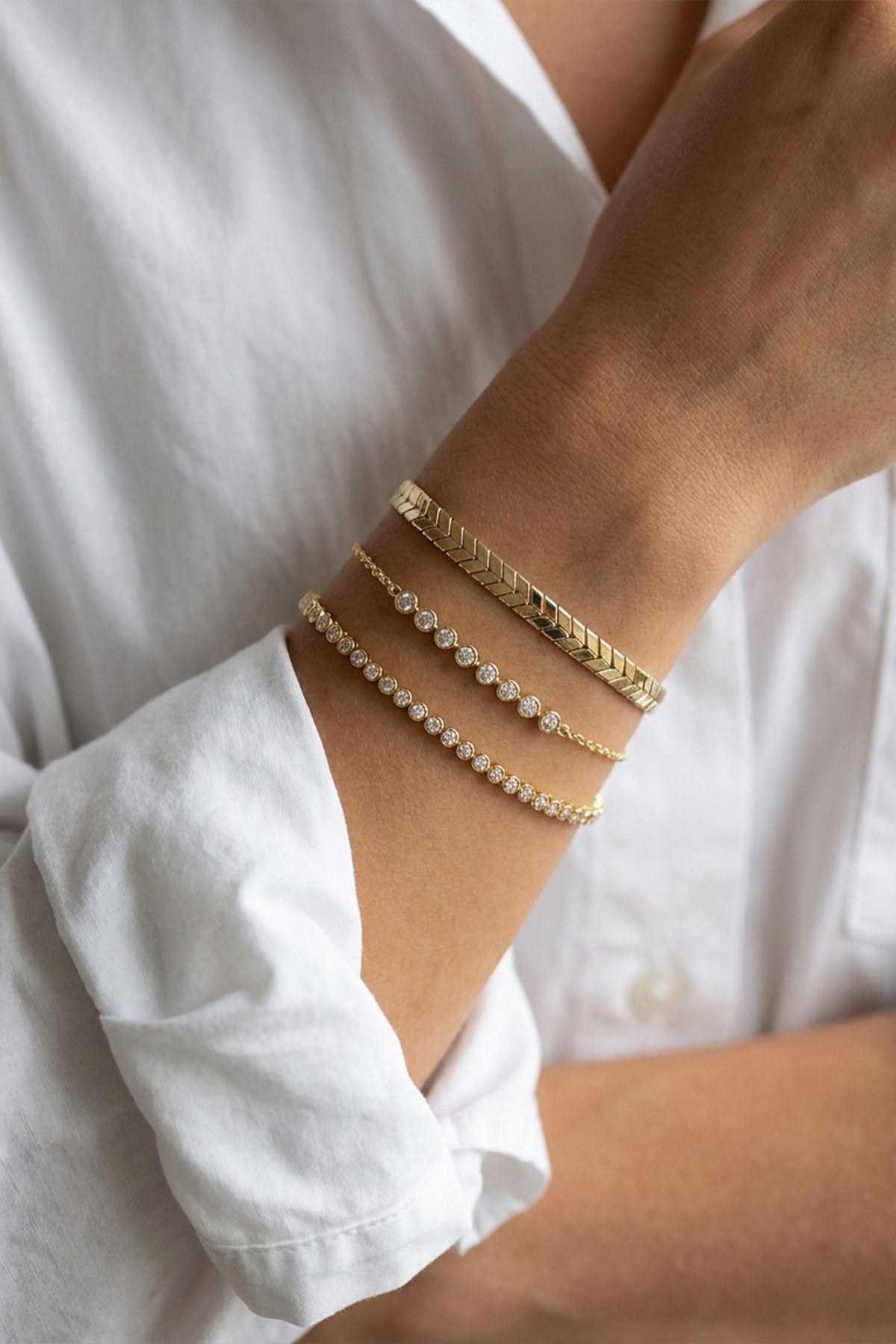
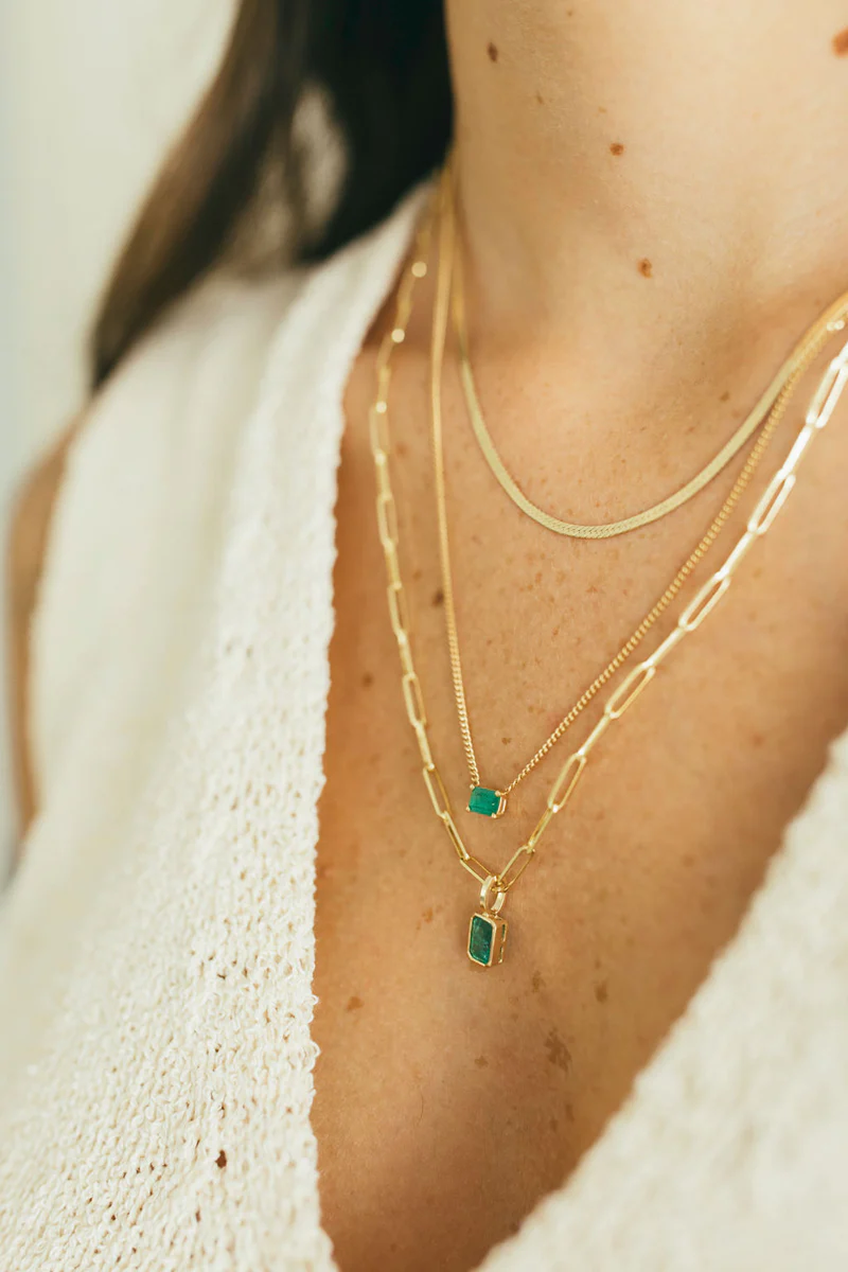
Mix dainty lab-grown diamond pendants with your favorite gold chains. Try pairing a classic diamond tennis bracelet with chunkier bracelets or your everyday watch for a look that’s polished but still playful.

Stacking Made Simple
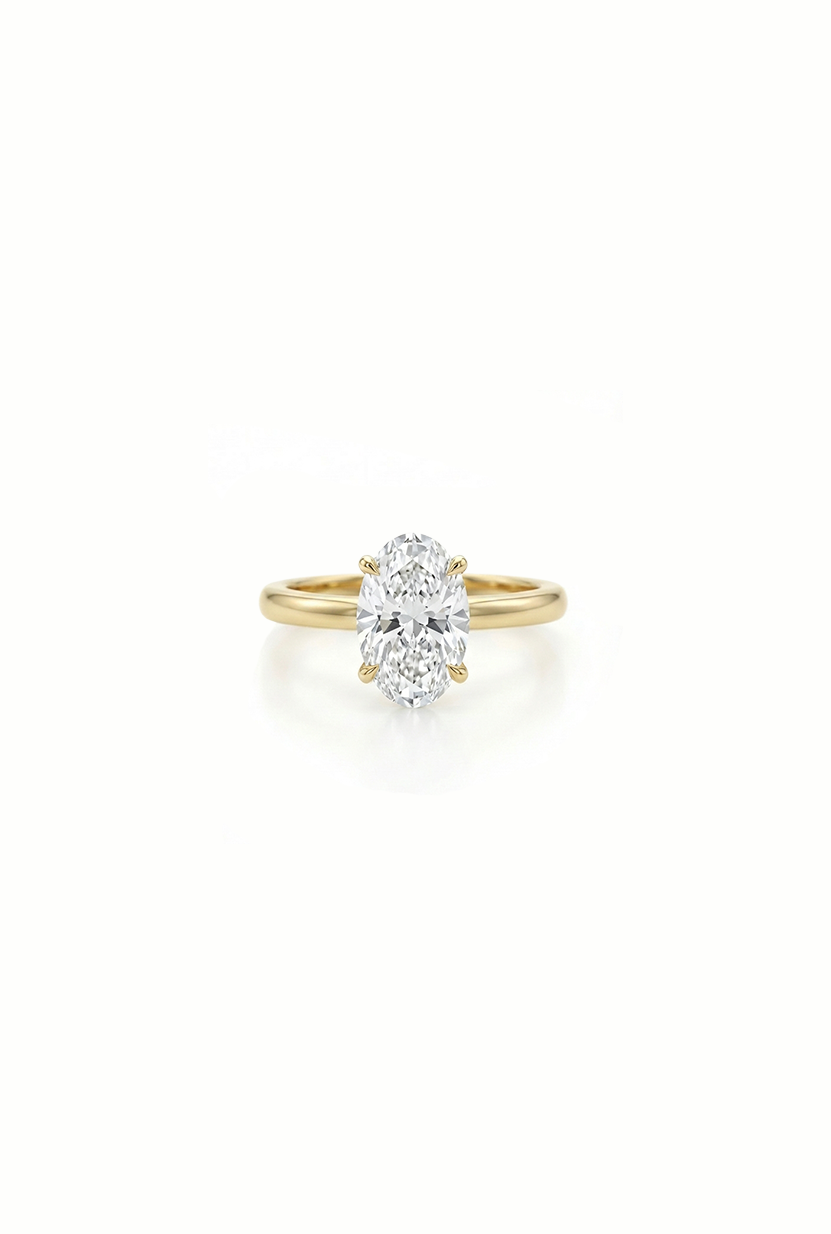
Stackable lab-grown diamond rings are one of our favorite ways to bring effortless luxury to your daily style. Play with mixing delicate diamond bands with plain gold or gemstone rings — it’s about what feels you.

Wear Them Fearlessly
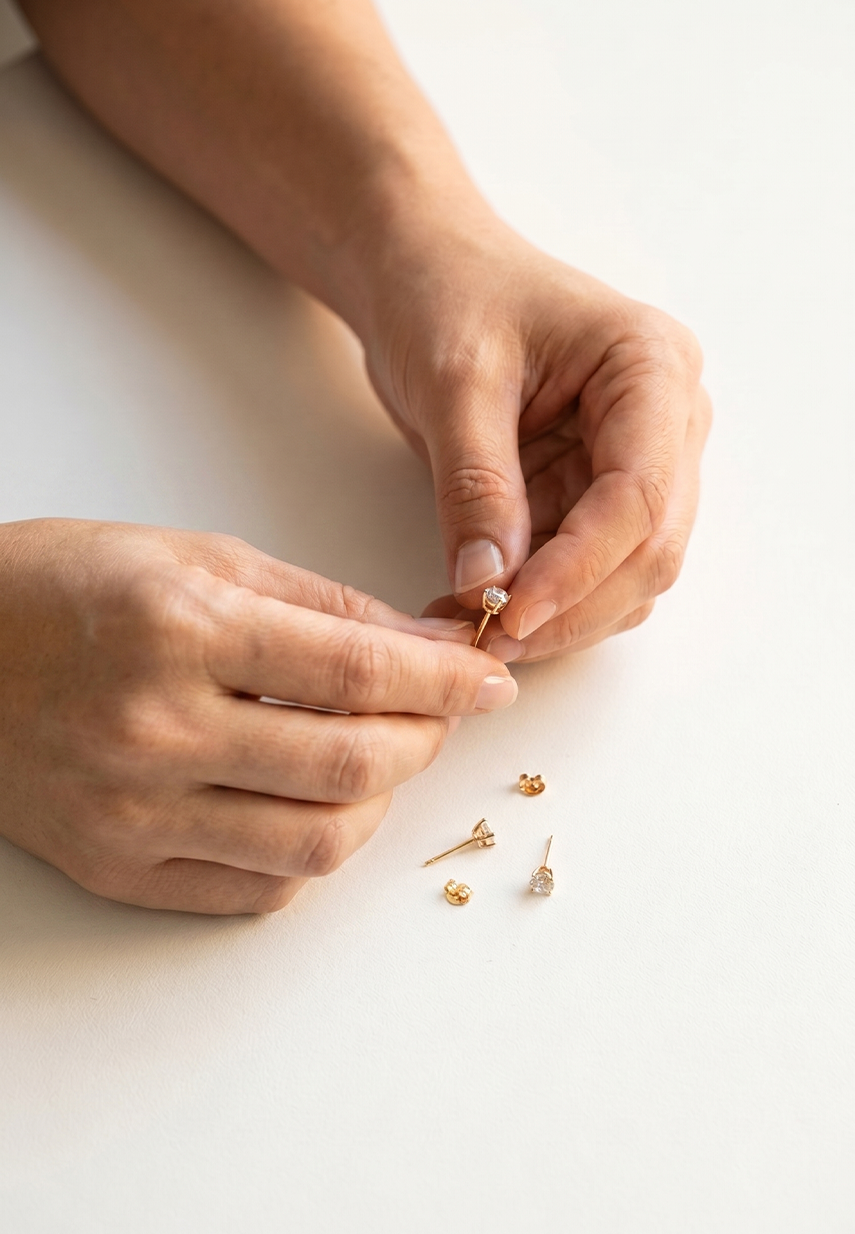
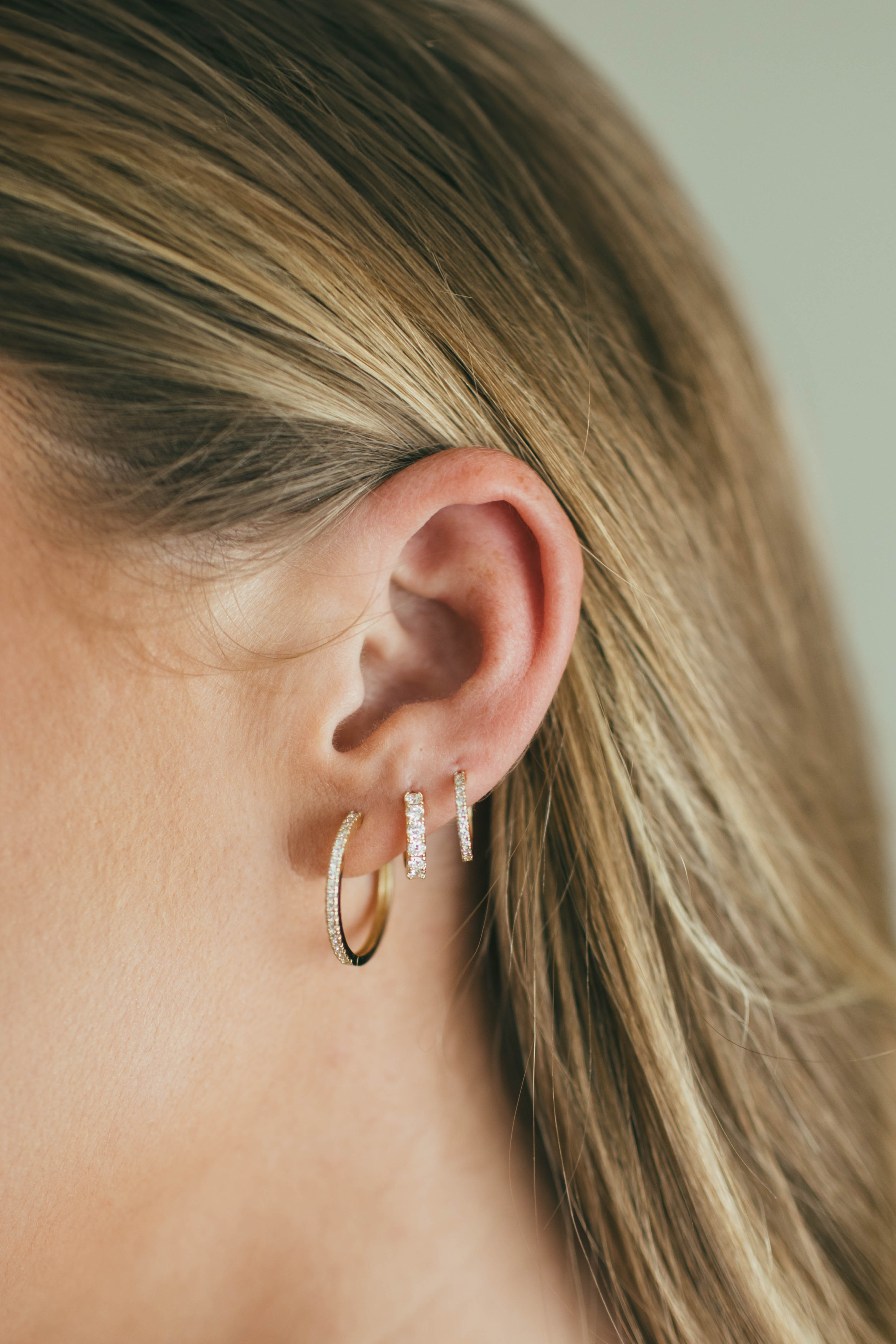
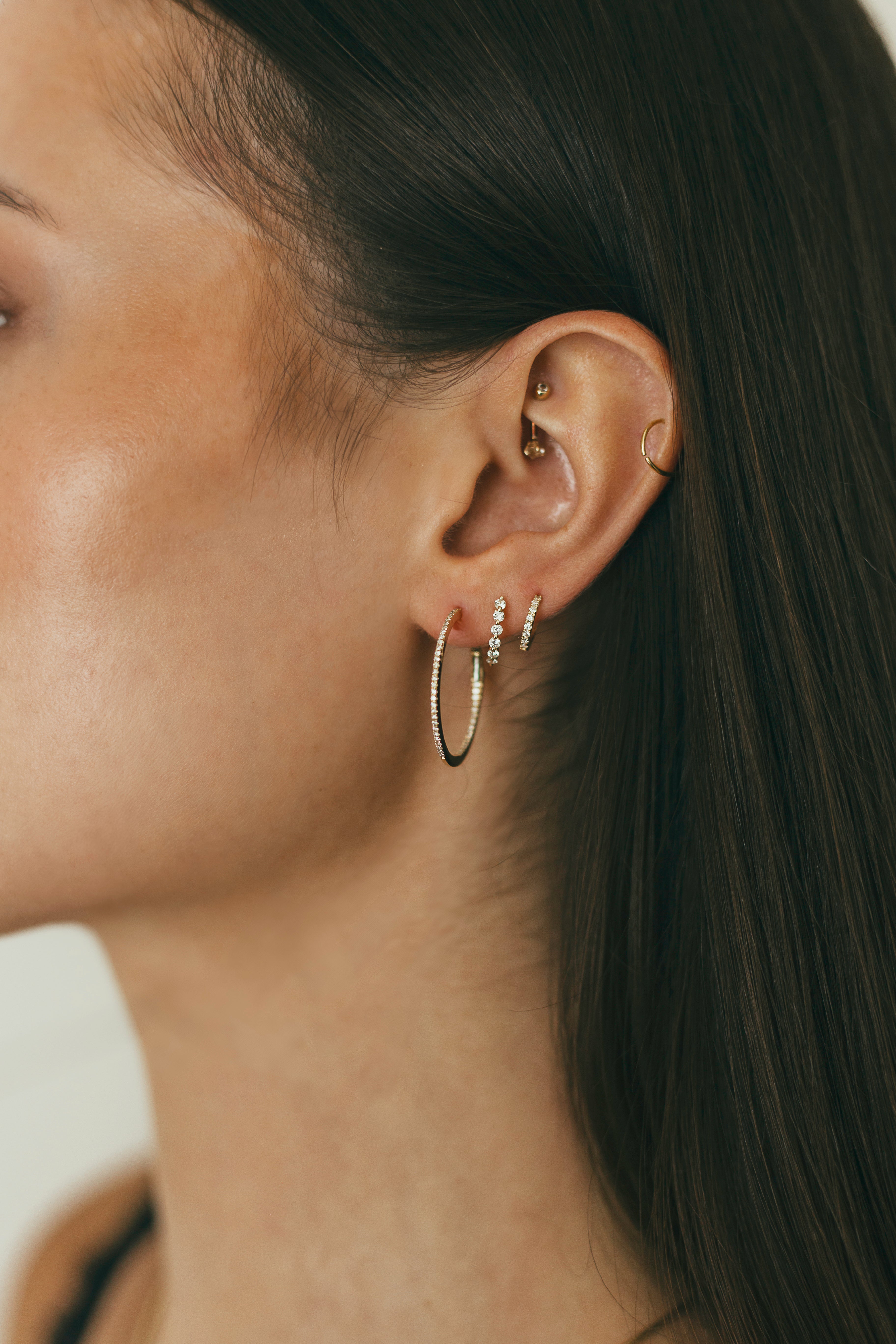
Lab-grown studs, petite huggies, or a subtle diamond charm add just enough sparkle without feeling overdone. And the best part? You won’t feel like you have to tuck them away for fear of losing a fortune.

Elevate Your Everyday

At Jessica Jewellery, our lab-grown diamond collection is designed to help you layer, stack, and shine your way — whether you’re dressing up a tee and jeans or adding the final touch to your date-night look.

So go ahead — treat yourself to that sparkle you actually wear every day. Because diamonds shouldn’t sit in a box — they should shine with you.

Ready to add lab-grown diamonds to your stack?
Explore our latest lab pieces and let your everyday shine a little brighter.

Leave a comment

This site is protected by hCaptcha and the hCaptcha Privacy Policy and Terms of Service apply.

All comments are moderated before being published.

Read more

2024 Jewellery Trends to Watch for New Year’s Eve

2024 Jewellery Trends to Watch for New Year’s Eve

As we prepare to ring in 2024, it’s time to refresh your jewellery collection with pieces that reflect the year’s most exciting trends. Whether you’re attending a New Year’s Eve celebration or pla...

Read more
Holiday Event Gift Guide

Holiday Event Gift Guide

The holidays are here — and with them come festive parties, cozy dinners, and New Year’s Eve countdowns filled with shimmer. Whether you’re gifting someone special or treating yourself, the right j...

Read more
Continuing from JESSICA JEWELLERY: Help implement a sticky category-image carousel on Jessica Jewellery Shopify collection pages. The category multicolumn/image-link section should scroll normally until reaching the top, then remain sticky while the product grid scrolls below; title and description must scroll away. Inspect actual theme selectors/structure before editing, avoid global effects, and test desktop/mobile. 12:10 PM Prepared a Shopify snippet using the markup from five Jessica Jewellery collection pages. The carousel scrolls normally until it reaches the bottom of the sticky site header. It then stays in place while the title and description scroll away and the products move underneath. The filter toolbar sticks below the carousel. I scoped the change to collection pages where the category carousel sits directly before the product grid. I also tightened the carousel’s vertical padding to leave more room for products on smaller screens. I tested a local copy of the Bracelets page in Chrome at 1440px and 390px. The carousel stuck and released on scroll, the filter toolbar cleared it, and the next arrow scrolled the carousel at phone width. Live Shopify preview and physical-device testing are still pending. Bracelets collection To install it in an unpublished theme, add the snippet as snippets/collection-category-sticky.liquid and place this line after the closing in layout/theme.liquid: Continuing from JESSICA JEWELLERY: Help implement a sticky category-image carousel on Jessica Jewellery Shopify collection pages. The category multicolumn/image-link section should scroll normally until reaching the top, then remain sticky while the product grid scrolls below; title and description must scroll away. Inspect actual theme selectors/structure before editing, avoid global effects, and test desktop/mobile. 12:10 PM Prepared a Shopify snippet using the markup from five Jessica Jewellery collection pages. The carousel scrolls normally until it reaches the bottom of the sticky site header. It then stays in place while the title and description scroll away and the products move underneath. The filter toolbar sticks below the carousel. I scoped the change to collection pages where the category carousel sits directly before the product grid. I also tightened the carousel’s vertical padding to leave more room for products on smaller screens. I tested a local copy of the Bracelets page in Chrome at 1440px and 390px. The carousel stuck and released on scroll, the filter toolbar cleared it, and the next arrow scrolled the carousel at phone width. Live Shopify preview and physical-device testing are still pending. Bracelets collection To install it in an unpublished theme, add the snippet as snippets/collection-category-sticky.liquid and place this line after the closing in layout/theme.liquid: Continuing from JESSICA JEWELLERY: Help implement a sticky category-image carousel on Jessica Jewellery Shopify collection pages. The category multicolumn/image-link section should scroll normally until reaching the top, then remain sticky while the product grid scrolls below; title and description must scroll away. Inspect actual theme selectors/structure before editing, avoid global effects, and test desktop/mobile. 12:10 PM Prepared a Shopify snippet using the markup from five Jessica Jewellery collection pages. The carousel scrolls normally until it reaches the bottom of the sticky site header. It then stays in place while the title and description scroll away and the products move underneath. The filter toolbar sticks below the carousel. I scoped the change to collection pages where the category carousel sits directly before the product grid. I also tightened the carousel’s vertical padding to leave more room for products on smaller screens. I tested a local copy of the Bracelets page in Chrome at 1440px and 390px. The carousel stuck and released on scroll, the filter toolbar cleared it, and the next arrow scrolled the carousel at phone width. Live Shopify preview and physical-device testing are still pending. Bracelets collection To install it in an unpublished theme, add the snippet as snippets/collection-category-sticky.liquid and place this line after the closing in layout/theme.liquid: Continuing from JESSICA JEWELLERY: Help implement a sticky category-image carousel on Jessica Jewellery Shopify collection pages. The category multicolumn/image-link section should scroll normally until reaching the top, then remain sticky while the product grid scrolls below; title and description must scroll away. Inspect actual theme selectors/structure before editing, avoid global effects, and test desktop/mobile. 12:10 PM Prepared a Shopify snippet using the markup from five Jessica Jewellery collection pages. The carousel scrolls normally until it reaches the bottom of the sticky site header. It then stays in place while the title and description scroll away and the products move underneath. The filter toolbar sticks below the carousel. I scoped the change to collection pages where the category carousel sits directly before the product grid. I also tightened the carousel’s vertical padding to leave more room for products on smaller screens. I tested a local copy of the Bracelets page in Chrome at 1440px and 390px. The carousel stuck and released on scroll, the filter toolbar cleared it, and the next arrow scrolled the carousel at phone width. Live Shopify preview and physical-device testing are still pending. Bracelets collection To install it in an unpublished theme, add the snippet as snippets/collection-category-sticky.liquid and place this line after the closing in layout/theme.liquid: Continuing from JESSICA JEWELLERY: Help implement a sticky category-image carousel on Jessica Jewellery Shopify collection pages. The category multicolumn/image-link section should scroll normally until reaching the top, then remain sticky while the product grid scrolls below; title and description must scroll away. Inspect actual theme selectors/structure before editing, avoid global effects, and test desktop/mobile. 12:10 PM Prepared a Shopify snippet using the markup from five Jessica Jewellery collection pages. The carousel scrolls normally until it reaches the bottom of the sticky site header. It then stays in place while the title and description scroll away and the products move underneath. The filter toolbar sticks below the carousel. I scoped the change to collection pages where the category carousel sits directly before the product grid. I also tightened the carousel’s vertical padding to leave more room for products on smaller screens. I tested a local copy of the Bracelets page in Chrome at 1440px and 390px. The carousel stuck and released on scroll, the filter toolbar cleared it, and the next arrow scrolled the carousel at phone width. Live Shopify preview and physical-device testing are still pending. Bracelets collection To install it in an unpublished theme, add the snippet as snippets/collection-category-sticky.liquid and place this line after the closing in layout/theme.liquid: Continuing from JESSICA JEWELLERY: Help implement a sticky category-image carousel on Jessica Jewellery Shopify collection pages. The category multicolumn/image-link section should scroll normally until reaching the top, then remain sticky while the product grid scrolls below; title and description must scroll away. Inspect actual theme selectors/structure before editing, avoid global effects, and test desktop/mobile. 12:10 PM Prepared a Shopify snippet using the markup from five Jessica Jewellery collection pages. The carousel scrolls normally until it reaches the bottom of the sticky site header. It then stays in place while the title and description scroll away and the products move underneath. The filter toolbar sticks below the carousel. I scoped the change to collection pages where the category carousel sits directly before the product grid. I also tightened the carousel’s vertical padding to leave more room for products on smaller screens. I tested a local copy of the Bracelets page in Chrome at 1440px and 390px. The carousel stuck and released on scroll, the filter toolbar cleared it, and the next arrow scrolled the carousel at phone width. Live Shopify preview and physical-device testing are still pending. Bracelets collection To install it in an unpublished theme, add the snippet as snippets/collection-category-sticky.liquid and place this line after the closing in layout/theme.liquid: Continuing from JESSICA JEWELLERY: Help implement a sticky category-image carousel on Jessica Jewellery Shopify collection pages. The category multicolumn/image-link section should scroll normally until reaching the top, then remain sticky while the product grid scrolls below; title and description must scroll away. Inspect actual theme selectors/structure before editing, avoid global effects, and test desktop/mobile. 12:10 PM Prepared a Shopify snippet using the markup from five Jessica Jewellery collection pages. The carousel scrolls normally until it reaches the bottom of the sticky site header. It then stays in place while the title and description scroll away and the products move underneath. The filter toolbar sticks below the carousel. I scoped the change to collection pages where the category carousel sits directly before the product grid. I also tightened the carousel’s vertical padding to leave more room for products on smaller screens. I tested a local copy of the Bracelets page in Chrome at 1440px and 390px. The carousel stuck and released on scroll, the filter toolbar cleared it, and the next arrow scrolled the carousel at phone width. Live Shopify preview and physical-device testing are still pending. Bracelets collection To install it in an unpublished theme, add the snippet as snippets/collection-category-sticky.liquid and place this line after the closing in layout/theme.liquid: Continuing from JESSICA JEWELLERY: Help implement a sticky category-image carousel on Jessica Jewellery Shopify collection pages. The category multicolumn/image-link section should scroll normally until reaching the top, then remain sticky while the product grid scrolls below; title and description must scroll away. Inspect actual theme selectors/structure before editing, avoid global effects, and test desktop/mobile. 12:10 PM Prepared a Shopify snippet using the markup from five Jessica Jewellery collection pages. The carousel scrolls normally until it reaches the bottom of the sticky site header. It then stays in place while the title and description scroll away and the products move underneath. The filter toolbar sticks below the carousel. I scoped the change to collection pages where the category carousel sits directly before the product grid. I also tightened the carousel’s vertical padding to leave more room for products on smaller screens. I tested a local copy of the Bracelets page in Chrome at 1440px and 390px. The carousel stuck and released on scroll, the filter toolbar cleared it, and the next arrow scrolled the carousel at phone width. Live Shopify preview and physical-device testing are still pending. Bracelets collection To install it in an unpublished theme, add the snippet as snippets/collection-category-sticky.liquid and place this line after the closing in layout/theme.liquid: Continuing from JESSICA JEWELLERY: Help implement a sticky category-image carousel on Jessica Jewellery Shopify collection pages. The category multicolumn/image-link section should scroll normally until reaching the top, then remain sticky while the product grid scrolls below; title and description must scroll away. Inspect actual theme selectors/structure before editing, avoid global effects, and test desktop/mobile. 12:10 PM Prepared a Shopify snippet using the markup from five Jessica Jewellery collection pages. The carousel scrolls normally until it reaches the bottom of the sticky site header. It then stays in place while the title and description scroll away and the products move underneath. The filter toolbar sticks below the carousel. I scoped the change to collection pages where the category carousel sits directly before the product grid. I also tightened the carousel’s vertical padding to leave more room for products on smaller screens. I tested a local copy of the Bracelets page in Chrome at 1440px and 390px. The carousel stuck and released on scroll, the filter toolbar cleared it, and the next arrow scrolled the carousel at phone width. Live Shopify preview and physical-device testing are still pending. Bracelets collection To install it in an unpublished theme, add the snippet as snippets/collection-category-sticky.liquid and place this line after the closing in layout/theme.liquid: Continuing from JESSICA JEWELLERY: Help implement a sticky category-image carousel on Jessica Jewellery Shopify collection pages. The category multicolumn/image-link section should scroll normally until reaching the top, then remain sticky while the product grid scrolls below; title and description must scroll away. Inspect actual theme selectors/structure before editing, avoid global effects, and test desktop/mobile. 12:10 PM Prepared a Shopify snippet using the markup from five Jessica Jewellery collection pages. The carousel scrolls normally until it reaches the bottom of the sticky site header. It then stays in place while the title and description scroll away and the products move underneath. The filter toolbar sticks below the carousel. I scoped the change to collection pages where the category carousel sits directly before the product grid. I also tightened the carousel’s vertical padding to leave more room for products on smaller screens. I tested a local copy of the Bracelets page in Chrome at 1440px and 390px. The carousel stuck and released on scroll, the filter toolbar cleared it, and the next arrow scrolled the carousel at phone width. Live Shopify preview and physical-device testing are still pending. Bracelets collection To install it in an unpublished theme, add the snippet as snippets/collection-category-sticky.liquid and place this line after the closing in layout/theme.liquid: Continuing from JESSICA JEWELLERY: Help implement a sticky category-image carousel on Jessica Jewellery Shopify collection pages. The category multicolumn/image-link section should scroll normally until reaching the top, then remain sticky while the product grid scrolls below; title and description must scroll away. Inspect actual theme selectors/structure before editing, avoid global effects, and test desktop/mobile. 12:10 PM Prepared a Shopify snippet using the markup from five Jessica Jewellery collection pages. The carousel scrolls normally until it reaches the bottom of the sticky site header. It then stays in place while the title and description scroll away and the products move underneath. The filter toolbar sticks below the carousel. I scoped the change to collection pages where the category carousel sits directly before the product grid. I also tightened the carousel’s vertical padding to leave more room for products on smaller screens. I tested a local copy of the Bracelets page in Chrome at 1440px and 390px. The carousel stuck and released on scroll, the filter toolbar cleared it, and the next arrow scrolled the carousel at phone width. Live Shopify preview and physical-device testing are still pending. Bracelets collection To install it in an unpublished theme, add the snippet as snippets/collection-category-sticky.liquid and place this line after the closing in layout/theme.liquid: Continuing from JESSICA JEWELLERY: Help implement a sticky category-image carousel on Jessica Jewellery Shopify collection pages. The category multicolumn/image-link section should scroll normally until reaching the top, then remain sticky while the product grid scrolls below; title and description must scroll away. Inspect actual theme selectors/structure before editing, avoid global effects, and test desktop/mobile. 12:10 PM Prepared a Shopify snippet using the markup from five Jessica Jewellery collection pages. The carousel scrolls normally until it reaches the bottom of the sticky site header. It then stays in place while the title and description scroll away and the products move underneath. The filter toolbar sticks below the carousel. I scoped the change to collection pages where the category carousel sits directly before the product grid. I also tightened the carousel’s vertical padding to leave more room for products on smaller screens. I tested a local copy of the Bracelets page in Chrome at 1440px and 390px. The carousel stuck and released on scroll, the filter toolbar cleared it, and the next arrow scrolled the carousel at phone width. Live Shopify preview and physical-device testing are still pending. Bracelets collection To install it in an unpublished theme, add the snippet as snippets/collection-category-sticky.liquid and place this line after the closing in layout/theme.liquid: Continuing from JESSICA JEWELLERY: Help implement a sticky category-image carousel on Jessica Jewellery Shopify collection pages. The category multicolumn/image-link section should scroll normally until reaching the top, then remain sticky while the product grid scrolls below; title and description must scroll away. Inspect actual theme selectors/structure before editing, avoid global effects, and test desktop/mobile. 12:10 PM Prepared a Shopify snippet using the markup from five Jessica Jewellery collection pages. The carousel scrolls normally until it reaches the bottom of the sticky site header. It then stays in place while the title and description scroll away and the products move underneath. The filter toolbar sticks below the carousel. I scoped the change to collection pages where the category carousel sits directly before the product grid. I also tightened the carousel’s vertical padding to leave more room for products on smaller screens. I tested a local copy of the Bracelets page in Chrome at 1440px and 390px. The carousel stuck and released on scroll, the filter toolbar cleared it, and the next arrow scrolled the carousel at phone width. Live Shopify preview and physical-device testing are still pending. Bracelets collection To install it in an unpublished theme, add the snippet as snippets/collection-category-sticky.liquid and place this line after the closing in layout/theme.liquid: Continuing from JESSICA JEWELLERY: Help implement a sticky category-image carousel on Jessica Jewellery Shopify collection pages. The category multicolumn/image-link section should scroll normally until reaching the top, then remain sticky while the product grid scrolls below; title and description must scroll away. Inspect actual theme selectors/structure before editing, avoid global effects, and test desktop/mobile. 12:10 PM Prepared a Shopify snippet using the markup from five Jessica Jewellery collection pages. The carousel scrolls normally until it reaches the bottom of the sticky site header. It then stays in place while the title and description scroll away and the products move underneath. The filter toolbar sticks below the carousel. I scoped the change to collection pages where the category carousel sits directly before the product grid. I also tightened the carousel’s vertical padding to leave more room for products on smaller screens. I tested a local copy of the Bracelets page in Chrome at 1440px and 390px. The carousel stuck and released on scroll, the filter toolbar cleared it, and the next arrow scrolled the carousel at phone width. Live Shopify preview and physical-device testing are still pending. Bracelets collection To install it in an unpublished theme, add the snippet as snippets/collection-category-sticky.liquid and place this line after the closing in layout/theme.liquid: Continuing from JESSICA JEWELLERY: Help implement a sticky category-image carousel on Jessica Jewellery Shopify collection pages. The category multicolumn/image-link section should scroll normally until reaching the top, then remain sticky while the product grid scrolls below; title and description must scroll away. Inspect actual theme selectors/structure before editing, avoid global effects, and test desktop/mobile. 12:10 PM Prepared a Shopify snippet using the markup from five Jessica Jewellery collection pages. The carousel scrolls normally until it reaches the bottom of the sticky site header. It then stays in place while the title and description scroll away and the products move underneath. The filter toolbar sticks below the carousel. I scoped the change to collection pages where the category carousel sits directly before the product grid. I also tightened the carousel’s vertical padding to leave more room for products on smaller screens. I tested a local copy of the Bracelets page in Chrome at 1440px and 390px. The carousel stuck and released on scroll, the filter toolbar cleared it, and the next arrow scrolled the carousel at phone width. Live Shopify preview and physical-device testing are still pending. Bracelets collection To install it in an unpublished theme, add the snippet as snippets/collection-category-sticky.liquid and place this line after the closing in layout/theme.liquid: Continuing from JESSICA JEWELLERY: Help implement a sticky category-image carousel on Jessica Jewellery Shopify collection pages. The category multicolumn/image-link section should scroll normally until reaching the top, then remain sticky while the product grid scrolls below; title and description must scroll away. Inspect actual theme selectors/structure before editing, avoid global effects, and test desktop/mobile. 12:10 PM Prepared a Shopify snippet using the markup from five Jessica Jewellery collection pages. The carousel scrolls normally until it reaches the bottom of the sticky site header. It then stays in place while the title and description scroll away and the products move underneath. The filter toolbar sticks below the carousel. I scoped the change to collection pages where the category carousel sits directly before the product grid. I also tightened the carousel’s vertical padding to leave more room for products on smaller screens. I tested a local copy of the Bracelets page in Chrome at 1440px and 390px. The carousel stuck and released on scroll, the filter toolbar cleared it, and the next arrow scrolled the carousel at phone width. Live Shopify preview and physical-device testing are still pending. Bracelets collection To install it in an unpublished theme, add the snippet as snippets/collection-category-sticky.liquid and place this line after the closing in layout/theme.liquid: Continuing from JESSICA JEWELLERY: Help implement a sticky category-image carousel on Jessica Jewellery Shopify collection pages. The category multicolumn/image-link section should scroll normally until reaching the top, then remain sticky while the product grid scrolls below; title and description must scroll away. Inspect actual theme selectors/structure before editing, avoid global effects, and test desktop/mobile. 12:10 PM Prepared a Shopify snippet using the markup from five Jessica Jewellery collection pages. The carousel scrolls normally until it reaches the bottom of the sticky site header. It then stays in place while the title and description scroll away and the products move underneath. The filter toolbar sticks below the carousel. I scoped the change to collection pages where the category carousel sits directly before the product grid. I also tightened the carousel’s vertical padding to leave more room for products on smaller screens. I tested a local copy of the Bracelets page in Chrome at 1440px and 390px. The carousel stuck and released on scroll, the filter toolbar cleared it, and the next arrow scrolled the carousel at phone width. Live Shopify preview and physical-device testing are still pending. Bracelets collection To install it in an unpublished theme, add the snippet as snippets/collection-category-sticky.liquid and place this line after the closing in layout/theme.liquid: Continuing from JESSICA JEWELLERY: Help implement a sticky category-image carousel on Jessica Jewellery Shopify collection pages. The category multicolumn/image-link section should scroll normally until reaching the top, then remain sticky while the product grid scrolls below; title and description must scroll away. Inspect actual theme selectors/structure before editing, avoid global effects, and test desktop/mobile. 12:10 PM Prepared a Shopify snippet using the markup from five Jessica Jewellery collection pages. The carousel scrolls normally until it reaches the bottom of the sticky site header. It then stays in place while the title and description scroll away and the products move underneath. The filter toolbar sticks below the carousel. I scoped the change to collection pages where the category carousel sits directly before the product grid. I also tightened the carousel’s vertical padding to leave more room for products on smaller screens. I tested a local copy of the Bracelets page in Chrome at 1440px and 390px. The carousel stuck and released on scroll, the filter toolbar cleared it, and the next arrow scrolled the carousel at phone width. Live Shopify preview and physical-device testing are still pending. Bracelets collection To install it in an unpublished theme, add the snippet as snippets/collection-category-sticky.liquid and place this line after the closing in layout/theme.liquid: Continuing from JESSICA JEWELLERY: Help implement a sticky category-image carousel on Jessica Jewellery Shopify collection pages. The category multicolumn/image-link section should scroll normally until reaching the top, then remain sticky while the product grid scrolls below; title and description must scroll away. Inspect actual theme selectors/structure before editing, avoid global effects, and test desktop/mobile. 12:10 PM Prepared a Shopify snippet using the markup from five Jessica Jewellery collection pages. The carousel scrolls normally until it reaches the bottom of the sticky site header. It then stays in place while the title and description scroll away and the products move underneath. The filter toolbar sticks below the carousel. I scoped the change to collection pages where the category carousel sits directly before the product grid. I also tightened the carousel’s vertical padding to leave more room for products on smaller screens. I tested a local copy of the Bracelets page in Chrome at 1440px and 390px. The carousel stuck and released on scroll, the filter toolbar cleared it, and the next arrow scrolled the carousel at phone width. Live Shopify preview and physical-device testing are still pending. Bracelets collection To install it in an unpublished theme, add the snippet as snippets/collection-category-sticky.liquid and place this line after the closing in layout/theme.liquid: Continuing from JESSICA JEWELLERY: Help implement a sticky category-image carousel on Jessica Jewellery Shopify collection pages. The category multicolumn/image-link section should scroll normally until reaching the top, then remain sticky while the product grid scrolls below; title and description must scroll away. Inspect actual theme selectors/structure before editing, avoid global effects, and test desktop/mobile. 12:10 PM Prepared a Shopify snippet using the markup from five Jessica Jewellery collection pages. The carousel scrolls normally until it reaches the bottom of the sticky site header. It then stays in place while the title and description scroll away and the products move underneath. The filter toolbar sticks below the carousel. I scoped the change to collection pages where the category carousel sits directly before the product grid. I also tightened the carousel’s vertical padding to leave more room for products on smaller screens. I tested a local copy of the Bracelets page in Chrome at 1440px and 390px. The carousel stuck and released on scroll, the filter toolbar cleared it, and the next arrow scrolled the carousel at phone width. Live Shopify preview and physical-device testing are still pending. Bracelets collection To install it in an unpublished theme, add the snippet as snippets/collection-category-sticky.liquid and place this line after the closing in layout/theme.liquid: Continuing from JESSICA JEWELLERY: Help implement a sticky category-image carousel on Jessica Jewellery Shopify collection pages. The category multicolumn/image-link section should scroll normally until reaching the top, then remain sticky while the product grid scrolls below; title and description must scroll away. Inspect actual theme selectors/structure before editing, avoid global effects, and test desktop/mobile. 12:10 PM Prepared a Shopify snippet using the markup from five Jessica Jewellery collection pages. The carousel scrolls normally until it reaches the bottom of the sticky site header. It then stays in place while the title and description scroll away and the products move underneath. The filter toolbar sticks below the carousel. I scoped the change to collection pages where the category carousel sits directly before the product grid. I also tightened the carousel’s vertical padding to leave more room for products on smaller screens. I tested a local copy of the Bracelets page in Chrome at 1440px and 390px. The carousel stuck and released on scroll, the filter toolbar cleared it, and the next arrow scrolled the carousel at phone width. Live Shopify preview and physical-device testing are still pending. Bracelets collection To install it in an unpublished theme, add the snippet as snippets/collection-category-sticky.liquid and place this line after the closing in layout/theme.liquid: Continuing from JESSICA JEWELLERY: Help implement a sticky category-image carousel on Jessica Jewellery Shopify collection pages. The category multicolumn/image-link section should scroll normally until reaching the top, then remain sticky while the product grid scrolls below; title and description must scroll away. Inspect actual theme selectors/structure before editing, avoid global effects, and test desktop/mobile. 12:10 PM Prepared a Shopify snippet using the markup from five Jessica Jewellery collection pages. The carousel scrolls normally until it reaches the bottom of the sticky site header. It then stays in place while the title and description scroll away and the products move underneath. The filter toolbar sticks below the carousel. I scoped the change to collection pages where the category carousel sits directly before the product grid. I also tightened the carousel’s vertical padding to leave more room for products on smaller screens. I tested a local copy of the Bracelets page in Chrome at 1440px and 390px. The carousel stuck and released on scroll, the filter toolbar cleared it, and the next arrow scrolled the carousel at phone width. Live Shopify preview and physical-device testing are still pending. Bracelets collection To install it in an unpublished theme, add the snippet as snippets/collection-category-sticky.liquid and place this line after the closing in layout/theme.liquid: Continuing from JESSICA JEWELLERY: Help implement a sticky category-image carousel on Jessica Jewellery Shopify collection pages. The category multicolumn/image-link section should scroll normally until reaching the top, then remain sticky while the product grid scrolls below; title and description must scroll away. Inspect actual theme selectors/structure before editing, avoid global effects, and test desktop/mobile. 12:10 PM Prepared a Shopify snippet using the markup from five Jessica Jewellery collection pages. The carousel scrolls normally until it reaches the bottom of the sticky site header. It then stays in place while the title and description scroll away and the products move underneath. The filter toolbar sticks below the carousel. I scoped the change to collection pages where the category carousel sits directly before the product grid. I also tightened the carousel’s vertical padding to leave more room for products on smaller screens. I tested a local copy of the Bracelets page in Chrome at 1440px and 390px. The carousel stuck and released on scroll, the filter toolbar cleared it, and the next arrow scrolled the carousel at phone width. Live Shopify preview and physical-device testing are still pending. Bracelets collection To install it in an unpublished theme, add the snippet as snippets/collection-category-sticky.liquid and place this line after the closing in layout/theme.liquid: Continuing from JESSICA JEWELLERY: Help implement a sticky category-image carousel on Jessica Jewellery Shopify collection pages. The category multicolumn/image-link section should scroll normally until reaching the top, then remain sticky while the product grid scrolls below; title and description must scroll away. Inspect actual theme selectors/structure before editing, avoid global effects, and test desktop/mobile. 12:10 PM Prepared a Shopify snippet using the markup from five Jessica Jewellery collection pages. The carousel scrolls normally until it reaches the bottom of the sticky site header. It then stays in place while the title and description scroll away and the products move underneath. The filter toolbar sticks below the carousel. I scoped the change to collection pages where the category carousel sits directly before the product grid. I also tightened the carousel’s vertical padding to leave more room for products on smaller screens. I tested a local copy of the Bracelets page in Chrome at 1440px and 390px. The carousel stuck and released on scroll, the filter toolbar cleared it, and the next arrow scrolled the carousel at phone width. Live Shopify preview and physical-device testing are still pending. Bracelets collection To install it in an unpublished theme, add the snippet as snippets/collection-category-sticky.liquid and place this line after the closing in layout/theme.liquid: Continuing from JESSICA JEWELLERY: Help implement a sticky category-image carousel on Jessica Jewellery Shopify collection pages. The category multicolumn/image-link section should scroll normally until reaching the top, then remain sticky while the product grid scrolls below; title and description must scroll away. Inspect actual theme selectors/structure before editing, avoid global effects, and test desktop/mobile. 12:10 PM Prepared a Shopify snippet using the markup from five Jessica Jewellery collection pages. The carousel scrolls normally until it reaches the bottom of the sticky site header. It then stays in place while the title and description scroll away and the products move underneath. The filter toolbar sticks below the carousel. I scoped the change to collection pages where the category carousel sits directly before the product grid. I also tightened the carousel’s vertical padding to leave more room for products on smaller screens. I tested a local copy of the Bracelets page in Chrome at 1440px and 390px. The carousel stuck and released on scroll, the filter toolbar cleared it, and the next arrow scrolled the carousel at phone width. Live Shopify preview and physical-device testing are still pending. Bracelets collection To install it in an unpublished theme, add the snippet as snippets/collection-category-sticky.liquid and place this line after the closing in layout/theme.liquid: Continuing from JESSICA JEWELLERY: Help implement a sticky category-image carousel on Jessica Jewellery Shopify collection pages. The category multicolumn/image-link section should scroll normally until reaching the top, then remain sticky while the product grid scrolls below; title and description must scroll away. Inspect actual theme selectors/structure before editing, avoid global effects, and test desktop/mobile. 12:10 PM Prepared a Shopify snippet using the markup from five Jessica Jewellery collection pages. The carousel scrolls normally until it reaches the bottom of the sticky site header. It then stays in place while the title and description scroll away and the products move underneath. The filter toolbar sticks below the carousel. I scoped the change to collection pages where the category carousel sits directly before the product grid. I also tightened the carousel’s vertical padding to leave more room for products on smaller screens. I tested a local copy of the Bracelets page in Chrome at 1440px and 390px. The carousel stuck and released on scroll, the filter toolbar cleared it, and the next arrow scrolled the carousel at phone width. Live Shopify preview and physical-device testing are still pending. Bracelets collection To install it in an unpublished theme, add the snippet as snippets/collection-category-sticky.liquid and place this line after the closing in layout/theme.liquid: Continuing from JESSICA JEWELLERY: Help implement a sticky category-image carousel on Jessica Jewellery Shopify collection pages. The category multicolumn/image-link section should scroll normally until reaching the top, then remain sticky while the product grid scrolls below; title and description must scroll away. Inspect actual theme selectors/structure before editing, avoid global effects, and test desktop/mobile. 12:10 PM Prepared a Shopify snippet using the markup from five Jessica Jewellery collection pages. The carousel scrolls normally until it reaches the bottom of the sticky site header. It then stays in place while the title and description scroll away and the products move underneath. The filter toolbar sticks below the carousel. I scoped the change to collection pages where the category carousel sits directly before the product grid. I also tightened the carousel’s vertical padding to leave more room for products on smaller screens. I tested a local copy of the Bracelets page in Chrome at 1440px and 390px. The carousel stuck and released on scroll, the filter toolbar cleared it, and the next arrow scrolled the carousel at phone width. Live Shopify preview and physical-device testing are still pending. Bracelets collection To install it in an unpublished theme, add the snippet as snippets/collection-category-sticky.liquid and place this line after the closing in layout/theme.liquid: Continuing from JESSICA JEWELLERY: Help implement a sticky category-image carousel on Jessica Jewellery Shopify collection pages. The category multicolumn/image-link section should scroll normally until reaching the top, then remain sticky while the product grid scrolls below; title and description must scroll away. Inspect actual theme selectors/structure before editing, avoid global effects, and test desktop/mobile. 12:10 PM Prepared a Shopify snippet using the markup from five Jessica Jewellery collection pages. The carousel scrolls normally until it reaches the bottom of the sticky site header. It then stays in place while the title and description scroll away and the products move underneath. The filter toolbar sticks below the carousel. I scoped the change to collection pages where the category carousel sits directly before the product grid. I also tightened the carousel’s vertical padding to leave more room for products on smaller screens. I tested a local copy of the Bracelets page in Chrome at 1440px and 390px. The carousel stuck and released on scroll, the filter toolbar cleared it, and the next arrow scrolled the carousel at phone width. Live Shopify preview and physical-device testing are still pending. Bracelets collection To install it in an unpublished theme, add the snippet as snippets/collection-category-sticky.liquid and place this line after the closing in layout/theme.liquid: Continuing from JESSICA JEWELLERY: Help implement a sticky category-image carousel on Jessica Jewellery Shopify collection pages. The category multicolumn/image-link section should scroll normally until reaching the top, then remain sticky while the product grid scrolls below; title and description must scroll away. Inspect actual theme selectors/structure before editing, avoid global effects, and test desktop/mobile. 12:10 PM Prepared a Shopify snippet using the markup from five Jessica Jewellery collection pages. The carousel scrolls normally until it reaches the bottom of the sticky site header. It then stays in place while the title and description scroll away and the products move underneath. The filter toolbar sticks below the carousel. I scoped the change to collection pages where the category carousel sits directly before the product grid. I also tightened the carousel’s vertical padding to leave more room for products on smaller screens. I tested a local copy of the Bracelets page in Chrome at 1440px and 390px. The carousel stuck and released on scroll, the filter toolbar cleared it, and the next arrow scrolled the carousel at phone width. Live Shopify preview and physical-device testing are still pending. Bracelets collection To install it in an unpublished theme, add the snippet as snippets/collection-category-sticky.liquid and place this line after the closing in layout/theme.liquid: Continuing from JESSICA JEWELLERY: Help implement a sticky category-image carousel on Jessica Jewellery Shopify collection pages. The category multicolumn/image-link section should scroll normally until reaching the top, then remain sticky while the product grid scrolls below; title and description must scroll away. Inspect actual theme selectors/structure before editing, avoid global effects, and test desktop/mobile. 12:10 PM Prepared a Shopify snippet using the markup from five Jessica Jewellery collection pages. The carousel scrolls normally until it reaches the bottom of the sticky site header. It then stays in place while the title and description scroll away and the products move underneath. The filter toolbar sticks below the carousel. I scoped the change to collection pages where the category carousel sits directly before the product grid. I also tightened the carousel’s vertical padding to leave more room for products on smaller screens. I tested a local copy of the Bracelets page in Chrome at 1440px and 390px. The carousel stuck and released on scroll, the filter toolbar cleared it, and the next arrow scrolled the carousel at phone width. Live Shopify preview and physical-device testing are still pending. Bracelets collection To install it in an unpublished theme, add the snippet as snippets/collection-category-sticky.liquid and place this line after the closing in layout/theme.liquid: Continuing from JESSICA JEWELLERY: Help implement a sticky category-image carousel on Jessica Jewellery Shopify collection pages. The category multicolumn/image-link section should scroll normally until reaching the top, then remain sticky while the product grid scrolls below; title and description must scroll away. Inspect actual theme selectors/structure before editing, avoid global effects, and test desktop/mobile. 12:10 PM Prepared a Shopify snippet using the markup from five Jessica Jewellery collection pages. The carousel scrolls normally until it reaches the bottom of the sticky site header. It then stays in place while the title and description scroll away and the products move underneath. The filter toolbar sticks below the carousel. I scoped the change to collection pages where the category carousel sits directly before the product grid. I also tightened the carousel’s vertical padding to leave more room for products on smaller screens. I tested a local copy of the Bracelets page in Chrome at 1440px and 390px. The carousel stuck and released on scroll, the filter toolbar cleared it, and the next arrow scrolled the carousel at phone width. Live Shopify preview and physical-device testing are still pending. Bracelets collection To install it in an unpublished theme, add the snippet as snippets/collection-category-sticky.liquid and place this line after the closing in layout/theme.liquid: Continuing from JESSICA JEWELLERY: Help implement a sticky category-image carousel on Jessica Jewellery Shopify collection pages. The category multicolumn/image-link section should scroll normally until reaching the top, then remain sticky while the product grid scrolls below; title and description must scroll away. Inspect actual theme selectors/structure before editing, avoid global effects, and test desktop/mobile. 12:10 PM Prepared a Shopify snippet using the markup from five Jessica Jewellery collection pages. The carousel scrolls normally until it reaches the bottom of the sticky site header. It then stays in place while the title and description scroll away and the products move underneath. The filter toolbar sticks below the carousel. I scoped the change to collection pages where the category carousel sits directly before the product grid. I also tightened the carousel’s vertical padding to leave more room for products on smaller screens. I tested a local copy of the Bracelets page in Chrome at 1440px and 390px. The carousel stuck and released on scroll, the filter toolbar cleared it, and the next arrow scrolled the carousel at phone width. Live Shopify preview and physical-device testing are still pending. Bracelets collection To install it in an unpublished theme, add the snippet as snippets/collection-category-sticky.liquid and place this line after the closing in layout/theme.liquid: Continuing from JESSICA JEWELLERY: Help implement a sticky category-image carousel on Jessica Jewellery Shopify collection pages. The category multicolumn/image-link section should scroll normally until reaching the top, then remain sticky while the product grid scrolls below; title and description must scroll away. Inspect actual theme selectors/structure before editing, avoid global effects, and test desktop/mobile. 12:10 PM Prepared a Shopify snippet using the markup from five Jessica Jewellery collection pages. The carousel scrolls normally until it reaches the bottom of the sticky site header. It then stays in place while the title and description scroll away and the products move underneath. The filter toolbar sticks below the carousel. I scoped the change to collection pages where the category carousel sits directly before the product grid. I also tightened the carousel’s vertical padding to leave more room for products on smaller screens. I tested a local copy of the Bracelets page in Chrome at 1440px and 390px. The carousel stuck and released on scroll, the filter toolbar cleared it, and the next arrow scrolled the carousel at phone width. Live Shopify preview and physical-device testing are still pending. Bracelets collection To install it in an unpublished theme, add the snippet as snippets/collection-category-sticky.liquid and place this line after the closing in layout/theme.liquid: Continuing from JESSICA JEWELLERY: Help implement a sticky category-image carousel on Jessica Jewellery Shopify collection pages. The category multicolumn/image-link section should scroll normally until reaching the top, then remain sticky while the product grid scrolls below; title and description must scroll away. Inspect actual theme selectors/structure before editing, avoid global effects, and test desktop/mobile. 12:10 PM Prepared a Shopify snippet using the markup from five Jessica Jewellery collection pages. The carousel scrolls normally until it reaches the bottom of the sticky site header. It then stays in place while the title and description scroll away and the products move underneath. The filter toolbar sticks below the carousel. I scoped the change to collection pages where the category carousel sits directly before the product grid. I also tightened the carousel’s vertical padding to leave more room for products on smaller screens. I tested a local copy of the Bracelets page in Chrome at 1440px and 390px. The carousel stuck and released on scroll, the filter toolbar cleared it, and the next arrow scrolled the carousel at phone width. Live Shopify preview and physical-device testing are still pending. Bracelets collection To install it in an unpublished theme, add the snippet as snippets/collection-category-sticky.liquid and place this line after the closing in layout/theme.liquid: Continuing from JESSICA JEWELLERY: Help implement a sticky category-image carousel on Jessica Jewellery Shopify collection pages. The category multicolumn/image-link section should scroll normally until reaching the top, then remain sticky while the product grid scrolls below; title and description must scroll away. Inspect actual theme selectors/structure before editing, avoid global effects, and test desktop/mobile. 12:10 PM Prepared a Shopify snippet using the markup from five Jessica Jewellery collection pages. The carousel scrolls normally until it reaches the bottom of the sticky site header. It then stays in place while the title and description scroll away and the products move underneath. The filter toolbar sticks below the carousel. I scoped the change to collection pages where the category carousel sits directly before the product grid. I also tightened the carousel’s vertical padding to leave more room for products on smaller screens. I tested a local copy of the Bracelets page in Chrome at 1440px and 390px. The carousel stuck and released on scroll, the filter toolbar cleared it, and the next arrow scrolled the carousel at phone width. Live Shopify preview and physical-device testing are still pending. Bracelets collection To install it in an unpublished theme, add the snippet as snippets/collection-category-sticky.liquid and place this line after the closing in layout/theme.liquid: Continuing from JESSICA JEWELLERY: Help implement a sticky category-image carousel on Jessica Jewellery Shopify collection pages. The category multicolumn/image-link section should scroll normally until reaching the top, then remain sticky while the product grid scrolls below; title and description must scroll away. Inspect actual theme selectors/structure before editing, avoid global effects, and test desktop/mobile. 12:10 PM Prepared a Shopify snippet using the markup from five Jessica Jewellery collection pages. The carousel scrolls normally until it reaches the bottom of the sticky site header. It then stays in place while the title and description scroll away and the products move underneath. The filter toolbar sticks below the carousel. I scoped the change to collection pages where the category carousel sits directly before the product grid. I also tightened the carousel’s vertical padding to leave more room for products on smaller screens. I tested a local copy of the Bracelets page in Chrome at 1440px and 390px. The carousel stuck and released on scroll, the filter toolbar cleared it, and the next arrow scrolled the carousel at phone width. Live Shopify preview and physical-device testing are still pending. Bracelets collection To install it in an unpublished theme, add the snippet as snippets/collection-category-sticky.liquid and place this line after the closing in layout/theme.liquid: Continuing from JESSICA JEWELLERY: Help implement a sticky category-image carousel on Jessica Jewellery Shopify collection pages. The category multicolumn/image-link section should scroll normally until reaching the top, then remain sticky while the product grid scrolls below; title and description must scroll away. Inspect actual theme selectors/structure before editing, avoid global effects, and test desktop/mobile. 12:10 PM Prepared a Shopify snippet using the markup from five Jessica Jewellery collection pages. The carousel scrolls normally until it reaches the bottom of the sticky site header. It then stays in place while the title and description scroll away and the products move underneath. The filter toolbar sticks below the carousel. I scoped the change to collection pages where the category carousel sits directly before the product grid. I also tightened the carousel’s vertical padding to leave more room for products on smaller screens. I tested a local copy of the Bracelets page in Chrome at 1440px and 390px. The carousel stuck and released on scroll, the filter toolbar cleared it, and the next arrow scrolled the carousel at phone width. Live Shopify preview and physical-device testing are still pending. Bracelets collection To install it in an unpublished theme, add the snippet as snippets/collection-category-sticky.liquid and place this line after the closing in layout/theme.liquid: Continuing from JESSICA JEWELLERY: Help implement a sticky category-image carousel on Jessica Jewellery Shopify collection pages. The category multicolumn/image-link section should scroll normally until reaching the top, then remain sticky while the product grid scrolls below; title and description must scroll away. Inspect actual theme selectors/structure before editing, avoid global effects, and test desktop/mobile. 12:10 PM Prepared a Shopify snippet using the markup from five Jessica Jewellery collection pages. The carousel scrolls normally until it reaches the bottom of the sticky site header. It then stays in place while the title and description scroll away and the products move underneath. The filter toolbar sticks below the carousel. I scoped the change to collection pages where the category carousel sits directly before the product grid. I also tightened the carousel’s vertical padding to leave more room for products on smaller screens. I tested a local copy of the Bracelets page in Chrome at 1440px and 390px. The carousel stuck and released on scroll, the filter toolbar cleared it, and the next arrow scrolled the carousel at phone width. Live Shopify preview and physical-device testing are still pending. Bracelets collection To install it in an unpublished theme, add the snippet as snippets/collection-category-sticky.liquid and place this line after the closing in layout/theme.liquid: Continuing from JESSICA JEWELLERY: Help implement a sticky category-image carousel on Jessica Jewellery Shopify collection pages. The category multicolumn/image-link section should scroll normally until reaching the top, then remain sticky while the product grid scrolls below; title and description must scroll away. Inspect actual theme selectors/structure before editing, avoid global effects, and test desktop/mobile. 12:10 PM Prepared a Shopify snippet using the markup from five Jessica Jewellery collection pages. The carousel scrolls normally until it reaches the bottom of the sticky site header. It then stays in place while the title and description scroll away and the products move underneath. The filter toolbar sticks below the carousel. I scoped the change to collection pages where the category carousel sits directly before the product grid. I also tightened the carousel’s vertical padding to leave more room for products on smaller screens. I tested a local copy of the Bracelets page in Chrome at 1440px and 390px. The carousel stuck and released on scroll, the filter toolbar cleared it, and the next arrow scrolled the carousel at phone width. Live Shopify preview and physical-device testing are still pending. Bracelets collection To install it in an unpublished theme, add the snippet as snippets/collection-category-sticky.liquid and place this line after the closing in layout/theme.liquid: Continuing from JESSICA JEWELLERY: Help implement a sticky category-image carousel on Jessica Jewellery Shopify collection pages. The category multicolumn/image-link section should scroll normally until reaching the top, then remain sticky while the product grid scrolls below; title and description must scroll away. Inspect actual theme selectors/structure before editing, avoid global effects, and test desktop/mobile. 12:10 PM Prepared a Shopify snippet using the markup from five Jessica Jewellery collection pages. The carousel scrolls normally until it reaches the bottom of the sticky site header. It then stays in place while the title and description scroll away and the products move underneath. The filter toolbar sticks below the carousel. I scoped the change to collection pages where the category carousel sits directly before the product grid. I also tightened the carousel’s vertical padding to leave more room for products on smaller screens. I tested a local copy of the Bracelets page in Chrome at 1440px and 390px. The carousel stuck and released on scroll, the filter toolbar cleared it, and the next arrow scrolled the carousel at phone width. Live Shopify preview and physical-device testing are still pending. Bracelets collection To install it in an unpublished theme, add the snippet as snippets/collection-category-sticky.liquid and place this line after the closing in layout/theme.liquid: Continuing from JESSICA JEWELLERY: Help implement a sticky category-image carousel on Jessica Jewellery Shopify collection pages. The category multicolumn/image-link section should scroll normally until reaching the top, then remain sticky while the product grid scrolls below; title and description must scroll away. Inspect actual theme selectors/structure before editing, avoid global effects, and test desktop/mobile. 12:10 PM Prepared a Shopify snippet using the markup from five Jessica Jewellery collection pages. The carousel scrolls normally until it reaches the bottom of the sticky site header. It then stays in place while the title and description scroll away and the products move underneath. The filter toolbar sticks below the carousel. I scoped the change to collection pages where the category carousel sits directly before the product grid. I also tightened the carousel’s vertical padding to leave more room for products on smaller screens. I tested a local copy of the Bracelets page in Chrome at 1440px and 390px. The carousel stuck and released on scroll, the filter toolbar cleared it, and the next arrow scrolled the carousel at phone width. Live Shopify preview and physical-device testing are still pending. Bracelets collection To install it in an unpublished theme, add the snippet as snippets/collection-category-sticky.liquid and place this line after the closing in layout/theme.liquid: Continuing from JESSICA JEWELLERY: Help implement a sticky category-image carousel on Jessica Jewellery Shopify collection pages. The category multicolumn/image-link section should scroll normally until reaching the top, then remain sticky while the product grid scrolls below; title and description must scroll away. Inspect actual theme selectors/structure before editing, avoid global effects, and test desktop/mobile. 12:10 PM Prepared a Shopify snippet using the markup from five Jessica Jewellery collection pages. The carousel scrolls normally until it reaches the bottom of the sticky site header. It then stays in place while the title and description scroll away and the products move underneath. The filter toolbar sticks below the carousel. I scoped the change to collection pages where the category carousel sits directly before the product grid. I also tightened the carousel’s vertical padding to leave more room for products on smaller screens. I tested a local copy of the Bracelets page in Chrome at 1440px and 390px. The carousel stuck and released on scroll, the filter toolbar cleared it, and the next arrow scrolled the carousel at phone width. Live Shopify preview and physical-device testing are still pending. Bracelets collection To install it in an unpublished theme, add the snippet as snippets/collection-category-sticky.liquid and place this line after the closing in layout/theme.liquid: Continuing from JESSICA JEWELLERY: Help implement a sticky category-image carousel on Jessica Jewellery Shopify collection pages. The category multicolumn/image-link section should scroll normally until reaching the top, then remain sticky while the product grid scrolls below; title and description must scroll away. Inspect actual theme selectors/structure before editing, avoid global effects, and test desktop/mobile. 12:10 PM Prepared a Shopify snippet using the markup from five Jessica Jewellery collection pages. The carousel scrolls normally until it reaches the bottom of the sticky site header. It then stays in place while the title and description scroll away and the products move underneath. The filter toolbar sticks below the carousel. I scoped the change to collection pages where the category carousel sits directly before the product grid. I also tightened the carousel’s vertical padding to leave more room for products on smaller screens. I tested a local copy of the Bracelets page in Chrome at 1440px and 390px. The carousel stuck and released on scroll, the filter toolbar cleared it, and the next arrow scrolled the carousel at phone width. Live Shopify preview and physical-device testing are still pending. Bracelets collection To install it in an unpublished theme, add the snippet as snippets/collection-category-sticky.liquid and place this line after the closing in layout/theme.liquid: Continuing from JESSICA JEWELLERY: Help implement a sticky category-image carousel on Jessica Jewellery Shopify collection pages. The category multicolumn/image-link section should scroll normally until reaching the top, then remain sticky while the product grid scrolls below; title and description must scroll away. Inspect actual theme selectors/structure before editing, avoid global effects, and test desktop/mobile. 12:10 PM Prepared a Shopify snippet using the markup from five Jessica Jewellery collection pages. The carousel scrolls normally until it reaches the bottom of the sticky site header. It then stays in place while the title and description scroll away and the products move underneath. The filter toolbar sticks below the carousel. I scoped the change to collection pages where the category carousel sits directly before the product grid. I also tightened the carousel’s vertical padding to leave more room for products on smaller screens. I tested a local copy of the Bracelets page in Chrome at 1440px and 390px. The carousel stuck and released on scroll, the filter toolbar cleared it, and the next arrow scrolled the carousel at phone width. Live Shopify preview and physical-device testing are still pending. Bracelets collection To install it in an unpublished theme, add the snippet as snippets/collection-category-sticky.liquid and place this line after the closing in layout/theme.liquid: Continuing from JESSICA JEWELLERY: Help implement a sticky category-image carousel on Jessica Jewellery Shopify collection pages. The category multicolumn/image-link section should scroll normally until reaching the top, then remain sticky while the product grid scrolls below; title and description must scroll away. Inspect actual theme selectors/structure before editing, avoid global effects, and test desktop/mobile. 12:10 PM Prepared a Shopify snippet using the markup from five Jessica Jewellery collection pages. The carousel scrolls normally until it reaches the bottom of the sticky site header. It then stays in place while the title and description scroll away and the products move underneath. The filter toolbar sticks below the carousel. I scoped the change to collection pages where the category carousel sits directly before the product grid. I also tightened the carousel’s vertical padding to leave more room for products on smaller screens. I tested a local copy of the Bracelets page in Chrome at 1440px and 390px. The carousel stuck and released on scroll, the filter toolbar cleared it, and the next arrow scrolled the carousel at phone width. Live Shopify preview and physical-device testing are still pending. Bracelets collection To install it in an unpublished theme, add the snippet as snippets/collection-category-sticky.liquid and place this line after the closing in layout/theme.liquid: Continuing from JESSICA JEWELLERY: Help implement a sticky category-image carousel on Jessica Jewellery Shopify collection pages. The category multicolumn/image-link section should scroll normally until reaching the top, then remain sticky while the product grid scrolls below; title and description must scroll away. Inspect actual theme selectors/structure before editing, avoid global effects, and test desktop/mobile. 12:10 PM Prepared a Shopify snippet using the markup from five Jessica Jewellery collection pages. The carousel scrolls normally until it reaches the bottom of the sticky site header. It then stays in place while the title and description scroll away and the products move underneath. The filter toolbar sticks below the carousel. I scoped the change to collection pages where the category carousel sits directly before the product grid. I also tightened the carousel’s vertical padding to leave more room for products on smaller screens. I tested a local copy of the Bracelets page in Chrome at 1440px and 390px. The carousel stuck and released on scroll, the filter toolbar cleared it, and the next arrow scrolled the carousel at phone width. Live Shopify preview and physical-device testing are still pending. Bracelets collection To install it in an unpublished theme, add the snippet as snippets/collection-category-sticky.liquid and place this line after the closing in layout/theme.liquid: Continuing from JESSICA JEWELLERY: Help implement a sticky category-image carousel on Jessica Jewellery Shopify collection pages. The category multicolumn/image-link section should scroll normally until reaching the top, then remain sticky while the product grid scrolls below; title and description must scroll away. Inspect actual theme selectors/structure before editing, avoid global effects, and test desktop/mobile. 12:10 PM Prepared a Shopify snippet using the markup from five Jessica Jewellery collection pages. The carousel scrolls normally until it reaches the bottom of the sticky site header. It then stays in place while the title and description scroll away and the products move underneath. The filter toolbar sticks below the carousel. I scoped the change to collection pages where the category carousel sits directly before the product grid. I also tightened the carousel’s vertical padding to leave more room for products on smaller screens. I tested a local copy of the Bracelets page in Chrome at 1440px and 390px. The carousel stuck and released on scroll, the filter toolbar cleared it, and the next arrow scrolled the carousel at phone width. Live Shopify preview and physical-device testing are still pending. Bracelets collection To install it in an unpublished theme, add the snippet as snippets/collection-category-sticky.liquid and place this line after the closing in layout/theme.liquid: Continuing from JESSICA JEWELLERY: Help implement a sticky category-image carousel on Jessica Jewellery Shopify collection pages. The category multicolumn/image-link section should scroll normally until reaching the top, then remain sticky while the product grid scrolls below; title and description must scroll away. Inspect actual theme selectors/structure before editing, avoid global effects, and test desktop/mobile. 12:10 PM Prepared a Shopify snippet using the markup from five Jessica Jewellery collection pages. The carousel scrolls normally until it reaches the bottom of the sticky site header. It then stays in place while the title and description scroll away and the products move underneath. The filter toolbar sticks below the carousel. I scoped the change to collection pages where the category carousel sits directly before the product grid. I also tightened the carousel’s vertical padding to leave more room for products on smaller screens. I tested a local copy of the Bracelets page in Chrome at 1440px and 390px. The carousel stuck and released on scroll, the filter toolbar cleared it, and the next arrow scrolled the carousel at phone width. Live Shopify preview and physical-device testing are still pending. Bracelets collection To install it in an unpublished theme, add the snippet as snippets/collection-category-sticky.liquid and place this line after the closing in layout/theme.liquid: Continuing from JESSICA JEWELLERY: Help implement a sticky category-image carousel on Jessica Jewellery Shopify collection pages. The category multicolumn/image-link section should scroll normally until reaching the top, then remain sticky while the product grid scrolls below; title and description must scroll away. Inspect actual theme selectors/structure before editing, avoid global effects, and test desktop/mobile. 12:10 PM Prepared a Shopify snippet using the markup from five Jessica Jewellery collection pages. The carousel scrolls normally until it reaches the bottom of the sticky site header. It then stays in place while the title and description scroll away and the products move underneath. The filter toolbar sticks below the carousel. I scoped the change to collection pages where the category carousel sits directly before the product grid. I also tightened the carousel’s vertical padding to leave more room for products on smaller screens. I tested a local copy of the Bracelets page in Chrome at 1440px and 390px. The carousel stuck and released on scroll, the filter toolbar cleared it, and the next arrow scrolled the carousel at phone width. Live Shopify preview and physical-device testing are still pending. Bracelets collection To install it in an unpublished theme, add the snippet as snippets/collection-category-sticky.liquid and place this line after the closing in layout/theme.liquid: Continuing from JESSICA JEWELLERY: Help implement a sticky category-image carousel on Jessica Jewellery Shopify collection pages. The category multicolumn/image-link section should scroll normally until reaching the top, then remain sticky while the product grid scrolls below; title and description must scroll away. Inspect actual theme selectors/structure before editing, avoid global effects, and test desktop/mobile. 12:10 PM Prepared a Shopify snippet using the markup from five Jessica Jewellery collection pages. The carousel scrolls normally until it reaches the bottom of the sticky site header. It then stays in place while the title and description scroll away and the products move underneath. The filter toolbar sticks below the carousel. I scoped the change to collection pages where the category carousel sits directly before the product grid. I also tightened the carousel’s vertical padding to leave more room for products on smaller screens. I tested a local copy of the Bracelets page in Chrome at 1440px and 390px. The carousel stuck and released on scroll, the filter toolbar cleared it, and the next arrow scrolled the carousel at phone width. Live Shopify preview and physical-device testing are still pending. Bracelets collection To install it in an unpublished theme, add the snippet as snippets/collection-category-sticky.liquid and place this line after the closing in layout/theme.liquid: Continuing from JESSICA JEWELLERY: Help implement a sticky category-image carousel on Jessica Jewellery Shopify collection pages. The category multicolumn/image-link section should scroll normally until reaching the top, then remain sticky while the product grid scrolls below; title and description must scroll away. Inspect actual theme selectors/structure before editing, avoid global effects, and test desktop/mobile. 12:10 PM Prepared a Shopify snippet using the markup from five Jessica Jewellery collection pages. The carousel scrolls normally until it reaches the bottom of the sticky site header. It then stays in place while the title and description scroll away and the products move underneath. The filter toolbar sticks below the carousel. I scoped the change to collection pages where the category carousel sits directly before the product grid. I also tightened the carousel’s vertical padding to leave more room for products on smaller screens. I tested a local copy of the Bracelets page in Chrome at 1440px and 390px. The carousel stuck and released on scroll, the filter toolbar cleared it, and the next arrow scrolled the carousel at phone width. Live Shopify preview and physical-device testing are still pending. Bracelets collection To install it in an unpublished theme, add the snippet as snippets/collection-category-sticky.liquid and place this line after the closing in layout/theme.liquid: Continuing from JESSICA JEWELLERY: Help implement a sticky category-image carousel on Jessica Jewellery Shopify collection pages. The category multicolumn/image-link section should scroll normally until reaching the top, then remain sticky while the product grid scrolls below; title and description must scroll away. Inspect actual theme selectors/structure before editing, avoid global effects, and test desktop/mobile. 12:10 PM Prepared a Shopify snippet using the markup from five Jessica Jewellery collection pages. The carousel scrolls normally until it reaches the bottom of the sticky site header. It then stays in place while the title and description scroll away and the products move underneath. The filter toolbar sticks below the carousel. I scoped the change to collection pages where the category carousel sits directly before the product grid. I also tightened the carousel’s vertical padding to leave more room for products on smaller screens. I tested a local copy of the Bracelets page in Chrome at 1440px and 390px. The carousel stuck and released on scroll, the filter toolbar cleared it, and the next arrow scrolled the carousel at phone width. Live Shopify preview and physical-device testing are still pending. Bracelets collection To install it in an unpublished theme, add the snippet as snippets/collection-category-sticky.liquid and place this line after the closing in layout/theme.liquid: Continuing from JESSICA JEWELLERY: Help implement a sticky category-image carousel on Jessica Jewellery Shopify collection pages. The category multicolumn/image-link section should scroll normally until reaching the top, then remain sticky while the product grid scrolls below; title and description must scroll away. Inspect actual theme selectors/structure before editing, avoid global effects, and test desktop/mobile. 12:10 PM Prepared a Shopify snippet using the markup from five Jessica Jewellery collection pages. The carousel scrolls normally until it reaches the bottom of the sticky site header. It then stays in place while the title and description scroll away and the products move underneath. The filter toolbar sticks below the carousel. I scoped the change to collection pages where the category carousel sits directly before the product grid. I also tightened the carousel’s vertical padding to leave more room for products on smaller screens. I tested a local copy of the Bracelets page in Chrome at 1440px and 390px. The carousel stuck and released on scroll, the filter toolbar cleared it, and the next arrow scrolled the carousel at phone width. Live Shopify preview and physical-device testing are still pending. Bracelets collection To install it in an unpublished theme, add the snippet as snippets/collection-category-sticky.liquid and place this line after the closing in layout/theme.liquid: Continuing from JESSICA JEWELLERY: Help implement a sticky category-image carousel on Jessica Jewellery Shopify collection pages. The category multicolumn/image-link section should scroll normally until reaching the top, then remain sticky while the product grid scrolls below; title and description must scroll away. Inspect actual theme selectors/structure before editing, avoid global effects, and test desktop/mobile. 12:10 PM Prepared a Shopify snippet using the markup from five Jessica Jewellery collection pages. The carousel scrolls normally until it reaches the bottom of the sticky site header. It then stays in place while the title and description scroll away and the products move underneath. The filter toolbar sticks below the carousel. I scoped the change to collection pages where the category carousel sits directly before the product grid. I also tightened the carousel’s vertical padding to leave more room for products on smaller screens. I tested a local copy of the Bracelets page in Chrome at 1440px and 390px. The carousel stuck and released on scroll, the filter toolbar cleared it, and the next arrow scrolled the carousel at phone width. Live Shopify preview and physical-device testing are still pending. Bracelets collection To install it in an unpublished theme, add the snippet as snippets/collection-category-sticky.liquid and place this line after the closing in layout/theme.liquid: Continuing from JESSICA JEWELLERY: Help implement a sticky category-image carousel on Jessica Jewellery Shopify collection pages. The category multicolumn/image-link section should scroll normally until reaching the top, then remain sticky while the product grid scrolls below; title and description must scroll away. Inspect actual theme selectors/structure before editing, avoid global effects, and test desktop/mobile. 12:10 PM Prepared a Shopify snippet using the markup from five Jessica Jewellery collection pages. The carousel scrolls normally until it reaches the bottom of the sticky site header. It then stays in place while the title and description scroll away and the products move underneath. The filter toolbar sticks below the carousel. I scoped the change to collection pages where the category carousel sits directly before the product grid. I also tightened the carousel’s vertical padding to leave more room for products on smaller screens. I tested a local copy of the Bracelets page in Chrome at 1440px and 390px. The carousel stuck and released on scroll, the filter toolbar cleared it, and the next arrow scrolled the carousel at phone width. Live Shopify preview and physical-device testing are still pending. Bracelets collection To install it in an unpublished theme, add the snippet as snippets/collection-category-sticky.liquid and place this line after the closing in layout/theme.liquid: Continuing from JESSICA JEWELLERY: Help implement a sticky category-image carousel on Jessica Jewellery Shopify collection pages. The category multicolumn/image-link section should scroll normally until reaching the top, then remain sticky while the product grid scrolls below; title and description must scroll away. Inspect actual theme selectors/structure before editing, avoid global effects, and test desktop/mobile. 12:10 PM Prepared a Shopify snippet using the markup from five Jessica Jewellery collection pages. The carousel scrolls normally until it reaches the bottom of the sticky site header. It then stays in place while the title and description scroll away and the products move underneath. The filter toolbar sticks below the carousel. I scoped the change to collection pages where the category carousel sits directly before the product grid. I also tightened the carousel’s vertical padding to leave more room for products on smaller screens. I tested a local copy of the Bracelets page in Chrome at 1440px and 390px. The carousel stuck and released on scroll, the filter toolbar cleared it, and the next arrow scrolled the carousel at phone width. Live Shopify preview and physical-device testing are still pending. Bracelets collection To install it in an unpublished theme, add the snippet as snippets/collection-category-sticky.liquid and place this line after the closing in layout/theme.liquid: Continuing from JESSICA JEWELLERY: Help implement a sticky category-image carousel on Jessica Jewellery Shopify collection pages. The category multicolumn/image-link section should scroll normally until reaching the top, then remain sticky while the product grid scrolls below; title and description must scroll away. Inspect actual theme selectors/structure before editing, avoid global effects, and test desktop/mobile. 12:10 PM Prepared a Shopify snippet using the markup from five Jessica Jewellery collection pages. The carousel scrolls normally until it reaches the bottom of the sticky site header. It then stays in place while the title and description scroll away and the products move underneath. The filter toolbar sticks below the carousel. I scoped the change to collection pages where the category carousel sits directly before the product grid. I also tightened the carousel’s vertical padding to leave more room for products on smaller screens. I tested a local copy of the Bracelets page in Chrome at 1440px and 390px. The carousel stuck and released on scroll, the filter toolbar cleared it, and the next arrow scrolled the carousel at phone width. Live Shopify preview and physical-device testing are still pending. Bracelets collection To install it in an unpublished theme, add the snippet as snippets/collection-category-sticky.liquid and place this line after the closing in layout/theme.liquid: Continuing from JESSICA JEWELLERY: Help implement a sticky category-image carousel on Jessica Jewellery Shopify collection pages. The category multicolumn/image-link section should scroll normally until reaching the top, then remain sticky while the product grid scrolls below; title and description must scroll away. Inspect actual theme selectors/structure before editing, avoid global effects, and test desktop/mobile. 12:10 PM Prepared a Shopify snippet using the markup from five Jessica Jewellery collection pages. The carousel scrolls normally until it reaches the bottom of the sticky site header. It then stays in place while the title and description scroll away and the products move underneath. The filter toolbar sticks below the carousel. I scoped the change to collection pages where the category carousel sits directly before the product grid. I also tightened the carousel’s vertical padding to leave more room for products on smaller screens. I tested a local copy of the Bracelets page in Chrome at 1440px and 390px. The carousel stuck and released on scroll, the filter toolbar cleared it, and the next arrow scrolled the carousel at phone width. Live Shopify preview and physical-device testing are still pending. Bracelets collection To install it in an unpublished theme, add the snippet as snippets/collection-category-sticky.liquid and place this line after the closing in layout/theme.liquid: Continuing from JESSICA JEWELLERY: Help implement a sticky category-image carousel on Jessica Jewellery Shopify collection pages. The category multicolumn/image-link section should scroll normally until reaching the top, then remain sticky while the product grid scrolls below; title and description must scroll away. Inspect actual theme selectors/structure before editing, avoid global effects, and test desktop/mobile. 12:10 PM Prepared a Shopify snippet using the markup from five Jessica Jewellery collection pages. The carousel scrolls normally until it reaches the bottom of the sticky site header. It then stays in place while the title and description scroll away and the products move underneath. The filter toolbar sticks below the carousel. I scoped the change to collection pages where the category carousel sits directly before the product grid. I also tightened the carousel’s vertical padding to leave more room for products on smaller screens. I tested a local copy of the Bracelets page in Chrome at 1440px and 390px. The carousel stuck and released on scroll, the filter toolbar cleared it, and the next arrow scrolled the carousel at phone width. Live Shopify preview and physical-device testing are still pending. Bracelets collection To install it in an unpublished theme, add the snippet as snippets/collection-category-sticky.liquid and place this line after the closing in layout/theme.liquid: Continuing from JESSICA JEWELLERY: Help implement a sticky category-image carousel on Jessica Jewellery Shopify collection pages. The category multicolumn/image-link section should scroll normally until reaching the top, then remain sticky while the product grid scrolls below; title and description must scroll away. Inspect actual theme selectors/structure before editing, avoid global effects, and test desktop/mobile. 12:10 PM Prepared a Shopify snippet using the markup from five Jessica Jewellery collection pages. The carousel scrolls normally until it reaches the bottom of the sticky site header. It then stays in place while the title and description scroll away and the products move underneath. The filter toolbar sticks below the carousel. I scoped the change to collection pages where the category carousel sits directly before the product grid. I also tightened the carousel’s vertical padding to leave more room for products on smaller screens. I tested a local copy of the Bracelets page in Chrome at 1440px and 390px. The carousel stuck and released on scroll, the filter toolbar cleared it, and the next arrow scrolled the carousel at phone width. Live Shopify preview and physical-device testing are still pending. Bracelets collection To install it in an unpublished theme, add the snippet as snippets/collection-category-sticky.liquid and place this line after the closing in layout/theme.liquid: Continuing from JESSICA JEWELLERY: Help implement a sticky category-image carousel on Jessica Jewellery Shopify collection pages. The category multicolumn/image-link section should scroll normally until reaching the top, then remain sticky while the product grid scrolls below; title and description must scroll away. Inspect actual theme selectors/structure before editing, avoid global effects, and test desktop/mobile. 12:10 PM Prepared a Shopify snippet using the markup from five Jessica Jewellery collection pages. The carousel scrolls normally until it reaches the bottom of the sticky site header. It then stays in place while the title and description scroll away and the products move underneath. The filter toolbar sticks below the carousel. I scoped the change to collection pages where the category carousel sits directly before the product grid. I also tightened the carousel’s vertical padding to leave more room for products on smaller screens. I tested a local copy of the Bracelets page in Chrome at 1440px and 390px. The carousel stuck and released on scroll, the filter toolbar cleared it, and the next arrow scrolled the carousel at phone width. Live Shopify preview and physical-device testing are still pending. Bracelets collection To install it in an unpublished theme, add the snippet as snippets/collection-category-sticky.liquid and place this line after the closing in layout/theme.liquid: Continuing from JESSICA JEWELLERY: Help implement a sticky category-image carousel on Jessica Jewellery Shopify collection pages. The category multicolumn/image-link section should scroll normally until reaching the top, then remain sticky while the product grid scrolls below; title and description must scroll away. Inspect actual theme selectors/structure before editing, avoid global effects, and test desktop/mobile. 12:10 PM Prepared a Shopify snippet using the markup from five Jessica Jewellery collection pages. The carousel scrolls normally until it reaches the bottom of the sticky site header. It then stays in place while the title and description scroll away and the products move underneath. The filter toolbar sticks below the carousel. I scoped the change to collection pages where the category carousel sits directly before the product grid. I also tightened the carousel’s vertical padding to leave more room for products on smaller screens. I tested a local copy of the Bracelets page in Chrome at 1440px and 390px. The carousel stuck and released on scroll, the filter toolbar cleared it, and the next arrow scrolled the carousel at phone width. Live Shopify preview and physical-device testing are still pending. Bracelets collection To install it in an unpublished theme, add the snippet as snippets/collection-category-sticky.liquid and place this line after the closing in layout/theme.liquid: Continuing from JESSICA JEWELLERY: Help implement a sticky category-image carousel on Jessica Jewellery Shopify collection pages. The category multicolumn/image-link section should scroll normally until reaching the top, then remain sticky while the product grid scrolls below; title and description must scroll away. Inspect actual theme selectors/structure before editing, avoid global effects, and test desktop/mobile. 12:10 PM Prepared a Shopify snippet using the markup from five Jessica Jewellery collection pages. The carousel scrolls normally until it reaches the bottom of the sticky site header. It then stays in place while the title and description scroll away and the products move underneath. The filter toolbar sticks below the carousel. I scoped the change to collection pages where the category carousel sits directly before the product grid. I also tightened the carousel’s vertical padding to leave more room for products on smaller screens. I tested a local copy of the Bracelets page in Chrome at 1440px and 390px. The carousel stuck and released on scroll, the filter toolbar cleared it, and the next arrow scrolled the carousel at phone width. Live Shopify preview and physical-device testing are still pending. Bracelets collection To install it in an unpublished theme, add the snippet as snippets/collection-category-sticky.liquid and place this line after the closing in layout/theme.liquid: Continuing from JESSICA JEWELLERY: Help implement a sticky category-image carousel on Jessica Jewellery Shopify collection pages. The category multicolumn/image-link section should scroll normally until reaching the top, then remain sticky while the product grid scrolls below; title and description must scroll away. Inspect actual theme selectors/structure before editing, avoid global effects, and test desktop/mobile. 12:10 PM Prepared a Shopify snippet using the markup from five Jessica Jewellery collection pages. The carousel scrolls normally until it reaches the bottom of the sticky site header. It then stays in place while the title and description scroll away and the products move underneath. The filter toolbar sticks below the carousel. I scoped the change to collection pages where the category carousel sits directly before the product grid. I also tightened the carousel’s vertical padding to leave more room for products on smaller screens. I tested a local copy of the Bracelets page in Chrome at 1440px and 390px. The carousel stuck and released on scroll, the filter toolbar cleared it, and the next arrow scrolled the carousel at phone width. Live Shopify preview and physical-device testing are still pending. Bracelets collection To install it in an unpublished theme, add the snippet as snippets/collection-category-sticky.liquid and place this line after the closing in layout/theme.liquid: Continuing from JESSICA JEWELLERY: Help implement a sticky category-image carousel on Jessica Jewellery Shopify collection pages. The category multicolumn/image-link section should scroll normally until reaching the top, then remain sticky while the product grid scrolls below; title and description must scroll away. Inspect actual theme selectors/structure before editing, avoid global effects, and test desktop/mobile. 12:10 PM Prepared a Shopify snippet using the markup from five Jessica Jewellery collection pages. The carousel scrolls normally until it reaches the bottom of the sticky site header. It then stays in place while the title and description scroll away and the products move underneath. The filter toolbar sticks below the carousel. I scoped the change to collection pages where the category carousel sits directly before the product grid. I also tightened the carousel’s vertical padding to leave more room for products on smaller screens. I tested a local copy of the Bracelets page in Chrome at 1440px and 390px. The carousel stuck and released on scroll, the filter toolbar cleared it, and the next arrow scrolled the carousel at phone width. Live Shopify preview and physical-device testing are still pending. Bracelets collection To install it in an unpublished theme, add the snippet as snippets/collection-category-sticky.liquid and place this line after the closing in layout/theme.liquid: Continuing from JESSICA JEWELLERY: Help implement a sticky category-image carousel on Jessica Jewellery Shopify collection pages. The category multicolumn/image-link section should scroll normally until reaching the top, then remain sticky while the product grid scrolls below; title and description must scroll away. Inspect actual theme selectors/structure before editing, avoid global effects, and test desktop/mobile. 12:10 PM Prepared a Shopify snippet using the markup from five Jessica Jewellery collection pages. The carousel scrolls normally until it reaches the bottom of the sticky site header. It then stays in place while the title and description scroll away and the products move underneath. The filter toolbar sticks below the carousel. I scoped the change to collection pages where the category carousel sits directly before the product grid. I also tightened the carousel’s vertical padding to leave more room for products on smaller screens. I tested a local copy of the Bracelets page in Chrome at 1440px and 390px. The carousel stuck and released on scroll, the filter toolbar cleared it, and the next arrow scrolled the carousel at phone width. Live Shopify preview and physical-device testing are still pending. Bracelets collection To install it in an unpublished theme, add the snippet as snippets/collection-category-sticky.liquid and place this line after the closing in layout/theme.liquid: Continuing from JESSICA JEWELLERY: Help implement a sticky category-image carousel on Jessica Jewellery Shopify collection pages. The category multicolumn/image-link section should scroll normally until reaching the top, then remain sticky while the product grid scrolls below; title and description must scroll away. Inspect actual theme selectors/structure before editing, avoid global effects, and test desktop/mobile. 12:10 PM Prepared a Shopify snippet using the markup from five Jessica Jewellery collection pages. The carousel scrolls normally until it reaches the bottom of the sticky site header. It then stays in place while the title and description scroll away and the products move underneath. The filter toolbar sticks below the carousel. I scoped the change to collection pages where the category carousel sits directly before the product grid. I also tightened the carousel’s vertical padding to leave more room for products on smaller screens. I tested a local copy of the Bracelets page in Chrome at 1440px and 390px. The carousel stuck and released on scroll, the filter toolbar cleared it, and the next arrow scrolled the carousel at phone width. Live Shopify preview and physical-device testing are still pending. Bracelets collection To install it in an unpublished theme, add the snippet as snippets/collection-category-sticky.liquid and place this line after the closing in layout/theme.liquid: Continuing from JESSICA JEWELLERY: Help implement a sticky category-image carousel on Jessica Jewellery Shopify collection pages. The category multicolumn/image-link section should scroll normally until reaching the top, then remain sticky while the product grid scrolls below; title and description must scroll away. Inspect actual theme selectors/structure before editing, avoid global effects, and test desktop/mobile. 12:10 PM Prepared a Shopify snippet using the markup from five Jessica Jewellery collection pages. The carousel scrolls normally until it reaches the bottom of the sticky site header. It then stays in place while the title and description scroll away and the products move underneath. The filter toolbar sticks below the carousel. I scoped the change to collection pages where the category carousel sits directly before the product grid. I also tightened the carousel’s vertical padding to leave more room for products on smaller screens. I tested a local copy of the Bracelets page in Chrome at 1440px and 390px. The carousel stuck and released on scroll, the filter toolbar cleared it, and the next arrow scrolled the carousel at phone width. Live Shopify preview and physical-device testing are still pending. Bracelets collection To install it in an unpublished theme, add the snippet as snippets/collection-category-sticky.liquid and place this line after the closing in layout/theme.liquid: Continuing from JESSICA JEWELLERY: Help implement a sticky category-image carousel on Jessica Jewellery Shopify collection pages. The category multicolumn/image-link section should scroll normally until reaching the top, then remain sticky while the product grid scrolls below; title and description must scroll away. Inspect actual theme selectors/structure before editing, avoid global effects, and test desktop/mobile. 12:10 PM Prepared a Shopify snippet using the markup from five Jessica Jewellery collection pages. The carousel scrolls normally until it reaches the bottom of the sticky site header. It then stays in place while the title and description scroll away and the products move underneath. The filter toolbar sticks below the carousel. I scoped the change to collection pages where the category carousel sits directly before the product grid. I also tightened the carousel’s vertical padding to leave more room for products on smaller screens. I tested a local copy of the Bracelets page in Chrome at 1440px and 390px. The carousel stuck and released on scroll, the filter toolbar cleared it, and the next arrow scrolled the carousel at phone width. Live Shopify preview and physical-device testing are still pending. Bracelets collection To install it in an unpublished theme, add the snippet as snippets/collection-category-sticky.liquid and place this line after the closing in layout/theme.liquid: Continuing from JESSICA JEWELLERY: Help implement a sticky category-image carousel on Jessica Jewellery Shopify collection pages. The category multicolumn/image-link section should scroll normally until reaching the top, then remain sticky while the product grid scrolls below; title and description must scroll away. Inspect actual theme selectors/structure before editing, avoid global effects, and test desktop/mobile. 12:10 PM Prepared a Shopify snippet using the markup from five Jessica Jewellery collection pages. The carousel scrolls normally until it reaches the bottom of the sticky site header. It then stays in place while the title and description scroll away and the products move underneath. The filter toolbar sticks below the carousel. I scoped the change to collection pages where the category carousel sits directly before the product grid. I also tightened the carousel’s vertical padding to leave more room for products on smaller screens. I tested a local copy of the Bracelets page in Chrome at 1440px and 390px. The carousel stuck and released on scroll, the filter toolbar cleared it, and the next arrow scrolled the carousel at phone width. Live Shopify preview and physical-device testing are still pending. Bracelets collection To install it in an unpublished theme, add the snippet as snippets/collection-category-sticky.liquid and place this line after the closing in layout/theme.liquid: Continuing from JESSICA JEWELLERY: Help implement a sticky category-image carousel on Jessica Jewellery Shopify collection pages. The category multicolumn/image-link section should scroll normally until reaching the top, then remain sticky while the product grid scrolls below; title and description must scroll away. Inspect actual theme selectors/structure before editing, avoid global effects, and test desktop/mobile. 12:10 PM Prepared a Shopify snippet using the markup from five Jessica Jewellery collection pages. The carousel scrolls normally until it reaches the bottom of the sticky site header. It then stays in place while the title and description scroll away and the products move underneath. The filter toolbar sticks below the carousel. I scoped the change to collection pages where the category carousel sits directly before the product grid. I also tightened the carousel’s vertical padding to leave more room for products on smaller screens. I tested a local copy of the Bracelets page in Chrome at 1440px and 390px. The carousel stuck and released on scroll, the filter toolbar cleared it, and the next arrow scrolled the carousel at phone width. Live Shopify preview and physical-device testing are still pending. Bracelets collection To install it in an unpublished theme, add the snippet as snippets/collection-category-sticky.liquid and place this line after the closing in layout/theme.liquid: Continuing from JESSICA JEWELLERY: Help implement a sticky category-image carousel on Jessica Jewellery Shopify collection pages. The category multicolumn/image-link section should scroll normally until reaching the top, then remain sticky while the product grid scrolls below; title and description must scroll away. Inspect actual theme selectors/structure before editing, avoid global effects, and test desktop/mobile. 12:10 PM Prepared a Shopify snippet using the markup from five Jessica Jewellery collection pages. The carousel scrolls normally until it reaches the bottom of the sticky site header. It then stays in place while the title and description scroll away and the products move underneath. The filter toolbar sticks below the carousel. I scoped the change to collection pages where the category carousel sits directly before the product grid. I also tightened the carousel’s vertical padding to leave more room for products on smaller screens. I tested a local copy of the Bracelets page in Chrome at 1440px and 390px. The carousel stuck and released on scroll, the filter toolbar cleared it, and the next arrow scrolled the carousel at phone width. Live Shopify preview and physical-device testing are still pending. Bracelets collection To install it in an unpublished theme, add the snippet as snippets/collection-category-sticky.liquid and place this line after the closing in layout/theme.liquid: Continuing from JESSICA JEWELLERY: Help implement a sticky category-image carousel on Jessica Jewellery Shopify collection pages. The category multicolumn/image-link section should scroll normally until reaching the top, then remain sticky while the product grid scrolls below; title and description must scroll away. Inspect actual theme selectors/structure before editing, avoid global effects, and test desktop/mobile. 12:10 PM Prepared a Shopify snippet using the markup from five Jessica Jewellery collection pages. The carousel scrolls normally until it reaches the bottom of the sticky site header. It then stays in place while the title and description scroll away and the products move underneath. The filter toolbar sticks below the carousel. I scoped the change to collection pages where the category carousel sits directly before the product grid. I also tightened the carousel’s vertical padding to leave more room for products on smaller screens. I tested a local copy of the Bracelets page in Chrome at 1440px and 390px. The carousel stuck and released on scroll, the filter toolbar cleared it, and the next arrow scrolled the carousel at phone width. Live Shopify preview and physical-device testing are still pending. Bracelets collection To install it in an unpublished theme, add the snippet as snippets/collection-category-sticky.liquid and place this line after the closing in layout/theme.liquid: Continuing from JESSICA JEWELLERY: Help implement a sticky category-image carousel on Jessica Jewellery Shopify collection pages. The category multicolumn/image-link section should scroll normally until reaching the top, then remain sticky while the product grid scrolls below; title and description must scroll away. Inspect actual theme selectors/structure before editing, avoid global effects, and test desktop/mobile. 12:10 PM Prepared a Shopify snippet using the markup from five Jessica Jewellery collection pages. The carousel scrolls normally until it reaches the bottom of the sticky site header. It then stays in place while the title and description scroll away and the products move underneath. The filter toolbar sticks below the carousel. I scoped the change to collection pages where the category carousel sits directly before the product grid. I also tightened the carousel’s vertical padding to leave more room for products on smaller screens. I tested a local copy of the Bracelets page in Chrome at 1440px and 390px. The carousel stuck and released on scroll, the filter toolbar cleared it, and the next arrow scrolled the carousel at phone width. Live Shopify preview and physical-device testing are still pending. Bracelets collection To install it in an unpublished theme, add the snippet as snippets/collection-category-sticky.liquid and place this line after the closing in layout/theme.liquid: Continuing from JESSICA JEWELLERY: Help implement a sticky category-image carousel on Jessica Jewellery Shopify collection pages. The category multicolumn/image-link section should scroll normally until reaching the top, then remain sticky while the product grid scrolls below; title and description must scroll away. Inspect actual theme selectors/structure before editing, avoid global effects, and test desktop/mobile. 12:10 PM Prepared a Shopify snippet using the markup from five Jessica Jewellery collection pages. The carousel scrolls normally until it reaches the bottom of the sticky site header. It then stays in place while the title and description scroll away and the products move underneath. The filter toolbar sticks below the carousel. I scoped the change to collection pages where the category carousel sits directly before the product grid. I also tightened the carousel’s vertical padding to leave more room for products on smaller screens. I tested a local copy of the Bracelets page in Chrome at 1440px and 390px. The carousel stuck and released on scroll, the filter toolbar cleared it, and the next arrow scrolled the carousel at phone width. Live Shopify preview and physical-device testing are still pending. Bracelets collection To install it in an unpublished theme, add the snippet as snippets/collection-category-sticky.liquid and place this line after the closing in layout/theme.liquid: Continuing from JESSICA JEWELLERY: Help implement a sticky category-image carousel on Jessica Jewellery Shopify collection pages. The category multicolumn/image-link section should scroll normally until reaching the top, then remain sticky while the product grid scrolls below; title and description must scroll away. Inspect actual theme selectors/structure before editing, avoid global effects, and test desktop/mobile. 12:10 PM Prepared a Shopify snippet using the markup from five Jessica Jewellery collection pages. The carousel scrolls normally until it reaches the bottom of the sticky site header. It then stays in place while the title and description scroll away and the products move underneath. The filter toolbar sticks below the carousel. I scoped the change to collection pages where the category carousel sits directly before the product grid. I also tightened the carousel’s vertical padding to leave more room for products on smaller screens. I tested a local copy of the Bracelets page in Chrome at 1440px and 390px. The carousel stuck and released on scroll, the filter toolbar cleared it, and the next arrow scrolled the carousel at phone width. Live Shopify preview and physical-device testing are still pending. Bracelets collection To install it in an unpublished theme, add the snippet as snippets/collection-category-sticky.liquid and place this line after the closing in layout/theme.liquid: Continuing from JESSICA JEWELLERY: Help implement a sticky category-image carousel on Jessica Jewellery Shopify collection pages. The category multicolumn/image-link section should scroll normally until reaching the top, then remain sticky while the product grid scrolls below; title and description must scroll away. Inspect actual theme selectors/structure before editing, avoid global effects, and test desktop/mobile. 12:10 PM Prepared a Shopify snippet using the markup from five Jessica Jewellery collection pages. The carousel scrolls normally until it reaches the bottom of the sticky site header. It then stays in place while the title and description scroll away and the products move underneath. The filter toolbar sticks below the carousel. I scoped the change to collection pages where the category carousel sits directly before the product grid. I also tightened the carousel’s vertical padding to leave more room for products on smaller screens. I tested a local copy of the Bracelets page in Chrome at 1440px and 390px. The carousel stuck and released on scroll, the filter toolbar cleared it, and the next arrow scrolled the carousel at phone width. Live Shopify preview and physical-device testing are still pending. Bracelets collection To install it in an unpublished theme, add the snippet as snippets/collection-category-sticky.liquid and place this line after the closing in layout/theme.liquid: Continuing from JESSICA JEWELLERY: Help implement a sticky category-image carousel on Jessica Jewellery Shopify collection pages. The category multicolumn/image-link section should scroll normally until reaching the top, then remain sticky while the product grid scrolls below; title and description must scroll away. Inspect actual theme selectors/structure before editing, avoid global effects, and test desktop/mobile. 12:10 PM Prepared a Shopify snippet using the markup from five Jessica Jewellery collection pages. The carousel scrolls normally until it reaches the bottom of the sticky site header. It then stays in place while the title and description scroll away and the products move underneath. The filter toolbar sticks below the carousel. I scoped the change to collection pages where the category carousel sits directly before the product grid. I also tightened the carousel’s vertical padding to leave more room for products on smaller screens. I tested a local copy of the Bracelets page in Chrome at 1440px and 390px. The carousel stuck and released on scroll, the filter toolbar cleared it, and the next arrow scrolled the carousel at phone width. Live Shopify preview and physical-device testing are still pending. Bracelets collection To install it in an unpublished theme, add the snippet as snippets/collection-category-sticky.liquid and place this line after the closing in layout/theme.liquid: Continuing from JESSICA JEWELLERY: Help implement a sticky category-image carousel on Jessica Jewellery Shopify collection pages. The category multicolumn/image-link section should scroll normally until reaching the top, then remain sticky while the product grid scrolls below; title and description must scroll away. Inspect actual theme selectors/structure before editing, avoid global effects, and test desktop/mobile. 12:10 PM Prepared a Shopify snippet using the markup from five Jessica Jewellery collection pages. The carousel scrolls normally until it reaches the bottom of the sticky site header. It then stays in place while the title and description scroll away and the products move underneath. The filter toolbar sticks below the carousel. I scoped the change to collection pages where the category carousel sits directly before the product grid. I also tightened the carousel’s vertical padding to leave more room for products on smaller screens. I tested a local copy of the Bracelets page in Chrome at 1440px and 390px. The carousel stuck and released on scroll, the filter toolbar cleared it, and the next arrow scrolled the carousel at phone width. Live Shopify preview and physical-device testing are still pending. Bracelets collection To install it in an unpublished theme, add the snippet as snippets/collection-category-sticky.liquid and place this line after the closing in layout/theme.liquid: Continuing from JESSICA JEWELLERY: Help implement a sticky category-image carousel on Jessica Jewellery Shopify collection pages. The category multicolumn/image-link section should scroll normally until reaching the top, then remain sticky while the product grid scrolls below; title and description must scroll away. Inspect actual theme selectors/structure before editing, avoid global effects, and test desktop/mobile. 12:10 PM Prepared a Shopify snippet using the markup from five Jessica Jewellery collection pages. The carousel scrolls normally until it reaches the bottom of the sticky site header. It then stays in place while the title and description scroll away and the products move underneath. The filter toolbar sticks below the carousel. I scoped the change to collection pages where the category carousel sits directly before the product grid. I also tightened the carousel’s vertical padding to leave more room for products on smaller screens. I tested a local copy of the Bracelets page in Chrome at 1440px and 390px. The carousel stuck and released on scroll, the filter toolbar cleared it, and the next arrow scrolled the carousel at phone width. Live Shopify preview and physical-device testing are still pending. Bracelets collection To install it in an unpublished theme, add the snippet as snippets/collection-category-sticky.liquid and place this line after the closing in layout/theme.liquid: Continuing from JESSICA JEWELLERY: Help implement a sticky category-image carousel on Jessica Jewellery Shopify collection pages. The category multicolumn/image-link section should scroll normally until reaching the top, then remain sticky while the product grid scrolls below; title and description must scroll away. Inspect actual theme selectors/structure before editing, avoid global effects, and test desktop/mobile. 12:10 PM Prepared a Shopify snippet using the markup from five Jessica Jewellery collection pages. The carousel scrolls normally until it reaches the bottom of the sticky site header. It then stays in place while the title and description scroll away and the products move underneath. The filter toolbar sticks below the carousel. I scoped the change to collection pages where the category carousel sits directly before the product grid. I also tightened the carousel’s vertical padding to leave more room for products on smaller screens. I tested a local copy of the Bracelets page in Chrome at 1440px and 390px. The carousel stuck and released on scroll, the filter toolbar cleared it, and the next arrow scrolled the carousel at phone width. Live Shopify preview and physical-device testing are still pending. Bracelets collection To install it in an unpublished theme, add the snippet as snippets/collection-category-sticky.liquid and place this line after the closing in layout/theme.liquid: Continuing from JESSICA JEWELLERY: Help implement a sticky category-image carousel on Jessica Jewellery Shopify collection pages. The category multicolumn/image-link section should scroll normally until reaching the top, then remain sticky while the product grid scrolls below; title and description must scroll away. Inspect actual theme selectors/structure before editing, avoid global effects, and test desktop/mobile. 12:10 PM Prepared a Shopify snippet using the markup from five Jessica Jewellery collection pages. The carousel scrolls normally until it reaches the bottom of the sticky site header. It then stays in place while the title and description scroll away and the products move underneath. The filter toolbar sticks below the carousel. I scoped the change to collection pages where the category carousel sits directly before the product grid. I also tightened the carousel’s vertical padding to leave more room for products on smaller screens. I tested a local copy of the Bracelets page in Chrome at 1440px and 390px. The carousel stuck and released on scroll, the filter toolbar cleared it, and the next arrow scrolled the carousel at phone width. Live Shopify preview and physical-device testing are still pending. Bracelets collection To install it in an unpublished theme, add the snippet as snippets/collection-category-sticky.liquid and place this line after the closing in layout/theme.liquid: Continuing from JESSICA JEWELLERY: Help implement a sticky category-image carousel on Jessica Jewellery Shopify collection pages. The category multicolumn/image-link section should scroll normally until reaching the top, then remain sticky while the product grid scrolls below; title and description must scroll away. Inspect actual theme selectors/structure before editing, avoid global effects, and test desktop/mobile. 12:10 PM Prepared a Shopify snippet using the markup from five Jessica Jewellery collection pages. The carousel scrolls normally until it reaches the bottom of the sticky site header. It then stays in place while the title and description scroll away and the products move underneath. The filter toolbar sticks below the carousel. I scoped the change to collection pages where the category carousel sits directly before the product grid. I also tightened the carousel’s vertical padding to leave more room for products on smaller screens. I tested a local copy of the Bracelets page in Chrome at 1440px and 390px. The carousel stuck and released on scroll, the filter toolbar cleared it, and the next arrow scrolled the carousel at phone width. Live Shopify preview and physical-device testing are still pending. Bracelets collection To install it in an unpublished theme, add the snippet as snippets/collection-category-sticky.liquid and place this line after the closing in layout/theme.liquid: Continuing from JESSICA JEWELLERY: Help implement a sticky category-image carousel on Jessica Jewellery Shopify collection pages. The category multicolumn/image-link section should scroll normally until reaching the top, then remain sticky while the product grid scrolls below; title and description must scroll away. Inspect actual theme selectors/structure before editing, avoid global effects, and test desktop/mobile. 12:10 PM Prepared a Shopify snippet using the markup from five Jessica Jewellery collection pages. The carousel scrolls normally until it reaches the bottom of the sticky site header. It then stays in place while the title and description scroll away and the products move underneath. The filter toolbar sticks below the carousel. I scoped the change to collection pages where the category carousel sits directly before the product grid. I also tightened the carousel’s vertical padding to leave more room for products on smaller screens. I tested a local copy of the Bracelets page in Chrome at 1440px and 390px. The carousel stuck and released on scroll, the filter toolbar cleared it, and the next arrow scrolled the carousel at phone width. Live Shopify preview and physical-device testing are still pending. Bracelets collection To install it in an unpublished theme, add the snippet as snippets/collection-category-sticky.liquid and place this line after the closing in layout/theme.liquid: Continuing from JESSICA JEWELLERY: Help implement a sticky category-image carousel on Jessica Jewellery Shopify collection pages. The category multicolumn/image-link section should scroll normally until reaching the top, then remain sticky while the product grid scrolls below; title and description must scroll away. Inspect actual theme selectors/structure before editing, avoid global effects, and test desktop/mobile. 12:10 PM Prepared a Shopify snippet using the markup from five Jessica Jewellery collection pages. The carousel scrolls normally until it reaches the bottom of the sticky site header. It then stays in place while the title and description scroll away and the products move underneath. The filter toolbar sticks below the carousel. I scoped the change to collection pages where the category carousel sits directly before the product grid. I also tightened the carousel’s vertical padding to leave more room for products on smaller screens. I tested a local copy of the Bracelets page in Chrome at 1440px and 390px. The carousel stuck and released on scroll, the filter toolbar cleared it, and the next arrow scrolled the carousel at phone width. Live Shopify preview and physical-device testing are still pending. Bracelets collection To install it in an unpublished theme, add the snippet as snippets/collection-category-sticky.liquid and place this line after the closing in layout/theme.liquid: Continuing from JESSICA JEWELLERY: Help implement a sticky category-image carousel on Jessica Jewellery Shopify collection pages. The category multicolumn/image-link section should scroll normally until reaching the top, then remain sticky while the product grid scrolls below; title and description must scroll away. Inspect actual theme selectors/structure before editing, avoid global effects, and test desktop/mobile. 12:10 PM Prepared a Shopify snippet using the markup from five Jessica Jewellery collection pages. The carousel scrolls normally until it reaches the bottom of the sticky site header. It then stays in place while the title and description scroll away and the products move underneath. The filter toolbar sticks below the carousel. I scoped the change to collection pages where the category carousel sits directly before the product grid. I also tightened the carousel’s vertical padding to leave more room for products on smaller screens. I tested a local copy of the Bracelets page in Chrome at 1440px and 390px. The carousel stuck and released on scroll, the filter toolbar cleared it, and the next arrow scrolled the carousel at phone width. Live Shopify preview and physical-device testing are still pending. Bracelets collection To install it in an unpublished theme, add the snippet as snippets/collection-category-sticky.liquid and place this line after the closing in layout/theme.liquid: Continuing from JESSICA JEWELLERY: Help implement a sticky category-image carousel on Jessica Jewellery Shopify collection pages. The category multicolumn/image-link section should scroll normally until reaching the top, then remain sticky while the product grid scrolls below; title and description must scroll away. Inspect actual theme selectors/structure before editing, avoid global effects, and test desktop/mobile. 12:10 PM Prepared a Shopify snippet using the markup from five Jessica Jewellery collection pages. The carousel scrolls normally until it reaches the bottom of the sticky site header. It then stays in place while the title and description scroll away and the products move underneath. The filter toolbar sticks below the carousel. I scoped the change to collection pages where the category carousel sits directly before the product grid. I also tightened the carousel’s vertical padding to leave more room for products on smaller screens. I tested a local copy of the Bracelets page in Chrome at 1440px and 390px. The carousel stuck and released on scroll, the filter toolbar cleared it, and the next arrow scrolled the carousel at phone width. Live Shopify preview and physical-device testing are still pending. Bracelets collection To install it in an unpublished theme, add the snippet as snippets/collection-category-sticky.liquid and place this line after the closing in layout/theme.liquid: Continuing from JESSICA JEWELLERY: Help implement a sticky category-image carousel on Jessica Jewellery Shopify collection pages. The category multicolumn/image-link section should scroll normally until reaching the top, then remain sticky while the product grid scrolls below; title and description must scroll away. Inspect actual theme selectors/structure before editing, avoid global effects, and test desktop/mobile. 12:10 PM Prepared a Shopify snippet using the markup from five Jessica Jewellery collection pages. The carousel scrolls normally until it reaches the bottom of the sticky site header. It then stays in place while the title and description scroll away and the products move underneath. The filter toolbar sticks below the carousel. I scoped the change to collection pages where the category carousel sits directly before the product grid. I also tightened the carousel’s vertical padding to leave more room for products on smaller screens. I tested a local copy of the Bracelets page in Chrome at 1440px and 390px. The carousel stuck and released on scroll, the filter toolbar cleared it, and the next arrow scrolled the carousel at phone width. Live Shopify preview and physical-device testing are still pending. Bracelets collection To install it in an unpublished theme, add the snippet as snippets/collection-category-sticky.liquid and place this line after the closing in layout/theme.liquid: Continuing from JESSICA JEWELLERY: Help implement a sticky category-image carousel on Jessica Jewellery Shopify collection pages. The category multicolumn/image-link section should scroll normally until reaching the top, then remain sticky while the product grid scrolls below; title and description must scroll away. Inspect actual theme selectors/structure before editing, avoid global effects, and test desktop/mobile. 12:10 PM Prepared a Shopify snippet using the markup from five Jessica Jewellery collection pages. The carousel scrolls normally until it reaches the bottom of the sticky site header. It then stays in place while the title and description scroll away and the products move underneath. The filter toolbar sticks below the carousel. I scoped the change to collection pages where the category carousel sits directly before the product grid. I also tightened the carousel’s vertical padding to leave more room for products on smaller screens. I tested a local copy of the Bracelets page in Chrome at 1440px and 390px. The carousel stuck and released on scroll, the filter toolbar cleared it, and the next arrow scrolled the carousel at phone width. Live Shopify preview and physical-device testing are still pending. Bracelets collection To install it in an unpublished theme, add the snippet as snippets/collection-category-sticky.liquid and place this line after the closing in layout/theme.liquid: Continuing from JESSICA JEWELLERY: Help implement a sticky category-image carousel on Jessica Jewellery Shopify collection pages. The category multicolumn/image-link section should scroll normally until reaching the top, then remain sticky while the product grid scrolls below; title and description must scroll away. Inspect actual theme selectors/structure before editing, avoid global effects, and test desktop/mobile. 12:10 PM Prepared a Shopify snippet using the markup from five Jessica Jewellery collection pages. The carousel scrolls normally until it reaches the bottom of the sticky site header. It then stays in place while the title and description scroll away and the products move underneath. The filter toolbar sticks below the carousel. I scoped the change to collection pages where the category carousel sits directly before the product grid. I also tightened the carousel’s vertical padding to leave more room for products on smaller screens. I tested a local copy of the Bracelets page in Chrome at 1440px and 390px. The carousel stuck and released on scroll, the filter toolbar cleared it, and the next arrow scrolled the carousel at phone width. Live Shopify preview and physical-device testing are still pending. Bracelets collection To install it in an unpublished theme, add the snippet as snippets/collection-category-sticky.liquid and place this line after the closing in layout/theme.liquid: Continuing from JESSICA JEWELLERY: Help implement a sticky category-image carousel on Jessica Jewellery Shopify collection pages. The category multicolumn/image-link section should scroll normally until reaching the top, then remain sticky while the product grid scrolls below; title and description must scroll away. Inspect actual theme selectors/structure before editing, avoid global effects, and test desktop/mobile. 12:10 PM Prepared a Shopify snippet using the markup from five Jessica Jewellery collection pages. The carousel scrolls normally until it reaches the bottom of the sticky site header. It then stays in place while the title and description scroll away and the products move underneath. The filter toolbar sticks below the carousel. I scoped the change to collection pages where the category carousel sits directly before the product grid. I also tightened the carousel’s vertical padding to leave more room for products on smaller screens. I tested a local copy of the Bracelets page in Chrome at 1440px and 390px. The carousel stuck and released on scroll, the filter toolbar cleared it, and the next arrow scrolled the carousel at phone width. Live Shopify preview and physical-device testing are still pending. Bracelets collection To install it in an unpublished theme, add the snippet as snippets/collection-category-sticky.liquid and place this line after the closing in layout/theme.liquid: Continuing from JESSICA JEWELLERY: Help implement a sticky category-image carousel on Jessica Jewellery Shopify collection pages. The category multicolumn/image-link section should scroll normally until reaching the top, then remain sticky while the product grid scrolls below; title and description must scroll away. Inspect actual theme selectors/structure before editing, avoid global effects, and test desktop/mobile. 12:10 PM Prepared a Shopify snippet using the markup from five Jessica Jewellery collection pages. The carousel scrolls normally until it reaches the bottom of the sticky site header. It then stays in place while the title and description scroll away and the products move underneath. The filter toolbar sticks below the carousel. I scoped the change to collection pages where the category carousel sits directly before the product grid. I also tightened the carousel’s vertical padding to leave more room for products on smaller screens. I tested a local copy of the Bracelets page in Chrome at 1440px and 390px. The carousel stuck and released on scroll, the filter toolbar cleared it, and the next arrow scrolled the carousel at phone width. Live Shopify preview and physical-device testing are still pending. Bracelets collection To install it in an unpublished theme, add the snippet as snippets/collection-category-sticky.liquid and place this line after the closing in layout/theme.liquid: Continuing from JESSICA JEWELLERY: Help implement a sticky category-image carousel on Jessica Jewellery Shopify collection pages. The category multicolumn/image-link section should scroll normally until reaching the top, then remain sticky while the product grid scrolls below; title and description must scroll away. Inspect actual theme selectors/structure before editing, avoid global effects, and test desktop/mobile. 12:10 PM Prepared a Shopify snippet using the markup from five Jessica Jewellery collection pages. The carousel scrolls normally until it reaches the bottom of the sticky site header. It then stays in place while the title and description scroll away and the products move underneath. The filter toolbar sticks below the carousel. I scoped the change to collection pages where the category carousel sits directly before the product grid. I also tightened the carousel’s vertical padding to leave more room for products on smaller screens. I tested a local copy of the Bracelets page in Chrome at 1440px and 390px. The carousel stuck and released on scroll, the filter toolbar cleared it, and the next arrow scrolled the carousel at phone width. Live Shopify preview and physical-device testing are still pending. Bracelets collection To install it in an unpublished theme, add the snippet as snippets/collection-category-sticky.liquid and place this line after the closing in layout/theme.liquid: Continuing from JESSICA JEWELLERY: Help implement a sticky category-image carousel on Jessica Jewellery Shopify collection pages. The category multicolumn/image-link section should scroll normally until reaching the top, then remain sticky while the product grid scrolls below; title and description must scroll away. Inspect actual theme selectors/structure before editing, avoid global effects, and test desktop/mobile. 12:10 PM Prepared a Shopify snippet using the markup from five Jessica Jewellery collection pages. The carousel scrolls normally until it reaches the bottom of the sticky site header. It then stays in place while the title and description scroll away and the products move underneath. The filter toolbar sticks below the carousel. I scoped the change to collection pages where the category carousel sits directly before the product grid. I also tightened the carousel’s vertical padding to leave more room for products on smaller screens. I tested a local copy of the Bracelets page in Chrome at 1440px and 390px. The carousel stuck and released on scroll, the filter toolbar cleared it, and the next arrow scrolled the carousel at phone width. Live Shopify preview and physical-device testing are still pending. Bracelets collection To install it in an unpublished theme, add the snippet as snippets/collection-category-sticky.liquid and place this line after the closing in layout/theme.liquid: Continuing from JESSICA JEWELLERY: Help implement a sticky category-image carousel on Jessica Jewellery Shopify collection pages. The category multicolumn/image-link section should scroll normally until reaching the top, then remain sticky while the product grid scrolls below; title and description must scroll away. Inspect actual theme selectors/structure before editing, avoid global effects, and test desktop/mobile. 12:10 PM Prepared a Shopify snippet using the markup from five Jessica Jewellery collection pages. The carousel scrolls normally until it reaches the bottom of the sticky site header. It then stays in place while the title and description scroll away and the products move underneath. The filter toolbar sticks below the carousel. I scoped the change to collection pages where the category carousel sits directly before the product grid. I also tightened the carousel’s vertical padding to leave more room for products on smaller screens. I tested a local copy of the Bracelets page in Chrome at 1440px and 390px. The carousel stuck and released on scroll, the filter toolbar cleared it, and the next arrow scrolled the carousel at phone width. Live Shopify preview and physical-device testing are still pending. Bracelets collection To install it in an unpublished theme, add the snippet as snippets/collection-category-sticky.liquid and place this line after the closing in layout/theme.liquid: Continuing from JESSICA JEWELLERY: Help implement a sticky category-image carousel on Jessica Jewellery Shopify collection pages. The category multicolumn/image-link section should scroll normally until reaching the top, then remain sticky while the product grid scrolls below; title and description must scroll away. Inspect actual theme selectors/structure before editing, avoid global effects, and test desktop/mobile. 12:10 PM Prepared a Shopify snippet using the markup from five Jessica Jewellery collection pages. The carousel scrolls normally until it reaches the bottom of the sticky site header. It then stays in place while the title and description scroll away and the products move underneath. The filter toolbar sticks below the carousel. I scoped the change to collection pages where the category carousel sits directly before the product grid. I also tightened the carousel’s vertical padding to leave more room for products on smaller screens. I tested a local copy of the Bracelets page in Chrome at 1440px and 390px. The carousel stuck and released on scroll, the filter toolbar cleared it, and the next arrow scrolled the carousel at phone width. Live Shopify preview and physical-device testing are still pending. Bracelets collection To install it in an unpublished theme, add the snippet as snippets/collection-category-sticky.liquid and place this line after the closing in layout/theme.liquid: Continuing from JESSICA JEWELLERY: Help implement a sticky category-image carousel on Jessica Jewellery Shopify collection pages. The category multicolumn/image-link section should scroll normally until reaching the top, then remain sticky while the product grid scrolls below; title and description must scroll away. Inspect actual theme selectors/structure before editing, avoid global effects, and test desktop/mobile. 12:10 PM Prepared a Shopify snippet using the markup from five Jessica Jewellery collection pages. The carousel scrolls normally until it reaches the bottom of the sticky site header. It then stays in place while the title and description scroll away and the products move underneath. The filter toolbar sticks below the carousel. I scoped the change to collection pages where the category carousel sits directly before the product grid. I also tightened the carousel’s vertical padding to leave more room for products on smaller screens. I tested a local copy of the Bracelets page in Chrome at 1440px and 390px. The carousel stuck and released on scroll, the filter toolbar cleared it, and the next arrow scrolled the carousel at phone width. Live Shopify preview and physical-device testing are still pending. Bracelets collection To install it in an unpublished theme, add the snippet as snippets/collection-category-sticky.liquid and place this line after the closing in layout/theme.liquid: Continuing from JESSICA JEWELLERY: Help implement a sticky category-image carousel on Jessica Jewellery Shopify collection pages. The category multicolumn/image-link section should scroll normally until reaching the top, then remain sticky while the product grid scrolls below; title and description must scroll away. Inspect actual theme selectors/structure before editing, avoid global effects, and test desktop/mobile. 12:10 PM Prepared a Shopify snippet using the markup from five Jessica Jewellery collection pages. The carousel scrolls normally until it reaches the bottom of the sticky site header. It then stays in place while the title and description scroll away and the products move underneath. The filter toolbar sticks below the carousel. I scoped the change to collection pages where the category carousel sits directly before the product grid. I also tightened the carousel’s vertical padding to leave more room for products on smaller screens. I tested a local copy of the Bracelets page in Chrome at 1440px and 390px. The carousel stuck and released on scroll, the filter toolbar cleared it, and the next arrow scrolled the carousel at phone width. Live Shopify preview and physical-device testing are still pending. Bracelets collection To install it in an unpublished theme, add the snippet as snippets/collection-category-sticky.liquid and place this line after the closing in layout/theme.liquid: Continuing from JESSICA JEWELLERY: Help implement a sticky category-image carousel on Jessica Jewellery Shopify collection pages. The category multicolumn/image-link section should scroll normally until reaching the top, then remain sticky while the product grid scrolls below; title and description must scroll away. Inspect actual theme selectors/structure before editing, avoid global effects, and test desktop/mobile. 12:10 PM Prepared a Shopify snippet using the markup from five Jessica Jewellery collection pages. The carousel scrolls normally until it reaches the bottom of the sticky site header. It then stays in place while the title and description scroll away and the products move underneath. The filter toolbar sticks below the carousel. I scoped the change to collection pages where the category carousel sits directly before the product grid. I also tightened the carousel’s vertical padding to leave more room for products on smaller screens. I tested a local copy of the Bracelets page in Chrome at 1440px and 390px. The carousel stuck and released on scroll, the filter toolbar cleared it, and the next arrow scrolled the carousel at phone width. Live Shopify preview and physical-device testing are still pending. Bracelets collection To install it in an unpublished theme, add the snippet as snippets/collection-category-sticky.liquid and place this line after the closing in layout/theme.liquid: Continuing from JESSICA JEWELLERY: Help implement a sticky category-image carousel on Jessica Jewellery Shopify collection pages. The category multicolumn/image-link section should scroll normally until reaching the top, then remain sticky while the product grid scrolls below; title and description must scroll away. Inspect actual theme selectors/structure before editing, avoid global effects, and test desktop/mobile. 12:10 PM Prepared a Shopify snippet using the markup from five Jessica Jewellery collection pages. The carousel scrolls normally until it reaches the bottom of the sticky site header. It then stays in place while the title and description scroll away and the products move underneath. The filter toolbar sticks below the carousel. I scoped the change to collection pages where the category carousel sits directly before the product grid. I also tightened the carousel’s vertical padding to leave more room for products on smaller screens. I tested a local copy of the Bracelets page in Chrome at 1440px and 390px. The carousel stuck and released on scroll, the filter toolbar cleared it, and the next arrow scrolled the carousel at phone width. Live Shopify preview and physical-device testing are still pending. Bracelets collection To install it in an unpublished theme, add the snippet as snippets/collection-category-sticky.liquid and place this line after the closing in layout/theme.liquid: Liquid error (snippets/collection-category-sticky line 13): Nesting too deep 12:13 PM can we also make the image size smaller 12:16 PM I updated the Shopify snippet to make the category images smaller. They’re capped at 144 px and measured about 125 px on a 390 px phone viewport. In the local Chrome preview, the carousel still stuck beneath the header, the filters stayed below it, and the phone-width arrow still scrolled the row. The update is ready to preview in Shopify. 12:16 PM User attachment okay I like the size but they need to be spaced out properly based on screen size 12:18 PM Updated the Shopify snippet to keep the images at the size you liked and space them evenly across the row when they all fit. On narrower screens, the cards keep a 12 px gap and scroll horizontally. Verified both layouts in the local Chrome preview. The updated snippet is ready to preview in Shopify. 12:19 PM User attachment can we make the hyperlinks font under images a teeny bit smaller? 12:23 PM Updated the Shopify snippet so the category links beneath the images are about 1 px smaller. The change is scoped to the sticky collection carousel and is ready to preview in Shopify. 12:23 PM touch smaller 12:24 PM Made the carousel link text another half pixel smaller in the Shopify snippet. 12:24 PM collection-category-sticky.liquidDraggable item chatgpt:conversation:6aedf9d9-52a0-83e9-b2dc-5214a7d78ac4 was dropped over droppable area chatgpt:conversation:6aedf9d9-52a0-83e9-b2dc-5214a7d78ac4 12:13 PM can we also make the image size smaller 12:16 PM I updated the Shopify snippet to make the category images smaller. They’re capped at 144 px and measured about 125 px on a 390 px phone viewport. In the local Chrome preview, the carousel still stuck beneath the header, the filters stayed below it, and the phone-width arrow still scrolled the row. The update is ready to preview in Shopify. 12:16 PM User attachment okay I like the size but they need to be spaced out properly based on screen size 12:18 PM Updated the Shopify snippet to keep the images at the size you liked and space them evenly across the row when they all fit. On narrower screens, the cards keep a 12 px gap and scroll horizontally. Verified both layouts in the local Chrome preview. The updated snippet is ready to preview in Shopify. 12:19 PM User attachment can we make the hyperlinks font under images a teeny bit smaller? 12:23 PM Updated the Shopify snippet so the category links beneath the images are about 1 px smaller. The change is scoped to the sticky collection carousel and is ready to preview in Shopify. 12:23 PM touch smaller 12:24 PM Made the carousel link text another half pixel smaller in the Shopify snippet. 12:24 PM collection-category-sticky.liquidDraggable item chatgpt:conversation:6aedf9d9-52a0-83e9-b2dc-5214a7d78ac4 was dropped over droppable area chatgpt:conversation:6aedf9d9-52a0-83e9-b2dc-5214a7d78ac4 12:13 PM can we also make the image size smaller 12:16 PM I updated the Shopify snippet to make the category images smaller. They’re capped at 144 px and measured about 125 px on a 390 px phone viewport. In the local Chrome preview, the carousel still stuck beneath the header, the filters stayed below it, and the phone-width arrow still scrolled the row. The update is ready to preview in Shopify. 12:16 PM User attachment okay I like the size but they need to be spaced out properly based on screen size 12:18 PM Updated the Shopify snippet to keep the images at the size you liked and space them evenly across the row when they all fit. On narrower screens, the cards keep a 12 px gap and scroll horizontally. Verified both layouts in the local Chrome preview. The updated snippet is ready to preview in Shopify. 12:19 PM User attachment can we make the hyperlinks font under images a teeny bit smaller? 12:23 PM Updated the Shopify snippet so the category links beneath the images are about 1 px smaller. The change is scoped to the sticky collection carousel and is ready to preview in Shopify. 12:23 PM touch smaller 12:24 PM Made the carousel link text another half pixel smaller in the Shopify snippet. 12:24 PM collection-category-sticky.liquidDraggable item chatgpt:conversation:6aedf9d9-52a0-83e9-b2dc-5214a7d78ac4 was dropped over droppable area chatgpt:conversation:6aedf9d9-52a0-83e9-b2dc-5214a7d78ac4 12:13 PM can we also make the image size smaller 12:16 PM I updated the Shopify snippet to make the category images smaller. They’re capped at 144 px and measured about 125 px on a 390 px phone viewport. In the local Chrome preview, the carousel still stuck beneath the header, the filters stayed below it, and the phone-width arrow still scrolled the row. The update is ready to preview in Shopify. 12:16 PM User attachment okay I like the size but they need to be spaced out properly based on screen size 12:18 PM Updated the Shopify snippet to keep the images at the size you liked and space them evenly across the row when they all fit. On narrower screens, the cards keep a 12 px gap and scroll horizontally. Verified both layouts in the local Chrome preview. The updated snippet is ready to preview in Shopify. 12:19 PM User attachment can we make the hyperlinks font under images a teeny bit smaller? 12:23 PM Updated the Shopify snippet so the category links beneath the images are about 1 px smaller. The change is scoped to the sticky collection carousel and is ready to preview in Shopify. 12:23 PM touch smaller 12:24 PM Made the carousel link text another half pixel smaller in the Shopify snippet. 12:24 PM collection-category-sticky.liquidDraggable item chatgpt:conversation:6aedf9d9-52a0-83e9-b2dc-5214a7d78ac4 was dropped over droppable area chatgpt:conversation:6aedf9d9-52a0-83e9-b2dc-5214a7d78ac4 12:13 PM can we also make the image size smaller 12:16 PM I updated the Shopify snippet to make the category images smaller. They’re capped at 144 px and measured about 125 px on a 390 px phone viewport. In the local Chrome preview, the carousel still stuck beneath the header, the filters stayed below it, and the phone-width arrow still scrolled the row. The update is ready to preview in Shopify. 12:16 PM User attachment okay I like the size but they need to be spaced out properly based on screen size 12:18 PM Updated the Shopify snippet to keep the images at the size you liked and space them evenly across the row when they all fit. On narrower screens, the cards keep a 12 px gap and scroll horizontally. Verified both layouts in the local Chrome preview. The updated snippet is ready to preview in Shopify. 12:19 PM User attachment can we make the hyperlinks font under images a teeny bit smaller? 12:23 PM Updated the Shopify snippet so the category links beneath the images are about 1 px smaller. The change is scoped to the sticky collection carousel and is ready to preview in Shopify. 12:23 PM touch smaller 12:24 PM Made the carousel link text another half pixel smaller in the Shopify snippet. 12:24 PM collection-category-sticky.liquidDraggable item chatgpt:conversation:6aedf9d9-52a0-83e9-b2dc-5214a7d78ac4 was dropped over droppable area chatgpt:conversation:6aedf9d9-52a0-83e9-b2dc-5214a7d78ac4 12:13 PM can we also make the image size smaller 12:16 PM I updated the Shopify snippet to make the category images smaller. They’re capped at 144 px and measured about 125 px on a 390 px phone viewport. In the local Chrome preview, the carousel still stuck beneath the header, the filters stayed below it, and the phone-width arrow still scrolled the row. The update is ready to preview in Shopify. 12:16 PM User attachment okay I like the size but they need to be spaced out properly based on screen size 12:18 PM Updated the Shopify snippet to keep the images at the size you liked and space them evenly across the row when they all fit. On narrower screens, the cards keep a 12 px gap and scroll horizontally. Verified both layouts in the local Chrome preview. The updated snippet is ready to preview in Shopify. 12:19 PM User attachment can we make the hyperlinks font under images a teeny bit smaller? 12:23 PM Updated the Shopify snippet so the category links beneath the images are about 1 px smaller. The change is scoped to the sticky collection carousel and is ready to preview in Shopify. 12:23 PM touch smaller 12:24 PM Made the carousel link text another half pixel smaller in the Shopify snippet. 12:24 PM collection-category-sticky.liquidDraggable item chatgpt:conversation:6aedf9d9-52a0-83e9-b2dc-5214a7d78ac4 was dropped over droppable area chatgpt:conversation:6aedf9d9-52a0-83e9-b2dc-5214a7d78ac4 12:13 PM can we also make the image size smaller 12:16 PM I updated the Shopify snippet to make the category images smaller. They’re capped at 144 px and measured about 125 px on a 390 px phone viewport. In the local Chrome preview, the carousel still stuck beneath the header, the filters stayed below it, and the phone-width arrow still scrolled the row. The update is ready to preview in Shopify. 12:16 PM User attachment okay I like the size but they need to be spaced out properly based on screen size 12:18 PM Updated the Shopify snippet to keep the images at the size you liked and space them evenly across the row when they all fit. On narrower screens, the cards keep a 12 px gap and scroll horizontally. Verified both layouts in the local Chrome preview. The updated snippet is ready to preview in Shopify. 12:19 PM User attachment can we make the hyperlinks font under images a teeny bit smaller? 12:23 PM Updated the Shopify snippet so the category links beneath the images are about 1 px smaller. The change is scoped to the sticky collection carousel and is ready to preview in Shopify. 12:23 PM touch smaller 12:24 PM Made the carousel link text another half pixel smaller in the Shopify snippet. 12:24 PM collection-category-sticky.liquidDraggable item chatgpt:conversation:6aedf9d9-52a0-83e9-b2dc-5214a7d78ac4 was dropped over droppable area chatgpt:conversation:6aedf9d9-52a0-83e9-b2dc-5214a7d78ac4 12:13 PM can we also make the image size smaller 12:16 PM I updated the Shopify snippet to make the category images smaller. They’re capped at 144 px and measured about 125 px on a 390 px phone viewport. In the local Chrome preview, the carousel still stuck beneath the header, the filters stayed below it, and the phone-width arrow still scrolled the row. The update is ready to preview in Shopify. 12:16 PM User attachment okay I like the size but they need to be spaced out properly based on screen size 12:18 PM Updated the Shopify snippet to keep the images at the size you liked and space them evenly across the row when they all fit. On narrower screens, the cards keep a 12 px gap and scroll horizontally. Verified both layouts in the local Chrome preview. The updated snippet is ready to preview in Shopify. 12:19 PM User attachment can we make the hyperlinks font under images a teeny bit smaller? 12:23 PM Updated the Shopify snippet so the category links beneath the images are about 1 px smaller. The change is scoped to the sticky collection carousel and is ready to preview in Shopify. 12:23 PM touch smaller 12:24 PM Made the carousel link text another half pixel smaller in the Shopify snippet. 12:24 PM collection-category-sticky.liquidDraggable item chatgpt:conversation:6aedf9d9-52a0-83e9-b2dc-5214a7d78ac4 was dropped over droppable area chatgpt:conversation:6aedf9d9-52a0-83e9-b2dc-5214a7d78ac4 12:13 PM can we also make the image size smaller 12:16 PM I updated the Shopify snippet to make the category images smaller. They’re capped at 144 px and measured about 125 px on a 390 px phone viewport. In the local Chrome preview, the carousel still stuck beneath the header, the filters stayed below it, and the phone-width arrow still scrolled the row. The update is ready to preview in Shopify. 12:16 PM User attachment okay I like the size but they need to be spaced out properly based on screen size 12:18 PM Updated the Shopify snippet to keep the images at the size you liked and space them evenly across the row when they all fit. On narrower screens, the cards keep a 12 px gap and scroll horizontally. Verified both layouts in the local Chrome preview. The updated snippet is ready to preview in Shopify. 12:19 PM User attachment can we make the hyperlinks font under images a teeny bit smaller? 12:23 PM Updated the Shopify snippet so the category links beneath the images are about 1 px smaller. The change is scoped to the sticky collection carousel and is ready to preview in Shopify. 12:23 PM touch smaller 12:24 PM Made the carousel link text another half pixel smaller in the Shopify snippet. 12:24 PM collection-category-sticky.liquidDraggable item chatgpt:conversation:6aedf9d9-52a0-83e9-b2dc-5214a7d78ac4 was dropped over droppable area chatgpt:conversation:6aedf9d9-52a0-83e9-b2dc-5214a7d78ac4 12:13 PM can we also make the image size smaller 12:16 PM I updated the Shopify snippet to make the category images smaller. They’re capped at 144 px and measured about 125 px on a 390 px phone viewport. In the local Chrome preview, the carousel still stuck beneath the header, the filters stayed below it, and the phone-width arrow still scrolled the row. The update is ready to preview in Shopify. 12:16 PM User attachment okay I like the size but they need to be spaced out properly based on screen size 12:18 PM Updated the Shopify snippet to keep the images at the size you liked and space them evenly across the row when they all fit. On narrower screens, the cards keep a 12 px gap and scroll horizontally. Verified both layouts in the local Chrome preview. The updated snippet is ready to preview in Shopify. 12:19 PM User attachment can we make the hyperlinks font under images a teeny bit smaller? 12:23 PM Updated the Shopify snippet so the category links beneath the images are about 1 px smaller. The change is scoped to the sticky collection carousel and is ready to preview in Shopify. 12:23 PM touch smaller 12:24 PM Made the carousel link text another half pixel smaller in the Shopify snippet. 12:24 PM collection-category-sticky.liquidDraggable item chatgpt:conversation:6aedf9d9-52a0-83e9-b2dc-5214a7d78ac4 was dropped over droppable area chatgpt:conversation:6aedf9d9-52a0-83e9-b2dc-5214a7d78ac4 12:13 PM can we also make the image size smaller 12:16 PM I updated the Shopify snippet to make the category images smaller. They’re capped at 144 px and measured about 125 px on a 390 px phone viewport. In the local Chrome preview, the carousel still stuck beneath the header, the filters stayed below it, and the phone-width arrow still scrolled the row. The update is ready to preview in Shopify. 12:16 PM User attachment okay I like the size but they need to be spaced out properly based on screen size 12:18 PM Updated the Shopify snippet to keep the images at the size you liked and space them evenly across the row when they all fit. On narrower screens, the cards keep a 12 px gap and scroll horizontally. Verified both layouts in the local Chrome preview. The updated snippet is ready to preview in Shopify. 12:19 PM User attachment can we make the hyperlinks font under images a teeny bit smaller? 12:23 PM Updated the Shopify snippet so the category links beneath the images are about 1 px smaller. The change is scoped to the sticky collection carousel and is ready to preview in Shopify. 12:23 PM touch smaller 12:24 PM Made the carousel link text another half pixel smaller in the Shopify snippet. 12:24 PM collection-category-sticky.liquidDraggable item chatgpt:conversation:6aedf9d9-52a0-83e9-b2dc-5214a7d78ac4 was dropped over droppable area chatgpt:conversation:6aedf9d9-52a0-83e9-b2dc-5214a7d78ac4 12:13 PM can we also make the image size smaller 12:16 PM I updated the Shopify snippet to make the category images smaller. They’re capped at 144 px and measured about 125 px on a 390 px phone viewport. In the local Chrome preview, the carousel still stuck beneath the header, the filters stayed below it, and the phone-width arrow still scrolled the row. The update is ready to preview in Shopify. 12:16 PM User attachment okay I like the size but they need to be spaced out properly based on screen size 12:18 PM Updated the Shopify snippet to keep the images at the size you liked and space them evenly across the row when they all fit. On narrower screens, the cards keep a 12 px gap and scroll horizontally. Verified both layouts in the local Chrome preview. The updated snippet is ready to preview in Shopify. 12:19 PM User attachment can we make the hyperlinks font under images a teeny bit smaller? 12:23 PM Updated the Shopify snippet so the category links beneath the images are about 1 px smaller. The change is scoped to the sticky collection carousel and is ready to preview in Shopify. 12:23 PM touch smaller 12:24 PM Made the carousel link text another half pixel smaller in the Shopify snippet. 12:24 PM collection-category-sticky.liquidDraggable item chatgpt:conversation:6aedf9d9-52a0-83e9-b2dc-5214a7d78ac4 was dropped over droppable area chatgpt:conversation:6aedf9d9-52a0-83e9-b2dc-5214a7d78ac4 12:13 PM can we also make the image size smaller 12:16 PM I updated the Shopify snippet to make the category images smaller. They’re capped at 144 px and measured about 125 px on a 390 px phone viewport. In the local Chrome preview, the carousel still stuck beneath the header, the filters stayed below it, and the phone-width arrow still scrolled the row. The update is ready to preview in Shopify. 12:16 PM User attachment okay I like the size but they need to be spaced out properly based on screen size 12:18 PM Updated the Shopify snippet to keep the images at the size you liked and space them evenly across the row when they all fit. On narrower screens, the cards keep a 12 px gap and scroll horizontally. Verified both layouts in the local Chrome preview. The updated snippet is ready to preview in Shopify. 12:19 PM User attachment can we make the hyperlinks font under images a teeny bit smaller? 12:23 PM Updated the Shopify snippet so the category links beneath the images are about 1 px smaller. The change is scoped to the sticky collection carousel and is ready to preview in Shopify. 12:23 PM touch smaller 12:24 PM Made the carousel link text another half pixel smaller in the Shopify snippet. 12:24 PM collection-category-sticky.liquidDraggable item chatgpt:conversation:6aedf9d9-52a0-83e9-b2dc-5214a7d78ac4 was dropped over droppable area chatgpt:conversation:6aedf9d9-52a0-83e9-b2dc-5214a7d78ac4 12:13 PM can we also make the image size smaller 12:16 PM I updated the Shopify snippet to make the category images smaller. They’re capped at 144 px and measured about 125 px on a 390 px phone viewport. In the local Chrome preview, the carousel still stuck beneath the header, the filters stayed below it, and the phone-width arrow still scrolled the row. The update is ready to preview in Shopify. 12:16 PM User attachment okay I like the size but they need to be spaced out properly based on screen size 12:18 PM Updated the Shopify snippet to keep the images at the size you liked and space them evenly across the row when they all fit. On narrower screens, the cards keep a 12 px gap and scroll horizontally. Verified both layouts in the local Chrome preview. The updated snippet is ready to preview in Shopify. 12:19 PM User attachment can we make the hyperlinks font under images a teeny bit smaller? 12:23 PM Updated the Shopify snippet so the category links beneath the images are about 1 px smaller. The change is scoped to the sticky collection carousel and is ready to preview in Shopify. 12:23 PM touch smaller 12:24 PM Made the carousel link text another half pixel smaller in the Shopify snippet. 12:24 PM collection-category-sticky.liquidDraggable item chatgpt:conversation:6aedf9d9-52a0-83e9-b2dc-5214a7d78ac4 was dropped over droppable area chatgpt:conversation:6aedf9d9-52a0-83e9-b2dc-5214a7d78ac4 12:13 PM can we also make the image size smaller 12:16 PM I updated the Shopify snippet to make the category images smaller. They’re capped at 144 px and measured about 125 px on a 390 px phone viewport. In the local Chrome preview, the carousel still stuck beneath the header, the filters stayed below it, and the phone-width arrow still scrolled the row. The update is ready to preview in Shopify. 12:16 PM User attachment okay I like the size but they need to be spaced out properly based on screen size 12:18 PM Updated the Shopify snippet to keep the images at the size you liked and space them evenly across the row when they all fit. On narrower screens, the cards keep a 12 px gap and scroll horizontally. Verified both layouts in the local Chrome preview. The updated snippet is ready to preview in Shopify. 12:19 PM User attachment can we make the hyperlinks font under images a teeny bit smaller? 12:23 PM Updated the Shopify snippet so the category links beneath the images are about 1 px smaller. The change is scoped to the sticky collection carousel and is ready to preview in Shopify. 12:23 PM touch smaller 12:24 PM Made the carousel link text another half pixel smaller in the Shopify snippet. 12:24 PM collection-category-sticky.liquidDraggable item chatgpt:conversation:6aedf9d9-52a0-83e9-b2dc-5214a7d78ac4 was dropped over droppable area chatgpt:conversation:6aedf9d9-52a0-83e9-b2dc-5214a7d78ac4 12:13 PM can we also make the image size smaller 12:16 PM I updated the Shopify snippet to make the category images smaller. They’re capped at 144 px and measured about 125 px on a 390 px phone viewport. In the local Chrome preview, the carousel still stuck beneath the header, the filters stayed below it, and the phone-width arrow still scrolled the row. The update is ready to preview in Shopify. 12:16 PM User attachment okay I like the size but they need to be spaced out properly based on screen size 12:18 PM Updated the Shopify snippet to keep the images at the size you liked and space them evenly across the row when they all fit. On narrower screens, the cards keep a 12 px gap and scroll horizontally. Verified both layouts in the local Chrome preview. The updated snippet is ready to preview in Shopify. 12:19 PM User attachment can we make the hyperlinks font under images a teeny bit smaller? 12:23 PM Updated the Shopify snippet so the category links beneath the images are about 1 px smaller. The change is scoped to the sticky collection carousel and is ready to preview in Shopify. 12:23 PM touch smaller 12:24 PM Made the carousel link text another half pixel smaller in the Shopify snippet. 12:24 PM collection-category-sticky.liquidDraggable item chatgpt:conversation:6aedf9d9-52a0-83e9-b2dc-5214a7d78ac4 was dropped over droppable area chatgpt:conversation:6aedf9d9-52a0-83e9-b2dc-5214a7d78ac4 12:13 PM can we also make the image size smaller 12:16 PM I updated the Shopify snippet to make the category images smaller. They’re capped at 144 px and measured about 125 px on a 390 px phone viewport. In the local Chrome preview, the carousel still stuck beneath the header, the filters stayed below it, and the phone-width arrow still scrolled the row. The update is ready to preview in Shopify. 12:16 PM User attachment okay I like the size but they need to be spaced out properly based on screen size 12:18 PM Updated the Shopify snippet to keep the images at the size you liked and space them evenly across the row when they all fit. On narrower screens, the cards keep a 12 px gap and scroll horizontally. Verified both layouts in the local Chrome preview. The updated snippet is ready to preview in Shopify. 12:19 PM User attachment can we make the hyperlinks font under images a teeny bit smaller? 12:23 PM Updated the Shopify snippet so the category links beneath the images are about 1 px smaller. The change is scoped to the sticky collection carousel and is ready to preview in Shopify. 12:23 PM touch smaller 12:24 PM Made the carousel link text another half pixel smaller in the Shopify snippet. 12:24 PM collection-category-sticky.liquidDraggable item chatgpt:conversation:6aedf9d9-52a0-83e9-b2dc-5214a7d78ac4 was dropped over droppable area chatgpt:conversation:6aedf9d9-52a0-83e9-b2dc-5214a7d78ac4 12:13 PM can we also make the image size smaller 12:16 PM I updated the Shopify snippet to make the category images smaller. They’re capped at 144 px and measured about 125 px on a 390 px phone viewport. In the local Chrome preview, the carousel still stuck beneath the header, the filters stayed below it, and the phone-width arrow still scrolled the row. The update is ready to preview in Shopify. 12:16 PM User attachment okay I like the size but they need to be spaced out properly based on screen size 12:18 PM Updated the Shopify snippet to keep the images at the size you liked and space them evenly across the row when they all fit. On narrower screens, the cards keep a 12 px gap and scroll horizontally. Verified both layouts in the local Chrome preview. The updated snippet is ready to preview in Shopify. 12:19 PM User attachment can we make the hyperlinks font under images a teeny bit smaller? 12:23 PM Updated the Shopify snippet so the category links beneath the images are about 1 px smaller. The change is scoped to the sticky collection carousel and is ready to preview in Shopify. 12:23 PM touch smaller 12:24 PM Made the carousel link text another half pixel smaller in the Shopify snippet. 12:24 PM collection-category-sticky.liquidDraggable item chatgpt:conversation:6aedf9d9-52a0-83e9-b2dc-5214a7d78ac4 was dropped over droppable area chatgpt:conversation:6aedf9d9-52a0-83e9-b2dc-5214a7d78ac4 12:13 PM can we also make the image size smaller 12:16 PM I updated the Shopify snippet to make the category images smaller. They’re capped at 144 px and measured about 125 px on a 390 px phone viewport. In the local Chrome preview, the carousel still stuck beneath the header, the filters stayed below it, and the phone-width arrow still scrolled the row. The update is ready to preview in Shopify. 12:16 PM User attachment okay I like the size but they need to be spaced out properly based on screen size 12:18 PM Updated the Shopify snippet to keep the images at the size you liked and space them evenly across the row when they all fit. On narrower screens, the cards keep a 12 px gap and scroll horizontally. Verified both layouts in the local Chrome preview. The updated snippet is ready to preview in Shopify. 12:19 PM User attachment can we make the hyperlinks font under images a teeny bit smaller? 12:23 PM Updated the Shopify snippet so the category links beneath the images are about 1 px smaller. The change is scoped to the sticky collection carousel and is ready to preview in Shopify. 12:23 PM touch smaller 12:24 PM Made the carousel link text another half pixel smaller in the Shopify snippet. 12:24 PM collection-category-sticky.liquidDraggable item chatgpt:conversation:6aedf9d9-52a0-83e9-b2dc-5214a7d78ac4 was dropped over droppable area chatgpt:conversation:6aedf9d9-52a0-83e9-b2dc-5214a7d78ac4 12:13 PM can we also make the image size smaller 12:16 PM I updated the Shopify snippet to make the category images smaller. They’re capped at 144 px and measured about 125 px on a 390 px phone viewport. In the local Chrome preview, the carousel still stuck beneath the header, the filters stayed below it, and the phone-width arrow still scrolled the row. The update is ready to preview in Shopify. 12:16 PM User attachment okay I like the size but they need to be spaced out properly based on screen size 12:18 PM Updated the Shopify snippet to keep the images at the size you liked and space them evenly across the row when they all fit. On narrower screens, the cards keep a 12 px gap and scroll horizontally. Verified both layouts in the local Chrome preview. The updated snippet is ready to preview in Shopify. 12:19 PM User attachment can we make the hyperlinks font under images a teeny bit smaller? 12:23 PM Updated the Shopify snippet so the category links beneath the images are about 1 px smaller. The change is scoped to the sticky collection carousel and is ready to preview in Shopify. 12:23 PM touch smaller 12:24 PM Made the carousel link text another half pixel smaller in the Shopify snippet. 12:24 PM collection-category-sticky.liquidDraggable item chatgpt:conversation:6aedf9d9-52a0-83e9-b2dc-5214a7d78ac4 was dropped over droppable area chatgpt:conversation:6aedf9d9-52a0-83e9-b2dc-5214a7d78ac4 12:13 PM can we also make the image size smaller 12:16 PM I updated the Shopify snippet to make the category images smaller. They’re capped at 144 px and measured about 125 px on a 390 px phone viewport. In the local Chrome preview, the carousel still stuck beneath the header, the filters stayed below it, and the phone-width arrow still scrolled the row. The update is ready to preview in Shopify. 12:16 PM User attachment okay I like the size but they need to be spaced out properly based on screen size 12:18 PM Updated the Shopify snippet to keep the images at the size you liked and space them evenly across the row when they all fit. On narrower screens, the cards keep a 12 px gap and scroll horizontally. Verified both layouts in the local Chrome preview. The updated snippet is ready to preview in Shopify. 12:19 PM User attachment can we make the hyperlinks font under images a teeny bit smaller? 12:23 PM Updated the Shopify snippet so the category links beneath the images are about 1 px smaller. The change is scoped to the sticky collection carousel and is ready to preview in Shopify. 12:23 PM touch smaller 12:24 PM Made the carousel link text another half pixel smaller in the Shopify snippet. 12:24 PM collection-category-sticky.liquidDraggable item chatgpt:conversation:6aedf9d9-52a0-83e9-b2dc-5214a7d78ac4 was dropped over droppable area chatgpt:conversation:6aedf9d9-52a0-83e9-b2dc-5214a7d78ac4 12:13 PM can we also make the image size smaller 12:16 PM I updated the Shopify snippet to make the category images smaller. They’re capped at 144 px and measured about 125 px on a 390 px phone viewport. In the local Chrome preview, the carousel still stuck beneath the header, the filters stayed below it, and the phone-width arrow still scrolled the row. The update is ready to preview in Shopify. 12:16 PM User attachment okay I like the size but they need to be spaced out properly based on screen size 12:18 PM Updated the Shopify snippet to keep the images at the size you liked and space them evenly across the row when they all fit. On narrower screens, the cards keep a 12 px gap and scroll horizontally. Verified both layouts in the local Chrome preview. The updated snippet is ready to preview in Shopify. 12:19 PM User attachment can we make the hyperlinks font under images a teeny bit smaller? 12:23 PM Updated the Shopify snippet so the category links beneath the images are about 1 px smaller. The change is scoped to the sticky collection carousel and is ready to preview in Shopify. 12:23 PM touch smaller 12:24 PM Made the carousel link text another half pixel smaller in the Shopify snippet. 12:24 PM collection-category-sticky.liquidDraggable item chatgpt:conversation:6aedf9d9-52a0-83e9-b2dc-5214a7d78ac4 was dropped over droppable area chatgpt:conversation:6aedf9d9-52a0-83e9-b2dc-5214a7d78ac4 12:13 PM can we also make the image size smaller 12:16 PM I updated the Shopify snippet to make the category images smaller. They’re capped at 144 px and measured about 125 px on a 390 px phone viewport. In the local Chrome preview, the carousel still stuck beneath the header, the filters stayed below it, and the phone-width arrow still scrolled the row. The update is ready to preview in Shopify. 12:16 PM User attachment okay I like the size but they need to be spaced out properly based on screen size 12:18 PM Updated the Shopify snippet to keep the images at the size you liked and space them evenly across the row when they all fit. On narrower screens, the cards keep a 12 px gap and scroll horizontally. Verified both layouts in the local Chrome preview. The updated snippet is ready to preview in Shopify. 12:19 PM User attachment can we make the hyperlinks font under images a teeny bit smaller? 12:23 PM Updated the Shopify snippet so the category links beneath the images are about 1 px smaller. The change is scoped to the sticky collection carousel and is ready to preview in Shopify. 12:23 PM touch smaller 12:24 PM Made the carousel link text another half pixel smaller in the Shopify snippet. 12:24 PM collection-category-sticky.liquidDraggable item chatgpt:conversation:6aedf9d9-52a0-83e9-b2dc-5214a7d78ac4 was dropped over droppable area chatgpt:conversation:6aedf9d9-52a0-83e9-b2dc-5214a7d78ac4 12:13 PM can we also make the image size smaller 12:16 PM I updated the Shopify snippet to make the category images smaller. They’re capped at 144 px and measured about 125 px on a 390 px phone viewport. In the local Chrome preview, the carousel still stuck beneath the header, the filters stayed below it, and the phone-width arrow still scrolled the row. The update is ready to preview in Shopify. 12:16 PM User attachment okay I like the size but they need to be spaced out properly based on screen size 12:18 PM Updated the Shopify snippet to keep the images at the size you liked and space them evenly across the row when they all fit. On narrower screens, the cards keep a 12 px gap and scroll horizontally. Verified both layouts in the local Chrome preview. The updated snippet is ready to preview in Shopify. 12:19 PM User attachment can we make the hyperlinks font under images a teeny bit smaller? 12:23 PM Updated the Shopify snippet so the category links beneath the images are about 1 px smaller. The change is scoped to the sticky collection carousel and is ready to preview in Shopify. 12:23 PM touch smaller 12:24 PM Made the carousel link text another half pixel smaller in the Shopify snippet. 12:24 PM collection-category-sticky.liquidDraggable item chatgpt:conversation:6aedf9d9-52a0-83e9-b2dc-5214a7d78ac4 was dropped over droppable area chatgpt:conversation:6aedf9d9-52a0-83e9-b2dc-5214a7d78ac4 12:13 PM can we also make the image size smaller 12:16 PM I updated the Shopify snippet to make the category images smaller. They’re capped at 144 px and measured about 125 px on a 390 px phone viewport. In the local Chrome preview, the carousel still stuck beneath the header, the filters stayed below it, and the phone-width arrow still scrolled the row. The update is ready to preview in Shopify. 12:16 PM User attachment okay I like the size but they need to be spaced out properly based on screen size 12:18 PM Updated the Shopify snippet to keep the images at the size you liked and space them evenly across the row when they all fit. On narrower screens, the cards keep a 12 px gap and scroll horizontally. Verified both layouts in the local Chrome preview. The updated snippet is ready to preview in Shopify. 12:19 PM User attachment can we make the hyperlinks font under images a teeny bit smaller? 12:23 PM Updated the Shopify snippet so the category links beneath the images are about 1 px smaller. The change is scoped to the sticky collection carousel and is ready to preview in Shopify. 12:23 PM touch smaller 12:24 PM Made the carousel link text another half pixel smaller in the Shopify snippet. 12:24 PM collection-category-sticky.liquidDraggable item chatgpt:conversation:6aedf9d9-52a0-83e9-b2dc-5214a7d78ac4 was dropped over droppable area chatgpt:conversation:6aedf9d9-52a0-83e9-b2dc-5214a7d78ac4 12:13 PM can we also make the image size smaller 12:16 PM I updated the Shopify snippet to make the category images smaller. They’re capped at 144 px and measured about 125 px on a 390 px phone viewport. In the local Chrome preview, the carousel still stuck beneath the header, the filters stayed below it, and the phone-width arrow still scrolled the row. The update is ready to preview in Shopify. 12:16 PM User attachment okay I like the size but they need to be spaced out properly based on screen size 12:18 PM Updated the Shopify snippet to keep the images at the size you liked and space them evenly across the row when they all fit. On narrower screens, the cards keep a 12 px gap and scroll horizontally. Verified both layouts in the local Chrome preview. The updated snippet is ready to preview in Shopify. 12:19 PM User attachment can we make the hyperlinks font under images a teeny bit smaller? 12:23 PM Updated the Shopify snippet so the category links beneath the images are about 1 px smaller. The change is scoped to the sticky collection carousel and is ready to preview in Shopify. 12:23 PM touch smaller 12:24 PM Made the carousel link text another half pixel smaller in the Shopify snippet. 12:24 PM collection-category-sticky.liquidDraggable item chatgpt:conversation:6aedf9d9-52a0-83e9-b2dc-5214a7d78ac4 was dropped over droppable area chatgpt:conversation:6aedf9d9-52a0-83e9-b2dc-5214a7d78ac4 12:13 PM can we also make the image size smaller 12:16 PM I updated the Shopify snippet to make the category images smaller. They’re capped at 144 px and measured about 125 px on a 390 px phone viewport. In the local Chrome preview, the carousel still stuck beneath the header, the filters stayed below it, and the phone-width arrow still scrolled the row. The update is ready to preview in Shopify. 12:16 PM User attachment okay I like the size but they need to be spaced out properly based on screen size 12:18 PM Updated the Shopify snippet to keep the images at the size you liked and space them evenly across the row when they all fit. On narrower screens, the cards keep a 12 px gap and scroll horizontally. Verified both layouts in the local Chrome preview. The updated snippet is ready to preview in Shopify. 12:19 PM User attachment can we make the hyperlinks font under images a teeny bit smaller? 12:23 PM Updated the Shopify snippet so the category links beneath the images are about 1 px smaller. The change is scoped to the sticky collection carousel and is ready to preview in Shopify. 12:23 PM touch smaller 12:24 PM Made the carousel link text another half pixel smaller in the Shopify snippet. 12:24 PM collection-category-sticky.liquidDraggable item chatgpt:conversation:6aedf9d9-52a0-83e9-b2dc-5214a7d78ac4 was dropped over droppable area chatgpt:conversation:6aedf9d9-52a0-83e9-b2dc-5214a7d78ac4 12:13 PM can we also make the image size smaller 12:16 PM I updated the Shopify snippet to make the category images smaller. They’re capped at 144 px and measured about 125 px on a 390 px phone viewport. In the local Chrome preview, the carousel still stuck beneath the header, the filters stayed below it, and the phone-width arrow still scrolled the row. The update is ready to preview in Shopify. 12:16 PM User attachment okay I like the size but they need to be spaced out properly based on screen size 12:18 PM Updated the Shopify snippet to keep the images at the size you liked and space them evenly across the row when they all fit. On narrower screens, the cards keep a 12 px gap and scroll horizontally. Verified both layouts in the local Chrome preview. The updated snippet is ready to preview in Shopify. 12:19 PM User attachment can we make the hyperlinks font under images a teeny bit smaller? 12:23 PM Updated the Shopify snippet so the category links beneath the images are about 1 px smaller. The change is scoped to the sticky collection carousel and is ready to preview in Shopify. 12:23 PM touch smaller 12:24 PM Made the carousel link text another half pixel smaller in the Shopify snippet. 12:24 PM collection-category-sticky.liquidDraggable item chatgpt:conversation:6aedf9d9-52a0-83e9-b2dc-5214a7d78ac4 was dropped over droppable area chatgpt:conversation:6aedf9d9-52a0-83e9-b2dc-5214a7d78ac4 12:13 PM can we also make the image size smaller 12:16 PM I updated the Shopify snippet to make the category images smaller. They’re capped at 144 px and measured about 125 px on a 390 px phone viewport. In the local Chrome preview, the carousel still stuck beneath the header, the filters stayed below it, and the phone-width arrow still scrolled the row. The update is ready to preview in Shopify. 12:16 PM User attachment okay I like the size but they need to be spaced out properly based on screen size 12:18 PM Updated the Shopify snippet to keep the images at the size you liked and space them evenly across the row when they all fit. On narrower screens, the cards keep a 12 px gap and scroll horizontally. Verified both layouts in the local Chrome preview. The updated snippet is ready to preview in Shopify. 12:19 PM User attachment can we make the hyperlinks font under images a teeny bit smaller? 12:23 PM Updated the Shopify snippet so the category links beneath the images are about 1 px smaller. The change is scoped to the sticky collection carousel and is ready to preview in Shopify. 12:23 PM touch smaller 12:24 PM Made the carousel link text another half pixel smaller in the Shopify snippet. 12:24 PM collection-category-sticky.liquidDraggable item chatgpt:conversation:6aedf9d9-52a0-83e9-b2dc-5214a7d78ac4 was dropped over droppable area chatgpt:conversation:6aedf9d9-52a0-83e9-b2dc-5214a7d78ac4 12:13 PM can we also make the image size smaller 12:16 PM I updated the Shopify snippet to make the category images smaller. They’re capped at 144 px and measured about 125 px on a 390 px phone viewport. In the local Chrome preview, the carousel still stuck beneath the header, the filters stayed below it, and the phone-width arrow still scrolled the row. The update is ready to preview in Shopify. 12:16 PM User attachment okay I like the size but they need to be spaced out properly based on screen size 12:18 PM Updated the Shopify snippet to keep the images at the size you liked and space them evenly across the row when they all fit. On narrower screens, the cards keep a 12 px gap and scroll horizontally. Verified both layouts in the local Chrome preview. The updated snippet is ready to preview in Shopify. 12:19 PM User attachment can we make the hyperlinks font under images a teeny bit smaller? 12:23 PM Updated the Shopify snippet so the category links beneath the images are about 1 px smaller. The change is scoped to the sticky collection carousel and is ready to preview in Shopify. 12:23 PM touch smaller 12:24 PM Made the carousel link text another half pixel smaller in the Shopify snippet. 12:24 PM collection-category-sticky.liquidDraggable item chatgpt:conversation:6aedf9d9-52a0-83e9-b2dc-5214a7d78ac4 was dropped over droppable area chatgpt:conversation:6aedf9d9-52a0-83e9-b2dc-5214a7d78ac4 12:13 PM can we also make the image size smaller 12:16 PM I updated the Shopify snippet to make the category images smaller. They’re capped at 144 px and measured about 125 px on a 390 px phone viewport. In the local Chrome preview, the carousel still stuck beneath the header, the filters stayed below it, and the phone-width arrow still scrolled the row. The update is ready to preview in Shopify. 12:16 PM User attachment okay I like the size but they need to be spaced out properly based on screen size 12:18 PM Updated the Shopify snippet to keep the images at the size you liked and space them evenly across the row when they all fit. On narrower screens, the cards keep a 12 px gap and scroll horizontally. Verified both layouts in the local Chrome preview. The updated snippet is ready to preview in Shopify. 12:19 PM User attachment can we make the hyperlinks font under images a teeny bit smaller? 12:23 PM Updated the Shopify snippet so the category links beneath the images are about 1 px smaller. The change is scoped to the sticky collection carousel and is ready to preview in Shopify. 12:23 PM touch smaller 12:24 PM Made the carousel link text another half pixel smaller in the Shopify snippet. 12:24 PM collection-category-sticky.liquidDraggable item chatgpt:conversation:6aedf9d9-52a0-83e9-b2dc-5214a7d78ac4 was dropped over droppable area chatgpt:conversation:6aedf9d9-52a0-83e9-b2dc-5214a7d78ac4 12:13 PM can we also make the image size smaller 12:16 PM I updated the Shopify snippet to make the category images smaller. They’re capped at 144 px and measured about 125 px on a 390 px phone viewport. In the local Chrome preview, the carousel still stuck beneath the header, the filters stayed below it, and the phone-width arrow still scrolled the row. The update is ready to preview in Shopify. 12:16 PM User attachment okay I like the size but they need to be spaced out properly based on screen size 12:18 PM Updated the Shopify snippet to keep the images at the size you liked and space them evenly across the row when they all fit. On narrower screens, the cards keep a 12 px gap and scroll horizontally. Verified both layouts in the local Chrome preview. The updated snippet is ready to preview in Shopify. 12:19 PM User attachment can we make the hyperlinks font under images a teeny bit smaller? 12:23 PM Updated the Shopify snippet so the category links beneath the images are about 1 px smaller. The change is scoped to the sticky collection carousel and is ready to preview in Shopify. 12:23 PM touch smaller 12:24 PM Made the carousel link text another half pixel smaller in the Shopify snippet. 12:24 PM collection-category-sticky.liquidDraggable item chatgpt:conversation:6aedf9d9-52a0-83e9-b2dc-5214a7d78ac4 was dropped over droppable area chatgpt:conversation:6aedf9d9-52a0-83e9-b2dc-5214a7d78ac4 12:13 PM can we also make the image size smaller 12:16 PM I updated the Shopify snippet to make the category images smaller. They’re capped at 144 px and measured about 125 px on a 390 px phone viewport. In the local Chrome preview, the carousel still stuck beneath the header, the filters stayed below it, and the phone-width arrow still scrolled the row. The update is ready to preview in Shopify. 12:16 PM User attachment okay I like the size but they need to be spaced out properly based on screen size 12:18 PM Updated the Shopify snippet to keep the images at the size you liked and space them evenly across the row when they all fit. On narrower screens, the cards keep a 12 px gap and scroll horizontally. Verified both layouts in the local Chrome preview. The updated snippet is ready to preview in Shopify. 12:19 PM User attachment can we make the hyperlinks font under images a teeny bit smaller? 12:23 PM Updated the Shopify snippet so the category links beneath the images are about 1 px smaller. The change is scoped to the sticky collection carousel and is ready to preview in Shopify. 12:23 PM touch smaller 12:24 PM Made the carousel link text another half pixel smaller in the Shopify snippet. 12:24 PM collection-category-sticky.liquidDraggable item chatgpt:conversation:6aedf9d9-52a0-83e9-b2dc-5214a7d78ac4 was dropped over droppable area chatgpt:conversation:6aedf9d9-52a0-83e9-b2dc-5214a7d78ac4 12:13 PM can we also make the image size smaller 12:16 PM I updated the Shopify snippet to make the category images smaller. They’re capped at 144 px and measured about 125 px on a 390 px phone viewport. In the local Chrome preview, the carousel still stuck beneath the header, the filters stayed below it, and the phone-width arrow still scrolled the row. The update is ready to preview in Shopify. 12:16 PM User attachment okay I like the size but they need to be spaced out properly based on screen size 12:18 PM Updated the Shopify snippet to keep the images at the size you liked and space them evenly across the row when they all fit. On narrower screens, the cards keep a 12 px gap and scroll horizontally. Verified both layouts in the local Chrome preview. The updated snippet is ready to preview in Shopify. 12:19 PM User attachment can we make the hyperlinks font under images a teeny bit smaller? 12:23 PM Updated the Shopify snippet so the category links beneath the images are about 1 px smaller. The change is scoped to the sticky collection carousel and is ready to preview in Shopify. 12:23 PM touch smaller 12:24 PM Made the carousel link text another half pixel smaller in the Shopify snippet. 12:24 PM collection-category-sticky.liquidDraggable item chatgpt:conversation:6aedf9d9-52a0-83e9-b2dc-5214a7d78ac4 was dropped over droppable area chatgpt:conversation:6aedf9d9-52a0-83e9-b2dc-5214a7d78ac4 12:13 PM can we also make the image size smaller 12:16 PM I updated the Shopify snippet to make the category images smaller. They’re capped at 144 px and measured about 125 px on a 390 px phone viewport. In the local Chrome preview, the carousel still stuck beneath the header, the filters stayed below it, and the phone-width arrow still scrolled the row. The update is ready to preview in Shopify. 12:16 PM User attachment okay I like the size but they need to be spaced out properly based on screen size 12:18 PM Updated the Shopify snippet to keep the images at the size you liked and space them evenly across the row when they all fit. On narrower screens, the cards keep a 12 px gap and scroll horizontally. Verified both layouts in the local Chrome preview. The updated snippet is ready to preview in Shopify. 12:19 PM User attachment can we make the hyperlinks font under images a teeny bit smaller? 12:23 PM Updated the Shopify snippet so the category links beneath the images are about 1 px smaller. The change is scoped to the sticky collection carousel and is ready to preview in Shopify. 12:23 PM touch smaller 12:24 PM Made the carousel link text another half pixel smaller in the Shopify snippet. 12:24 PM collection-category-sticky.liquidDraggable item chatgpt:conversation:6aedf9d9-52a0-83e9-b2dc-5214a7d78ac4 was dropped over droppable area chatgpt:conversation:6aedf9d9-52a0-83e9-b2dc-5214a7d78ac4 12:13 PM can we also make the image size smaller 12:16 PM I updated the Shopify snippet to make the category images smaller. They’re capped at 144 px and measured about 125 px on a 390 px phone viewport. In the local Chrome preview, the carousel still stuck beneath the header, the filters stayed below it, and the phone-width arrow still scrolled the row. The update is ready to preview in Shopify. 12:16 PM User attachment okay I like the size but they need to be spaced out properly based on screen size 12:18 PM Updated the Shopify snippet to keep the images at the size you liked and space them evenly across the row when they all fit. On narrower screens, the cards keep a 12 px gap and scroll horizontally. Verified both layouts in the local Chrome preview. The updated snippet is ready to preview in Shopify. 12:19 PM User attachment can we make the hyperlinks font under images a teeny bit smaller? 12:23 PM Updated the Shopify snippet so the category links beneath the images are about 1 px smaller. The change is scoped to the sticky collection carousel and is ready to preview in Shopify. 12:23 PM touch smaller 12:24 PM Made the carousel link text another half pixel smaller in the Shopify snippet. 12:24 PM collection-category-sticky.liquidDraggable item chatgpt:conversation:6aedf9d9-52a0-83e9-b2dc-5214a7d78ac4 was dropped over droppable area chatgpt:conversation:6aedf9d9-52a0-83e9-b2dc-5214a7d78ac4 12:13 PM can we also make the image size smaller 12:16 PM I updated the Shopify snippet to make the category images smaller. They’re capped at 144 px and measured about 125 px on a 390 px phone viewport. In the local Chrome preview, the carousel still stuck beneath the header, the filters stayed below it, and the phone-width arrow still scrolled the row. The update is ready to preview in Shopify. 12:16 PM User attachment okay I like the size but they need to be spaced out properly based on screen size 12:18 PM Updated the Shopify snippet to keep the images at the size you liked and space them evenly across the row when they all fit. On narrower screens, the cards keep a 12 px gap and scroll horizontally. Verified both layouts in the local Chrome preview. The updated snippet is ready to preview in Shopify. 12:19 PM User attachment can we make the hyperlinks font under images a teeny bit smaller? 12:23 PM Updated the Shopify snippet so the category links beneath the images are about 1 px smaller. The change is scoped to the sticky collection carousel and is ready to preview in Shopify. 12:23 PM touch smaller 12:24 PM Made the carousel link text another half pixel smaller in the Shopify snippet. 12:24 PM collection-category-sticky.liquidDraggable item chatgpt:conversation:6aedf9d9-52a0-83e9-b2dc-5214a7d78ac4 was dropped over droppable area chatgpt:conversation:6aedf9d9-52a0-83e9-b2dc-5214a7d78ac4 12:13 PM can we also make the image size smaller 12:16 PM I updated the Shopify snippet to make the category images smaller. They’re capped at 144 px and measured about 125 px on a 390 px phone viewport. In the local Chrome preview, the carousel still stuck beneath the header, the filters stayed below it, and the phone-width arrow still scrolled the row. The update is ready to preview in Shopify. 12:16 PM User attachment okay I like the size but they need to be spaced out properly based on screen size 12:18 PM Updated the Shopify snippet to keep the images at the size you liked and space them evenly across the row when they all fit. On narrower screens, the cards keep a 12 px gap and scroll horizontally. Verified both layouts in the local Chrome preview. The updated snippet is ready to preview in Shopify. 12:19 PM User attachment can we make the hyperlinks font under images a teeny bit smaller? 12:23 PM Updated the Shopify snippet so the category links beneath the images are about 1 px smaller. The change is scoped to the sticky collection carousel and is ready to preview in Shopify. 12:23 PM touch smaller 12:24 PM Made the carousel link text another half pixel smaller in the Shopify snippet. 12:24 PM collection-category-sticky.liquidDraggable item chatgpt:conversation:6aedf9d9-52a0-83e9-b2dc-5214a7d78ac4 was dropped over droppable area chatgpt:conversation:6aedf9d9-52a0-83e9-b2dc-5214a7d78ac4 12:13 PM can we also make the image size smaller 12:16 PM I updated the Shopify snippet to make the category images smaller. They’re capped at 144 px and measured about 125 px on a 390 px phone viewport. In the local Chrome preview, the carousel still stuck beneath the header, the filters stayed below it, and the phone-width arrow still scrolled the row. The update is ready to preview in Shopify. 12:16 PM User attachment okay I like the size but they need to be spaced out properly based on screen size 12:18 PM Updated the Shopify snippet to keep the images at the size you liked and space them evenly across the row when they all fit. On narrower screens, the cards keep a 12 px gap and scroll horizontally. Verified both layouts in the local Chrome preview. The updated snippet is ready to preview in Shopify. 12:19 PM User attachment can we make the hyperlinks font under images a teeny bit smaller? 12:23 PM Updated the Shopify snippet so the category links beneath the images are about 1 px smaller. The change is scoped to the sticky collection carousel and is ready to preview in Shopify. 12:23 PM touch smaller 12:24 PM Made the carousel link text another half pixel smaller in the Shopify snippet. 12:24 PM collection-category-sticky.liquidDraggable item chatgpt:conversation:6aedf9d9-52a0-83e9-b2dc-5214a7d78ac4 was dropped over droppable area chatgpt:conversation:6aedf9d9-52a0-83e9-b2dc-5214a7d78ac4 12:13 PM can we also make the image size smaller 12:16 PM I updated the Shopify snippet to make the category images smaller. They’re capped at 144 px and measured about 125 px on a 390 px phone viewport. In the local Chrome preview, the carousel still stuck beneath the header, the filters stayed below it, and the phone-width arrow still scrolled the row. The update is ready to preview in Shopify. 12:16 PM User attachment okay I like the size but they need to be spaced out properly based on screen size 12:18 PM Updated the Shopify snippet to keep the images at the size you liked and space them evenly across the row when they all fit. On narrower screens, the cards keep a 12 px gap and scroll horizontally. Verified both layouts in the local Chrome preview. The updated snippet is ready to preview in Shopify. 12:19 PM User attachment can we make the hyperlinks font under images a teeny bit smaller? 12:23 PM Updated the Shopify snippet so the category links beneath the images are about 1 px smaller. The change is scoped to the sticky collection carousel and is ready to preview in Shopify. 12:23 PM touch smaller 12:24 PM Made the carousel link text another half pixel smaller in the Shopify snippet. 12:24 PM collection-category-sticky.liquidDraggable item chatgpt:conversation:6aedf9d9-52a0-83e9-b2dc-5214a7d78ac4 was dropped over droppable area chatgpt:conversation:6aedf9d9-52a0-83e9-b2dc-5214a7d78ac4 12:13 PM can we also make the image size smaller 12:16 PM I updated the Shopify snippet to make the category images smaller. They’re capped at 144 px and measured about 125 px on a 390 px phone viewport. In the local Chrome preview, the carousel still stuck beneath the header, the filters stayed below it, and the phone-width arrow still scrolled the row. The update is ready to preview in Shopify. 12:16 PM User attachment okay I like the size but they need to be spaced out properly based on screen size 12:18 PM Updated the Shopify snippet to keep the images at the size you liked and space them evenly across the row when they all fit. On narrower screens, the cards keep a 12 px gap and scroll horizontally. Verified both layouts in the local Chrome preview. The updated snippet is ready to preview in Shopify. 12:19 PM User attachment can we make the hyperlinks font under images a teeny bit smaller? 12:23 PM Updated the Shopify snippet so the category links beneath the images are about 1 px smaller. The change is scoped to the sticky collection carousel and is ready to preview in Shopify. 12:23 PM touch smaller 12:24 PM Made the carousel link text another half pixel smaller in the Shopify snippet. 12:24 PM collection-category-sticky.liquidDraggable item chatgpt:conversation:6aedf9d9-52a0-83e9-b2dc-5214a7d78ac4 was dropped over droppable area chatgpt:conversation:6aedf9d9-52a0-83e9-b2dc-5214a7d78ac4 12:13 PM can we also make the image size smaller 12:16 PM I updated the Shopify snippet to make the category images smaller. They’re capped at 144 px and measured about 125 px on a 390 px phone viewport. In the local Chrome preview, the carousel still stuck beneath the header, the filters stayed below it, and the phone-width arrow still scrolled the row. The update is ready to preview in Shopify. 12:16 PM User attachment okay I like the size but they need to be spaced out properly based on screen size 12:18 PM Updated the Shopify snippet to keep the images at the size you liked and space them evenly across the row when they all fit. On narrower screens, the cards keep a 12 px gap and scroll horizontally. Verified both layouts in the local Chrome preview. The updated snippet is ready to preview in Shopify. 12:19 PM User attachment can we make the hyperlinks font under images a teeny bit smaller? 12:23 PM Updated the Shopify snippet so the category links beneath the images are about 1 px smaller. The change is scoped to the sticky collection carousel and is ready to preview in Shopify. 12:23 PM touch smaller 12:24 PM Made the carousel link text another half pixel smaller in the Shopify snippet. 12:24 PM collection-category-sticky.liquidDraggable item chatgpt:conversation:6aedf9d9-52a0-83e9-b2dc-5214a7d78ac4 was dropped over droppable area chatgpt:conversation:6aedf9d9-52a0-83e9-b2dc-5214a7d78ac4 12:13 PM can we also make the image size smaller 12:16 PM I updated the Shopify snippet to make the category images smaller. They’re capped at 144 px and measured about 125 px on a 390 px phone viewport. In the local Chrome preview, the carousel still stuck beneath the header, the filters stayed below it, and the phone-width arrow still scrolled the row. The update is ready to preview in Shopify. 12:16 PM User attachment okay I like the size but they need to be spaced out properly based on screen size 12:18 PM Updated the Shopify snippet to keep the images at the size you liked and space them evenly across the row when they all fit. On narrower screens, the cards keep a 12 px gap and scroll horizontally. Verified both layouts in the local Chrome preview. The updated snippet is ready to preview in Shopify. 12:19 PM User attachment can we make the hyperlinks font under images a teeny bit smaller? 12:23 PM Updated the Shopify snippet so the category links beneath the images are about 1 px smaller. The change is scoped to the sticky collection carousel and is ready to preview in Shopify. 12:23 PM touch smaller 12:24 PM Made the carousel link text another half pixel smaller in the Shopify snippet. 12:24 PM collection-category-sticky.liquidDraggable item chatgpt:conversation:6aedf9d9-52a0-83e9-b2dc-5214a7d78ac4 was dropped over droppable area chatgpt:conversation:6aedf9d9-52a0-83e9-b2dc-5214a7d78ac4 12:13 PM can we also make the image size smaller 12:16 PM I updated the Shopify snippet to make the category images smaller. They’re capped at 144 px and measured about 125 px on a 390 px phone viewport. In the local Chrome preview, the carousel still stuck beneath the header, the filters stayed below it, and the phone-width arrow still scrolled the row. The update is ready to preview in Shopify. 12:16 PM User attachment okay I like the size but they need to be spaced out properly based on screen size 12:18 PM Updated the Shopify snippet to keep the images at the size you liked and space them evenly across the row when they all fit. On narrower screens, the cards keep a 12 px gap and scroll horizontally. Verified both layouts in the local Chrome preview. The updated snippet is ready to preview in Shopify. 12:19 PM User attachment can we make the hyperlinks font under images a teeny bit smaller? 12:23 PM Updated the Shopify snippet so the category links beneath the images are about 1 px smaller. The change is scoped to the sticky collection carousel and is ready to preview in Shopify. 12:23 PM touch smaller 12:24 PM Made the carousel link text another half pixel smaller in the Shopify snippet. 12:24 PM collection-category-sticky.liquidDraggable item chatgpt:conversation:6aedf9d9-52a0-83e9-b2dc-5214a7d78ac4 was dropped over droppable area chatgpt:conversation:6aedf9d9-52a0-83e9-b2dc-5214a7d78ac4 12:13 PM can we also make the image size smaller 12:16 PM I updated the Shopify snippet to make the category images smaller. They’re capped at 144 px and measured about 125 px on a 390 px phone viewport. In the local Chrome preview, the carousel still stuck beneath the header, the filters stayed below it, and the phone-width arrow still scrolled the row. The update is ready to preview in Shopify. 12:16 PM User attachment okay I like the size but they need to be spaced out properly based on screen size 12:18 PM Updated the Shopify snippet to keep the images at the size you liked and space them evenly across the row when they all fit. On narrower screens, the cards keep a 12 px gap and scroll horizontally. Verified both layouts in the local Chrome preview. The updated snippet is ready to preview in Shopify. 12:19 PM User attachment can we make the hyperlinks font under images a teeny bit smaller? 12:23 PM Updated the Shopify snippet so the category links beneath the images are about 1 px smaller. The change is scoped to the sticky collection carousel and is ready to preview in Shopify. 12:23 PM touch smaller 12:24 PM Made the carousel link text another half pixel smaller in the Shopify snippet. 12:24 PM collection-category-sticky.liquidDraggable item chatgpt:conversation:6aedf9d9-52a0-83e9-b2dc-5214a7d78ac4 was dropped over droppable area chatgpt:conversation:6aedf9d9-52a0-83e9-b2dc-5214a7d78ac4 12:13 PM can we also make the image size smaller 12:16 PM I updated the Shopify snippet to make the category images smaller. They’re capped at 144 px and measured about 125 px on a 390 px phone viewport. In the local Chrome preview, the carousel still stuck beneath the header, the filters stayed below it, and the phone-width arrow still scrolled the row. The update is ready to preview in Shopify. 12:16 PM User attachment okay I like the size but they need to be spaced out properly based on screen size 12:18 PM Updated the Shopify snippet to keep the images at the size you liked and space them evenly across the row when they all fit. On narrower screens, the cards keep a 12 px gap and scroll horizontally. Verified both layouts in the local Chrome preview. The updated snippet is ready to preview in Shopify. 12:19 PM User attachment can we make the hyperlinks font under images a teeny bit smaller? 12:23 PM Updated the Shopify snippet so the category links beneath the images are about 1 px smaller. The change is scoped to the sticky collection carousel and is ready to preview in Shopify. 12:23 PM touch smaller 12:24 PM Made the carousel link text another half pixel smaller in the Shopify snippet. 12:24 PM collection-category-sticky.liquidDraggable item chatgpt:conversation:6aedf9d9-52a0-83e9-b2dc-5214a7d78ac4 was dropped over droppable area chatgpt:conversation:6aedf9d9-52a0-83e9-b2dc-5214a7d78ac4 12:13 PM can we also make the image size smaller 12:16 PM I updated the Shopify snippet to make the category images smaller. They’re capped at 144 px and measured about 125 px on a 390 px phone viewport. In the local Chrome preview, the carousel still stuck beneath the header, the filters stayed below it, and the phone-width arrow still scrolled the row. The update is ready to preview in Shopify. 12:16 PM User attachment okay I like the size but they need to be spaced out properly based on screen size 12:18 PM Updated the Shopify snippet to keep the images at the size you liked and space them evenly across the row when they all fit. On narrower screens, the cards keep a 12 px gap and scroll horizontally. Verified both layouts in the local Chrome preview. The updated snippet is ready to preview in Shopify. 12:19 PM User attachment can we make the hyperlinks font under images a teeny bit smaller? 12:23 PM Updated the Shopify snippet so the category links beneath the images are about 1 px smaller. The change is scoped to the sticky collection carousel and is ready to preview in Shopify. 12:23 PM touch smaller 12:24 PM Made the carousel link text another half pixel smaller in the Shopify snippet. 12:24 PM collection-category-sticky.liquidDraggable item chatgpt:conversation:6aedf9d9-52a0-83e9-b2dc-5214a7d78ac4 was dropped over droppable area chatgpt:conversation:6aedf9d9-52a0-83e9-b2dc-5214a7d78ac4 12:13 PM can we also make the image size smaller 12:16 PM I updated the Shopify snippet to make the category images smaller. They’re capped at 144 px and measured about 125 px on a 390 px phone viewport. In the local Chrome preview, the carousel still stuck beneath the header, the filters stayed below it, and the phone-width arrow still scrolled the row. The update is ready to preview in Shopify. 12:16 PM User attachment okay I like the size but they need to be spaced out properly based on screen size 12:18 PM Updated the Shopify snippet to keep the images at the size you liked and space them evenly across the row when they all fit. On narrower screens, the cards keep a 12 px gap and scroll horizontally. Verified both layouts in the local Chrome preview. The updated snippet is ready to preview in Shopify. 12:19 PM User attachment can we make the hyperlinks font under images a teeny bit smaller? 12:23 PM Updated the Shopify snippet so the category links beneath the images are about 1 px smaller. The change is scoped to the sticky collection carousel and is ready to preview in Shopify. 12:23 PM touch smaller 12:24 PM Made the carousel link text another half pixel smaller in the Shopify snippet. 12:24 PM collection-category-sticky.liquidDraggable item chatgpt:conversation:6aedf9d9-52a0-83e9-b2dc-5214a7d78ac4 was dropped over droppable area chatgpt:conversation:6aedf9d9-52a0-83e9-b2dc-5214a7d78ac4 12:13 PM can we also make the image size smaller 12:16 PM I updated the Shopify snippet to make the category images smaller. They’re capped at 144 px and measured about 125 px on a 390 px phone viewport. In the local Chrome preview, the carousel still stuck beneath the header, the filters stayed below it, and the phone-width arrow still scrolled the row. The update is ready to preview in Shopify. 12:16 PM User attachment okay I like the size but they need to be spaced out properly based on screen size 12:18 PM Updated the Shopify snippet to keep the images at the size you liked and space them evenly across the row when they all fit. On narrower screens, the cards keep a 12 px gap and scroll horizontally. Verified both layouts in the local Chrome preview. The updated snippet is ready to preview in Shopify. 12:19 PM User attachment can we make the hyperlinks font under images a teeny bit smaller? 12:23 PM Updated the Shopify snippet so the category links beneath the images are about 1 px smaller. The change is scoped to the sticky collection carousel and is ready to preview in Shopify. 12:23 PM touch smaller 12:24 PM Made the carousel link text another half pixel smaller in the Shopify snippet. 12:24 PM collection-category-sticky.liquidDraggable item chatgpt:conversation:6aedf9d9-52a0-83e9-b2dc-5214a7d78ac4 was dropped over droppable area chatgpt:conversation:6aedf9d9-52a0-83e9-b2dc-5214a7d78ac4 12:13 PM can we also make the image size smaller 12:16 PM I updated the Shopify snippet to make the category images smaller. They’re capped at 144 px and measured about 125 px on a 390 px phone viewport. In the local Chrome preview, the carousel still stuck beneath the header, the filters stayed below it, and the phone-width arrow still scrolled the row. The update is ready to preview in Shopify. 12:16 PM User attachment okay I like the size but they need to be spaced out properly based on screen size 12:18 PM Updated the Shopify snippet to keep the images at the size you liked and space them evenly across the row when they all fit. On narrower screens, the cards keep a 12 px gap and scroll horizontally. Verified both layouts in the local Chrome preview. The updated snippet is ready to preview in Shopify. 12:19 PM User attachment can we make the hyperlinks font under images a teeny bit smaller? 12:23 PM Updated the Shopify snippet so the category links beneath the images are about 1 px smaller. The change is scoped to the sticky collection carousel and is ready to preview in Shopify. 12:23 PM touch smaller 12:24 PM Made the carousel link text another half pixel smaller in the Shopify snippet. 12:24 PM collection-category-sticky.liquidDraggable item chatgpt:conversation:6aedf9d9-52a0-83e9-b2dc-5214a7d78ac4 was dropped over droppable area chatgpt:conversation:6aedf9d9-52a0-83e9-b2dc-5214a7d78ac4 12:13 PM can we also make the image size smaller 12:16 PM I updated the Shopify snippet to make the category images smaller. They’re capped at 144 px and measured about 125 px on a 390 px phone viewport. In the local Chrome preview, the carousel still stuck beneath the header, the filters stayed below it, and the phone-width arrow still scrolled the row. The update is ready to preview in Shopify. 12:16 PM User attachment okay I like the size but they need to be spaced out properly based on screen size 12:18 PM Updated the Shopify snippet to keep the images at the size you liked and space them evenly across the row when they all fit. On narrower screens, the cards keep a 12 px gap and scroll horizontally. Verified both layouts in the local Chrome preview. The updated snippet is ready to preview in Shopify. 12:19 PM User attachment can we make the hyperlinks font under images a teeny bit smaller? 12:23 PM Updated the Shopify snippet so the category links beneath the images are about 1 px smaller. The change is scoped to the sticky collection carousel and is ready to preview in Shopify. 12:23 PM touch smaller 12:24 PM Made the carousel link text another half pixel smaller in the Shopify snippet. 12:24 PM collection-category-sticky.liquidDraggable item chatgpt:conversation:6aedf9d9-52a0-83e9-b2dc-5214a7d78ac4 was dropped over droppable area chatgpt:conversation:6aedf9d9-52a0-83e9-b2dc-5214a7d78ac4 12:13 PM can we also make the image size smaller 12:16 PM I updated the Shopify snippet to make the category images smaller. They’re capped at 144 px and measured about 125 px on a 390 px phone viewport. In the local Chrome preview, the carousel still stuck beneath the header, the filters stayed below it, and the phone-width arrow still scrolled the row. The update is ready to preview in Shopify. 12:16 PM User attachment okay I like the size but they need to be spaced out properly based on screen size 12:18 PM Updated the Shopify snippet to keep the images at the size you liked and space them evenly across the row when they all fit. On narrower screens, the cards keep a 12 px gap and scroll horizontally. Verified both layouts in the local Chrome preview. The updated snippet is ready to preview in Shopify. 12:19 PM User attachment can we make the hyperlinks font under images a teeny bit smaller? 12:23 PM Updated the Shopify snippet so the category links beneath the images are about 1 px smaller. The change is scoped to the sticky collection carousel and is ready to preview in Shopify. 12:23 PM touch smaller 12:24 PM Made the carousel link text another half pixel smaller in the Shopify snippet. 12:24 PM collection-category-sticky.liquidDraggable item chatgpt:conversation:6aedf9d9-52a0-83e9-b2dc-5214a7d78ac4 was dropped over droppable area chatgpt:conversation:6aedf9d9-52a0-83e9-b2dc-5214a7d78ac4 12:13 PM can we also make the image size smaller 12:16 PM I updated the Shopify snippet to make the category images smaller. They’re capped at 144 px and measured about 125 px on a 390 px phone viewport. In the local Chrome preview, the carousel still stuck beneath the header, the filters stayed below it, and the phone-width arrow still scrolled the row. The update is ready to preview in Shopify. 12:16 PM User attachment okay I like the size but they need to be spaced out properly based on screen size 12:18 PM Updated the Shopify snippet to keep the images at the size you liked and space them evenly across the row when they all fit. On narrower screens, the cards keep a 12 px gap and scroll horizontally. Verified both layouts in the local Chrome preview. The updated snippet is ready to preview in Shopify. 12:19 PM User attachment can we make the hyperlinks font under images a teeny bit smaller? 12:23 PM Updated the Shopify snippet so the category links beneath the images are about 1 px smaller. The change is scoped to the sticky collection carousel and is ready to preview in Shopify. 12:23 PM touch smaller 12:24 PM Made the carousel link text another half pixel smaller in the Shopify snippet. 12:24 PM collection-category-sticky.liquidDraggable item chatgpt:conversation:6aedf9d9-52a0-83e9-b2dc-5214a7d78ac4 was dropped over droppable area chatgpt:conversation:6aedf9d9-52a0-83e9-b2dc-5214a7d78ac4 12:13 PM can we also make the image size smaller 12:16 PM I updated the Shopify snippet to make the category images smaller. They’re capped at 144 px and measured about 125 px on a 390 px phone viewport. In the local Chrome preview, the carousel still stuck beneath the header, the filters stayed below it, and the phone-width arrow still scrolled the row. The update is ready to preview in Shopify. 12:16 PM User attachment okay I like the size but they need to be spaced out properly based on screen size 12:18 PM Updated the Shopify snippet to keep the images at the size you liked and space them evenly across the row when they all fit. On narrower screens, the cards keep a 12 px gap and scroll horizontally. Verified both layouts in the local Chrome preview. The updated snippet is ready to preview in Shopify. 12:19 PM User attachment can we make the hyperlinks font under images a teeny bit smaller? 12:23 PM Updated the Shopify snippet so the category links beneath the images are about 1 px smaller. The change is scoped to the sticky collection carousel and is ready to preview in Shopify. 12:23 PM touch smaller 12:24 PM Made the carousel link text another half pixel smaller in the Shopify snippet. 12:24 PM collection-category-sticky.liquidDraggable item chatgpt:conversation:6aedf9d9-52a0-83e9-b2dc-5214a7d78ac4 was dropped over droppable area chatgpt:conversation:6aedf9d9-52a0-83e9-b2dc-5214a7d78ac4 12:13 PM can we also make the image size smaller 12:16 PM I updated the Shopify snippet to make the category images smaller. They’re capped at 144 px and measured about 125 px on a 390 px phone viewport. In the local Chrome preview, the carousel still stuck beneath the header, the filters stayed below it, and the phone-width arrow still scrolled the row. The update is ready to preview in Shopify. 12:16 PM User attachment okay I like the size but they need to be spaced out properly based on screen size 12:18 PM Updated the Shopify snippet to keep the images at the size you liked and space them evenly across the row when they all fit. On narrower screens, the cards keep a 12 px gap and scroll horizontally. Verified both layouts in the local Chrome preview. The updated snippet is ready to preview in Shopify. 12:19 PM User attachment can we make the hyperlinks font under images a teeny bit smaller? 12:23 PM Updated the Shopify snippet so the category links beneath the images are about 1 px smaller. The change is scoped to the sticky collection carousel and is ready to preview in Shopify. 12:23 PM touch smaller 12:24 PM Made the carousel link text another half pixel smaller in the Shopify snippet. 12:24 PM collection-category-sticky.liquidDraggable item chatgpt:conversation:6aedf9d9-52a0-83e9-b2dc-5214a7d78ac4 was dropped over droppable area chatgpt:conversation:6aedf9d9-52a0-83e9-b2dc-5214a7d78ac4 12:13 PM can we also make the image size smaller 12:16 PM I updated the Shopify snippet to make the category images smaller. They’re capped at 144 px and measured about 125 px on a 390 px phone viewport. In the local Chrome preview, the carousel still stuck beneath the header, the filters stayed below it, and the phone-width arrow still scrolled the row. The update is ready to preview in Shopify. 12:16 PM User attachment okay I like the size but they need to be spaced out properly based on screen size 12:18 PM Updated the Shopify snippet to keep the images at the size you liked and space them evenly across the row when they all fit. On narrower screens, the cards keep a 12 px gap and scroll horizontally. Verified both layouts in the local Chrome preview. The updated snippet is ready to preview in Shopify. 12:19 PM User attachment can we make the hyperlinks font under images a teeny bit smaller? 12:23 PM Updated the Shopify snippet so the category links beneath the images are about 1 px smaller. The change is scoped to the sticky collection carousel and is ready to preview in Shopify. 12:23 PM touch smaller 12:24 PM Made the carousel link text another half pixel smaller in the Shopify snippet. 12:24 PM collection-category-sticky.liquidDraggable item chatgpt:conversation:6aedf9d9-52a0-83e9-b2dc-5214a7d78ac4 was dropped over droppable area chatgpt:conversation:6aedf9d9-52a0-83e9-b2dc-5214a7d78ac4 12:13 PM can we also make the image size smaller 12:16 PM I updated the Shopify snippet to make the category images smaller. They’re capped at 144 px and measured about 125 px on a 390 px phone viewport. In the local Chrome preview, the carousel still stuck beneath the header, the filters stayed below it, and the phone-width arrow still scrolled the row. The update is ready to preview in Shopify. 12:16 PM User attachment okay I like the size but they need to be spaced out properly based on screen size 12:18 PM Updated the Shopify snippet to keep the images at the size you liked and space them evenly across the row when they all fit. On narrower screens, the cards keep a 12 px gap and scroll horizontally. Verified both layouts in the local Chrome preview. The updated snippet is ready to preview in Shopify. 12:19 PM User attachment can we make the hyperlinks font under images a teeny bit smaller? 12:23 PM Updated the Shopify snippet so the category links beneath the images are about 1 px smaller. The change is scoped to the sticky collection carousel and is ready to preview in Shopify. 12:23 PM touch smaller 12:24 PM Made the carousel link text another half pixel smaller in the Shopify snippet. 12:24 PM collection-category-sticky.liquidDraggable item chatgpt:conversation:6aedf9d9-52a0-83e9-b2dc-5214a7d78ac4 was dropped over droppable area chatgpt:conversation:6aedf9d9-52a0-83e9-b2dc-5214a7d78ac4 12:13 PM can we also make the image size smaller 12:16 PM I updated the Shopify snippet to make the category images smaller. They’re capped at 144 px and measured about 125 px on a 390 px phone viewport. In the local Chrome preview, the carousel still stuck beneath the header, the filters stayed below it, and the phone-width arrow still scrolled the row. The update is ready to preview in Shopify. 12:16 PM User attachment okay I like the size but they need to be spaced out properly based on screen size 12:18 PM Updated the Shopify snippet to keep the images at the size you liked and space them evenly across the row when they all fit. On narrower screens, the cards keep a 12 px gap and scroll horizontally. Verified both layouts in the local Chrome preview. The updated snippet is ready to preview in Shopify. 12:19 PM User attachment can we make the hyperlinks font under images a teeny bit smaller? 12:23 PM Updated the Shopify snippet so the category links beneath the images are about 1 px smaller. The change is scoped to the sticky collection carousel and is ready to preview in Shopify. 12:23 PM touch smaller 12:24 PM Made the carousel link text another half pixel smaller in the Shopify snippet. 12:24 PM collection-category-sticky.liquidDraggable item chatgpt:conversation:6aedf9d9-52a0-83e9-b2dc-5214a7d78ac4 was dropped over droppable area chatgpt:conversation:6aedf9d9-52a0-83e9-b2dc-5214a7d78ac4 12:13 PM can we also make the image size smaller 12:16 PM I updated the Shopify snippet to make the category images smaller. They’re capped at 144 px and measured about 125 px on a 390 px phone viewport. In the local Chrome preview, the carousel still stuck beneath the header, the filters stayed below it, and the phone-width arrow still scrolled the row. The update is ready to preview in Shopify. 12:16 PM User attachment okay I like the size but they need to be spaced out properly based on screen size 12:18 PM Updated the Shopify snippet to keep the images at the size you liked and space them evenly across the row when they all fit. On narrower screens, the cards keep a 12 px gap and scroll horizontally. Verified both layouts in the local Chrome preview. The updated snippet is ready to preview in Shopify. 12:19 PM User attachment can we make the hyperlinks font under images a teeny bit smaller? 12:23 PM Updated the Shopify snippet so the category links beneath the images are about 1 px smaller. The change is scoped to the sticky collection carousel and is ready to preview in Shopify. 12:23 PM touch smaller 12:24 PM Made the carousel link text another half pixel smaller in the Shopify snippet. 12:24 PM collection-category-sticky.liquidDraggable item chatgpt:conversation:6aedf9d9-52a0-83e9-b2dc-5214a7d78ac4 was dropped over droppable area chatgpt:conversation:6aedf9d9-52a0-83e9-b2dc-5214a7d78ac4 12:13 PM can we also make the image size smaller 12:16 PM I updated the Shopify snippet to make the category images smaller. They’re capped at 144 px and measured about 125 px on a 390 px phone viewport. In the local Chrome preview, the carousel still stuck beneath the header, the filters stayed below it, and the phone-width arrow still scrolled the row. The update is ready to preview in Shopify. 12:16 PM User attachment okay I like the size but they need to be spaced out properly based on screen size 12:18 PM Updated the Shopify snippet to keep the images at the size you liked and space them evenly across the row when they all fit. On narrower screens, the cards keep a 12 px gap and scroll horizontally. Verified both layouts in the local Chrome preview. The updated snippet is ready to preview in Shopify. 12:19 PM User attachment can we make the hyperlinks font under images a teeny bit smaller? 12:23 PM Updated the Shopify snippet so the category links beneath the images are about 1 px smaller. The change is scoped to the sticky collection carousel and is ready to preview in Shopify. 12:23 PM touch smaller 12:24 PM Made the carousel link text another half pixel smaller in the Shopify snippet. 12:24 PM collection-category-sticky.liquidDraggable item chatgpt:conversation:6aedf9d9-52a0-83e9-b2dc-5214a7d78ac4 was dropped over droppable area chatgpt:conversation:6aedf9d9-52a0-83e9-b2dc-5214a7d78ac4 12:13 PM can we also make the image size smaller 12:16 PM I updated the Shopify snippet to make the category images smaller. They’re capped at 144 px and measured about 125 px on a 390 px phone viewport. In the local Chrome preview, the carousel still stuck beneath the header, the filters stayed below it, and the phone-width arrow still scrolled the row. The update is ready to preview in Shopify. 12:16 PM User attachment okay I like the size but they need to be spaced out properly based on screen size 12:18 PM Updated the Shopify snippet to keep the images at the size you liked and space them evenly across the row when they all fit. On narrower screens, the cards keep a 12 px gap and scroll horizontally. Verified both layouts in the local Chrome preview. The updated snippet is ready to preview in Shopify. 12:19 PM User attachment can we make the hyperlinks font under images a teeny bit smaller? 12:23 PM Updated the Shopify snippet so the category links beneath the images are about 1 px smaller. The change is scoped to the sticky collection carousel and is ready to preview in Shopify. 12:23 PM touch smaller 12:24 PM Made the carousel link text another half pixel smaller in the Shopify snippet. 12:24 PM collection-category-sticky.liquidDraggable item chatgpt:conversation:6aedf9d9-52a0-83e9-b2dc-5214a7d78ac4 was dropped over droppable area chatgpt:conversation:6aedf9d9-52a0-83e9-b2dc-5214a7d78ac4 12:13 PM can we also make the image size smaller 12:16 PM I updated the Shopify snippet to make the category images smaller. They’re capped at 144 px and measured about 125 px on a 390 px phone viewport. In the local Chrome preview, the carousel still stuck beneath the header, the filters stayed below it, and the phone-width arrow still scrolled the row. The update is ready to preview in Shopify. 12:16 PM User attachment okay I like the size but they need to be spaced out properly based on screen size 12:18 PM Updated the Shopify snippet to keep the images at the size you liked and space them evenly across the row when they all fit. On narrower screens, the cards keep a 12 px gap and scroll horizontally. Verified both layouts in the local Chrome preview. The updated snippet is ready to preview in Shopify. 12:19 PM User attachment can we make the hyperlinks font under images a teeny bit smaller? 12:23 PM Updated the Shopify snippet so the category links beneath the images are about 1 px smaller. The change is scoped to the sticky collection carousel and is ready to preview in Shopify. 12:23 PM touch smaller 12:24 PM Made the carousel link text another half pixel smaller in the Shopify snippet. 12:24 PM collection-category-sticky.liquidDraggable item chatgpt:conversation:6aedf9d9-52a0-83e9-b2dc-5214a7d78ac4 was dropped over droppable area chatgpt:conversation:6aedf9d9-52a0-83e9-b2dc-5214a7d78ac4 12:13 PM can we also make the image size smaller 12:16 PM I updated the Shopify snippet to make the category images smaller. They’re capped at 144 px and measured about 125 px on a 390 px phone viewport. In the local Chrome preview, the carousel still stuck beneath the header, the filters stayed below it, and the phone-width arrow still scrolled the row. The update is ready to preview in Shopify. 12:16 PM User attachment okay I like the size but they need to be spaced out properly based on screen size 12:18 PM Updated the Shopify snippet to keep the images at the size you liked and space them evenly across the row when they all fit. On narrower screens, the cards keep a 12 px gap and scroll horizontally. Verified both layouts in the local Chrome preview. The updated snippet is ready to preview in Shopify. 12:19 PM User attachment can we make the hyperlinks font under images a teeny bit smaller? 12:23 PM Updated the Shopify snippet so the category links beneath the images are about 1 px smaller. The change is scoped to the sticky collection carousel and is ready to preview in Shopify. 12:23 PM touch smaller 12:24 PM Made the carousel link text another half pixel smaller in the Shopify snippet. 12:24 PM collection-category-sticky.liquidDraggable item chatgpt:conversation:6aedf9d9-52a0-83e9-b2dc-5214a7d78ac4 was dropped over droppable area chatgpt:conversation:6aedf9d9-52a0-83e9-b2dc-5214a7d78ac4 12:13 PM can we also make the image size smaller 12:16 PM I updated the Shopify snippet to make the category images smaller. They’re capped at 144 px and measured about 125 px on a 390 px phone viewport. In the local Chrome preview, the carousel still stuck beneath the header, the filters stayed below it, and the phone-width arrow still scrolled the row. The update is ready to preview in Shopify. 12:16 PM User attachment okay I like the size but they need to be spaced out properly based on screen size 12:18 PM Updated the Shopify snippet to keep the images at the size you liked and space them evenly across the row when they all fit. On narrower screens, the cards keep a 12 px gap and scroll horizontally. Verified both layouts in the local Chrome preview. The updated snippet is ready to preview in Shopify. 12:19 PM User attachment can we make the hyperlinks font under images a teeny bit smaller? 12:23 PM Updated the Shopify snippet so the category links beneath the images are about 1 px smaller. The change is scoped to the sticky collection carousel and is ready to preview in Shopify. 12:23 PM touch smaller 12:24 PM Made the carousel link text another half pixel smaller in the Shopify snippet. 12:24 PM collection-category-sticky.liquidDraggable item chatgpt:conversation:6aedf9d9-52a0-83e9-b2dc-5214a7d78ac4 was dropped over droppable area chatgpt:conversation:6aedf9d9-52a0-83e9-b2dc-5214a7d78ac4 12:13 PM can we also make the image size smaller 12:16 PM I updated the Shopify snippet to make the category images smaller. They’re capped at 144 px and measured about 125 px on a 390 px phone viewport. In the local Chrome preview, the carousel still stuck beneath the header, the filters stayed below it, and the phone-width arrow still scrolled the row. The update is ready to preview in Shopify. 12:16 PM User attachment okay I like the size but they need to be spaced out properly based on screen size 12:18 PM Updated the Shopify snippet to keep the images at the size you liked and space them evenly across the row when they all fit. On narrower screens, the cards keep a 12 px gap and scroll horizontally. Verified both layouts in the local Chrome preview. The updated snippet is ready to preview in Shopify. 12:19 PM User attachment can we make the hyperlinks font under images a teeny bit smaller? 12:23 PM Updated the Shopify snippet so the category links beneath the images are about 1 px smaller. The change is scoped to the sticky collection carousel and is ready to preview in Shopify. 12:23 PM touch smaller 12:24 PM Made the carousel link text another half pixel smaller in the Shopify snippet. 12:24 PM collection-category-sticky.liquidDraggable item chatgpt:conversation:6aedf9d9-52a0-83e9-b2dc-5214a7d78ac4 was dropped over droppable area chatgpt:conversation:6aedf9d9-52a0-83e9-b2dc-5214a7d78ac4 12:13 PM can we also make the image size smaller 12:16 PM I updated the Shopify snippet to make the category images smaller. They’re capped at 144 px and measured about 125 px on a 390 px phone viewport. In the local Chrome preview, the carousel still stuck beneath the header, the filters stayed below it, and the phone-width arrow still scrolled the row. The update is ready to preview in Shopify. 12:16 PM User attachment okay I like the size but they need to be spaced out properly based on screen size 12:18 PM Updated the Shopify snippet to keep the images at the size you liked and space them evenly across the row when they all fit. On narrower screens, the cards keep a 12 px gap and scroll horizontally. Verified both layouts in the local Chrome preview. The updated snippet is ready to preview in Shopify. 12:19 PM User attachment can we make the hyperlinks font under images a teeny bit smaller? 12:23 PM Updated the Shopify snippet so the category links beneath the images are about 1 px smaller. The change is scoped to the sticky collection carousel and is ready to preview in Shopify. 12:23 PM touch smaller 12:24 PM Made the carousel link text another half pixel smaller in the Shopify snippet. 12:24 PM collection-category-sticky.liquidDraggable item chatgpt:conversation:6aedf9d9-52a0-83e9-b2dc-5214a7d78ac4 was dropped over droppable area chatgpt:conversation:6aedf9d9-52a0-83e9-b2dc-5214a7d78ac4 12:13 PM can we also make the image size smaller 12:16 PM I updated the Shopify snippet to make the category images smaller. They’re capped at 144 px and measured about 125 px on a 390 px phone viewport. In the local Chrome preview, the carousel still stuck beneath the header, the filters stayed below it, and the phone-width arrow still scrolled the row. The update is ready to preview in Shopify. 12:16 PM User attachment okay I like the size but they need to be spaced out properly based on screen size 12:18 PM Updated the Shopify snippet to keep the images at the size you liked and space them evenly across the row when they all fit. On narrower screens, the cards keep a 12 px gap and scroll horizontally. Verified both layouts in the local Chrome preview. The updated snippet is ready to preview in Shopify. 12:19 PM User attachment can we make the hyperlinks font under images a teeny bit smaller? 12:23 PM Updated the Shopify snippet so the category links beneath the images are about 1 px smaller. The change is scoped to the sticky collection carousel and is ready to preview in Shopify. 12:23 PM touch smaller 12:24 PM Made the carousel link text another half pixel smaller in the Shopify snippet. 12:24 PM collection-category-sticky.liquidDraggable item chatgpt:conversation:6aedf9d9-52a0-83e9-b2dc-5214a7d78ac4 was dropped over droppable area chatgpt:conversation:6aedf9d9-52a0-83e9-b2dc-5214a7d78ac4 12:13 PM can we also make the image size smaller 12:16 PM I updated the Shopify snippet to make the category images smaller. They’re capped at 144 px and measured about 125 px on a 390 px phone viewport. In the local Chrome preview, the carousel still stuck beneath the header, the filters stayed below it, and the phone-width arrow still scrolled the row. The update is ready to preview in Shopify. 12:16 PM User attachment okay I like the size but they need to be spaced out properly based on screen size 12:18 PM Updated the Shopify snippet to keep the images at the size you liked and space them evenly across the row when they all fit. On narrower screens, the cards keep a 12 px gap and scroll horizontally. Verified both layouts in the local Chrome preview. The updated snippet is ready to preview in Shopify. 12:19 PM User attachment can we make the hyperlinks font under images a teeny bit smaller? 12:23 PM Updated the Shopify snippet so the category links beneath the images are about 1 px smaller. The change is scoped to the sticky collection carousel and is ready to preview in Shopify. 12:23 PM touch smaller 12:24 PM Made the carousel link text another half pixel smaller in the Shopify snippet. 12:24 PM collection-category-sticky.liquidDraggable item chatgpt:conversation:6aedf9d9-52a0-83e9-b2dc-5214a7d78ac4 was dropped over droppable area chatgpt:conversation:6aedf9d9-52a0-83e9-b2dc-5214a7d78ac4 12:13 PM can we also make the image size smaller 12:16 PM I updated the Shopify snippet to make the category images smaller. They’re capped at 144 px and measured about 125 px on a 390 px phone viewport. In the local Chrome preview, the carousel still stuck beneath the header, the filters stayed below it, and the phone-width arrow still scrolled the row. The update is ready to preview in Shopify. 12:16 PM User attachment okay I like the size but they need to be spaced out properly based on screen size 12:18 PM Updated the Shopify snippet to keep the images at the size you liked and space them evenly across the row when they all fit. On narrower screens, the cards keep a 12 px gap and scroll horizontally. Verified both layouts in the local Chrome preview. The updated snippet is ready to preview in Shopify. 12:19 PM User attachment can we make the hyperlinks font under images a teeny bit smaller? 12:23 PM Updated the Shopify snippet so the category links beneath the images are about 1 px smaller. The change is scoped to the sticky collection carousel and is ready to preview in Shopify. 12:23 PM touch smaller 12:24 PM Made the carousel link text another half pixel smaller in the Shopify snippet. 12:24 PM collection-category-sticky.liquidDraggable item chatgpt:conversation:6aedf9d9-52a0-83e9-b2dc-5214a7d78ac4 was dropped over droppable area chatgpt:conversation:6aedf9d9-52a0-83e9-b2dc-5214a7d78ac4 12:13 PM can we also make the image size smaller 12:16 PM I updated the Shopify snippet to make the category images smaller. They’re capped at 144 px and measured about 125 px on a 390 px phone viewport. In the local Chrome preview, the carousel still stuck beneath the header, the filters stayed below it, and the phone-width arrow still scrolled the row. The update is ready to preview in Shopify. 12:16 PM User attachment okay I like the size but they need to be spaced out properly based on screen size 12:18 PM Updated the Shopify snippet to keep the images at the size you liked and space them evenly across the row when they all fit. On narrower screens, the cards keep a 12 px gap and scroll horizontally. Verified both layouts in the local Chrome preview. The updated snippet is ready to preview in Shopify. 12:19 PM User attachment can we make the hyperlinks font under images a teeny bit smaller? 12:23 PM Updated the Shopify snippet so the category links beneath the images are about 1 px smaller. The change is scoped to the sticky collection carousel and is ready to preview in Shopify. 12:23 PM touch smaller 12:24 PM Made the carousel link text another half pixel smaller in the Shopify snippet. 12:24 PM collection-category-sticky.liquidDraggable item chatgpt:conversation:6aedf9d9-52a0-83e9-b2dc-5214a7d78ac4 was dropped over droppable area chatgpt:conversation:6aedf9d9-52a0-83e9-b2dc-5214a7d78ac4 12:13 PM can we also make the image size smaller 12:16 PM I updated the Shopify snippet to make the category images smaller. They’re capped at 144 px and measured about 125 px on a 390 px phone viewport. In the local Chrome preview, the carousel still stuck beneath the header, the filters stayed below it, and the phone-width arrow still scrolled the row. The update is ready to preview in Shopify. 12:16 PM User attachment okay I like the size but they need to be spaced out properly based on screen size 12:18 PM Updated the Shopify snippet to keep the images at the size you liked and space them evenly across the row when they all fit. On narrower screens, the cards keep a 12 px gap and scroll horizontally. Verified both layouts in the local Chrome preview. The updated snippet is ready to preview in Shopify. 12:19 PM User attachment can we make the hyperlinks font under images a teeny bit smaller? 12:23 PM Updated the Shopify snippet so the category links beneath the images are about 1 px smaller. The change is scoped to the sticky collection carousel and is ready to preview in Shopify. 12:23 PM touch smaller 12:24 PM Made the carousel link text another half pixel smaller in the Shopify snippet. 12:24 PM collection-category-sticky.liquidDraggable item chatgpt:conversation:6aedf9d9-52a0-83e9-b2dc-5214a7d78ac4 was dropped over droppable area chatgpt:conversation:6aedf9d9-52a0-83e9-b2dc-5214a7d78ac4 12:13 PM can we also make the image size smaller 12:16 PM I updated the Shopify snippet to make the category images smaller. They’re capped at 144 px and measured about 125 px on a 390 px phone viewport. In the local Chrome preview, the carousel still stuck beneath the header, the filters stayed below it, and the phone-width arrow still scrolled the row. The update is ready to preview in Shopify. 12:16 PM User attachment okay I like the size but they need to be spaced out properly based on screen size 12:18 PM Updated the Shopify snippet to keep the images at the size you liked and space them evenly across the row when they all fit. On narrower screens, the cards keep a 12 px gap and scroll horizontally. Verified both layouts in the local Chrome preview. The updated snippet is ready to preview in Shopify. 12:19 PM User attachment can we make the hyperlinks font under images a teeny bit smaller? 12:23 PM Updated the Shopify snippet so the category links beneath the images are about 1 px smaller. The change is scoped to the sticky collection carousel and is ready to preview in Shopify. 12:23 PM touch smaller 12:24 PM Made the carousel link text another half pixel smaller in the Shopify snippet. 12:24 PM collection-category-sticky.liquidDraggable item chatgpt:conversation:6aedf9d9-52a0-83e9-b2dc-5214a7d78ac4 was dropped over droppable area chatgpt:conversation:6aedf9d9-52a0-83e9-b2dc-5214a7d78ac4 12:13 PM can we also make the image size smaller 12:16 PM I updated the Shopify snippet to make the category images smaller. They’re capped at 144 px and measured about 125 px on a 390 px phone viewport. In the local Chrome preview, the carousel still stuck beneath the header, the filters stayed below it, and the phone-width arrow still scrolled the row. The update is ready to preview in Shopify. 12:16 PM User attachment okay I like the size but they need to be spaced out properly based on screen size 12:18 PM Updated the Shopify snippet to keep the images at the size you liked and space them evenly across the row when they all fit. On narrower screens, the cards keep a 12 px gap and scroll horizontally. Verified both layouts in the local Chrome preview. The updated snippet is ready to preview in Shopify. 12:19 PM User attachment can we make the hyperlinks font under images a teeny bit smaller? 12:23 PM Updated the Shopify snippet so the category links beneath the images are about 1 px smaller. The change is scoped to the sticky collection carousel and is ready to preview in Shopify. 12:23 PM touch smaller 12:24 PM Made the carousel link text another half pixel smaller in the Shopify snippet. 12:24 PM collection-category-sticky.liquidDraggable item chatgpt:conversation:6aedf9d9-52a0-83e9-b2dc-5214a7d78ac4 was dropped over droppable area chatgpt:conversation:6aedf9d9-52a0-83e9-b2dc-5214a7d78ac4 12:13 PM can we also make the image size smaller 12:16 PM I updated the Shopify snippet to make the category images smaller. They’re capped at 144 px and measured about 125 px on a 390 px phone viewport. In the local Chrome preview, the carousel still stuck beneath the header, the filters stayed below it, and the phone-width arrow still scrolled the row. The update is ready to preview in Shopify. 12:16 PM User attachment okay I like the size but they need to be spaced out properly based on screen size 12:18 PM Updated the Shopify snippet to keep the images at the size you liked and space them evenly across the row when they all fit. On narrower screens, the cards keep a 12 px gap and scroll horizontally. Verified both layouts in the local Chrome preview. The updated snippet is ready to preview in Shopify. 12:19 PM User attachment can we make the hyperlinks font under images a teeny bit smaller? 12:23 PM Updated the Shopify snippet so the category links beneath the images are about 1 px smaller. The change is scoped to the sticky collection carousel and is ready to preview in Shopify. 12:23 PM touch smaller 12:24 PM Made the carousel link text another half pixel smaller in the Shopify snippet. 12:24 PM collection-category-sticky.liquidDraggable item chatgpt:conversation:6aedf9d9-52a0-83e9-b2dc-5214a7d78ac4 was dropped over droppable area chatgpt:conversation:6aedf9d9-52a0-83e9-b2dc-5214a7d78ac4 12:13 PM can we also make the image size smaller 12:16 PM I updated the Shopify snippet to make the category images smaller. They’re capped at 144 px and measured about 125 px on a 390 px phone viewport. In the local Chrome preview, the carousel still stuck beneath the header, the filters stayed below it, and the phone-width arrow still scrolled the row. The update is ready to preview in Shopify. 12:16 PM User attachment okay I like the size but they need to be spaced out properly based on screen size 12:18 PM Updated the Shopify snippet to keep the images at the size you liked and space them evenly across the row when they all fit. On narrower screens, the cards keep a 12 px gap and scroll horizontally. Verified both layouts in the local Chrome preview. The updated snippet is ready to preview in Shopify. 12:19 PM User attachment can we make the hyperlinks font under images a teeny bit smaller? 12:23 PM Updated the Shopify snippet so the category links beneath the images are about 1 px smaller. The change is scoped to the sticky collection carousel and is ready to preview in Shopify. 12:23 PM touch smaller 12:24 PM Made the carousel link text another half pixel smaller in the Shopify snippet. 12:24 PM collection-category-sticky.liquidDraggable item chatgpt:conversation:6aedf9d9-52a0-83e9-b2dc-5214a7d78ac4 was dropped over droppable area chatgpt:conversation:6aedf9d9-52a0-83e9-b2dc-5214a7d78ac4 12:13 PM can we also make the image size smaller 12:16 PM I updated the Shopify snippet to make the category images smaller. They’re capped at 144 px and measured about 125 px on a 390 px phone viewport. In the local Chrome preview, the carousel still stuck beneath the header, the filters stayed below it, and the phone-width arrow still scrolled the row. The update is ready to preview in Shopify. 12:16 PM User attachment okay I like the size but they need to be spaced out properly based on screen size 12:18 PM Updated the Shopify snippet to keep the images at the size you liked and space them evenly across the row when they all fit. On narrower screens, the cards keep a 12 px gap and scroll horizontally. Verified both layouts in the local Chrome preview. The updated snippet is ready to preview in Shopify. 12:19 PM User attachment can we make the hyperlinks font under images a teeny bit smaller? 12:23 PM Updated the Shopify snippet so the category links beneath the images are about 1 px smaller. The change is scoped to the sticky collection carousel and is ready to preview in Shopify. 12:23 PM touch smaller 12:24 PM Made the carousel link text another half pixel smaller in the Shopify snippet. 12:24 PM collection-category-sticky.liquidDraggable item chatgpt:conversation:6aedf9d9-52a0-83e9-b2dc-5214a7d78ac4 was dropped over droppable area chatgpt:conversation:6aedf9d9-52a0-83e9-b2dc-5214a7d78ac4 12:13 PM can we also make the image size smaller 12:16 PM I updated the Shopify snippet to make the category images smaller. They’re capped at 144 px and measured about 125 px on a 390 px phone viewport. In the local Chrome preview, the carousel still stuck beneath the header, the filters stayed below it, and the phone-width arrow still scrolled the row. The update is ready to preview in Shopify. 12:16 PM User attachment okay I like the size but they need to be spaced out properly based on screen size 12:18 PM Updated the Shopify snippet to keep the images at the size you liked and space them evenly across the row when they all fit. On narrower screens, the cards keep a 12 px gap and scroll horizontally. Verified both layouts in the local Chrome preview. The updated snippet is ready to preview in Shopify. 12:19 PM User attachment can we make the hyperlinks font under images a teeny bit smaller? 12:23 PM Updated the Shopify snippet so the category links beneath the images are about 1 px smaller. The change is scoped to the sticky collection carousel and is ready to preview in Shopify. 12:23 PM touch smaller 12:24 PM Made the carousel link text another half pixel smaller in the Shopify snippet. 12:24 PM collection-category-sticky.liquidDraggable item chatgpt:conversation:6aedf9d9-52a0-83e9-b2dc-5214a7d78ac4 was dropped over droppable area chatgpt:conversation:6aedf9d9-52a0-83e9-b2dc-5214a7d78ac4 12:13 PM can we also make the image size smaller 12:16 PM I updated the Shopify snippet to make the category images smaller. They’re capped at 144 px and measured about 125 px on a 390 px phone viewport. In the local Chrome preview, the carousel still stuck beneath the header, the filters stayed below it, and the phone-width arrow still scrolled the row. The update is ready to preview in Shopify. 12:16 PM User attachment okay I like the size but they need to be spaced out properly based on screen size 12:18 PM Updated the Shopify snippet to keep the images at the size you liked and space them evenly across the row when they all fit. On narrower screens, the cards keep a 12 px gap and scroll horizontally. Verified both layouts in the local Chrome preview. The updated snippet is ready to preview in Shopify. 12:19 PM User attachment can we make the hyperlinks font under images a teeny bit smaller? 12:23 PM Updated the Shopify snippet so the category links beneath the images are about 1 px smaller. The change is scoped to the sticky collection carousel and is ready to preview in Shopify. 12:23 PM touch smaller 12:24 PM Made the carousel link text another half pixel smaller in the Shopify snippet. 12:24 PM collection-category-sticky.liquidDraggable item chatgpt:conversation:6aedf9d9-52a0-83e9-b2dc-5214a7d78ac4 was dropped over droppable area chatgpt:conversation:6aedf9d9-52a0-83e9-b2dc-5214a7d78ac4 12:13 PM can we also make the image size smaller 12:16 PM I updated the Shopify snippet to make the category images smaller. They’re capped at 144 px and measured about 125 px on a 390 px phone viewport. In the local Chrome preview, the carousel still stuck beneath the header, the filters stayed below it, and the phone-width arrow still scrolled the row. The update is ready to preview in Shopify. 12:16 PM User attachment okay I like the size but they need to be spaced out properly based on screen size 12:18 PM Updated the Shopify snippet to keep the images at the size you liked and space them evenly across the row when they all fit. On narrower screens, the cards keep a 12 px gap and scroll horizontally. Verified both layouts in the local Chrome preview. The updated snippet is ready to preview in Shopify. 12:19 PM User attachment can we make the hyperlinks font under images a teeny bit smaller? 12:23 PM Updated the Shopify snippet so the category links beneath the images are about 1 px smaller. The change is scoped to the sticky collection carousel and is ready to preview in Shopify. 12:23 PM touch smaller 12:24 PM Made the carousel link text another half pixel smaller in the Shopify snippet. 12:24 PM collection-category-sticky.liquidDraggable item chatgpt:conversation:6aedf9d9-52a0-83e9-b2dc-5214a7d78ac4 was dropped over droppable area chatgpt:conversation:6aedf9d9-52a0-83e9-b2dc-5214a7d78ac4 12:13 PM can we also make the image size smaller 12:16 PM I updated the Shopify snippet to make the category images smaller. They’re capped at 144 px and measured about 125 px on a 390 px phone viewport. In the local Chrome preview, the carousel still stuck beneath the header, the filters stayed below it, and the phone-width arrow still scrolled the row. The update is ready to preview in Shopify. 12:16 PM User attachment okay I like the size but they need to be spaced out properly based on screen size 12:18 PM Updated the Shopify snippet to keep the images at the size you liked and space them evenly across the row when they all fit. On narrower screens, the cards keep a 12 px gap and scroll horizontally. Verified both layouts in the local Chrome preview. The updated snippet is ready to preview in Shopify. 12:19 PM User attachment can we make the hyperlinks font under images a teeny bit smaller? 12:23 PM Updated the Shopify snippet so the category links beneath the images are about 1 px smaller. The change is scoped to the sticky collection carousel and is ready to preview in Shopify. 12:23 PM touch smaller 12:24 PM Made the carousel link text another half pixel smaller in the Shopify snippet. 12:24 PM collection-category-sticky.liquidDraggable item chatgpt:conversation:6aedf9d9-52a0-83e9-b2dc-5214a7d78ac4 was dropped over droppable area chatgpt:conversation:6aedf9d9-52a0-83e9-b2dc-5214a7d78ac4 12:13 PM can we also make the image size smaller 12:16 PM I updated the Shopify snippet to make the category images smaller. They’re capped at 144 px and measured about 125 px on a 390 px phone viewport. In the local Chrome preview, the carousel still stuck beneath the header, the filters stayed below it, and the phone-width arrow still scrolled the row. The update is ready to preview in Shopify. 12:16 PM User attachment okay I like the size but they need to be spaced out properly based on screen size 12:18 PM Updated the Shopify snippet to keep the images at the size you liked and space them evenly across the row when they all fit. On narrower screens, the cards keep a 12 px gap and scroll horizontally. Verified both layouts in the local Chrome preview. The updated snippet is ready to preview in Shopify. 12:19 PM User attachment can we make the hyperlinks font under images a teeny bit smaller? 12:23 PM Updated the Shopify snippet so the category links beneath the images are about 1 px smaller. The change is scoped to the sticky collection carousel and is ready to preview in Shopify. 12:23 PM touch smaller 12:24 PM Made the carousel link text another half pixel smaller in the Shopify snippet. 12:24 PM collection-category-sticky.liquidDraggable item chatgpt:conversation:6aedf9d9-52a0-83e9-b2dc-5214a7d78ac4 was dropped over droppable area chatgpt:conversation:6aedf9d9-52a0-83e9-b2dc-5214a7d78ac4 12:13 PM can we also make the image size smaller 12:16 PM I updated the Shopify snippet to make the category images smaller. They’re capped at 144 px and measured about 125 px on a 390 px phone viewport. In the local Chrome preview, the carousel still stuck beneath the header, the filters stayed below it, and the phone-width arrow still scrolled the row. The update is ready to preview in Shopify. 12:16 PM User attachment okay I like the size but they need to be spaced out properly based on screen size 12:18 PM Updated the Shopify snippet to keep the images at the size you liked and space them evenly across the row when they all fit. On narrower screens, the cards keep a 12 px gap and scroll horizontally. Verified both layouts in the local Chrome preview. The updated snippet is ready to preview in Shopify. 12:19 PM User attachment can we make the hyperlinks font under images a teeny bit smaller? 12:23 PM Updated the Shopify snippet so the category links beneath the images are about 1 px smaller. The change is scoped to the sticky collection carousel and is ready to preview in Shopify. 12:23 PM touch smaller 12:24 PM Made the carousel link text another half pixel smaller in the Shopify snippet. 12:24 PM collection-category-sticky.liquidDraggable item chatgpt:conversation:6aedf9d9-52a0-83e9-b2dc-5214a7d78ac4 was dropped over droppable area chatgpt:conversation:6aedf9d9-52a0-83e9-b2dc-5214a7d78ac4 12:13 PM can we also make the image size smaller 12:16 PM I updated the Shopify snippet to make the category images smaller. They’re capped at 144 px and measured about 125 px on a 390 px phone viewport. In the local Chrome preview, the carousel still stuck beneath the header, the filters stayed below it, and the phone-width arrow still scrolled the row. The update is ready to preview in Shopify. 12:16 PM User attachment okay I like the size but they need to be spaced out properly based on screen size 12:18 PM Updated the Shopify snippet to keep the images at the size you liked and space them evenly across the row when they all fit. On narrower screens, the cards keep a 12 px gap and scroll horizontally. Verified both layouts in the local Chrome preview. The updated snippet is ready to preview in Shopify. 12:19 PM User attachment can we make the hyperlinks font under images a teeny bit smaller? 12:23 PM Updated the Shopify snippet so the category links beneath the images are about 1 px smaller. The change is scoped to the sticky collection carousel and is ready to preview in Shopify. 12:23 PM touch smaller 12:24 PM Made the carousel link text another half pixel smaller in the Shopify snippet. 12:24 PM collection-category-sticky.liquidDraggable item chatgpt:conversation:6aedf9d9-52a0-83e9-b2dc-5214a7d78ac4 was dropped over droppable area chatgpt:conversation:6aedf9d9-52a0-83e9-b2dc-5214a7d78ac4 12:13 PM can we also make the image size smaller 12:16 PM I updated the Shopify snippet to make the category images smaller. They’re capped at 144 px and measured about 125 px on a 390 px phone viewport. In the local Chrome preview, the carousel still stuck beneath the header, the filters stayed below it, and the phone-width arrow still scrolled the row. The update is ready to preview in Shopify. 12:16 PM User attachment okay I like the size but they need to be spaced out properly based on screen size 12:18 PM Updated the Shopify snippet to keep the images at the size you liked and space them evenly across the row when they all fit. On narrower screens, the cards keep a 12 px gap and scroll horizontally. Verified both layouts in the local Chrome preview. The updated snippet is ready to preview in Shopify. 12:19 PM User attachment can we make the hyperlinks font under images a teeny bit smaller? 12:23 PM Updated the Shopify snippet so the category links beneath the images are about 1 px smaller. The change is scoped to the sticky collection carousel and is ready to preview in Shopify. 12:23 PM touch smaller 12:24 PM Made the carousel link text another half pixel smaller in the Shopify snippet. 12:24 PM collection-category-sticky.liquidDraggable item chatgpt:conversation:6aedf9d9-52a0-83e9-b2dc-5214a7d78ac4 was dropped over droppable area chatgpt:conversation:6aedf9d9-52a0-83e9-b2dc-5214a7d78ac4 12:13 PM can we also make the image size smaller 12:16 PM I updated the Shopify snippet to make the category images smaller. They’re capped at 144 px and measured about 125 px on a 390 px phone viewport. In the local Chrome preview, the carousel still stuck beneath the header, the filters stayed below it, and the phone-width arrow still scrolled the row. The update is ready to preview in Shopify. 12:16 PM User attachment okay I like the size but they need to be spaced out properly based on screen size 12:18 PM Updated the Shopify snippet to keep the images at the size you liked and space them evenly across the row when they all fit. On narrower screens, the cards keep a 12 px gap and scroll horizontally. Verified both layouts in the local Chrome preview. The updated snippet is ready to preview in Shopify. 12:19 PM User attachment can we make the hyperlinks font under images a teeny bit smaller? 12:23 PM Updated the Shopify snippet so the category links beneath the images are about 1 px smaller. The change is scoped to the sticky collection carousel and is ready to preview in Shopify. 12:23 PM touch smaller 12:24 PM Made the carousel link text another half pixel smaller in the Shopify snippet. 12:24 PM collection-category-sticky.liquidDraggable item chatgpt:conversation:6aedf9d9-52a0-83e9-b2dc-5214a7d78ac4 was dropped over droppable area chatgpt:conversation:6aedf9d9-52a0-83e9-b2dc-5214a7d78ac4 12:13 PM can we also make the image size smaller 12:16 PM I updated the Shopify snippet to make the category images smaller. They’re capped at 144 px and measured about 125 px on a 390 px phone viewport. In the local Chrome preview, the carousel still stuck beneath the header, the filters stayed below it, and the phone-width arrow still scrolled the row. The update is ready to preview in Shopify. 12:16 PM User attachment okay I like the size but they need to be spaced out properly based on screen size 12:18 PM Updated the Shopify snippet to keep the images at the size you liked and space them evenly across the row when they all fit. On narrower screens, the cards keep a 12 px gap and scroll horizontally. Verified both layouts in the local Chrome preview. The updated snippet is ready to preview in Shopify. 12:19 PM User attachment can we make the hyperlinks font under images a teeny bit smaller? 12:23 PM Updated the Shopify snippet so the category links beneath the images are about 1 px smaller. The change is scoped to the sticky collection carousel and is ready to preview in Shopify. 12:23 PM touch smaller 12:24 PM Made the carousel link text another half pixel smaller in the Shopify snippet. 12:24 PM collection-category-sticky.liquidDraggable item chatgpt:conversation:6aedf9d9-52a0-83e9-b2dc-5214a7d78ac4 was dropped over droppable area chatgpt:conversation:6aedf9d9-52a0-83e9-b2dc-5214a7d78ac4 12:13 PM can we also make the image size smaller 12:16 PM I updated the Shopify snippet to make the category images smaller. They’re capped at 144 px and measured about 125 px on a 390 px phone viewport. In the local Chrome preview, the carousel still stuck beneath the header, the filters stayed below it, and the phone-width arrow still scrolled the row. The update is ready to preview in Shopify. 12:16 PM User attachment okay I like the size but they need to be spaced out properly based on screen size 12:18 PM Updated the Shopify snippet to keep the images at the size you liked and space them evenly across the row when they all fit. On narrower screens, the cards keep a 12 px gap and scroll horizontally. Verified both layouts in the local Chrome preview. The updated snippet is ready to preview in Shopify. 12:19 PM User attachment can we make the hyperlinks font under images a teeny bit smaller? 12:23 PM Updated the Shopify snippet so the category links beneath the images are about 1 px smaller. The change is scoped to the sticky collection carousel and is ready to preview in Shopify. 12:23 PM touch smaller 12:24 PM Made the carousel link text another half pixel smaller in the Shopify snippet. 12:24 PM collection-category-sticky.liquidDraggable item chatgpt:conversation:6aedf9d9-52a0-83e9-b2dc-5214a7d78ac4 was dropped over droppable area chatgpt:conversation:6aedf9d9-52a0-83e9-b2dc-5214a7d78ac4 12:13 PM can we also make the image size smaller 12:16 PM I updated the Shopify snippet to make the category images smaller. They’re capped at 144 px and measured about 125 px on a 390 px phone viewport. In the local Chrome preview, the carousel still stuck beneath the header, the filters stayed below it, and the phone-width arrow still scrolled the row. The update is ready to preview in Shopify. 12:16 PM User attachment okay I like the size but they need to be spaced out properly based on screen size 12:18 PM Updated the Shopify snippet to keep the images at the size you liked and space them evenly across the row when they all fit. On narrower screens, the cards keep a 12 px gap and scroll horizontally. Verified both layouts in the local Chrome preview. The updated snippet is ready to preview in Shopify. 12:19 PM User attachment can we make the hyperlinks font under images a teeny bit smaller? 12:23 PM Updated the Shopify snippet so the category links beneath the images are about 1 px smaller. The change is scoped to the sticky collection carousel and is ready to preview in Shopify. 12:23 PM touch smaller 12:24 PM Made the carousel link text another half pixel smaller in the Shopify snippet. 12:24 PM collection-category-sticky.liquidDraggable item chatgpt:conversation:6aedf9d9-52a0-83e9-b2dc-5214a7d78ac4 was dropped over droppable area chatgpt:conversation:6aedf9d9-52a0-83e9-b2dc-5214a7d78ac4 12:13 PM can we also make the image size smaller 12:16 PM I updated the Shopify snippet to make the category images smaller. They’re capped at 144 px and measured about 125 px on a 390 px phone viewport. In the local Chrome preview, the carousel still stuck beneath the header, the filters stayed below it, and the phone-width arrow still scrolled the row. The update is ready to preview in Shopify. 12:16 PM User attachment okay I like the size but they need to be spaced out properly based on screen size 12:18 PM Updated the Shopify snippet to keep the images at the size you liked and space them evenly across the row when they all fit. On narrower screens, the cards keep a 12 px gap and scroll horizontally. Verified both layouts in the local Chrome preview. The updated snippet is ready to preview in Shopify. 12:19 PM User attachment can we make the hyperlinks font under images a teeny bit smaller? 12:23 PM Updated the Shopify snippet so the category links beneath the images are about 1 px smaller. The change is scoped to the sticky collection carousel and is ready to preview in Shopify. 12:23 PM touch smaller 12:24 PM Made the carousel link text another half pixel smaller in the Shopify snippet. 12:24 PM collection-category-sticky.liquidDraggable item chatgpt:conversation:6aedf9d9-52a0-83e9-b2dc-5214a7d78ac4 was dropped over droppable area chatgpt:conversation:6aedf9d9-52a0-83e9-b2dc-5214a7d78ac4 12:13 PM can we also make the image size smaller 12:16 PM I updated the Shopify snippet to make the category images smaller. They’re capped at 144 px and measured about 125 px on a 390 px phone viewport. In the local Chrome preview, the carousel still stuck beneath the header, the filters stayed below it, and the phone-width arrow still scrolled the row. The update is ready to preview in Shopify. 12:16 PM User attachment okay I like the size but they need to be spaced out properly based on screen size 12:18 PM Updated the Shopify snippet to keep the images at the size you liked and space them evenly across the row when they all fit. On narrower screens, the cards keep a 12 px gap and scroll horizontally. Verified both layouts in the local Chrome preview. The updated snippet is ready to preview in Shopify. 12:19 PM User attachment can we make the hyperlinks font under images a teeny bit smaller? 12:23 PM Updated the Shopify snippet so the category links beneath the images are about 1 px smaller. The change is scoped to the sticky collection carousel and is ready to preview in Shopify. 12:23 PM touch smaller 12:24 PM Made the carousel link text another half pixel smaller in the Shopify snippet. 12:24 PM collection-category-sticky.liquidDraggable item chatgpt:conversation:6aedf9d9-52a0-83e9-b2dc-5214a7d78ac4 was dropped over droppable area chatgpt:conversation:6aedf9d9-52a0-83e9-b2dc-5214a7d78ac4 12:13 PM can we also make the image size smaller 12:16 PM I updated the Shopify snippet to make the category images smaller. They’re capped at 144 px and measured about 125 px on a 390 px phone viewport. In the local Chrome preview, the carousel still stuck beneath the header, the filters stayed below it, and the phone-width arrow still scrolled the row. The update is ready to preview in Shopify. 12:16 PM User attachment okay I like the size but they need to be spaced out properly based on screen size 12:18 PM Updated the Shopify snippet to keep the images at the size you liked and space them evenly across the row when they all fit. On narrower screens, the cards keep a 12 px gap and scroll horizontally. Verified both layouts in the local Chrome preview. The updated snippet is ready to preview in Shopify. 12:19 PM User attachment can we make the hyperlinks font under images a teeny bit smaller? 12:23 PM Updated the Shopify snippet so the category links beneath the images are about 1 px smaller. The change is scoped to the sticky collection carousel and is ready to preview in Shopify. 12:23 PM touch smaller 12:24 PM Made the carousel link text another half pixel smaller in the Shopify snippet. 12:24 PM collection-category-sticky.liquidDraggable item chatgpt:conversation:6aedf9d9-52a0-83e9-b2dc-5214a7d78ac4 was dropped over droppable area chatgpt:conversation:6aedf9d9-52a0-83e9-b2dc-5214a7d78ac4 12:13 PM can we also make the image size smaller 12:16 PM I updated the Shopify snippet to make the category images smaller. They’re capped at 144 px and measured about 125 px on a 390 px phone viewport. In the local Chrome preview, the carousel still stuck beneath the header, the filters stayed below it, and the phone-width arrow still scrolled the row. The update is ready to preview in Shopify. 12:16 PM User attachment okay I like the size but they need to be spaced out properly based on screen size 12:18 PM Updated the Shopify snippet to keep the images at the size you liked and space them evenly across the row when they all fit. On narrower screens, the cards keep a 12 px gap and scroll horizontally. Verified both layouts in the local Chrome preview. The updated snippet is ready to preview in Shopify. 12:19 PM User attachment can we make the hyperlinks font under images a teeny bit smaller? 12:23 PM Updated the Shopify snippet so the category links beneath the images are about 1 px smaller. The change is scoped to the sticky collection carousel and is ready to preview in Shopify. 12:23 PM touch smaller 12:24 PM Made the carousel link text another half pixel smaller in the Shopify snippet. 12:24 PM collection-category-sticky.liquidDraggable item chatgpt:conversation:6aedf9d9-52a0-83e9-b2dc-5214a7d78ac4 was dropped over droppable area chatgpt:conversation:6aedf9d9-52a0-83e9-b2dc-5214a7d78ac4 12:13 PM can we also make the image size smaller 12:16 PM I updated the Shopify snippet to make the category images smaller. They’re capped at 144 px and measured about 125 px on a 390 px phone viewport. In the local Chrome preview, the carousel still stuck beneath the header, the filters stayed below it, and the phone-width arrow still scrolled the row. The update is ready to preview in Shopify. 12:16 PM User attachment okay I like the size but they need to be spaced out properly based on screen size 12:18 PM Updated the Shopify snippet to keep the images at the size you liked and space them evenly across the row when they all fit. On narrower screens, the cards keep a 12 px gap and scroll horizontally. Verified both layouts in the local Chrome preview. The updated snippet is ready to preview in Shopify. 12:19 PM User attachment can we make the hyperlinks font under images a teeny bit smaller? 12:23 PM Updated the Shopify snippet so the category links beneath the images are about 1 px smaller. The change is scoped to the sticky collection carousel and is ready to preview in Shopify. 12:23 PM touch smaller 12:24 PM Made the carousel link text another half pixel smaller in the Shopify snippet. 12:24 PM collection-category-sticky.liquidDraggable item chatgpt:conversation:6aedf9d9-52a0-83e9-b2dc-5214a7d78ac4 was dropped over droppable area chatgpt:conversation:6aedf9d9-52a0-83e9-b2dc-5214a7d78ac4 12:13 PM can we also make the image size smaller 12:16 PM I updated the Shopify snippet to make the category images smaller. They’re capped at 144 px and measured about 125 px on a 390 px phone viewport. In the local Chrome preview, the carousel still stuck beneath the header, the filters stayed below it, and the phone-width arrow still scrolled the row. The update is ready to preview in Shopify. 12:16 PM User attachment okay I like the size but they need to be spaced out properly based on screen size 12:18 PM Updated the Shopify snippet to keep the images at the size you liked and space them evenly across the row when they all fit. On narrower screens, the cards keep a 12 px gap and scroll horizontally. Verified both layouts in the local Chrome preview. The updated snippet is ready to preview in Shopify. 12:19 PM User attachment can we make the hyperlinks font under images a teeny bit smaller? 12:23 PM Updated the Shopify snippet so the category links beneath the images are about 1 px smaller. The change is scoped to the sticky collection carousel and is ready to preview in Shopify. 12:23 PM touch smaller 12:24 PM Made the carousel link text another half pixel smaller in the Shopify snippet. 12:24 PM collection-category-sticky.liquidDraggable item chatgpt:conversation:6aedf9d9-52a0-83e9-b2dc-5214a7d78ac4 was dropped over droppable area chatgpt:conversation:6aedf9d9-52a0-83e9-b2dc-5214a7d78ac4 12:13 PM can we also make the image size smaller 12:16 PM I updated the Shopify snippet to make the category images smaller. They’re capped at 144 px and measured about 125 px on a 390 px phone viewport. In the local Chrome preview, the carousel still stuck beneath the header, the filters stayed below it, and the phone-width arrow still scrolled the row. The update is ready to preview in Shopify. 12:16 PM User attachment okay I like the size but they need to be spaced out properly based on screen size 12:18 PM Updated the Shopify snippet to keep the images at the size you liked and space them evenly across the row when they all fit. On narrower screens, the cards keep a 12 px gap and scroll horizontally. Verified both layouts in the local Chrome preview. The updated snippet is ready to preview in Shopify. 12:19 PM User attachment can we make the hyperlinks font under images a teeny bit smaller? 12:23 PM Updated the Shopify snippet so the category links beneath the images are about 1 px smaller. The change is scoped to the sticky collection carousel and is ready to preview in Shopify. 12:23 PM touch smaller 12:24 PM Made the carousel link text another half pixel smaller in the Shopify snippet. 12:24 PM collection-category-sticky.liquidDraggable item chatgpt:conversation:6aedf9d9-52a0-83e9-b2dc-5214a7d78ac4 was dropped over droppable area chatgpt:conversation:6aedf9d9-52a0-83e9-b2dc-5214a7d78ac4 12:13 PM can we also make the image size smaller 12:16 PM I updated the Shopify snippet to make the category images smaller. They’re capped at 144 px and measured about 125 px on a 390 px phone viewport. In the local Chrome preview, the carousel still stuck beneath the header, the filters stayed below it, and the phone-width arrow still scrolled the row. The update is ready to preview in Shopify. 12:16 PM User attachment okay I like the size but they need to be spaced out properly based on screen size 12:18 PM Updated the Shopify snippet to keep the images at the size you liked and space them evenly across the row when they all fit. On narrower screens, the cards keep a 12 px gap and scroll horizontally. Verified both layouts in the local Chrome preview. The updated snippet is ready to preview in Shopify. 12:19 PM User attachment can we make the hyperlinks font under images a teeny bit smaller? 12:23 PM Updated the Shopify snippet so the category links beneath the images are about 1 px smaller. The change is scoped to the sticky collection carousel and is ready to preview in Shopify. 12:23 PM touch smaller 12:24 PM Made the carousel link text another half pixel smaller in the Shopify snippet. 12:24 PM collection-category-sticky.liquidDraggable item chatgpt:conversation:6aedf9d9-52a0-83e9-b2dc-5214a7d78ac4 was dropped over droppable area chatgpt:conversation:6aedf9d9-52a0-83e9-b2dc-5214a7d78ac4 12:13 PM can we also make the image size smaller 12:16 PM I updated the Shopify snippet to make the category images smaller. They’re capped at 144 px and measured about 125 px on a 390 px phone viewport. In the local Chrome preview, the carousel still stuck beneath the header, the filters stayed below it, and the phone-width arrow still scrolled the row. The update is ready to preview in Shopify. 12:16 PM User attachment okay I like the size but they need to be spaced out properly based on screen size 12:18 PM Updated the Shopify snippet to keep the images at the size you liked and space them evenly across the row when they all fit. On narrower screens, the cards keep a 12 px gap and scroll horizontally. Verified both layouts in the local Chrome preview. The updated snippet is ready to preview in Shopify. 12:19 PM User attachment can we make the hyperlinks font under images a teeny bit smaller? 12:23 PM Updated the Shopify snippet so the category links beneath the images are about 1 px smaller. The change is scoped to the sticky collection carousel and is ready to preview in Shopify. 12:23 PM touch smaller 12:24 PM Made the carousel link text another half pixel smaller in the Shopify snippet. 12:24 PM collection-category-sticky.liquidDraggable item chatgpt:conversation:6aedf9d9-52a0-83e9-b2dc-5214a7d78ac4 was dropped over droppable area chatgpt:conversation:6aedf9d9-52a0-83e9-b2dc-5214a7d78ac4 12:13 PM can we also make the image size smaller 12:16 PM I updated the Shopify snippet to make the category images smaller. They’re capped at 144 px and measured about 125 px on a 390 px phone viewport. In the local Chrome preview, the carousel still stuck beneath the header, the filters stayed below it, and the phone-width arrow still scrolled the row. The update is ready to preview in Shopify. 12:16 PM User attachment okay I like the size but they need to be spaced out properly based on screen size 12:18 PM Updated the Shopify snippet to keep the images at the size you liked and space them evenly across the row when they all fit. On narrower screens, the cards keep a 12 px gap and scroll horizontally. Verified both layouts in the local Chrome preview. The updated snippet is ready to preview in Shopify. 12:19 PM User attachment can we make the hyperlinks font under images a teeny bit smaller? 12:23 PM Updated the Shopify snippet so the category links beneath the images are about 1 px smaller. The change is scoped to the sticky collection carousel and is ready to preview in Shopify. 12:23 PM touch smaller 12:24 PM Made the carousel link text another half pixel smaller in the Shopify snippet. 12:24 PM collection-category-sticky.liquidDraggable item chatgpt:conversation:6aedf9d9-52a0-83e9-b2dc-5214a7d78ac4 was dropped over droppable area chatgpt:conversation:6aedf9d9-52a0-83e9-b2dc-5214a7d78ac4 12:13 PM can we also make the image size smaller 12:16 PM I updated the Shopify snippet to make the category images smaller. They’re capped at 144 px and measured about 125 px on a 390 px phone viewport. In the local Chrome preview, the carousel still stuck beneath the header, the filters stayed below it, and the phone-width arrow still scrolled the row. The update is ready to preview in Shopify. 12:16 PM User attachment okay I like the size but they need to be spaced out properly based on screen size 12:18 PM Updated the Shopify snippet to keep the images at the size you liked and space them evenly across the row when they all fit. On narrower screens, the cards keep a 12 px gap and scroll horizontally. Verified both layouts in the local Chrome preview. The updated snippet is ready to preview in Shopify. 12:19 PM User attachment can we make the hyperlinks font under images a teeny bit smaller? 12:23 PM Updated the Shopify snippet so the category links beneath the images are about 1 px smaller. The change is scoped to the sticky collection carousel and is ready to preview in Shopify. 12:23 PM touch smaller 12:24 PM Made the carousel link text another half pixel smaller in the Shopify snippet. 12:24 PM collection-category-sticky.liquidDraggable item chatgpt:conversation:6aedf9d9-52a0-83e9-b2dc-5214a7d78ac4 was dropped over droppable area chatgpt:conversation:6aedf9d9-52a0-83e9-b2dc-5214a7d78ac4 12:13 PM can we also make the image size smaller 12:16 PM I updated the Shopify snippet to make the category images smaller. They’re capped at 144 px and measured about 125 px on a 390 px phone viewport. In the local Chrome preview, the carousel still stuck beneath the header, the filters stayed below it, and the phone-width arrow still scrolled the row. The update is ready to preview in Shopify. 12:16 PM User attachment okay I like the size but they need to be spaced out properly based on screen size 12:18 PM Updated the Shopify snippet to keep the images at the size you liked and space them evenly across the row when they all fit. On narrower screens, the cards keep a 12 px gap and scroll horizontally. Verified both layouts in the local Chrome preview. The updated snippet is ready to preview in Shopify. 12:19 PM User attachment can we make the hyperlinks font under images a teeny bit smaller? 12:23 PM Updated the Shopify snippet so the category links beneath the images are about 1 px smaller. The change is scoped to the sticky collection carousel and is ready to preview in Shopify. 12:23 PM touch smaller 12:24 PM Made the carousel link text another half pixel smaller in the Shopify snippet. 12:24 PM collection-category-sticky.liquidDraggable item chatgpt:conversation:6aedf9d9-52a0-83e9-b2dc-5214a7d78ac4 was dropped over droppable area chatgpt:conversation:6aedf9d9-52a0-83e9-b2dc-5214a7d78ac4